Best Capture Cards for Mac

Updated 2026-04-23 · 10 picks tested

This post contains affiliate links. We may earn a commission at no extra cost to you when you buy through our links. This helps us keep GamePlays running.

If you're streaming or recording gameplay on a Mac, you need a capture card that actually works with your system. Not all devices are created equal—some are built specifically for Mac compatibility, while others require workarounds or third-party software to function properly. The best capture cards for Mac combine native driver support, reliable HDMI passthrough, and solid build quality without forcing you into a complicated setup process.

We've tested and ranked the top capture cards that Mac users trust for everything from console streaming to camera feeds. Whether you're capturing PS5 gameplay, running a Twitch stream, or recording with an external camera, you'll find a solution that fits your budget and performance needs. Let's dig into what makes each of these capture cards stand out for Mac workflows.

Buyer's guide

When shopping for a capture card for Mac, focus on these key factors to avoid buyer's remorse.

Mac Compatibility & Drivers: This is non-negotiable. Look for cards that explicitly list macOS support and have active driver updates. Some budget cards claim Mac compatibility but rely on generic USB video class (UVC) drivers that can be flaky. Elgato and AVerMedia typically have the most polished Mac drivers.

Resolution & Frame Rate: If you're capturing 4K content, confirm the card actually outputs 4K at your target frame rate. Many cards advertise "4K input" but only capture at 1080p60. For Mac streaming, 1080p60 is the practical sweet spot—it's stable, doesn't tank your CPU, and looks sharp on Twitch or YouTube.

Passthrough: This feature lets video pass through the card to a monitor while simultaneously capturing it. It's essential if you're playing on a console and want to see the action on your display without lag. Not all budget cards support passthrough.

USB 3.0 vs. USB-C: Most Macs have USB-C now. Some cards use USB 3.0 with adapters (annoying), while newer models have native USB-C. This matters more than you'd think—USB-C connection is faster and more reliable on modern Macs.

Latency: Low-latency capture means what you see on stream matches what's happening in real-time. Cards with HDMI 2.1 support and true passthrough have better latency performance.

Red Flags: Avoid cards with no recent reviews, missing Mac driver downloads, or reviews mentioning "doesn't work on Mac without workarounds." Budget is tempting, but a $10 card that requires 30 minutes of troubleshooting isn't a deal.

The picks

Elgato Cam Link 4K – External Capture Card for DSLR & Camcorder, ActionCam as Webcam, Meet/Stream/Record in 1080p60 or 4K30/4K60, Easy Connect for OBS/Zoom/Discord – HDMI to USB 3.0, PC/Mac/iPad
#1 · Best Overall for Mac4.6 (13,814)

Elgato Cam Link 4K – External Capture Card for DSLR & Camcorder, ActionCam as Webcam, Meet/Stream/Record in 1080p60 or 4K30/4K60, Easy Connect for OBS/Zoom/Discord – HDMI to USB 3.0, PC/Mac/iPad

$99.99

The Elgato Cam Link 4K is the gold standard for Mac users who want a capture card that just works. It's built by the streaming company that understands Mac workflows, and the driver support proves it. You'll spend more upfront, but you'll save hours of troubleshooting.

Pros

  • + Polished macOS driver with zero setup friction
  • + Supports 4K30/4K60 passthrough and capture
  • + Works seamlessly with OBS, Streamlabs, and native Mac apps
  • + Excellent build quality and reliability

Cons

  • Premium price at $99.99 limits budget buyers
  • Requires HDMI source with HDCP support
Check price on Amazon →
Elgato 4K S – External Capture Card for PS5, Xbox Series X/S, Switch 2, PC, Mac, iPad | 4K60, 1440p120, or 1080p240 Passthrough and Capture, HDR10, VRR, USB-C, Near-Zero Latency
#2 · Best for High Refresh Rate Gaming4.5 (1,222)

Elgato 4K S – External Capture Card for PS5, Xbox Series X/S, Switch 2, PC, Mac, iPad | 4K60, 1440p120, or 1080p240 Passthrough and Capture, HDR10, VRR, USB-C, Near-Zero Latency

$159.99

The Elgato 4K S is built for Mac users who want to capture next-gen console gaming at high frame rates. It handles 1440p120 passthrough beautifully, making it ideal for competitive gaming streams where responsiveness matters.

Pros

  • + Captures up to 4K60 or 1440p120 with native Mac support
  • + HDMI 2.1 for future-proof console compatibility
  • + Excellent passthrough performance with minimal latency
  • + HDR10 support for modern consoles

Cons

  • Expensive at $159.99, overkill for casual streamers
  • Requires USB 3.0 or better for stable 4K capture
Check price on Amazon →
Elgato 4K X – Capture Up to 4K144 with Ultra-Low Latency on PS5|Pro, Xbox Series X|S, Nintendo Switch 2, OBS and More, HDMI 2.1, VRR, HDR10, USB 3.2 Gen 2, for Streaming & Recording, PC|Mac|iPad
#3 · Best for Pro Streamers4.5 (1,222)

Elgato 4K X – Capture Up to 4K144 with Ultra-Low Latency on PS5|Pro, Xbox Series X|S, Nintendo Switch 2, OBS and More, HDMI 2.1, VRR, HDR10, USB 3.2 Gen 2, for Streaming & Recording, PC|Mac|iPad

$247.99

The Elgato 4K X is for Mac streamers who demand the absolute best performance and don't mind paying for it. If you're capturing high-refresh competitive gaming or need zero latency, this card delivers.

Pros

  • + Captures up to 4K144 with ultra-low latency on PS5 Pro
  • + HDMI 2.1 and VRR support for competitive gaming
  • + Native Mac driver with reliable performance
  • + Handles HDR10 and modern console features

Cons

  • At $247.99, it's the most expensive option here
  • Overkill if you're only streaming 1080p
Check price on Amazon →
AVerMedia 4K HDMI Capture Card, USB Game Capture Card for Streaming and Recording with True Low Latency on PS5/Pro, Xbox, Switch 2, PC on Twitch, OBS, for Win11, Mac-GC553Pro Live Gamer Ultra S Black
#4 · Best Budget 4K Option4.2 (1,108)

AVerMedia 4K HDMI Capture Card, USB Game Capture Card for Streaming and Recording with True Low Latency on PS5/Pro, Xbox, Switch 2, PC on Twitch, OBS, for Win11, Mac-GC553Pro Live Gamer Ultra S Black

$139.99

The AVerMedia 4K HDMI Capture Card gives you 4K capture without the Elgato price tag. It's a solid middle-ground option for Mac users who want 4K quality but don't need bleeding-edge specs.

Pros

  • + True 4K HDMI capture at a reasonable $139.99 price
  • + Solid Mac compatibility with reliable USB drivers
  • + Low-latency passthrough for console gaming
  • + Works with OBS and most streaming software

Cons

  • Occasional driver stability issues on newer macOS versions
  • Slower USB 3.0 connection can bottleneck 4K capture
Check price on Amazon →
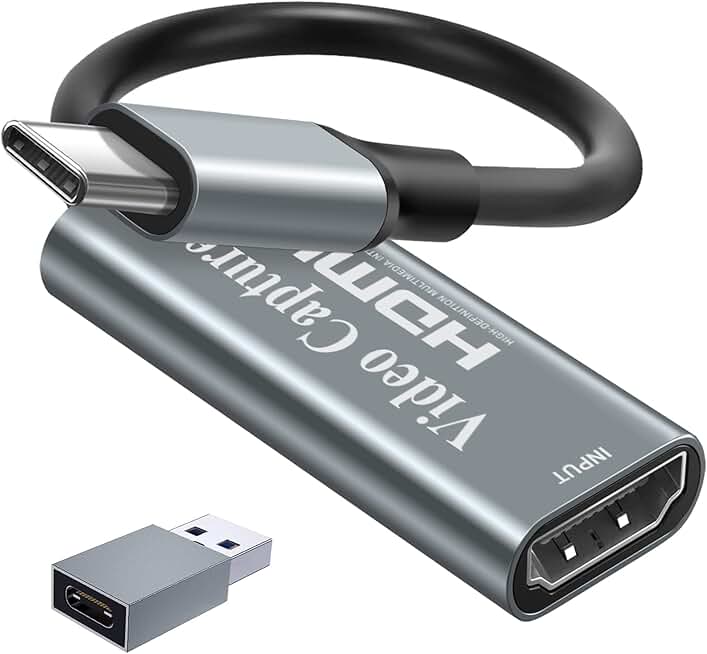
Guermok Video Capture Card, 4K USB3.0 HDMI to USB C Capture Card for Streaming, 1080P 60FPS, Compatible with iPad Mac OS Windows, Quest 3, OBS, PS5/4, Switch2/1, Xbox, Camera (Silver)
#5 · Best for Mac Portability4.4 (3,136)

Guermok Video Capture Card, 4K USB3.0 HDMI to USB C Capture Card for Streaming, 1080P 60FPS, Compatible with iPad Mac OS Windows, Quest 3, OBS, PS5/4, Switch2/1, Xbox, Camera (Silver)

$15.99

The Guermok Video Capture Card is perfect if you're streaming on the go with a MacBook. It's tiny, affordable, and handles 1080p60 without fuss—ideal for travel streamers or content creators.

Pros

  • + Tiny USB-C form factor fits in any bag
  • + Native Mac compatibility with plug-and-play setup
  • + Captures 1080p60 reliably without driver headaches
  • + Budget-friendly at $15.99

Cons

  • Only captures up to 1080p60, not 4K
  • USB-C cable included but may conflict with other Mac peripherals
Check price on Amazon →
Papeaso Video Capture Card, Video Recording Card Wonderful 4K HDMI to 1080P USB C for Gaming Streaming TV Recorder, for Windows Mac OS System with USB C Adapter to Adjust PS4, Switch, Xbox1
#6 · Best Budget Pick4.3 (1,056)

Papeaso Video Capture Card, Video Recording Card Wonderful 4K HDMI to 1080P USB C for Gaming Streaming TV Recorder, for Windows Mac OS System with USB C Adapter to Adjust PS4, Switch, Xbox1

$15.29

The Papeaso Video Capture Card proves you don't need to spend $100 to get a working Mac capture card. It's lean, mean, and does the job for casual streamers on a tight budget.

Pros

  • + Incredibly affordable at $15.29 with solid 4.3★ rating
  • + USB-C connection works natively on modern Macs
  • + Captures 1080p60 reliably for streaming
  • + Minimal setup required

Cons

  • Limited to 1080p capture—no 4K support
  • Fewer features than premium cards, basic passthrough
Check price on Amazon →
UGREEN 2K@30Hz 1080P 60FPS Video Capture Card 4K Input HDMI to USB 3.0 A and USB C Capture, Low Latency Capture Card for Streaming Game Recording Compatible with Switch 2/Xbox/PS4/PS5/PC/Camera
#7 · Best for Flexible Connectivity4.5 (642)

UGREEN 2K@30Hz 1080P 60FPS Video Capture Card 4K Input HDMI to USB 3.0 A and USB C Capture, Low Latency Capture Card for Streaming Game Recording Compatible with Switch 2/Xbox/PS4/PS5/PC/Camera

$19.99

The UGREEN 2K capture card gives you connection flexibility without forcing you into one ecosystem. The dual USB options make it a smart pick for Mac users with mixed peripherals.

Pros

  • + Both USB 3.0 and USB-C options for any Mac setup
  • + Solid 1080p60 capture with low latency
  • + Compact design that travels well
  • + Great value at $19.99

Cons

  • Maxes out at 1080p60—no 4K support
  • USB 3.0 option requires adapter on newer Macs
Check price on Amazon →
Capture Card Nintendo Switch, 4K HDMI Video Capture Card, 1080P 60FPS, HDMI to USB 3.0 Capture Card for Streaming Work with Camera/Xbox/PS4/PS5/PC/OBS
#8 · Best for Nintendo Switch4.3 (2,082)

Capture Card Nintendo Switch, 4K HDMI Video Capture Card, 1080P 60FPS, HDMI to USB 3.0 Capture Card for Streaming Work with Camera/Xbox/PS4/PS5/PC/OBS

$27.99

If you're streaming Nintendo Switch gameplay on Mac, this capture card is purpose-built for the job. It handles Switch's HDMI output cleanly and integrates seamlessly with OBS.

Pros

  • + Optimized for Switch capture at 1080p60
  • + Works flawlessly with Mac OBS setups
  • + Reliable USB 3.0 connection with low latency
  • + Solid build quality for the price

Cons

  • Only captures 1080p60, not 4K
  • Better suited for Switch than multi-console setups
Check price on Amazon →
4K HDMI Capture Card USB 3.0 – 1080P 60FPS Gaming & Streaming Video Capture Card with HDMI Loop-Out, Plug & Play, Low-Latency Recording for PS5/PS4/Xbox/Switch/OBS/PC/Mac
#9 · Best for Console Loop-Out4.4 (917)

4K HDMI Capture Card USB 3.0 – 1080P 60FPS Gaming & Streaming Video Capture Card with HDMI Loop-Out, Plug & Play, Low-Latency Recording for PS5/PS4/Xbox/Switch/OBS/PC/Mac

$26.99

This generic 4K HDMI capture card delivers solid passthrough performance at a low price. It's a no-frills option for Mac users who just need reliable 1080p capture without premium features.

Pros

  • + HDMI loop-out lets you see gameplay on a monitor while capturing
  • + Plug-and-play setup with minimal Mac driver fuss
  • + 1080p60 capture with low latency
  • + Budget-friendly at $26.99

Cons

  • No 4K support, limited to 1080p
  • USB 3.0 only, can struggle with sustained recording
Check price on Amazon →
BENFEI Video/Audio Capture Card Supporting Full HD 1080P 60FPS for Streaming, Recording, Gaming, Compatible with Switch, PS4, PS5, Xbox, Work with PC/Windows/Mac OS
#10 · Best Entry-Level Option4.2 (553)

BENFEI Video/Audio Capture Card Supporting Full HD 1080P 60FPS for Streaming, Recording, Gaming, Compatible with Switch, PS4, PS5, Xbox, Work with PC/Windows/Mac OS

$10.13

The BENFEI capture card is for Mac users testing the waters before investing in better gear. It works, but don't expect longevity or premium performance at this price point.

Pros

  • + Ultra-affordable at $10.13—lowest price here
  • + Full 1080p60 capture for basic streaming needs
  • + Works with Mac, Windows, and multiple consoles
  • + Minimal setup required

Cons

  • Cheapest build quality—expect durability concerns
  • Limited Mac driver support and troubleshooting resources
  • No passthrough or advanced features
Check price on Amazon →

Frequently Asked Questions

Final word

The best capture card for Mac depends on your budget and use case. If you want zero headaches and native Mac support, the Elgato Cam Link 4K is the gold standard. For high-refresh gaming, the Elgato 4K S or 4K X offer unmatched performance. On a tight budget, the Guermok or Papeaso cards deliver solid 1080p60 capture without breaking the bank.

Whatever you choose, prioritize Mac driver support and read recent reviews from actual Mac users. A cheap capture card that requires hours of troubleshooting isn't a bargain—it's a time sink. Test your setup with OBS before going live, and you'll have a reliable streaming setup that works every time.

More capture cards guides