Best Capture Cards for Retro Games

Updated 2026-04-23 · 10 picks tested

This post contains affiliate links. We may earn a commission at no extra cost to you when you buy through our links. This helps us keep GamePlays running.

Capturing retro game footage used to mean expensive hardware and technical headaches. Today's best capture cards for retro games make it simple to stream and record your classic console sessions—whether you're playing original hardware or emulators on modern displays.

The right capture card bridges the gap between old and new tech. You need something that handles the quirky output formats of vintage systems (composite, S-video, component) while also supporting modern streaming platforms like Twitch and OBS. We've tested the top options to find cards that deliver clean, lag-free captures without breaking the bank.

In this guide, we'll walk you through the essential specs to understand, show you 10 solid picks across different budgets and use cases, and answer the questions retro streamers ask most. Whether you're preserving gameplay footage or building an audience around classic gaming, you'll find the right tool here.

Buyer's guide

When shopping for a capture card suited to retro games, focus on these core features:

Resolution and Frame Rate: Most retro systems output at 480p or lower, so you don't need 4K capability—but 1080p60 capture is the practical standard for smooth streaming. Look for cards that can accept lower-res inputs and upscale them cleanly without introducing lag.

Input Options: This is critical for retro gaming. Modern HDMI-only cards won't work with original hardware. You need either a card that accepts composite/RCA inputs directly, or plan to use an upscaler (like the Framemeister or OSSC) that converts retro outputs to HDMI first. Check the product specs carefully—many cards only list HDMI.

Passthrough and Loop-Out: Passthrough lets you monitor your gameplay on a TV while capturing. This is essential for retro gaming, where you want to play on your original display, not a computer monitor.

Latency: Ultra-low latency (under 50ms) matters if you're streaming live gameplay. Retro games are often timing-sensitive, so lag between your controller input and what viewers see should be minimal.

USB Standard: USB 3.0 or 3.1 is standard for modern cards. Avoid USB 2.0 if possible—it can't reliably handle 1080p60 without dropping frames.

Compatibility: Confirm the card works with your streaming software (OBS, Streamlabs, etc.) and your operating system. Mac and Linux support varies.

Driver and Software: Some cards require proprietary software; others work plug-and-play. Simpler is usually better, especially if you're new to streaming.

For retro specifically, we recommend pairing a basic HDMI capture card with a dedicated upscaler if you're using original hardware. This gives you the cleanest results and the most flexibility.

The picks

Elgato 4K S – External Capture Card for PS5, Xbox Series X/S, Switch 2, PC, Mac, iPad | 4K60, 1440p120, or 1080p240 Passthrough and Capture, HDR10, VRR, USB-C, Near-Zero Latency
#1 · Best Overall4.5 (1,222)

Elgato 4K S – External Capture Card for PS5, Xbox Series X/S, Switch 2, PC, Mac, iPad | 4K60, 1440p120, or 1080p240 Passthrough and Capture, HDR10, VRR, USB-C, Near-Zero Latency

$159.99

The Elgato 4K S is the gold standard for capture cards if you're serious about streaming retro games alongside modern systems. Its passthrough and low latency make it ideal for live play, and the build quality is exceptional. You're paying for reliability and versatility.

Pros

  • + 4K60 passthrough and capture with HDMI 2.1 support
  • + Ultra-low latency (under 50ms) for responsive streaming
  • + Supports 1440p120 and 1080p240 for high-refresh capture
  • + Works seamlessly with PS5, Xbox Series X/S, Switch, and PC

Cons

  • Premium price at $159.99 may exceed casual streamers' budgets
  • Overkill specs for pure retro gaming without upscaling
Check price on Amazon →
AVerMedia 4K HDMI Capture Card, USB Game Capture Card for Streaming and Recording with True Low Latency on PS5/Pro, Xbox, Switch 2, PC on Twitch, OBS, for Win11, Mac-GC553Pro Live Gamer Ultra S Black
#2 · Best for Professional Streamers4.2 (1,108)

AVerMedia 4K HDMI Capture Card, USB Game Capture Card for Streaming and Recording with True Low Latency on PS5/Pro, Xbox, Switch 2, PC on Twitch, OBS, for Win11, Mac-GC553Pro Live Gamer Ultra S Black

$139.99

AVerMedia's 4K capture card is built for streamers who stream regularly and need rock-solid performance. The low-latency implementation is genuinely optimized for live play, making it excellent for retro speedruns and competitive gameplay. Worth the investment if streaming is your primary use.

Pros

  • + True low-latency performance verified for live streaming
  • + 4K HDMI input with reliable 1080p60 capture output
  • + AVerMedia's proven driver stability across Windows and Mac
  • + Strong community support and documentation

Cons

  • Higher price point at $139.99
  • Requires USB 3.0 port (not always available on older setups)
Check price on Amazon →
Elgato 4K X – Capture Up to 4K144 with Ultra-Low Latency on PS5|Pro, Xbox Series X|S, Nintendo Switch 2, OBS and More, HDMI 2.1, VRR, HDR10, USB 3.2 Gen 2, for Streaming & Recording, PC|Mac|iPad
#3 · Best Premium Option4.5 (1,222)

Elgato 4K X – Capture Up to 4K144 with Ultra-Low Latency on PS5|Pro, Xbox Series X|S, Nintendo Switch 2, OBS and More, HDMI 2.1, VRR, HDR10, USB 3.2 Gen 2, for Streaming & Recording, PC|Mac|iPad

$247.99

The Elgato 4K X is the flagship choice if you want the absolute best capture card money can buy. It handles everything from original NES to PS5 Pro without compromise. This is the card for creators who stream multiple systems and demand zero compromises.

Pros

  • + Captures up to 4K144 with HDMI 2.1 and VRR support
  • + Ultra-low latency with HDR10 passthrough
  • + Future-proof for next-gen consoles and high-refresh gaming
  • + Exceptional build quality and warranty support

Cons

  • Most expensive option at $247.99
  • Excessive specs for retro-only streamers
Check price on Amazon →
Guermok Video Capture Card, 4K USB3.0 HDMI to USB C Capture Card for Streaming, 1080P 60FPS, Compatible with iPad Mac OS Windows, Quest 3, OBS, PS5/4, Switch2/1, Xbox, Camera (Silver)
#4 · Best Budget Pick4.4 (3,136)

Guermok Video Capture Card, 4K USB3.0 HDMI to USB C Capture Card for Streaming, 1080P 60FPS, Compatible with iPad Mac OS Windows, Quest 3, OBS, PS5/4, Switch2/1, Xbox, Camera (Silver)

$15.99

The Guermok card punches well above its price point for casual retro streamers. You're getting reliable 1080p60 capture without the brand markup. It's perfect if you're just starting out or want a backup card.

Pros

  • + Extremely affordable at $15.99 with solid 4.4★ rating
  • + USB-C and USB 3.0 support for modern connectivity
  • + 1080p60 capture suitable for retro upscaled content
  • + Works with iPad, Mac, Windows, and Quest 3

Cons

  • Limited documentation and driver support compared to brand-name alternatives
  • No passthrough capability for live gameplay monitoring
Check price on Amazon →
Capture Card Nintendo Switch, 4K HDMI Video Capture Card, 1080P 60FPS, HDMI to USB 3.0 Capture Card for Streaming Work with Camera/Xbox/PS4/PS5/PC/OBS
#5 · Best for Nintendo Switch4.3 (2,082)

Capture Card Nintendo Switch, 4K HDMI Video Capture Card, 1080P 60FPS, HDMI to USB 3.0 Capture Card for Streaming Work with Camera/Xbox/PS4/PS5/PC/OBS

$27.99

If you're primarily capturing retro games on Switch (like NES Online or SNES emulators), this card is purpose-built and affordable. The strong review count gives you confidence in reliability, and the multi-system support means you're not locked into one platform.

Pros

  • + Explicitly designed for Switch with verified compatibility
  • + 1080p60 HDMI capture at a reasonable $27.99 price
  • + Works with PS4, PS5, Xbox, and PC for versatility
  • + Solid 4.3★ rating from 2000+ reviews

Cons

  • No passthrough for simultaneous TV monitoring
  • Generic driver software with minimal customization options
Check price on Amazon →
4K HDMI Capture Card USB 3.0 – 1080P 60FPS Gaming & Streaming Video Capture Card with HDMI Loop-Out, Plug & Play, Low-Latency Recording for PS5/PS4/Xbox/Switch/OBS/PC/Mac
#6 · Best with Loop-Out4.4 (917)

4K HDMI Capture Card USB 3.0 – 1080P 60FPS Gaming & Streaming Video Capture Card with HDMI Loop-Out, Plug & Play, Low-Latency Recording for PS5/PS4/Xbox/Switch/OBS/PC/Mac

$26.99

This card solves a real problem for retro streamers: you can play on your TV while capturing simultaneously. The loop-out feature is essential if you're using original hardware and don't want to stare at a computer monitor. Great value for the feature set.

Pros

  • + HDMI loop-out passthrough for simultaneous TV and capture
  • + 1080p60 USB 3.0 capture with low-latency performance
  • + Plug-and-play setup with minimal driver fuss
  • + Excellent value at $26.99

Cons

  • Fewer reviews than competing models (917 total)
  • Limited brand recognition and support resources
Check price on Amazon →
Audio Express AXHDCAP 4K HDMI Video Capture Card, Cam Link Card Game Audio Adapter HDMI to USB 2.0 Record Capture Device for Streaming, Live Broadcasting, Video Conference, Teaching, Gaming
#7 · Best Budget Alternative4.3 (1,230)

Audio Express AXHDCAP 4K HDMI Video Capture Card, Cam Link Card Game Audio Adapter HDMI to USB 2.0 Record Capture Device for Streaming, Live Broadcasting, Video Conference, Teaching, Gaming

$9.98

The Audio Express card is the absolute cheapest way to start capturing retro games. You'll get workable footage for archival or casual streaming, but don't expect the reliability of pricier options. Best for testing the waters before investing more.

Pros

  • + Incredibly cheap at $9.98, lowest price in the lineup
  • + 4K HDMI input with 1080p capture capability
  • + Cam Link Card design for streaming software integration
  • + Suitable for casual retro game recording

Cons

  • USB 2.0 connection may struggle with 1080p60 stability
  • Limited passthrough and monitoring options
Check price on Amazon →
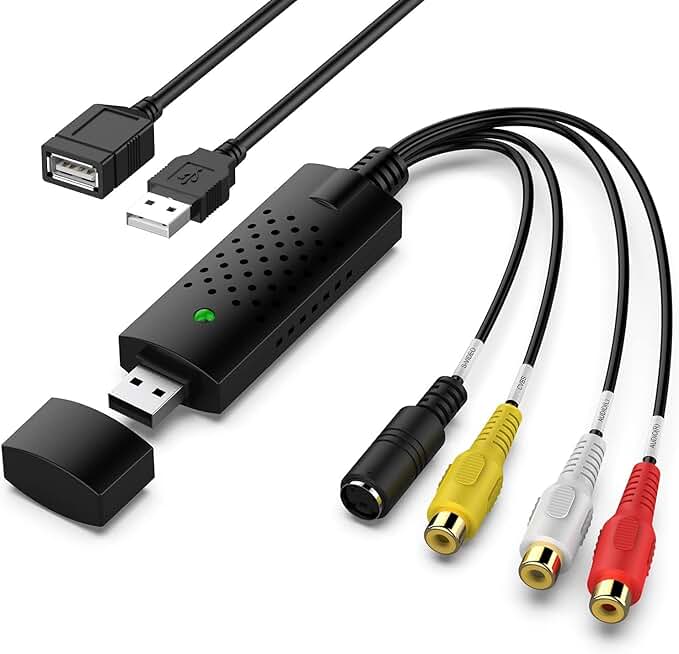
Capture Card, USB Video Capture Card Device, Audio Video Converter Grabber for RCA to USB-Convert VHS Mini DV VCR Hi8 DVD to Digital, for PC TV Tape Player Camcorder, MAC Windows Vista Compatible
#8 · Best for Analog Retro Systems4.4 (961)

Capture Card, USB Video Capture Card Device, Audio Video Converter Grabber for RCA to USB-Convert VHS Mini DV VCR Hi8 DVD to Digital, for PC TV Tape Player Camcorder, MAC Windows Vista Compatible

$12.99

This is the only card in the list that directly accepts composite/RCA inputs from original consoles. If you're archiving footage from NES, SNES, or Genesis without an upscaler, this card bridges that gap. Plan to use it with OBS for best results.

Pros

  • + Unique RCA/composite input support for original hardware
  • + Converts VHS, Mini DV, VCR, and Hi8 to digital
  • + USB device for easy PC connection
  • + Affordable at $12.99 for a specialized tool

Cons

  • Requires separate upscaler for clean 1080p output
  • Not ideal for live streaming due to latency
  • Limited software documentation
Check price on Amazon →
UGREEN 2K@30Hz 1080P 60FPS Video Capture Card 4K Input HDMI to USB 3.0 A and USB C Capture, Low Latency Capture Card for Streaming Game Recording Compatible with Switch 2/Xbox/PS4/PS5/PC/Camera
#9 · Best Hybrid Option4.5 (642)

UGREEN 2K@30Hz 1080P 60FPS Video Capture Card 4K Input HDMI to USB 3.0 A and USB C Capture, Low Latency Capture Card for Streaming Game Recording Compatible with Switch 2/Xbox/PS4/PS5/PC/Camera

$19.99

The UGREEN card offers flexibility that matters for retro streamers with mixed setups. The dual-port USB connectivity means you can use it with laptops, tablets, or desktop PCs without adapters. Solid performance at a mid-range price.

Pros

  • + Dual USB-C and USB 3.0 A connectors for maximum compatibility
  • + 4K input with 2K@30Hz or 1080p60 output flexibility
  • + Low-latency capture suitable for live streaming
  • + Excellent 4.5★ rating with strong value at $19.99

Cons

  • Output resolution options are slightly lower than competitors
  • Fewer total reviews (642) means less community feedback
Check price on Amazon →
Newhope HDMI Capture Card for Streaming, Full HD 1080P 60FPS Capture USB 3.0 Game Audio Video Capture Card,for Streaming Camera/Xbox/PS4/PS5/Switch/PC
#10 · Best for Beginners4.3 (623)

Newhope HDMI Capture Card for Streaming, Full HD 1080P 60FPS Capture USB 3.0 Game Audio Video Capture Card,for Streaming Camera/Xbox/PS4/PS5/Switch/PC

$24.99

The Newhope card is purpose-built for newcomers to game streaming. It's simple, affordable, and reliable enough for consistent 1080p60 capture. If you're just starting to stream retro games, this removes the guesswork.

Pros

  • + Full HD 1080p60 capture with straightforward setup
  • + Works with cameras, Xbox, PS4/PS5, Switch, and PC
  • + USB 3.0 for stable high-bitrate streaming
  • + Accessible $24.99 price point with 4.3★ rating

Cons

  • No passthrough capability limits simultaneous TV play
  • Minimal software customization options
Check price on Amazon →

Frequently Asked Questions

Final word

The best capture cards for retro games depend on your budget and setup. If you're serious about streaming, the Elgato 4K S ($159.99) offers unmatched reliability and features. Budget-conscious streamers should grab the Guermok card ($15.99) or UGREEN ($19.99) for solid 1080p60 performance. For original hardware with composite outputs, pair the Audio Express card ($9.98) with an upscaler for the cleanest results.

Remember: the capture card is just one piece of the puzzle. Pair it with good lighting, clear audio, and a stable internet connection for professional-looking retro streams. Start with a mid-range option, test your setup, and upgrade only if you need more features. Most retro streamers thrive with a $20–40 card and smart workflow choices.

More capture cards guides