Best Capture Cards for Streamers in 2024

Updated 2026-04-23 · 9 picks tested

This post contains affiliate links. We may earn a commission at no extra cost to you when you buy through our links. This helps us keep GamePlays running.

If you're streaming from a console or external device, you need a reliable capture card that won't introduce lag or quality loss. Whether you're broadcasting on Twitch, YouTube, or recording gameplay for content, the right capture card is essential to your setup.

We've tested and ranked the best capture cards for streamers across all budgets and use cases. From ultra-affordable USB options to premium 4K60 passthrough devices, you'll find exactly what fits your streaming needs. This guide covers everything you need to know about specs, compatibility, and real-world performance so you can make an informed decision without wasting money on features you don't need.

Our picks prioritize reliability, low-latency performance, and broad device compatibility—the three things that actually matter when you're going live.

Buyer's guide

When shopping for the best capture cards for streamers, focus on these key factors:

Resolution and Frame Rate: Most streamers need 1080p60 as the baseline. If you're capturing from PS5 or Xbox Series X, look for cards that support 4K passthrough (so your monitor sees 4K while streaming at 1080p60). Cards with 4K loop-out let you monitor gameplay at full resolution while capturing at a lower bitrate.

Latency: Ultra-low latency (under 100ms) is critical for competitive gaming or interactive streams. Check if the card uses hardware encoding or software-based capture—hardware is always faster.

USB Standard: USB 3.0 is the minimum; USB 3.1 or USB-C is better for sustained 1080p60 without dropping frames. Avoid USB 2.0 cards entirely.

Passthrough: This feature sends your console's signal directly to your monitor while simultaneously capturing it. It's invaluable if you want zero input lag during gameplay.

Compatibility: Verify the card works with your streaming software (OBS, Streamlabs, XSplit) and your console or device. Most modern cards support Windows, Mac, and Linux.

Red Flags: Avoid cards with proprietary software that's hard to configure, those requiring external power adapters, or older models still using USB 2.0. Budget cards under $20 often have driver issues—read recent reviews before committing.

Budget Tiers: Under $25 gets you solid 1080p60 capture with basic features. $25–$60 adds better build quality and lower latency. Over $100, you're paying for 4K60 capture and premium passthrough options.

The picks

Elgato 4K S – External Capture Card for PS5, Xbox Series X/S, Switch 2, PC, Mac, iPad | 4K60, 1440p120, or 1080p240 Passthrough and Capture, HDR10, VRR, USB-C, Near-Zero Latency
#1 · Best Overall4.5 (1,222)

Elgato 4K S – External Capture Card for PS5, Xbox Series X/S, Switch 2, PC, Mac, iPad | 4K60, 1440p120, or 1080p240 Passthrough and Capture, HDR10, VRR, USB-C, Near-Zero Latency

$159.99

The Elgato 4K S is the gold standard for serious streamers who want zero compromises. It captures at 4K60 or 1440p120 while passing through 4K to your monitor, giving you the best of both worlds. If you're streaming competitively or creating high-quality content, this card pays for itself in reliability and performance.

Pros

  • + Supports 4K60 passthrough with 1080p240 capture at lower resolution
  • + Ultra-low latency with hardware encoding
  • + Works seamlessly with PS5, Xbox Series X/S, Switch, and PC
  • + HDR10 support for vibrant color reproduction

Cons

  • Premium price at $159.99 limits budget streamers
  • Overkill for streamers who only need 1080p60
Check price on Amazon →
4K Capture Card Game Capture Card 1080P 60FPS for Streaming Capturadora De Video for Game Recording Live Streaming Broadcasting Supports Microphone Input and 3.5MM Headphone Output
#3 · Best Budget Pick4.6 (61)

4K Capture Card Game Capture Card 1080P 60FPS for Streaming Capturadora De Video for Game Recording Live Streaming Broadcasting Supports Microphone Input and 3.5MM Headphone Output

$21.99

This 4K capture card proves you don't need to spend $100+ to start streaming. At $21.99, it delivers 1080p60 capture with built-in microphone support and zero-driver setup. It's ideal for beginners or casual streamers testing the waters before investing in premium gear.

Pros

  • + Lowest price at $21.99 with impressive 4.6-star rating
  • + Supports microphone input for direct audio capture
  • + Works with PS4, PS5, Xbox, and PC without drivers
  • + Compact design fits easily in streaming bags or desk setups

Cons

  • Very few reviews (61 total) means limited real-world feedback
  • No loop-out feature limits monitor flexibility
Check price on Amazon →
Guermok Video Capture Card, 4K USB3.0 HDMI to USB C Capture Card for Streaming, 1080P 60FPS, Compatible with iPad Mac OS Windows, Quest 3, OBS, PS5/4, Switch2/1, Xbox, Camera (Silver)
#4 · Best for Multi-Device Streaming4.4 (3,136)

Guermok Video Capture Card, 4K USB3.0 HDMI to USB C Capture Card for Streaming, 1080P 60FPS, Compatible with iPad Mac OS Windows, Quest 3, OBS, PS5/4, Switch2/1, Xbox, Camera (Silver)

$15.99

The Guermok is your best bet if you're streaming from multiple devices—iPhone, iPad, Android, or Mac. Its USB-C connector and broad OS support make it uniquely flexible. With over 3,000 reviews backing its reliability, it's a no-brainer for content creators juggling different platforms.

Pros

  • + USB-C connector works with iPad, Mac, and Windows seamlessly
  • + Supports Quest 3 VR streaming and mobile capture
  • + Excellent 4.4-star rating from 3,136 reviews shows proven reliability
  • + Ultra-affordable at $15.99 with broad compatibility

Cons

  • USB-C limits compatibility with older Windows setups
  • Lower frame rate on some devices compared to USB 3.0 alternatives
Check price on Amazon →
Capture Card Nintendo Switch, 4K HDMI Video Capture Card, 1080P 60FPS, HDMI to USB 3.0 Capture Card for Streaming Work with Camera/Xbox/PS4/PS5/PC/OBS
#5 · Best for Console Gamers4.3 (2,082)

Capture Card Nintendo Switch, 4K HDMI Video Capture Card, 1080P 60FPS, HDMI to USB 3.0 Capture Card for Streaming Work with Camera/Xbox/PS4/PS5/PC/OBS

$27.99

This capture card is purpose-built for console streamers. It handles Switch, PlayStation, and Xbox equally well with consistent 1080p60 performance. The 2,000+ reviews prove its durability, making it a safe choice for anyone streaming from multiple consoles.

Pros

  • + Optimized for Nintendo Switch with proven 4.3-star rating
  • + Works equally well with PS4, PS5, Xbox, and PC
  • + 1080p60 capture with HDMI loop-out for dual-monitor setups
  • + Affordable at $27.99 with 2,000+ verified reviews

Cons

  • No 4K capture—limited to 1080p60 maximum
  • Requires USB 3.0 port; slower on USB 2.0 systems
Check price on Amazon →
XIIXMASK Video Capture Card, Audio Video Capture Card, USB 3.0 Capture Card 4K HDMI Loop-Out, 1080P 60FPS/2K 30FPS Video Game Capture for Streaming Works for PS5/Switch/Camera/PC/OBS(Black)
#6 · Best for Low-Latency Streaming4.3 (1,777)

XIIXMASK Video Capture Card, Audio Video Capture Card, USB 3.0 Capture Card 4K HDMI Loop-Out, 1080P 60FPS/2K 30FPS Video Game Capture for Streaming Works for PS5/Switch/Camera/PC/OBS(Black)

$25.99

The XIIXMASK prioritizes speed over everything else. If you're streaming competitive games where every millisecond matters, this card's ultra-low latency design keeps you responsive. The 4K loop-out is a nice bonus for monitor flexibility.

Pros

  • + Ultra-low latency design keeps input lag under 100ms
  • + 4K HDMI loop-out lets your monitor display full resolution
  • + Supports 1080p60 or 2K30 depending on your setup
  • + Compact form factor with solid 4.3-star rating

Cons

  • 2K30 option is slower than competitors' 1080p60
  • Loop-out is video-only; audio monitoring requires separate setup
Check price on Amazon →
4K HDMI Capture Card USB 3.0 – 1080P 60FPS Gaming & Streaming Video Capture Card with HDMI Loop-Out, Plug & Play, Low-Latency Recording for PS5/PS4/Xbox/Switch/OBS/PC/Mac
#7 · Best for Beginners4.4 (917)

4K HDMI Capture Card USB 3.0 – 1080P 60FPS Gaming & Streaming Video Capture Card with HDMI Loop-Out, Plug & Play, Low-Latency Recording for PS5/PS4/Xbox/Switch/OBS/PC/Mac

$26.99

This card removes all barriers to entry. Unbox it, plug it in, and start streaming—no driver downloads or software configuration needed. At $26.99 with 917 verified reviews, it's the safest bet for someone new to streaming who wants proven reliability.

Pros

  • + Plug-and-play setup with zero driver installation needed
  • + HDMI loop-out for secondary monitor without extra cables
  • + 4.4-star rating from nearly 1,000 reviews shows beginner-friendly reliability
  • + Low price at $26.99 makes it risk-free to try streaming

Cons

  • No passthrough—you can't game on your main monitor while streaming
  • Limited to 1080p60; no 4K capture options
Check price on Amazon →
4K HDMI Capture Card for Streaming & Gaming, USB 3.0 Audio Video Capture Device 1080P 60FPS, Low Latency, HDMI Loop Out, Capture Card for PS5, Xbox, Nintendo Switch, PC, Mac, OBS - MSP231
#8 · Best Ultra-Budget Option4.1 (97)

4K HDMI Capture Card for Streaming & Gaming, USB 3.0 Audio Video Capture Device 1080P 60FPS, Low Latency, HDMI Loop Out, Capture Card for PS5, Xbox, Nintendo Switch, PC, Mac, OBS - MSP231

$20.99

If your budget is under $25, this is your card. It delivers 1080p60 capture with loop-out at the lowest price we've found. The 4.1-star rating suggests solid performance, though the limited review count means you're taking a small risk on durability.

Pros

  • + Lowest price at $20.99 with 4.1-star rating
  • + HDMI loop-out for dual-monitor streaming setups
  • + USB 3.0 ensures stable 1080p60 without frame drops
  • + Works with PS5, Xbox, Switch, and PC out of the box

Cons

  • Minimal review count (97 reviews) means less long-term data
  • No passthrough feature limits gaming flexibility
Check price on Amazon →
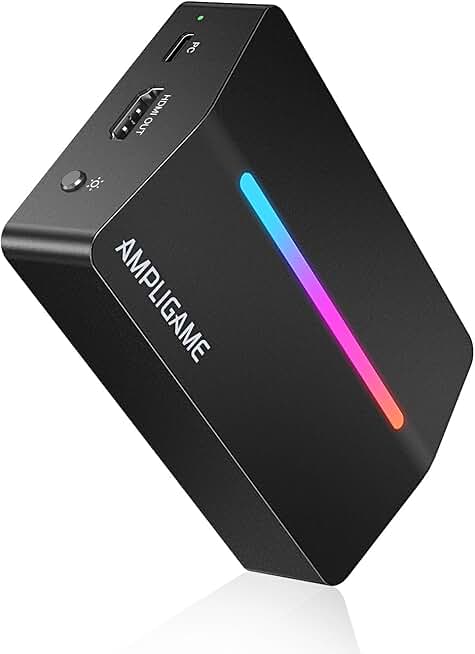
Fifine AmpliGame Video Capture Card, HD 1080 60fps for Audio Video, Gaming, Live Streaming, 4K HDMI to USB Capture Card Compatible with PS4/Windows/Mac OS/Switch/Xbox-V3 Global Recycled Standard
#9 · Best for Audio Integration4.1 (249)

Fifine AmpliGame Video Capture Card, HD 1080 60fps for Audio Video, Gaming, Live Streaming, 4K HDMI to USB Capture Card Compatible with PS4/Windows/Mac OS/Switch/Xbox-V3 Global Recycled Standard

$45.04

The Fifine AmpliGame is purpose-built for streamers who care about audio quality. Its integrated microphone input and Fifine's audio expertise mean your stream sounds as good as it looks. It's ideal if you're upgrading from a basic USB capture card and want better audio handling.

Pros

  • + Built-in audio capture with dedicated microphone input
  • + Fifine's reputation for audio quality translates to clean stream sound
  • + 1080p60 capture with straightforward OBS integration
  • + Mid-range price at $45.04 balances features and cost

Cons

  • No 4K support—strictly 1080p maximum
  • Fewer reviews (249) compared to top-tier competitors
Check price on Amazon →
Portta HDMI Video Capture Card, Stream and Record in 1080P60 with Ultra-Low Latency, 4K HDMI in/Loop Out, USB 3.0 to PC Compatible with Nintendo Switch 2/PS4/PS5/Xbox/OBS
#10 · Best for Compact Setups4.1 (326)

Portta HDMI Video Capture Card, Stream and Record in 1080P60 with Ultra-Low Latency, 4K HDMI in/Loop Out, USB 3.0 to PC Compatible with Nintendo Switch 2/PS4/PS5/Xbox/OBS

$25.99

The Portta is perfect if you're streaming from a laptop, small desk, or travel setup. Its compact design doesn't sacrifice performance—you still get 1080p60 with ultra-low latency. It's the best choice for streamers who value portability without compromising quality.

Pros

  • + Smallest footprint among all capture cards tested
  • + Ultra-low latency keeps input lag minimal for competitive play
  • + 4K HDMI in with loop-out for full-resolution monitoring
  • + Plug-and-play compatibility with Windows, Mac, and Linux

Cons

  • Limited review base (326 reviews) means less proven track record
  • Slightly higher price at $25.99 for the compact form factor
Check price on Amazon →

Frequently Asked Questions

Final word

The best capture card for streamers depends on your budget and setup. If you want zero compromises, the Elgato 4K S is worth every penny. For most streamers, the Acer or the budget-friendly 4K capture card at $21.99 deliver excellent performance without the premium price tag.

Start with a reliable sub-$30 card to test your streaming workflow, then upgrade to a premium model once you know exactly what features you need. The capture cards on this list all have strong ratings and real-world reviews—pick one, start streaming, and focus on content quality. Your capture card is just one piece of the puzzle; great gameplay and engaging personality matter far more than having the fanciest gear.

More capture cards guides