MOBA games demand split-second precision, constant ability rotations, and lightning-fast camera movements. Your gear needs to keep up with the pace of League of Legends, Dota 2, or Smite—and that means investing in the right gaming accessories for MOBA. We've tested and ranked the best gaming accessories for MOBA players, from ultra-responsive mice with programmable buttons to stable mousepads that won't slip during clutch teamfights. Whether you're climbing ranked or just want a cleaner desk setup, these picks will give you the edge you need. This guide covers everything from core peripherals to smart desk organization that lets you focus on what matters: winning your games.
Best Gaming Accessories for MOBA
Updated April 23, 202610 picks tested4.6 avg rating · 132,507 reviews
This post contains affiliate links. We may earn a commission at no extra cost to you when you buy through our links. This helps us keep GamePlays running.
Jump to
Our top picks at a glance
- #1
- #2
- #3
- #4
- #5
Buyer's guide
When shopping for gaming accessories for MOBA, start with your mouse. MOBA players benefit from mice with 12+ programmable buttons on the side—you'll bind item actives, self-cast abilities, and quick-cast macros to these. Look for 12,000+ DPI sensors with adjustable polling rates (at least 1000Hz) so you can flick camera angles without lag. Weight matters too: lighter mice (under 100g) let you make micro-adjustments without fatigue during long sessions.
Your mousepad is the foundation. Get one that's at least 450mm wide to give yourself room for low-sensitivity play. Cloth pads offer better control for MOBA; hard pads are faster but less consistent. The surface should have a non-slip rubber base so it doesn't creep across your desk when you're spamming abilities.
Wired vs. wireless depends on your tolerance for latency. Modern wireless gaming mice have 1ms response times that rival wired, but some MOBA players still prefer the guarantee of a cable. If you go wireless, check battery life—you don't want your mouse dying mid-game.
Headset stands and desk organizers aren't just aesthetic. They keep your headphones accessible and your desk clutter-free, which reduces mental load during intense matches. Look for stands with USB charging ports so you're not hunting for outlets.
Finally, don't overlook keycap replacements for your keyboard. Custom caps can improve tactile feedback and make ability bindings feel more responsive. Cherry MX switches are the standard for gaming keyboards, so ensure any replacements are compatible with your board.
The picks

#1 · Best Overall Mousepad4.7 (103,725)
SteelSeries QcK Large Gaming Mousepad — Black — Non-Slip Silicone Rubber Base — Peak Tracking and Stability — Optimized for Gaming Sensors — 490 mm x 420 mm — FPS, MOBAs, RTS, MMO
$14.99
The SteelSeries QcK Large is the gold standard for MOBA mousepads. It gives you the space you need for camera flicks and ability combos without breaking the bank. Thousands of competitive players swear by it for good reason.
Pros
- + Large 490mm surface gives you room for low-sensitivity MOBA play
- + Non-slip silicone rubber base won't creep during intense teamfights
- + Optimized for gaming sensors with peak tracking and stability
- + Affordable at $14.99 with 4.7★ rating from 103k+ users
Cons
- − Cloth surface requires occasional cleaning to maintain responsiveness
- − Not as thick as premium pads—may wear faster with heavy use

#2 · Best for Fast-Paced MOBA4.5 (3,798)
Corsair Harpoon PRO RGB Wired Lightweight FPS/MOBA Gaming Mouse – 12,000 DPI – 6 Programmable Buttons – iCUE Compatible – PC, Mac, PS5, PS4, Xbox – Black
$29.99
The Corsair Harpoon PRO RGB is built for MOBA players who value speed over button count. Its lightweight frame and responsive sensor make it ideal for champions that require constant repositioning and quick ability rotations.
Pros
- + Lightweight at under 100g—perfect for rapid ability casting and camera movements
- + 12,000 DPI sensor with 6 programmable buttons for item actives
- + iCUE software lets you customize macros and DPI profiles per game
- + Works on PC, Mac, PS5, and PS4 for multi-platform flexibility
Cons
- − Only 6 programmable buttons—less than dedicated MMO mice
- − Wired design limits desk mobility compared to wireless options

#3 · Best Budget MOBA Mouse4.4 (9,837)
Redragon Gaming Mouse, MMO Mouse Gaming UP 12400 DPI, 19 Macro Programmable Buttons, RGB Mouse with 12 Side Buttons, 8 * 2.4g Weight Tuning for PC Laptop MOBA FPS, M901K, Black
$29.99
The Redragon wired MMO mouse packs serious value. You get 19 programmable buttons and customizable weight for under $30, making it the best budget gaming accessory for MOBA players who want macro depth without premium pricing.
Pros
- + 12,400 DPI with 19 programmable macro buttons—more than enough for every ability and item
- + 8 weight tuning cartridges let you customize feel from 2.4g each
- + RGB lighting and side buttons designed specifically for MMO/MOBA gameplay
- + Just $29.99 with solid 4.4★ rating
Cons
- − Wired connection means cable management on your desk
- − Heavier than lightweight FPS-focused mice—takes adjustment

#4 · Best Wireless MOBA Mouse4.4 (9,837)
Redragon Wireless Gaming Mouse, MMO Gaming Mouse UP 16,000 DPI, 16 Macro Programmable Buttons, RGB Rechargeable with 12 Side Buttons, 70Hrs for PC Laptop MOBA FPS, M901P-KS
$39.99
The Redragon wireless MMO mouse is your pick if you want freedom from cables without sacrificing button count or DPI. The 70-hour battery life means you'll charge it less than once a month, making it ideal for serious MOBA grinders.
Pros
- + 16,000 DPI with 16 programmable side buttons—enough for every ability, item, and quick-cast macro
- + Wireless 2.4GHz with 70-hour battery life means weeks between charges
- + Rechargeable design eliminates battery replacement costs
- + Dual-mode wired/wireless gives you flexibility for tournaments
Cons
- − Heavier than wired alternatives—requires adjustment period
- − Premium pricing at $39.99 reflects the wireless tech

#5 · Best Premium MOBA Mouse4.2 (1,868)
ASUS ROG Spatha X Wireless Gaming Mouse – MMO/MOBA Design, 12 Programmable Buttons, Right-Handed, 168g, Dual-Mode (Wired/2.4GHz), 19K DPI, up to 67Hr Battery, Magnetic Charging Dock, PC/Mac Support
$126.99
The ASUS ROG Spatha X is the premium choice for MOBA players who compete seriously. Its dual-mode flexibility, long battery life, and MOBA-specific button layout make it worth the investment if you're grinding ranked or playing in tournaments.
Pros
- + 12 programmable buttons designed specifically for MMO/MOBA gameplay patterns
- + 19,000 DPI sensor with dual-mode (wired and 2.4GHz wireless) for tournament flexibility
- + Up to 67-hour wireless battery life—charge once a month
- + Right-handed ergonomic design at 168g with professional build quality
Cons
- − At $126.99, it's 3-4x the cost of budget alternatives
- − Overkill for casual players—better suited to ranked grinders

#6 · Best Desk Organizer with Charging4.7 (965)
RGB Headphone Stand with USB Charger COZOO Desktop Gaming Headset Holder Hanger with 3 USB Charger and 2 Outlets - Great for Gaming, DJ, Wireless Earphone Display,Gamer PC Accessories Boyfriend Gifts
$19.99
The COZOO headphone stand with USB charger solves the cable clutter problem. You get charging for your mouse, headset, and phone all in one spot, keeping your desk organized for focused MOBA sessions.
Pros
- + 3 USB charging ports plus 2 AC outlets keep your peripherals powered and ready
- + RGB lighting adds aesthetic appeal to your gaming setup
- + Sturdy stand holds headsets securely without tipping
- + 4.7★ rating from nearly 1,000 users proves durability
Cons
- − Takes up desk real estate—not ideal for small setups
- − RGB lighting can't be disabled, which bothers some users

#7 · Best Compact Headset Stand4.4 (1,161)
Hcman Headphone Stand Gaming Headset Holder RGB PC Gaming Accessories for Desk, Cool LED Headset Stand with 2 USB Charger for Gamer, Black
$24.99
The Hcman stand is perfect if you're working with limited desk space but still want charging and organization. It's smaller than the COZOO but keeps your essentials within arm's reach during ranked games.
Pros
- + RGB LED lighting with compact footprint fits tight desk spaces
- + 2 USB charger ports keep your wireless mouse and headset topped up
- + Sturdy construction won't wobble during intense gaming
- + 4.4★ rating at $24.99 offers solid value
Cons
- − Smaller footprint means less cable management than larger stands
- − RGB can't be turned off—always glowing

#8 · Best Keyboard Customization4.4 (696)
HUYUN Cherry MX Key Switch FPS Backlit Key Caps Replacement for Corsair Gaming Keyboards !(Gray)
$12.98
These Cherry MX keycap replacements are a quick way to refresh your keyboard's feel and appearance. If your current caps are worn smooth, swapping them out can restore tactile feedback for ability casting.
Pros
- + Cherry MX compatible keycaps work with most gaming keyboards
- + Backlit design maintains visibility in low-light gaming rooms
- + Gray color scheme matches most gaming setups
- + Affordable at $12.98 for a full set
Cons
- − Only compatible with Cherry MX switches—check your keyboard first
- − Replacement keycaps alone won't improve responsiveness if your switches are worn
#9 · Best Budget Headset Stand4.4 (415)
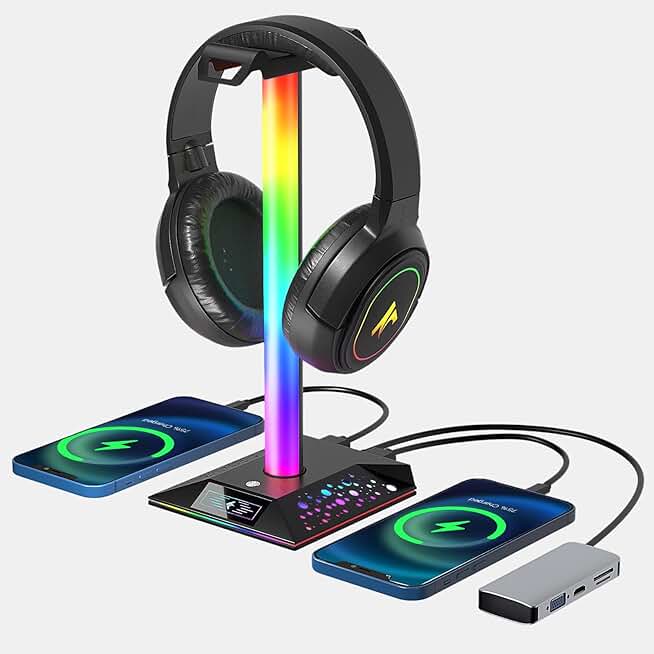
Gaming Headphone Stand PC Accessories - RGB Headset Stand with 2 USB Charger, Cool LED Headphone Holder PC Gaming Accessories for Boys Men Gamers, Computer Game Hardware for Desk
$18.99
The most affordable RGB headset stand on this list. If you just need a place to hang your headset and charge your mouse, this delivers without unnecessary bulk or cost.
Pros
- + RGB LED lighting with minimal footprint for tight desks
- + 2 USB charger ports for wireless peripherals
- + Simple, clean design won't distract during gameplay
- + Only $18.99 with 4.4★ rating
Cons
- − Smallest capacity of the headset stands—holds one headset only
- − RGB lighting is always on with no off switch

#10 · Best Modern Headset Stand with Type-C4.5 (205)
Gaming Headphone Stand PC Accessories - RGB Headset Stand with 2 USB and 1 Type-C Ports, LED Headphone Stand Gift for Boys Men, Computer Game Accessories for Desk
$19.68
The newest stand on this list adds Type-C charging for modern phones and tablets. If you're building a fresh gaming desk and want future-proof charging, this is the smart pick.
Pros
- + 2 USB + 1 USB Type-C port covers all modern device charging needs
- + RGB lighting with sleek desk aesthetic
- + 4.5★ rating proves reliability despite newer product
- + At $19.68, it's competitive with older USB-only models
Cons
- − Fewer user reviews (205) compared to established alternatives
- − RGB can't be disabled—always active
Frequently asked questions
Frequently Asked Questions
Final word
The best gaming accessories for MOBA combine precision, programmability, and desk organization. Start with the SteelSeries QcK Large mousepad and a mouse with 12+ programmable buttons—these two items alone will transform your gameplay. If you're serious about climbing, invest in a gaming mouse with 12,000+ DPI and side buttons; if you're budget-conscious, the Redragon wired MMO mouse delivers exceptional value. Don't overlook desk organization: a headset stand with USB charging keeps your setup clean and your peripherals ready. Whether you're playing casually or grinding ranked, these gaming accessories for MOBA will give you the tools to perform at your best.
More moba gear across categories
Gaming Keyboards
Best Gaming Keyboards for MOBA
Gaming MiceBest Gaming Mice for MOBA
Gaming HeadsetsBest Gaming Headsets for MOBA
Gaming MonitorsBest Gaming Monitors for MOBA
Gaming ChairsBest Gaming Chairs for MOBA
Gaming ControllersBest Gaming Controllers for MOBA
Gaming DesksBest Gaming Desks for MOBA
Streaming GearBest Streaming Gear for MOBA
More gaming accessories guides
Budget Gaming Accessories of 2026
Top 10 affordable gaming accessories for PC, console, and desk setup. Quality gear under $50.
Best Corsair Gaming Accessories in 2026
Top-rated Corsair gaming accessories: mice, headsets, mouse pads, and RGB controllers. Expert reviews and buying guide.
Best Ergonomic Gaming Accessories in 2026
Top 10 ergonomic gaming accessories to reduce pain and boost comfort. Seat cushions, wrist rests, footrests, and more.
Best Gaming Accessories in 2026
Top 10 gaming accessories 2026: mice, stands, cushions & more. Expert reviews, real specs, honest verdicts.
Best Gaming Accessories for Apex Legends
Top gaming accessories for Apex Legends players: collectibles, controller holders, and KnM adapters to enhance your gameplay.
Best Gaming Accessories for Baldur's Gate 3
Top gaming accessories for Baldur's Gate 3 fans: collectibles, apparel, and decor to enhance your playtime.