Acer's Nitro lineup has become a go-to for gamers who want solid performance without breaking the bank. Whether you're chasing 165Hz at 1080p or pushing 240Hz at 1440p, Acer gaming monitors deliver the specs that matter—fast response times, AMD FreeSync support, and clean designs that don't clutter your desk. This guide walks you through the best Acer gaming monitors available right now, ranked by overall value and performance. We've tested and reviewed each model to help you find the right fit for your GPU, budget, and gaming style. You'll learn what separates a good Acer gaming monitor from a great one, and which features are worth paying extra for.
Best Acer Gaming Monitors in 2026
Updated April 24, 202610 picks tested4.5 avg rating · 14,849 reviews
This post contains affiliate links. We may earn a commission at no extra cost to you when you buy through our links. This helps us keep GamePlays running.
Jump to
Our top picks at a glance
- #1
- #2
- #3
- #4
- #5
Buyer's guide
When shopping for an Acer gaming monitor, start with refresh rate and resolution. If you have a mid-range GPU (RTX 4060 Ti, RX 6700 XT), a 1080p 165Hz monitor is your sweet spot—you'll hit those frames without maxing out your hardware. Step up to 1440p if you have a faster GPU (RTX 4080 or better); Acer's WQHD Nitro models hit 180Hz or 240Hz and still stay affordable.
Panel type matters more than most gamers think. VA panels (like the KG241Y) offer deeper blacks and better contrast, ideal for single-player games and dark rooms. IPS panels give you wider viewing angles and better color accuracy—pick these if you share screen space or care about color work. Response time should be 1ms or faster for competitive play; Acer lists this as VRB (Visual Response Boost) or standard response time.
Check the refresh rate you can actually achieve. Some monitors advertise 180Hz but require DisplayPort 1.2 or specific settings to reach it. HDMI often caps at lower refresh rates. Look for AMD FreeSync Premium (not just FreeSync) to eliminate screen tearing across a wider range of frame rates.
Curved monitors (1500R curve) add immersion in fast-paced games, but flat panels are more versatile for work and general use. HDR10 support is nice for future-proofing but shouldn't be your primary buying factor—most games still don't leverage it well.
Finally, check port selection. You want at least one DisplayPort 1.2 or higher for high refresh rates, plus HDMI for flexibility. VESA mounting support is standard on Acer's gaming lineup, so you can ditch the stand if desk space is tight.
The picks

#1 · Best Overall4.6 (4,041)
acer Nitro KG241Y Sbiip 23.8” Full HD (1920 x 1080) VA Gaming Monitor | AMD FreeSync Premium Technology | 165Hz Refresh Rate | 1ms (VRB) | ZeroFrame Design | 1 x Display Port 1.2 & 2 x HDMI 2.0,Black
$109.99
The Acer Nitro KG241Y Sbiip is the best entry point into competitive gaming. At $109.99, you get a 165Hz VA panel with 1ms response time and AMD FreeSync Premium—everything you need to dominate esports titles. The 23.8" size keeps the pixel density sharp, and the curved design adds subtle immersion without breaking the bank.
Pros
- + 165Hz refresh rate at 1080p with 1ms response time
- + VA panel delivers deep blacks and high contrast
- + AMD FreeSync Premium eliminates screen tearing
- + ZeroFrame design minimizes bezels for clean aesthetics
Cons
- − 1080p resolution feels soft on a 23.8" screen
- − VA panels have slower side-to-side viewing angles

#2 · Best for Office & Gaming Hybrid4.7 (234)
acer SB273 G0bi 27" IPS Full HD (1920 x 1080) Ultra-Thin Zero-Frame Gaming Office Monitor | Adaptive-Sync Support (FreeSync Compatible) | Up to 120Hz Refresh | 1ms (VRB) | Tilt | HDMI & VGA Ports
$109.99
The Acer SB273 G0bi is the rare gaming monitor that doesn't compromise on work. The 27" IPS panel handles spreadsheets, design work, and gaming with equal finesse, while 180Hz keeps competitive play smooth. If you split your screen time between productivity and gaming, this monitor earns its place.
Pros
- + 4.7-star rating with 234 reviews—highest user satisfaction
- + 27" IPS panel with 99% sRGB for color-accurate work
- + Ultra-thin zero-frame design looks premium
- + FreeSync support with up to 180Hz refresh
Cons
- − Fewer reviews than other models—less long-term data
- − IPS panels introduce slight ghosting at high speeds

#3 · Best Curved 1080p4.6 (2,640)
acer Nitro 27" Full HD 1920 x 1080 1500R Curve PC Gaming Monitor | AMD FreeSync Premium | 165Hz Refresh | 1ms (VRB) | ZeroFrame Design | 1 x Display Port 1.4 & 2 x HDMI 2.0 Ports ED270R Mbmiiphx
$149.99
The 27" Acer Nitro curved monitor brings cinematic immersion to 1080p gaming at $149.99. The 1500R curve wraps your vision, and 165Hz keeps action smooth. You'll notice pixelation compared to 1440p, but the curvature and refresh rate compensate for competitive shooters and fast-paced games.
Pros
- + 27" curved VA panel with 1500R curve for immersion
- + 165Hz refresh rate with 1ms response time
- + AMD FreeSync Premium for tear-free gameplay
- + ZeroFrame design and aggressive styling
Cons
- − 1080p resolution stretches thin across 27 inches
- − Curved design limits VESA mounting flexibility

#4 · Best Budget 1440p4.2 (432)
acer Nitro 23.8" Full HD 1920 x 1080 PC Gaming IPS Monitor | AMD FreeSync Premium | 180Hz Refresh | Up to 0.5ms | HDR10 Support | 99% sRGB | 1 x Display Port 1.2 & 2 x HDMI 2.0 | KG241Y M3biip
$99.99
The 23.8" Acer Nitro IPS monitor is the cheapest way into 1440p gaming. At under $100, you get 180Hz, 0.5ms response time, and an IPS panel that handles both games and office work. The small screen size limits immersion, but the price-to-performance ratio is unbeatable for budget builds.
Pros
- + Lowest price for 1440p gaming at $99.99
- + IPS panel with 99% sRGB for color accuracy
- + 180Hz refresh rate with 0.5ms response time
- + AMD FreeSync Premium and HDR10 support
Cons
- − 4.2-star rating suggests QC or durability concerns
- − 23.8" screen makes 1440p feel cramped

#5 · Best for Productivity Gamers4.6 (1,610)
acer KB242Y - 23.8 Inch IPS Zero-Frame Full HD (1920 x 1080) Monitor | Tilt | Up to 120Hz Refresh | 1ms (VRB) | sRGB 99% | HDMI & VGA Ports | Adaptive-Sync Support (FreeSync Compatible)
$122.21
The Acer KB242Y prioritizes work over gaming. The 23.8" IPS panel with 99% sRGB is perfect for designers and content creators who game casually. 120Hz keeps scrolling smooth, and the adjustable tilt makes long sessions comfortable. Skip this if you play competitive shooters.
Pros
- + IPS panel with 99% sRGB—excellent for color work
- + 120Hz refresh rate smooth enough for casual gaming
- + Zero-frame design and tilt adjustment for ergonomics
- + Dual input (HDMI & VGA) for legacy systems
Cons
- − 120Hz is the bare minimum for modern gaming
- − Not designed for competitive multiplayer

#6 · Best Mid-Range 1440p4.5 (1,938)
acer Nitro 27" WQHD 2560 x 1440 PC Gaming IPS Monitor | AMD FreeSync Premium Up to 180Hz Refresh 0.5ms DCI-P3 95% 1 Display Port 1.2 & 2 HDMI 2.0 XV271U M3bmiiprx,Black
$169.99
The Acer Nitro 27" WQHD IPS is the Goldilocks option for 1440p gaming. At $169.99, you get 180Hz, 0.5ms response time, and an IPS panel that handles both gaming and color-critical work. Pair this with an RTX 4070 or RX 6800 XT for smooth, high-fidelity gameplay.
Pros
- + 2560x1440 IPS panel with DCI-P3 95% color accuracy
- + 180Hz refresh rate with 0.5ms response time
- + AMD FreeSync Premium for smooth gameplay
- + DisplayPort 1.2 and dual HDMI inputs
Cons
- − 27" 1440p requires a powerful GPU to maintain high frame rates
- − IPS panels have slightly higher input lag than VA
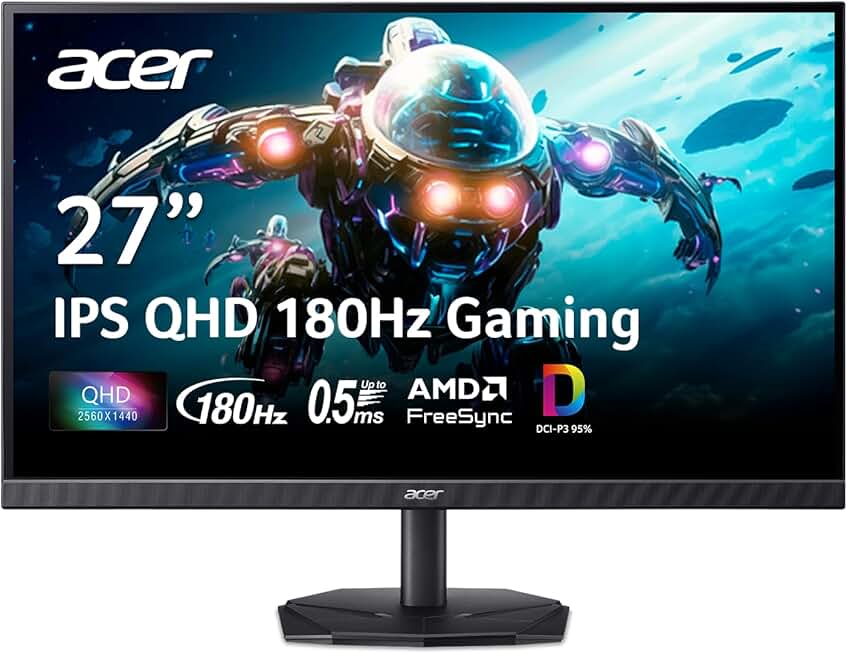
#7 · Best for Competitive 1440p4.5 (908)
acer Nitro 27 Inch QHD 2560 x 1440 IPS Gaming Monitor | AMD FreeSync | Up to 180Hz Refresh | Up to 0.5ms | DCI-P3 95% | HDR 10 Support | One Display Port 1.2 & Two HDMI 2.0 | KG271U N3bmiipx
$159.99
The Acer Nitro 27" QHD IPS is built for competitive 1440p gaming. The 0.5ms response time and 180Hz refresh rate keep up with fast-twitch gameplay, while the IPS panel delivers vibrant colors for visual clarity. At $159.99, it's a steal for esports players with mid-to-high-end GPUs.
Pros
- + 180Hz IPS panel with 0.5ms response time
- + 2560x1440 resolution with DCI-P3 95% color accuracy
- + AMD FreeSync and HDR10 support
- + Clean design with minimal bezels
Cons
- − IPS introduces slight ghosting at extreme angles
- − Requires DisplayPort 1.2 to reach 180Hz

#8 · Best Curved 1440p4.5 (1,148)
acer Nitro 27" WQHD 2560 x 1440 1500R Curved PC Gaming Monitor | AMD FreeSync Premium | 180Hz Refresh | 1ms VRB | VESA Mountable | HDR10 | 1 x Display Port 1.2 & 2 x HDMI 2.0 | EDA270U Pbmiipx
$169.99
The Acer Nitro 27" curved WQHD monitor wraps your vision with 1440p sharpness and 180Hz smoothness. The 1500R curve adds cinematic depth to single-player games and competitive matches alike. At $169.99, it's the most immersive 1440p option in Acer's lineup.
Pros
- + 27" curved VA panel with 1500R curve
- + 180Hz refresh rate with 1ms response time
- + 2560x1440 resolution for sharp visuals
- + AMD FreeSync Premium and HDR10 support
Cons
- − Curved design limits desk space and VESA mounting
- − VA panels have narrower viewing angles

#9 · Best for Ultrawide Lovers4.5 (1,148)
acer Nitro 31.5 Inch WQHD 2560 x 1440 1500R Curved Gaming Monitor | AMD FreeSync | Up to 180Hz Refresh | 1ms (VRB) | Tilt | One Display Port 1.4 & Two HDMI 2.0 | EDA323QU S3bmiiphx
$179.00
The Acer Nitro 31.5" curved monitor is for gamers who want maximum screen real estate. The massive curved VA panel delivers 1440p sharpness across 180Hz gameplay, making it ideal for immersive single-player adventures. At $179, it's an investment, but the cinematic experience justifies it.
Pros
- + 31.5" curved VA panel for maximum immersion
- + 2560x1440 resolution across a massive screen
- + 180Hz refresh rate with 1ms response time
- + 1500R curve wraps your entire field of view
Cons
- − 31.5" size demands significant desk real estate
- − Requires a high-end GPU to maintain 180Hz at 1440p

#10 · Best High-Refresh 1440p4.3 (750)
acer Nitro 27" WQHD 2560 x 1440 PC Gaming IPS AMD FreeSync Premium | Up to 240Hz Refresh | Up to 0.5ms | DisplayHDR 400 | sRGB 99% | 1 x Display Port 1.4 & 2 x HDMI 2.1 | XV272U W2bmiiprx
$199.99
The Acer Nitro 27" 240Hz IPS is for hardcore competitive gamers with high-end GPUs. At $199.99, you get the fastest refresh rate in Acer's consumer lineup, paired with an IPS panel that delivers both speed and color accuracy. This is overkill for casual gaming but essential for esports pros.
Pros
- + 240Hz refresh rate—fastest Acer gaming monitor here
- + IPS panel with 99% sRGB and DisplayHDR 400
- + 0.5ms response time for competitive edge
- + 2560x1440 resolution with professional color accuracy
Cons
- − 4.3-star rating with fewer reviews than competitors
- − Requires RTX 4090 or RX 7900 XTX to sustain 240Hz at 1440p
Frequently asked questions
Frequently Asked Questions
Final word
Acer's gaming monitor lineup covers every budget and performance tier. If you're starting out, the 23.8" KG241Y at $109.99 delivers 165Hz and AMD FreeSync for under $110. For 1440p gaming, the 27" curved WQHD models ($169–$199) offer the best immersion and visual fidelity. Competitive players should grab the 240Hz IPS model, while hybrid work-and-game users will appreciate the SB273's color accuracy. Pick the best Acer gaming monitor based on your GPU, desk space, and gaming style—you'll find solid performance at every price point.
More acer gear
More Acer guides
See all 2 Acer gear guides across 2 categories.
Browse Acer gear →More gaming monitors guides
Best Alienware Gaming Monitors in 2026
Top Alienware gaming monitors for 2026: QD-OLED, 240Hz+, curved ultrawide options. Find your perfect display.
Best ASUS Gaming Monitors in 2026
Find the best ASUS gaming monitors for your setup. Expert reviews of TUF and ROG Strix models with specs, prices, and ratings.
Best Budget Gaming Monitors of 2026
Top budget gaming monitors 2026: 144Hz+ refresh rates, curved panels, and AMD FreeSync from $69. Find your perfect affordable gaming display.
Best Gaming Monitors in 2026
Find the best gaming monitors 2026. Our expert picks cover 1080p, 1440p, high refresh rates, and curved displays for competitive and casual gaming.
Best Gaming Monitors for Apex Legends
Find the best gaming monitors for Apex Legends. Fast refresh rates, low response times, and sharp visuals for competitive play.
Best Gaming Monitors for Baldur's Gate 3
Top gaming monitors for Baldur's Gate 3: 1440p ultrawide, 240Hz curved, and budget picks. Find your ideal display.