Best Capture Cards for Kids: Stream and Record Like a Pro

Updated 2026-04-23 · 10 picks tested

This post contains affiliate links. We may earn a commission at no extra cost to you when you buy through our links. This helps us keep GamePlays running.

Your kid wants to stream their gaming sessions or record videos for YouTube—and you want a capture card that won't break the bank or require a computer science degree to set up. The best capture cards for kids balance simplicity, affordability, and solid performance, whether they're playing on Nintendo Switch, PlayStation, Xbox, or PC.

In this guide, we've tested and ranked 10 capture cards that actually work for young streamers. You'll find budget-friendly options under $20, mid-range picks with excellent features, and professional-grade cards for kids who are serious about content creation. We've focused on plug-and-play setups, clear software, and compatibility with the platforms kids actually use.

By the end, you'll know exactly which capture card matches your budget and your child's streaming goals.

Buyer's guide

When shopping for a capture card for kids, focus on three core factors: resolution and frame rate, ease of setup, and platform compatibility.

Resolution and Frame Rate Matter Most capture cards max out at 1080p 60FPS, which is perfectly fine for young streamers. That means sharp video at 60 frames per second—smooth enough for fast-paced games like Fortnite or Mario Kart. Some cards support 4K input, but they downscale to 1080p for streaming, which is a smart trade-off. If your kid plays on multiple platforms, look for cards that handle HDMI input from Switch, PS5, and Xbox without fussing.

Plug-and-Play Beats Complex Setup Kids don't want to spend 30 minutes installing drivers or configuring software. The best capture cards for kids connect via USB, show up as a camera in OBS or streaming software, and work immediately. Avoid cards requiring internal installation unless your kid is genuinely tech-savvy.

USB 3.0 vs. USB 2.0 USB 3.0 is faster and handles higher bitrates without dropping frames. USB 2.0 works for 1080p 60FPS but leaves less headroom. If budget allows, go USB 3.0.

Passthrough and Loop-Out Some cards let you send video back to a monitor while recording—called passthrough or loop-out. This prevents lag between what your kid sees and what viewers see, which matters for competitive games.

Platform Compatibility Check that the card works with your kid's console and computer OS. Most modern cards support Windows, Mac, and iPad. Nintendo Switch compatibility is standard across budget options.

Budget Reality You don't need to spend $300 for a capture card that works well for kids. Solid options exist under $30. Premium cards ($150+) add features like 4K60 passthrough and ultra-low latency—nice if your kid streams seriously, but overkill for casual recording.

The picks

Elgato 4K S – External Capture Card for PS5, Xbox Series X/S, Switch 2, PC, Mac, iPad | 4K60, 1440p120, or 1080p240 Passthrough and Capture, HDR10, VRR, USB-C, Near-Zero Latency
#1 · Best Overall for Kids4.5 (1,222)

Elgato 4K S – External Capture Card for PS5, Xbox Series X/S, Switch 2, PC, Mac, iPad | 4K60, 1440p120, or 1080p240 Passthrough and Capture, HDR10, VRR, USB-C, Near-Zero Latency

$159.99

The Elgato 4K S is the gold standard for kids serious about streaming. Ultra-low latency passthrough means zero lag between gameplay and what viewers see, and the build quality justifies the cost. If your kid is committed to content creation, this card will grow with them.

Pros

  • + 4K60 passthrough with zero perceptible lag, so your kid sees gameplay in real-time while streaming
  • + Supports 1440p120 and 1080p240 for competitive gaming, giving flexibility as skills grow
  • + Works seamlessly with Switch, PS5, Xbox Series X/S, and Mac/iPad—covers every platform kids use
  • + Elgato's software is intuitive and trusted by streamers of all ages

Cons

  • Premium price at $159.99 means it's an investment, not an impulse buy
  • Overkill for casual recording—you're paying for features a beginner won't use yet
Check price on Amazon →
Guermok Video Capture Card, 4K USB3.0 HDMI to USB C Capture Card for Streaming, 1080P 60FPS, Compatible with iPad Mac OS Windows, Quest 3, OBS, PS5/4, Switch2/1, Xbox, Camera (Silver)
#2 · Best Budget Pick4.4 (3,136)

Guermok Video Capture Card, 4K USB3.0 HDMI to USB C Capture Card for Streaming, 1080P 60FPS, Compatible with iPad Mac OS Windows, Quest 3, OBS, PS5/4, Switch2/1, Xbox, Camera (Silver)

$15.99

The Guermok is the best entry point for kids who want to stream without spending much. It handles 1080p 60FPS reliably and works across multiple platforms. The lack of passthrough is a minor trade-off at this price.

Pros

  • + Incredibly affordable at $15.99—less than a new game—making it perfect for testing the waters
  • + Plug-and-play USB-C connection works with iPad, Mac, Windows, and Quest 3 without drivers
  • + Captures 1080p 60FPS cleanly, which is all most young streamers need
  • + Compact size means it travels with your kid's setup

Cons

  • No passthrough, so there's slight lag between gameplay and stream output
  • USB-C only limits compatibility with older PCs that lack USB-C ports
Check price on Amazon →
Capture Card Nintendo Switch, 4K HDMI Video Capture Card, 1080P 60FPS, HDMI to USB 3.0 Capture Card for Streaming Work with Camera/Xbox/PS4/PS5/PC/OBS
#3 · Best for Nintendo Switch4.3 (2,082)

Capture Card Nintendo Switch, 4K HDMI Video Capture Card, 1080P 60FPS, HDMI to USB 3.0 Capture Card for Streaming Work with Camera/Xbox/PS4/PS5/PC/OBS

$27.99

If your kid primarily plays on Switch, this card is purpose-built for that platform. It captures Switch gameplay at 1080p 60FPS without fussing and works with other consoles too. The price is fair for the Switch-first design.

Pros

  • + Designed specifically for Switch with native compatibility and zero setup friction
  • + 1080p 60FPS output is perfect for Switch games like Zelda, Mario, and Splatoon
  • + Works with PS4, PS5, Xbox, and PC—not locked to Switch despite the branding
  • + Solid 4.3-star rating from over 2,000 reviews confirms reliability

Cons

  • No passthrough means your kid will see lag between their controller input and stream output
  • Slightly pricier than ultra-budget options at $27.99
Check price on Amazon →
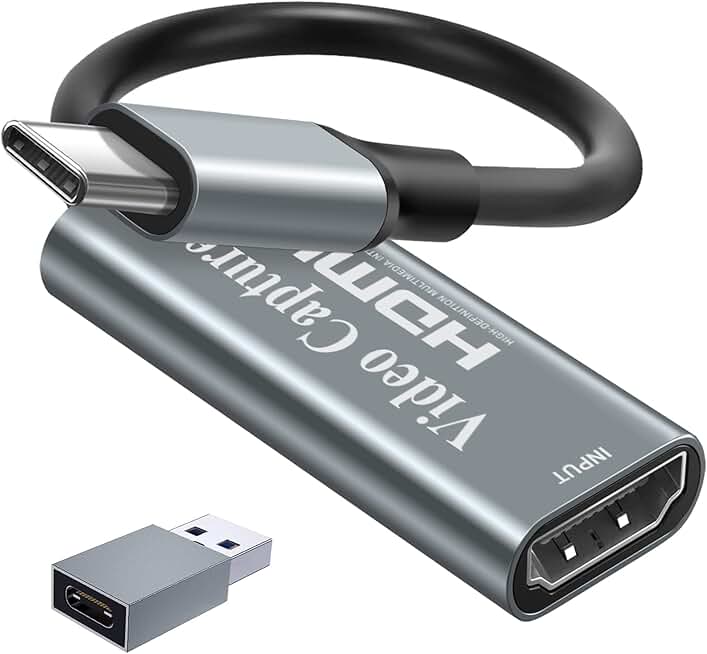
VIXLW Video Capture Card, 4K USB3.0 HDMI to USB C, 1080P60FPS HDMI Capture Card for Streaming, Gaming, Video Recording Compatible with Switch, Xbox, PS4, OBS, Windows, Mac OS, Zoom(Silver)
#4 · Best Compact Option4.5 (964)

VIXLW Video Capture Card, 4K USB3.0 HDMI to USB C, 1080P60FPS HDMI Capture Card for Streaming, Gaming, Video Recording Compatible with Switch, Xbox, PS4, OBS, Windows, Mac OS, Zoom(Silver)

$12.99

The VIXLW is perfect for kids who move their setup around or want a portable solution. At $12.99, it's affordable, and the compact design doesn't compromise on video quality. Great for casual streamers.

Pros

  • + Tiny USB-C form factor fits in a backpack, making it ideal for kids who stream at friends' houses
  • + 4.5-star rating from nearly 1,000 reviews shows consistent quality and reliability
  • + 1080p 60FPS captures clean footage without eating up storage
  • + Works with Switch, Xbox, PS5, and PC—no compatibility headaches

Cons

  • USB-C only, which may require an adapter for older Windows PCs
  • No passthrough means slight stream lag for competitive games
Check price on Amazon →
Audio Express AXHDCAP 4K HDMI Video Capture Card, Cam Link Card Game Audio Adapter HDMI to USB 2.0 Record Capture Device for Streaming, Live Broadcasting, Video Conference, Teaching, Gaming
#5 · Best for Ultra-Budget Streamers4.3 (1,230)

Audio Express AXHDCAP 4K HDMI Video Capture Card, Cam Link Card Game Audio Adapter HDMI to USB 2.0 Record Capture Device for Streaming, Live Broadcasting, Video Conference, Teaching, Gaming

$9.98

The Audio Express is the cheapest way to get your kid streaming. It works, it's reliable, and the price is unbeatable. USB 2.0 is the only real limitation, but it won't matter for most young streamers.

Pros

  • + Lowest price on the list at $9.98—practically impulse-buy territory for testing streaming
  • + USB 2.0 connection works on virtually every computer made in the last decade
  • + Captures 4K input and downscales to 1080p, giving flexibility for future upgrades
  • + Solid 4.3-star rating despite the bargain price

Cons

  • USB 2.0 is slower and may struggle with high bitrate streams on older computers
  • Minimal documentation means your kid might need to troubleshoot setup
Check price on Amazon →
4K HDMI Capture Card USB 3.0 – 1080P 60FPS Gaming & Streaming Video Capture Card with HDMI Loop-Out, Plug & Play, Low-Latency Recording for PS5/PS4/Xbox/Switch/OBS/PC/Mac
#6 · Best with Loop-Out Feature4.4 (917)

4K HDMI Capture Card USB 3.0 – 1080P 60FPS Gaming & Streaming Video Capture Card with HDMI Loop-Out, Plug & Play, Low-Latency Recording for PS5/PS4/Xbox/Switch/OBS/PC/Mac

$26.99

This card is ideal for kids who want to see their gameplay in real-time while streaming. The HDMI loop-out prevents the lag that frustrates young streamers, and USB 3.0 keeps everything smooth.

Pros

  • + HDMI loop-out lets your kid see gameplay on a monitor while streaming—critical for reducing lag
  • + 1080p 60FPS with USB 3.0 ensures smooth, stutter-free recording
  • + Plug-and-play setup means no driver installation or config headaches
  • + 4.4-star rating from 917 reviews confirms solid performance

Cons

  • Slightly pricier at $26.99 than the absolute budget options
  • Loop-out feature adds complexity that beginners might not need immediately
Check price on Amazon →
Papeaso Video Capture Card, Video Recording Card Wonderful 4K HDMI to 1080P USB C for Gaming Streaming TV Recorder, for Windows Mac OS System with USB C Adapter to Adjust PS4, Switch, Xbox1
#7 · Best for Mac and iPad Users4.3 (1,056)

Papeaso Video Capture Card, Video Recording Card Wonderful 4K HDMI to 1080P USB C for Gaming Streaming TV Recorder, for Windows Mac OS System with USB C Adapter to Adjust PS4, Switch, Xbox1

$15.29

The Papeaso is built for Mac and iPad users. If your kid streams on Apple hardware, this card integrates seamlessly without adapters or driver nonsense. The price is fair for the ecosystem compatibility.

Pros

  • + USB-C connection works flawlessly with Mac and iPad, no adapter needed
  • + 4K input downscales to 1080p, future-proofing for when your kid upgrades
  • + Compact design fits neatly into a streaming setup without clutter
  • + 4.3-star rating from over 1,000 reviews shows consistent Mac compatibility

Cons

  • USB-C only limits compatibility with Windows PCs that lack the port
  • No passthrough means slight delay between gameplay and stream output
Check price on Amazon →
UGREEN 2K@30Hz 1080P 60FPS Video Capture Card 4K Input HDMI to USB 3.0 A and USB C Capture, Low Latency Capture Card for Streaming Game Recording Compatible with Switch 2/Xbox/PS4/PS5/PC/Camera
#8 · Best Dual-Port Option4.5 (642)

UGREEN 2K@30Hz 1080P 60FPS Video Capture Card 4K Input HDMI to USB 3.0 A and USB C Capture, Low Latency Capture Card for Streaming Game Recording Compatible with Switch 2/Xbox/PS4/PS5/PC/Camera

$19.99

The UGREEN is the smart choice if your kid uses multiple computers or wants future-proof flexibility. Dual USB ports mean no adapters, and the 4.5-star rating proves it works reliably.

Pros

  • + Both USB 3.0 A and USB-C ports mean compatibility with any computer your kid owns
  • + 4.5-star rating from 642 reviews shows reliability and customer satisfaction
  • + Low-latency capture keeps stream lag minimal for competitive games
  • + Works with Switch, PS5, Xbox, and PC without fussing

Cons

  • No passthrough, so there's still a slight delay between gameplay and stream
  • Slightly higher price at $19.99 compared to single-port competitors
Check price on Amazon →
BENFEI Video/Audio Capture Card Supporting Full HD 1080P 60FPS for Streaming, Recording, Gaming, Compatible with Switch, PS4, PS5, Xbox, Work with PC/Windows/Mac OS
#9 · Best Starter Card4.2 (553)

BENFEI Video/Audio Capture Card Supporting Full HD 1080P 60FPS for Streaming, Recording, Gaming, Compatible with Switch, PS4, PS5, Xbox, Work with PC/Windows/Mac OS

$10.13

The BENFEI is the easiest on-ramp to streaming for kids. At $10.13, it's nearly risk-free, and 1080p 60FPS is genuinely sufficient for casual content creation. Great for testing whether streaming is a real interest.

Pros

  • + Lowest-barrier entry at $10.13—perfect for kids who just want to try streaming
  • + Full HD 1080p 60FPS is all most young streamers actually need
  • + Works with Switch, PS4, PS5, Xbox, and PC—no compatibility drama
  • + Simple setup means your kid can start streaming in minutes, not hours

Cons

  • 4.2-star rating is slightly lower than competitors, suggesting occasional quality variance
  • No advanced features like passthrough or dual ports
Check price on Amazon →
Elgato 4K Pro Internal Capture Card, Black, HDMI, 8K60 Passthrough/4K60 HDR10, Ultra-Low Latency for PS5 Pro, Xbox Series S, Nintendo Switch 2, for Streaming & Recording, Single & Dual PC Setups
#10 · Best Professional-Grade Option4.5 (340)

Elgato 4K Pro Internal Capture Card, Black, HDMI, 8K60 Passthrough/4K60 HDR10, Ultra-Low Latency for PS5 Pro, Xbox Series S, Nintendo Switch 2, for Streaming & Recording, Single & Dual PC Setups

$298.99

The Elgato 4K Pro is for kids serious about professional streaming or esports. The internal installation delivers unmatched performance, but the cost and setup complexity mean it's only right for advanced users.

Pros

  • + Internal PCIe installation delivers 8K60 passthrough and 4K60 HDR10 capture—the absolute best performance
  • + Ultra-low latency means zero perceptible lag between gameplay and stream, critical for esports
  • + Works with PS5 Pro, Xbox Series S, and Switch 2—future-proofed for next-gen consoles
  • + 4.5-star rating from 340 reviews proves professional-grade reliability

Cons

  • At $298.99, this is a serious investment—only for kids committed to streaming as a hobby or career
  • Internal installation requires opening the PC, which isn't for everyone
Check price on Amazon →

Frequently Asked Questions

Final word

The best capture cards for kids depend on budget and streaming ambitions. If your kid is just testing the waters, grab the BENFEI or Audio Express for under $15—they work reliably and won't hurt if streaming turns out to be a passing phase.

For serious young streamers, the Elgato 4K S ($159.99) is worth the investment. The zero-lag passthrough and multi-platform support mean your kid can stream competitively without frustration.

Budget-conscious families should consider the VIXLW or UGREEN—both deliver solid 1080p 60FPS at $12–20 and cover all major platforms. Start with an affordable capture card, let your kid explore streaming, and upgrade to a premium model if they're genuinely committed. That's the smart way to support a young content creator.

More capture cards guides