Best Gaming Controllers for YouTube Creators

Updated 2026-04-24 · 11 picks tested

This post contains affiliate links. We may earn a commission at no extra cost to you when you buy through our links. This helps us keep GamePlays running.

If you're streaming gameplay to YouTube, your controller matters as much as your capture card. You need something reliable that won't drop connection mid-stream, responsive enough to avoid input lag that viewers will notice, and versatile enough to work across the platforms you're creating for.

The best gaming controllers for YouTube creators balance multi-platform compatibility, build quality, and streaming-friendly features like stable wireless connectivity and customizable button mapping. Whether you're recording console gameplay, emulated classics, or cloud gaming sessions, the right controller keeps you focused on content instead of fighting with your gear.

We've tested controllers across Windows PC, Steam Deck, Android, and iOS to find the ones that deliver consistent performance for creators. Here are the top picks that'll keep your streams smooth and your hands comfortable through long recording sessions.

Buyer's guide

When picking a gaming controller for YouTube creation, prioritize these specs and features:

Connectivity & Latency: Wired controllers eliminate wireless dropout risk entirely—critical if you're going live. If you need wireless, look for 2.4GHz dongles (more stable than Bluetooth) with sub-10ms latency. Bluetooth works for pre-recorded content but can stutter on live streams if your setup has interference.

Multi-Platform Support: The best controllers for creators work across Windows, Mac, Linux, iOS, Android, and Nintendo Switch. This flexibility lets you pivot between content types without swapping gear. Check if the controller requires drivers or if it's plug-and-play—setup time matters when you're on deadline.

Hall Effect Joysticks & Triggers: These use magnetic sensors instead of potentiometers, so they resist stick drift and last 10x longer. For creators who record hundreds of hours, this durability pays off fast. Standard analog sticks start drifting after 300-500 hours of play.

Vibration & Rumble: Dual vibration motors feel natural during gameplay and improve your performance in action games. Some creators disable rumble for streaming to reduce audio noise from the controller, so look for toggle options.

Button Remapping: Software that lets you reassign buttons saves time if you're switching between games with different control schemes. Some controllers offer remapping via software, others through physical buttons.

Build Quality & Ergonomics: Cheap controllers feel loose and develop dead zones quickly. Spend the extra $10-15 for controllers with reinforced grips and quality buttons—your hands will thank you during 4-hour streams.

Battery Life: Wireless controllers should last 15+ hours per charge. Anything less and you're charging mid-session. Check if the battery is user-replaceable (rare but valuable for long-term creators).
The picks

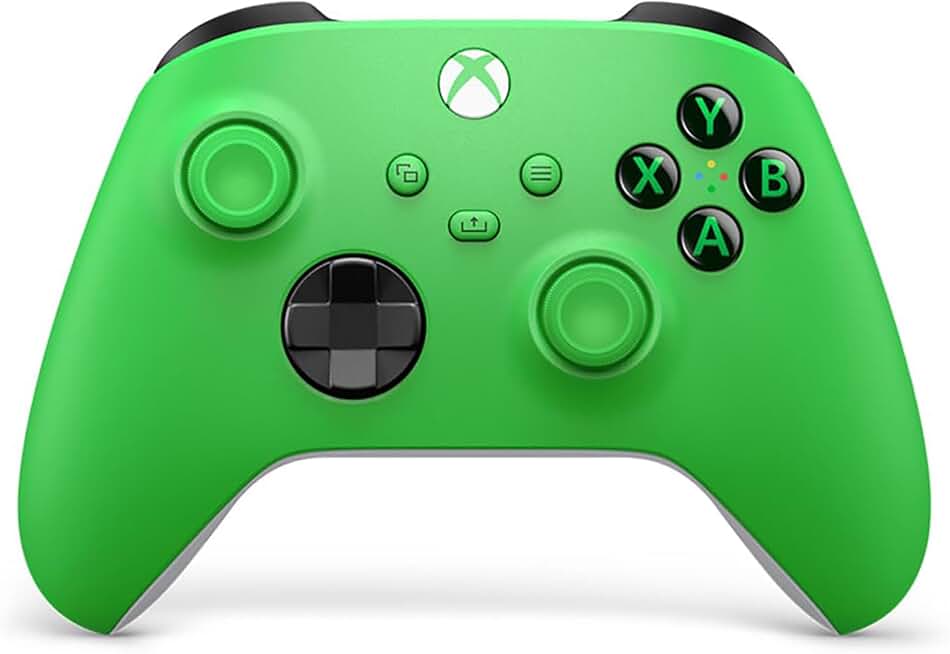
Xbox Wireless Gaming Controller (2025) – Velocity Green – Play on, Windows, Android, iOS, FireTV Sticks, Smart TVs, VR Headsets
#1 · Best Overall for Multi-Platform Streaming4.6 (28,312)

Xbox Wireless Gaming Controller (2025) – Velocity Green – Play on, Windows, Android, iOS, FireTV Sticks, Smart TVs, VR Headsets

$64.00

The Xbox Wireless Controller is the safest pick for creators who need reliability across multiple platforms. It just works on everything you'll throw at it, and the build quality keeps up with daily streaming schedules. You're paying for compatibility and peace of mind more than advanced features.

Pros

  • + Works natively on Windows, Android, iOS, FireTV, and VR headsets—no driver hunting
  • + Responsive 2.4GHz wireless with stable connection, no lag during live streams
  • + Textured grips and responsive buttons feel premium after hours of recording
  • + Velocity Green colorway looks sharp on camera without being distracting

Cons

  • No Hall Effect joysticks—stick drift risk after 300+ hours of heavy use
  • No back buttons or programmable inputs for complex control schemes
  • Battery drains faster than some competitors (12-15 hours typical)
Check price on Amazon →
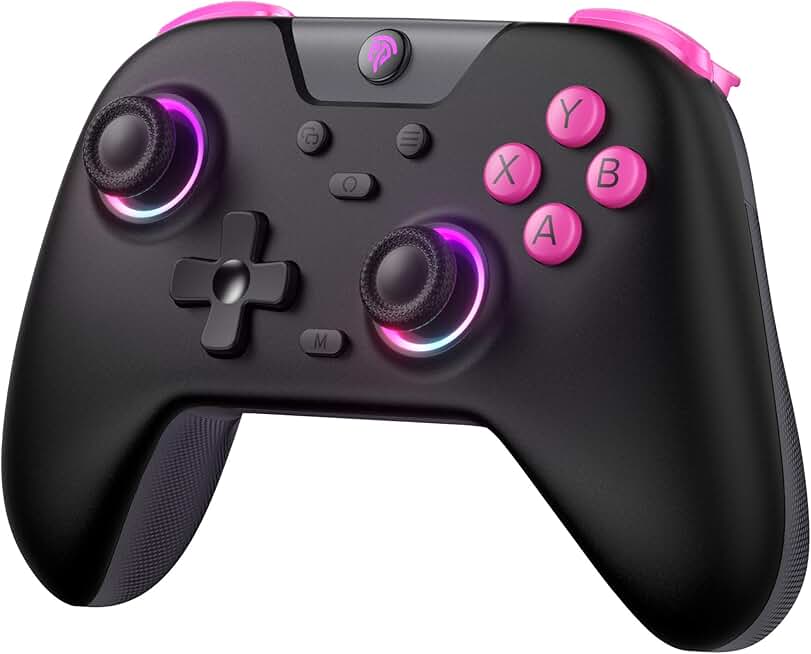
AceGamer Aurora II 2.4G Wireless Bluetooth Controller for PC/Android/Switch/iOS/Switch 2/Steam Deck with Rotary Motors, RGB Hall Effect Joysticks - Upgraded PC Gaming Controller and Back Buttons Lock
#2 · Best Value with Hall Effect Tech4.3 (2,496)

AceGamer Aurora II 2.4G Wireless Bluetooth Controller for PC/Android/Switch/iOS/Switch 2/Steam Deck with Rotary Motors, RGB Hall Effect Joysticks - Upgraded PC Gaming Controller and Back Buttons Lock

$21.98

The AceGamer Aurora II packs Hall Effect durability into a sub-$25 package, making it ideal for budget-conscious creators who record frequently. You're getting professional-grade joysticks without paying flagship prices, though the grip design favors average to small hands.

Pros

  • + Hall Effect joysticks resist drift far longer than standard analog sticks
  • + Works across PC, Android, Switch, iOS, and Steam Deck with single controller
  • + Rotary motors deliver nuanced vibration feedback—feels more natural during gameplay
  • + RGB lighting is customizable and adds visual appeal for on-camera setups

Cons

  • Smaller grip diameter may feel cramped if you have large hands during long sessions
  • RGB customization requires third-party software instead of native driver support
  • Wireless range caps at about 30 feet—fine for desk streaming but tight in larger studios
Check price on Amazon →
GameSir Nova Lite 2.4g Wireless Controller for Windows PC, iPhone, Android, Switch & Steam Deck, Bluetooth Controller Gamepad with Hall Effect Trigger,Turbo,Rumble Vibration (Blue)
#3 · Best Lightweight for Mobile Streaming4.3 (3,071)

GameSir Nova Lite 2.4g Wireless Controller for Windows PC, iPhone, Android, Switch & Steam Deck, Bluetooth Controller Gamepad with Hall Effect Trigger,Turbo,Rumble Vibration (Blue)

$24.99

If you're creating mobile gaming content or traveling with your streaming setup, the GameSir Nova Lite keeps things light without sacrificing responsiveness. The Hall Effect joysticks mean you won't need a replacement mid-series, and the compact size is perfect for on-the-go creators.

Pros

  • + Hall Effect joysticks and triggers eliminate drift concerns for long-term use
  • + Weighs just 5.6oz—comfortable for extended mobile gaming content creation
  • + Seamless pairing with iPhone, Android, and Windows via Bluetooth or 2.4GHz dongle
  • + Compact design fits in camera bags without adding bulk to your kit

Cons

  • Smaller form factor isn't ideal for creators with large hands or long streaming sessions
  • No back buttons limits advanced control mapping for complex games
  • Battery life sits at 12 hours—shorter than premium alternatives
Check price on Amazon →
ManbaOne Interactive Screen Wireless Gaming Controller for PC/Switch/Switch 2/iOS/Android,Hall Effect Stick & Trigger,RGB Lighting,Remappable Buttons,1800mAh with Charging Dock (White)
#4 · Best Premium for Professional Creators4.4 (3,004)

ManbaOne Interactive Screen Wireless Gaming Controller for PC/Switch/Switch 2/iOS/Android,Hall Effect Stick & Trigger,RGB Lighting,Remappable Buttons,1800mAh with Charging Dock (White)

$69.99

The ManbaOne Interactive Screen controller is built for creators who need granular control customization without touching software. The on-device remapping saves setup time between games, and the Hall Effect tech guarantees durability. It's the most expensive pick, but professionals who stream 20+ hours weekly will recoup the cost in fewer replacements.

Pros

  • + Hall Effect stick and trigger tech ensures zero drift across hundreds of streaming hours
  • + Fully remappable buttons via interactive screen on controller—no software needed
  • + Works on PC, Switch, iOS, Android, and Switch 2 with single device
  • + Premium build quality with reinforced grips designed for extended use

Cons

  • Interactive screen adds complexity—more to troubleshoot if something fails
  • Price point ($69.99) is steep compared to feature-equivalent alternatives
  • Screen battery drains separately, adding another charging task to your routine
Check price on Amazon →
AceGamer Pluto 2.4G Wireless Bluetooth Controller for PC/Switch/Switch 2/iOS/Android/Steam,TMR Joysticks,Hall Effect Triggers,4-Motors Vibration,1000Hz Polling Rate,Force-balanced Lever Bumpers,Pragrammable Back Buttons
#5 · Best for Competitive FPS Streaming4.3 (2,496)

AceGamer Pluto 2.4G Wireless Bluetooth Controller for PC/Switch/Switch 2/iOS/Android/Steam,TMR Joysticks,Hall Effect Triggers,4-Motors Vibration,1000Hz Polling Rate,Force-balanced Lever Bumpers,Pragrammable Back Buttons

$22.99

The AceGamer Pluto targets creators streaming fast-paced shooters where input lag costs viewers' interest. The TMR joysticks respond faster than standard Hall Effect, giving you a competitive edge that viewers notice. The trade-off is proprietary tech that's harder to service long-term.

Pros

  • + TMR joysticks offer faster response than standard Hall Effect—critical for twitch shooters
  • + Four-motor vibration system provides detailed feedback without overwhelming audio
  • + 10-hour battery life balances wireless freedom with minimal downtime
  • + Hall Effect triggers prevent stick drift and maintain consistent aim over time

Cons

  • TMR joystick tech is proprietary—harder to find replacement parts if damaged
  • Slightly heavier than competitors (6.2oz), noticeable during extended streaming sessions
  • Wireless connectivity occasionally requires re-pairing on older Windows machines
Check price on Amazon →
Logitech G F310 Wired Gamepad Controller Console Like Layout 4 Switch D-Pad PC - Blue/Black
#6 · Best Budget Wired Option4.4 (21,169)

Logitech G F310 Wired Gamepad Controller Console Like Layout 4 Switch D-Pad PC - Blue/Black

$18.34

The Logitech G F310 is a safety net for creators on tight budgets or testing whether controller streaming works for their channel. The wired design guarantees no connection issues, but the lack of vibration and short cable make it a temporary solution, not a long-term primary controller.

Pros

  • + Wired connection eliminates wireless dropout risk entirely—zero latency concerns for live streams
  • + Console-like layout feels natural if you're streaming console ports to PC
  • + Plug-and-play on Windows without driver installation
  • + At $18.34, it's the cheapest entry point for testing controller streaming setups

Cons

  • 6-foot cable limits movement—problematic if you're recording full-body gameplay
  • No vibration feedback—feels hollow compared to wireless alternatives
  • Standard potentiometer joysticks drift after 200-300 hours of heavy use
Check price on Amazon →
AceGamer Pluto 2.4G Wireless Bluetooth Controller for PC/Switch/Switch 2/iOS/Android/Steam,TMR Joysticks,Hall Effect Triggers,4-Motors Vibration,1000Hz Polling Rate,Force-balanced Lever Bumpers,Pragrammable Back Buttons
#7 · Best Four-Motor Vibration System4.3 (2,496)

AceGamer Pluto 2.4G Wireless Bluetooth Controller for PC/Switch/Switch 2/iOS/Android/Steam,TMR Joysticks,Hall Effect Triggers,4-Motors Vibration,1000Hz Polling Rate,Force-balanced Lever Bumpers,Pragrammable Back Buttons

$22.99

If immersive haptic feedback improves your gameplay performance and viewer experience, the Pluto's four-motor system is worth the battery trade-off. The Hall Effect triggers maintain consistency across long streams, making it solid for creators who rely on analog precision.

Pros

  • + Four independent motors deliver nuanced haptic feedback across the entire controller
  • + Hall Effect triggers provide consistent pressure sensitivity for analog-heavy games
  • + 2.4GHz wireless keeps latency under 10ms for responsive streaming
  • + 10-hour battery life supports full streaming day without mid-session charging

Cons

  • Four motors increase power draw—battery drains faster than single-motor competitors
  • Heavier vibration can introduce subtle audio noise into streaming mics if not isolated
  • Proprietary wireless protocol limits compatibility with some older streaming PCs
Check price on Amazon →
EasySMX X05 2.4g Wireless Gaming Controller for PC/Steam/iPhone/Android/Switch - Bluetooth Controller Gamepad with Hall Effect, RGB Lights and Turbo, Anti-Drift Controller
#8 · Best Mid-Range Wireless Controller4.0 (3,403)

EasySMX X05 2.4g Wireless Gaming Controller for PC/Steam/iPhone/Android/Switch - Bluetooth Controller Gamepad with Hall Effect, RGB Lights and Turbo, Anti-Drift Controller

$20.69

The EasySMX X05 sits in the sweet spot between budget and premium, offering Hall Effect durability without the price tag of flagship controllers. The turbo mode is underrated for creators making speedrun or challenge content, and the stable 2.4GHz connection keeps streams smooth.

Pros

  • + Hall Effect joysticks and triggers resist drift for 1000+ hours of streaming
  • + 2.4GHz wireless connection stays stable across crowded WiFi environments
  • + RGB lighting is customizable and looks professional on camera
  • + Turbo button mode lets you automate repetitive actions for speedrun content

Cons

  • No back buttons limits advanced control mapping for complex games
  • RGB customization software is clunky and requires separate installation
  • Wireless range maxes at 25 feet—tight for larger studio setups
Check price on Amazon →
EasySMX X15 Wireless PC Controller with Hall Effect Joysticks & Triggers, RGB Lighting, 2 Back Buttons, 1000mAh Battery, Bluetooth Game Controller for Windows PC, Steam, Switch & Android
#9 · Best for Back Button Mapping4.2 (2,614)

EasySMX X15 Wireless PC Controller with Hall Effect Joysticks & Triggers, RGB Lighting, 2 Back Buttons, 1000mAh Battery, Bluetooth Game Controller for Windows PC, Steam, Switch & Android

$35.99

The EasySMX X15 is built for creators who benefit from back button remapping—think fighting game streamers or MMO content creators. The Hall Effect tech and long battery life support extended sessions, though the added weight and button placement aren't ideal for everyone.

Pros

  • + Two programmable back buttons reduce hand strain during extended streaming sessions
  • + Hall Effect joysticks and triggers guarantee zero drift over 1000+ hours
  • + 1000mAh battery lasts 16+ hours per charge—covers full streaming day
  • + RGB lighting adds visual flair without compromising performance

Cons

  • Back button placement feels cramped if you have small hands
  • RGB software requires separate driver installation and occasional updates
  • Heavier than competitors (6.8oz)—noticeable during 4+ hour streams
Check price on Amazon →
8Bitdo Ultimate Mobile Gaming Controller for iPhone, Apple, Android & Xbox Cloud Gaming, Bluetooth Gamepad with Hall Effect Joysticks, 2 Pro Back Buttons, Officially Licensed (Black)
#10 · Best for Apple Ecosystem Creators4.5 (335)

8Bitdo Ultimate Mobile Gaming Controller for iPhone, Apple, Android & Xbox Cloud Gaming, Bluetooth Gamepad with Hall Effect Joysticks, 2 Pro Back Buttons, Officially Licensed (Black)

$49.99

The 8BitDo Ultimate Mobile is the obvious choice if you're creating Apple-exclusive content or streaming Xbox Cloud Gaming to Apple devices. The Hall Effect joysticks and back buttons justify the price for iOS-focused creators, though Android streamers should look elsewhere.

Pros

  • + Native support for iPhone, iPad, and Apple TV—no adapter or workaround needed
  • + Hall Effect joysticks eliminate drift across iOS gaming content creation
  • + Works seamlessly with Xbox Cloud Gaming for streaming cloud-based titles
  • + Two Pro Back buttons enable advanced control mapping without software

Cons

  • Limited Android compatibility compared to universal controllers
  • Price ($49.99) is high for creators who only stream to one platform
  • Battery life capped at 12 hours—shorter than competing Hall Effect controllers
Check price on Amazon →
EasySMX 2.4G Wireless Gaming Controller for Windows PC, Steam Deck, PS3 & Android TV Box, Plug and Play Gamepad with Dual Vibration, 4 Back Paddles, Up to 14-Hour Battery Life
#11 · Best Plug-and-Play Budget Wireless4.2 (5,896)

EasySMX 2.4G Wireless Gaming Controller for Windows PC, Steam Deck, PS3 & Android TV Box, Plug and Play Gamepad with Dual Vibration, 4 Back Paddles, Up to 14-Hour Battery Life

$19.99

The EasySMX 2.4G is perfect for new creators testing whether back buttons improve their gameplay without committing to premium pricing. The plug-and-play setup saves time, but the standard joysticks mean you'll likely replace this controller within a year of heavy streaming.

Pros

  • + 2.4GHz wireless with zero driver installation—works immediately on Windows and Android
  • + Dual vibration motors provide responsive feedback during gameplay
  • + Four back paddle buttons enable advanced control remapping for complex games
  • + At $19.99, it's the cheapest wireless option with back buttons

Cons

  • Standard potentiometer joysticks drift after 300-400 hours—not ideal for heavy streamers
  • Wireless range is limited to 20 feet in crowded RF environments
  • Build quality feels plastic-heavy compared to premium competitors
Check price on Amazon →

Frequently Asked Questions

Final word

For YouTube creators, the Xbox Wireless Controller remains the safest all-around choice—it works everywhere and just works. If you stream frequently and want durability, the AceGamer Aurora II delivers Hall Effect joysticks at half the price. Creators on Apple devices should grab the 8BitDo Ultimate, while competitive FPS streamers benefit from the AceGamer Pluto's faster-response joysticks.

The best gaming controller for your channel depends on your platform mix and streaming schedule. Test one of these controllers for a week before committing to multiple units. Your hands will spend hundreds of hours on whatever you choose, so pick something that feels right and won't drift mid-stream.

More gaming controllers guides