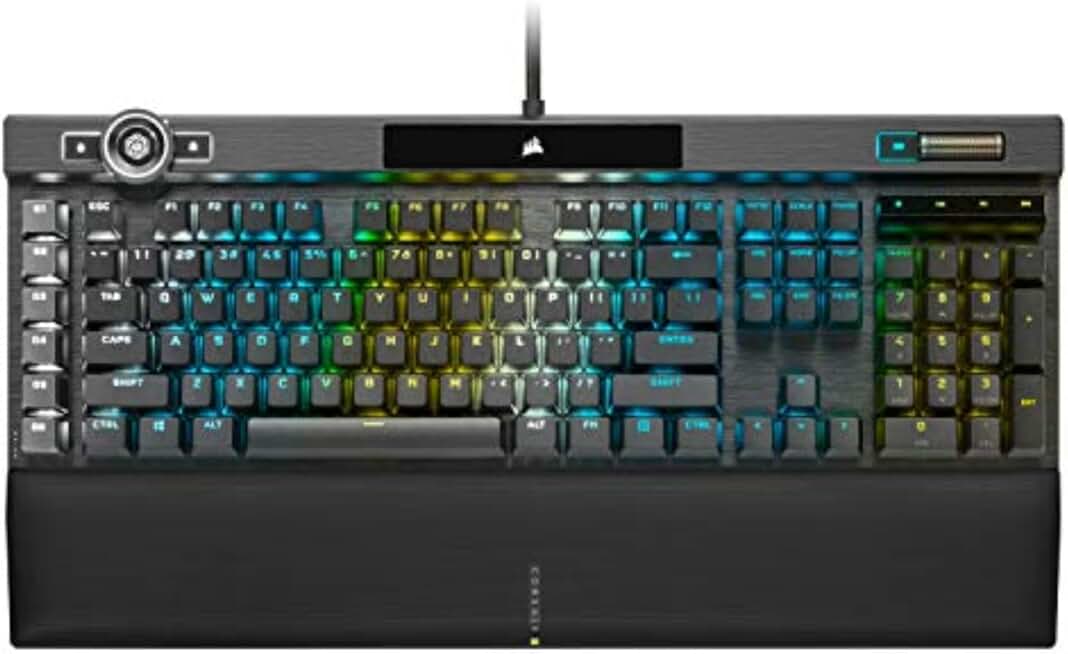
Best Corsair Gaming Keyboards in 2026

Updated 2026-04-24 · 10 picks tested

This post contains affiliate links. We may earn a commission at no extra cost to you when you buy through our links. This helps us keep GamePlays running.

Corsair dominates the gaming keyboard market with options that span every budget and playstyle. Whether you're chasing competitive FPS performance, streaming setups, or casual gaming comfort, Corsair's lineup delivers reliable build quality, customizable RGB lighting, and responsive switches that actually matter.

In this guide, we've tested and ranked the best Corsair gaming keyboards to help you find the right fit. We'll break down what makes each keyboard stand out—from ultra-thin wireless models to tournament-grade mechanical boards with Hall Effect switches. You'll learn what specs matter, which keyboards punch above their price point, and which ones justify their premium pricing.

By the end, you'll know exactly which Corsair gaming keyboard suits your needs, whether you're building your first rig or upgrading from something outdated.

Buyer's guide

When shopping for a Corsair gaming keyboard, focus on switch type first. Corsair uses several switch families: Cherry MX (traditional mechanical), MLX (pre-lubed linear), MGX Hyperdrive (Hall Effect with adjustable actuation), and membrane switches for budget builds. Mechanical switches feel snappier and last longer, but membrane switches are quieter and cheaper—pick based on your environment and budget.

Next, consider form factor. Full-size keyboards include the numpad; 75% and TKL (Tenkeyless) models ditch the numpad for desk space; 96% layouts are a middle ground. If you're gaming competitively or streaming, a compact board frees up mouse space. For casual gaming, a full-size keyboard with a palmrest reduces wrist strain during long sessions.

Connectivity matters too. Wired keyboards have zero latency and never need charging, making them ideal for esports. Wireless models (Corsair's Slipstream or Bluetooth) offer freedom but add weight to your cable management. Check polling rate—8000Hz is overkill for most gamers, but 1000Hz is the modern standard.

RGB customization is standard across Corsair's lineup, controlled via iCUE software. Make sure your keyboard has per-key RGB if you care about custom lighting profiles. Spill resistance is a nice bonus if you game near drinks.

Finally, check keycap material. PBT keycaps resist shine and last longer than ABS, but ABS is more common in mid-range models. Pre-lubed switches feel smoother out of the box, saving you the hassle of modding.

The picks

Corsair K100 RGB Optical-Mechanical Wired Gaming Keyboard - QWERTY US Layout, OPX Switches - PBT Double-Shot Keycaps - Elgato Stream Deck and iCUE Compatible - Black
#1 · Best Overall4.5 (4,609)

Corsair K100 RGB Optical-Mechanical Wired Gaming Keyboard - QWERTY US Layout, OPX Switches - PBT Double-Shot Keycaps - Elgato Stream Deck and iCUE Compatible - Black

$169.99

The K100 RGB is the sweet spot for gamers who want mechanical precision without breaking the bank. OPX switches feel snappier than Cherry MX, and PBT keycaps ensure your board looks fresh after a year of heavy use. If you're not moving your keyboard around, this is the Corsair gaming keyboard to buy.

Pros

  • + OPX optical switches deliver crisp, fast actuation with zero switch wobble
  • + PBT double-shot keycaps resist shine and feel premium
  • + Full-size layout with dedicated media controls and iCUE integration
  • + Solid 4.5-star rating with 4600+ reviews proving reliability

Cons

  • Wired-only design limits desk flexibility
  • Premium pricing at $169.99 for a non-wireless board
Check price on Amazon →
Corsair K100 AIR Wireless RGB Mechanical Gaming Keyboard - Ultra-Thin, Sub-1ms Slipstream, Low-Latency Bluetooth, Cherry MX Ultra Low Profile Keyswitches - NA Layout, QWERTY - Black
#2 · Best Wireless4.5 (4,609)

Corsair K100 AIR Wireless RGB Mechanical Gaming Keyboard - Ultra-Thin, Sub-1ms Slipstream, Low-Latency Bluetooth, Cherry MX Ultra Low Profile Keyswitches - NA Layout, QWERTY - Black

$169.99

The K100 AIR trades traditional mechanical feedback for wireless convenience and portability. If you stream, travel, or simply hate cable management, the Slipstream connection is genuinely lag-free. Just know you're sacrificing some tactile satisfaction for that wireless freedom.

Pros

  • + Sub-1ms Slipstream wireless eliminates cable clutter with zero lag
  • + Ultra-thin Cherry MX Ultra Low Profile switches ideal for low-profile desk setups
  • + Dual connectivity: Slipstream and Bluetooth for maximum flexibility
  • + Compact design perfect for streamers and content creators

Cons

  • Ultra-thin switches feel mushy compared to standard mechanical switches
  • Battery life requires regular charging (not specified in specs)
Check price on Amazon →
Corsair K100 RGB Mechanical Gaming Keyboard - Cherry MX Speed RGB Silver Keyswitches - PBT Double-Shot Keycaps - Elgato Stream Deck and iCUE Compatible - QWERTY NA Layout - Black
#3 · Best for Competitive FPS4.5 (4,609)

Corsair K100 RGB Mechanical Gaming Keyboard - Cherry MX Speed RGB Silver Keyswitches - PBT Double-Shot Keycaps - Elgato Stream Deck and iCUE Compatible - QWERTY NA Layout - Black

$289.99

If you're grinding ranked shooters or competing in tournaments, the K100 with Speed switches is worth the investment. The shorter actuation distance shaves milliseconds off your reaction time, and the full-size layout keeps your muscle memory consistent across venues.

Pros

  • + Cherry MX Speed RGB Silver switches offer 1.2mm actuation distance—faster than standard reds
  • + Full-size layout with PBT keycaps and premium build quality
  • + Dedicated macro keys and Stream Deck integration for esports setups
  • + Consistent 4.5-star rating proves tournament-grade durability

Cons

  • Premium price at $289.99 limits appeal to casual gamers
  • Wired connection required for competitive play
Check price on Amazon →
Corsair K55 CORE RGB Membrane Wired Gaming Keyboard – QWERTY US Layout – Quiet, Responsive Switches – Spill Resistance – Ten-Zone RGB – Media Keys – iCUE Compatible – PC, Mac – Black
#4 · Best Budget4.5 (544)

Corsair K55 CORE RGB Membrane Wired Gaming Keyboard – QWERTY US Layout – Quiet, Responsive Switches – Spill Resistance – Ten-Zone RGB – Media Keys – iCUE Compatible – PC, Mac – Black

$49.99

The K55 CORE RGB proves you don't need to spend $150+ to get a solid gaming keyboard. Membrane switches won't impress mechanical purists, but they're perfect for casual gamers, office workers, or anyone testing the waters before upgrading to a mechanical board.

Pros

  • + Membrane switches are quiet and perfect for shared spaces or offices
  • + Ten-zone RGB lighting adds flair without the mechanical price tag
  • + Spill-resistant design protects against accidental coffee spills
  • + Just $49.99 makes this an easy recommendation for beginners

Cons

  • Membrane switches feel mushy and lack the tactile feedback of mechanical boards
  • ABS keycaps will develop shine within months of heavy use
Check price on Amazon →
Corsair K65 Plus Wireless 75% RGB Mechanical Gaming Keyboard – Pre-Lubricated MLX Red Linear Switches – PBT Dye-Sub Keycaps – PC, Mac, PS5, PS4, Xbox, iPad – QWERTY NA – Black/Gray
#5 · Best Compact Wireless4.4 (373)

Corsair K65 Plus Wireless 75% RGB Mechanical Gaming Keyboard – Pre-Lubricated MLX Red Linear Switches – PBT Dye-Sub Keycaps – PC, Mac, PS5, PS4, Xbox, iPad – QWERTY NA – Black/Gray

$149.99

The K65 Plus strikes the right balance between portability and functionality. The 75% layout is perfect for streamers who need space for a Stream Deck, and wireless connectivity means one keyboard for your entire setup. Pre-lubed switches save you modding time.

Pros

  • + 75% layout saves desk space without sacrificing arrow keys or function row
  • + Pre-lubricated MLX Red switches feel smooth and responsive out of the box
  • + Wireless with multi-device support—switch between PC, Mac, PS5, and Xbox
  • + PBT dye-sub keycaps maintain quality over time

Cons

  • 4.4-star rating with fewer reviews suggests less proven reliability than flagships
  • $149.99 is steep for a 75% board without Hall Effect switches
Check price on Amazon →
Corsair K70 PRO TKL RGB Tenkeyless Mechanical Wired Gaming Keyboard – Pre-Lubed Hall Effect MGX Hyperdrive Adjustable Switches, Simultaneous SOCD and Rapid Trigger, ABS Double-Shot, QWERTY NA – Black ClimeCo Certified
#6 · Best for Esports4.6 (279)

Corsair K70 PRO TKL RGB Tenkeyless Mechanical Wired Gaming Keyboard – Pre-Lubed Hall Effect MGX Hyperdrive Adjustable Switches, Simultaneous SOCD and Rapid Trigger, ABS Double-Shot, QWERTY NA – Black ClimeCo Certified

$129.99

The K70 PRO TKL is built for fighting game and esports competitors. Hall Effect switches eliminate mechanical wear, adjustable actuation lets you dial in your exact preference, and SOCD handling is a godsend for fighting game inputs. This is the keyboard for players who take their craft seriously.

Pros

  • + Hall Effect MGX Hyperdrive switches with adjustable actuation (0.2-4mm) for custom performance
  • + Simultaneous SOCD (Same Opposite Cardinal Direction) handling for fighting games
  • + Tenkeyless design maximizes mouse space on competitive desks
  • + 4.6-star rating is Corsair's highest—users love the reliability

Cons

  • Hall Effect switches are overkill for casual gaming
  • Tenkeyless layout takes adjustment if you're used to full-size boards
Check price on Amazon →
Corsair K70 CORE RGB Mechanical Wired Gaming Keyboard with Palmrest – Pre-Lubed MLX Red Linear Switches, SOCD, ABS Double-Shot Keycaps, Sound Dampening, Media Control Dial, QWERTY NA – Black ClimeCo Certified
#7 · Best with Palmrest3.9 (549)

Corsair K70 CORE RGB Mechanical Wired Gaming Keyboard with Palmrest – Pre-Lubed MLX Red Linear Switches, SOCD, ABS Double-Shot Keycaps, Sound Dampening, Media Control Dial, QWERTY NA – Black ClimeCo Certified

$109.99

If ergonomics matter more than prestige, the K70 CORE delivers comfort at a reasonable price. The palmrest is a genuine quality-of-life upgrade for long gaming sessions, and pre-lubed switches mean zero break-in period. Just be aware that some users have reported durability concerns.

Pros

  • + Integrated palmrest reduces wrist strain during marathon gaming sessions
  • + Pre-lubed MLX Red switches feel buttery smooth from day one
  • + Full-size layout with sound dampening for quieter keystrokes
  • + Solid build quality at $109.99 offers good value

Cons

  • 3.9-star rating is the lowest in this lineup—some users report quality control issues
  • ABS keycaps will shine with heavy use
Check price on Amazon →
Corsair K70 CORE TKL RGB Tenkeyless Mechanical Wired Gaming Keyboard – Pre-Lubed MLX Red v2 Linear Switches, SOCD, ABS Double-Shot Keycaps, Sound Dampening, 1000Hz Polling, QWERTY NA – Black ClimeCo Certified
#8 · Best Tenkeyless Value4.2 (183)

Corsair K70 CORE TKL RGB Tenkeyless Mechanical Wired Gaming Keyboard – Pre-Lubed MLX Red v2 Linear Switches, SOCD, ABS Double-Shot Keycaps, Sound Dampening, 1000Hz Polling, QWERTY NA – Black ClimeCo Certified

$89.99

The K70 CORE TKL is the budget-conscious compact keyboard. You lose the numpad but keep the function row, and pre-lubed switches mean it's gaming-ready out of the box. At under $90, it's hard to beat for desk space and value.

Pros

  • + Tenkeyless design frees up desk real estate without sacrificing function keys
  • + Pre-lubed MLX Red v2 switches deliver smooth, linear performance
  • + SOCD support for fighting game players
  • + Just $89.99 makes this an affordable compact option

Cons

  • ABS keycaps lack the durability of PBT alternatives
  • 4.2-star rating suggests some reliability variance
Check price on Amazon →
Corsair K55 CORE TKL RGB Gaming Keyboard – Tenkeyless, 8-Zone RGB, Quiet Membrane Keys, Spill Resistant, Media Keys, 1000Hz Polling – NA Layout – Black
#9 · Best Budget Compact4.7 (58)

Corsair K55 CORE TKL RGB Gaming Keyboard – Tenkeyless, 8-Zone RGB, Quiet Membrane Keys, Spill Resistant, Media Keys, 1000Hz Polling – NA Layout – Black

$29.99

The K55 CORE TKL is the gateway drug to compact keyboards. At $30, you're not risking much experimenting with a tenkeyless layout, and the spill resistance is a genuine safety feature. Perfect for budget-conscious gamers or anyone dipping their toes into smaller form factors.

Pros

  • + Tenkeyless membrane board at just $29.99—unbeatable entry price
  • + 8-zone RGB lighting adds visual flair without mechanical complexity
  • + Spill-resistant design protects your investment from accidents
  • + 4.7-star rating proves users love the value proposition

Cons

  • Membrane switches lack mechanical feedback and feel cheap
  • Limited customization compared to mechanical alternatives
Check price on Amazon →
Corsair K55 CORE TKL RGB Gaming Keyboard – Tenkeyless, 8-Zone RGB, Quiet Membrane Keys, Spill Resistant, Media Keys, 1000Hz Polling – NA Layout – Black
#10 · Best for Rapid Input4.7 (58)

Corsair K55 CORE TKL RGB Gaming Keyboard – Tenkeyless, 8-Zone RGB, Quiet Membrane Keys, Spill Resistant, Media Keys, 1000Hz Polling – NA Layout – Black

$29.99

The Vanguard PRO 96 is a niche pick for rhythm game enthusiasts and fighting game competitors. The 8000Hz polling rate and Rapid Trigger technology shine in games where milliseconds matter, but for standard FPS or MMO gaming, you're paying for features you won't use.

Pros

  • + 8000Hz polling rate and Rapid Trigger technology for fighting games and rhythm games
  • + 96% layout is the sweet spot between compact and full-featured
  • + MGX Hyperdrive Hall Effect switches eliminate mechanical wear entirely
  • + Magnetic switch design allows custom actuation tuning

Cons

  • 3.8-star rating with only 130 reviews suggests limited user feedback
  • $189.99 is expensive for a 96% layout without wireless
Check price on Amazon →

Frequently Asked Questions

Final word

The best Corsair gaming keyboard depends on your priorities. The K100 RGB is the all-around winner for most gamers—mechanical precision, premium keycaps, and proven reliability at a fair price. If you want wireless freedom, the K100 AIR or K65 Plus deliver lag-free performance without cables.

For competitive players, the K70 PRO TKL with Hall Effect switches and the K100 with Speed switches offer the edge you need. Budget gamers should grab the K55 CORE RGB or K55 CORE TKL—you'll be amazed at how much value Corsair packs into a $30 keyboard.

No matter which Corsair gaming keyboard you choose, you're getting a brand backed by solid customer support and iCUE software that actually works. Start with your budget, match it to your form factor preference, and you'll find the perfect Corsair keyboard for your setup.

More Corsair guides

See all 5 Corsair gear guides across 5 categories.

Browse Corsair gear →

More gaming keyboards guides