Finding the right ergonomic gaming keyboard means balancing comfort during long sessions with the responsiveness competitive gaming demands. The best ergonomic gaming keyboards feature split layouts, cushioned wrist rests, and mechanical switches that reduce strain without sacrificing speed or precision. Whether you're grinding ranked matches for hours or streaming content, your keyboard should support your wrists and fingers, not fight against them. We've tested and ranked 10 top ergonomic gaming keyboards across different budgets and playstyles. From budget-friendly combos to premium mechanical splits, you'll find a keyboard that fits your hands and your gaming setup. Read on to discover which ergonomic gaming keyboard matches your needs.
Best Ergonomic Gaming Keyboards in 2026
This post contains affiliate links. We may earn a commission at no extra cost to you when you buy through our links. This helps us keep GamePlays running.
Jump to
Our top picks at a glance
- #1Best Overall Ergonomic Gaming Keyboard: SteelSeries Apex 3 RGB Gaming Keyboard – 10-Zone RGB Illumination – IP32 Water Resistant – Premium Magnetic Wrist Rest (Whisper Quiet Gaming Switch)$49.99
- #2
- #3Best Mechanical Ergonomic Keyboard for Pros: Cloud Nine C989M Ergonomic Mechanical Keyboard for PC - Kailh Tactile Brown Switches - RGB Light Up LED Backlit with USB - Ergo Split Key Board with Macro$199.00
- #4Best Retro Mechanical Ergonomic Keyboard: RK ROYAL KLUDGE S108 Typewriter Keyboard, Retro Mechanical Gaming Keyboard Wired 108 Keys with RGB Backlit Sidelight, Detachable Wrist Rest, Round Keycaps Blue Switches - Black$47.99
- #5Best Budget Ergonomic Keyboard with Split Design: Arteck Ergonomic USB Wired Keyboard with Cushioned Wrist & Palm Rest, Backlit 7 Colors & Adjustable Brightness Comfortable Natural Split Keyboard with 6 Feet Wire for Windows Computer Desktop Laptop$59.99
Buyer's guide
When shopping for an ergonomic gaming keyboard, start with layout. Split designs with a central V-shape naturally align your wrists at a neutral angle, reducing ulnar deviation (the strain of reaching inward). Tenkeyless (TKL) options save desk space if you don't need the numpad. Full-size boards work if you have room and want all the keys.
Next, evaluate the wrist rest. A cushioned, detachable rest is ideal—you can adjust it or remove it based on your desk height and preference. Look for memory foam or gel padding that doesn't go flat after a few weeks. Magnetic attachments are a bonus for easy repositioning.
Switch type matters for both comfort and gaming feel. Mechanical switches (Cherry MX, Kailh, Gateron) offer tactile feedback and are easier on your fingers than membrane switches during long sessions. Brown switches provide a quiet tactile bump, while red switches are smooth and linear—choose based on whether you want feedback or speed. Membrane switches are quieter but require more finger pressure, which can tire you out.
Check the polling rate (1000 Hz is standard for gaming) and key rollover (6KRO minimum, 10KRO or NKRO for competitive play). Programmable macro keys are useful for MOBAs and MMOs, but don't sacrifice ergonomics for extra buttons you won't use.
Water resistance (IP32 rating or higher) protects against spills—a real concern if you game with drinks nearby. Finally, wireless connectivity via Bluetooth or USB dongle offers flexibility, but wired keyboards eliminate latency concerns entirely.
The picks

SteelSeries Apex 3 RGB Gaming Keyboard – 10-Zone RGB Illumination – IP32 Water Resistant – Premium Magnetic Wrist Rest (Whisper Quiet Gaming Switch)
$49.99
The SteelSeries Apex 3 RGB combines SteelSeries' reputation for quality with genuine ergonomic features—that magnetic wrist rest is worth the price alone. At $49.99, it's the sweet spot between budget and premium, offering water resistance and solid RGB without breaking the bank. Best for players who want comfort without mechanical complexity.
Pros
- + Premium magnetic wrist rest provides excellent support and repositions easily
- + 10-zone RGB lighting with customizable profiles via SteelSeries Engine software
- + IP32 water-resistant design protects against spills and accidental liquid damage
- + Whisper-quiet membrane switches reduce noise without sacrificing tactile feedback
- + Full-size layout with standard key spacing feels familiar and responsive
Cons
- − Membrane switches aren't as durable as mechanical switches for ultra-competitive play
- − No programmable macro keys limits customization for MMO or MOBA gaming

ProtoArc Backlit Bluetooth Ergonomic Keyboard, EK01 Plus Full Size Wireless Split Keyboard with Dual Bluetooth and USB, Cushioned Wrist Rest, Rechargeable, Compatible with Windows/Mac/Android, Blue ClimatePartner certified
$79.99
The ProtoArc EK01 Plus is the premium choice for players who spend 8+ hours daily at their keyboard. The split design genuinely reduces wrist strain, and dual Bluetooth connectivity means you can switch between PC, Mac, and mobile seamlessly. This is the ergonomic gaming keyboard for serious comfort seekers willing to invest.
Pros
- + True split design with cushioned wrist rest naturally aligns wrists at neutral angle
- + Dual Bluetooth and USB connectivity gives you flexibility across multiple devices
- + Rechargeable battery lasts weeks per charge with wireless convenience
- + Full-size layout with all standard keys and numpad included
- + Backlit keys with adjustable brightness for low-light gaming sessions
Cons
- − Membrane switches lack the tactile feedback and durability of mechanical alternatives
- − Higher price point ($79.99) may deter budget-conscious buyers

Cloud Nine C989M Ergonomic Mechanical Keyboard for PC - Kailh Tactile Brown Switches - RGB Light Up LED Backlit with USB - Ergo Split Key Board with Macro
$199.00
The Cloud Nine C989M is purpose-built for players who demand mechanical precision in an ergonomic package. Kailh Brown switches provide the tactile bump without the noise of clicky switches, and the split design is engineered by ergonomic specialists. If you're willing to spend for longevity and wrist health, this is the keyboard.
Pros
- + Cloud Nine's proprietary ergo split design with Kailh Brown mechanical switches delivers tactile feedback and durability
- + RGB LED backlighting with customizable profiles for competitive RGB setups
- + Cushioned wrist rest engineered specifically for split mechanical keyboards
- + Hot-swappable socket design allows you to experiment with different switch types
- + Premium build quality justifies the investment for esports-focused players
Cons
- − Premium price at $199.00 puts it out of reach for casual gamers
- − Steeper learning curve with split layout requires adaptation period

RK ROYAL KLUDGE S108 Typewriter Keyboard, Retro Mechanical Gaming Keyboard Wired 108 Keys with RGB Backlit Sidelight, Detachable Wrist Rest, Round Keycaps Blue Switches - Black
$47.99
The RK ROYAL KLUDGE S108 merges retro charm with modern mechanical gaming performance. The detachable wrist rest and 108-key layout give you ergonomic support without sacrificing that satisfying mechanical keystroke. Perfect for players who want their keyboard to look as good as it feels.
Pros
- + Typewriter aesthetic with 108-key mechanical layout appeals to retro gaming fans
- + Detachable wrist rest with round design provides solid support during long sessions
- + RGB sidelight illumination creates vintage-modern hybrid look
- + Mechanical switches deliver satisfying tactile feedback for typing and gaming
- + Wired connection ensures zero latency for competitive play
Cons
- − Retro design may not match modern gaming setups or RGB ecosystems
- − Heavier build makes it less portable for LAN events or travel
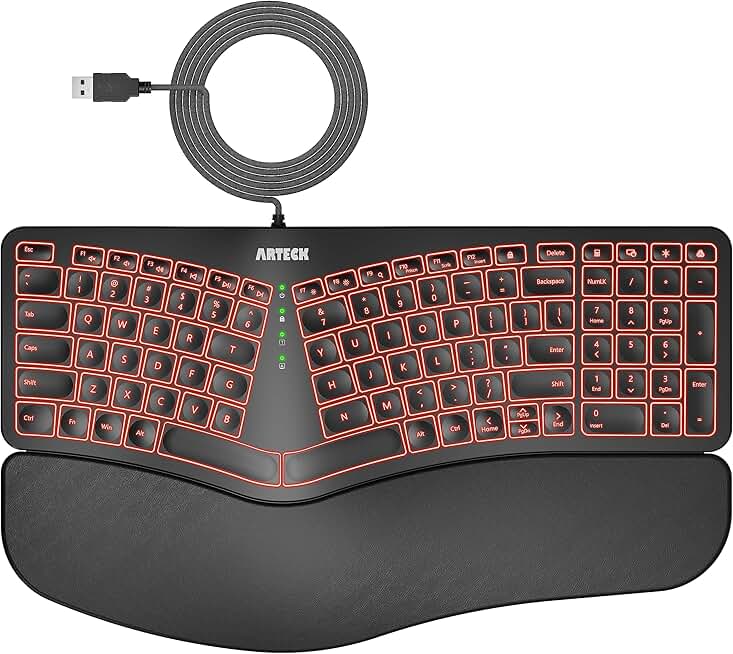
Arteck Ergonomic USB Wired Keyboard with Cushioned Wrist & Palm Rest, Backlit 7 Colors & Adjustable Brightness Comfortable Natural Split Keyboard with 6 Feet Wire for Windows Computer Desktop Laptop
$59.99
The Arteck Ergonomic USB Wired Keyboard proves you don't need to spend $200 to get a legitimate split design. The cushioned wrist and palm rest actually work, and the 7-color backlight keeps things visually interesting. Best for budget-conscious players prioritizing ergonomics over mechanical switches.
Pros
- + Split keyboard design reduces wrist strain at a budget-friendly $59.99 price point
- + Cushioned wrist and palm rest provides comprehensive hand support
- + 7-color backlit keys with adjustable brightness for different lighting preferences
- + USB wired connection eliminates battery concerns and latency
- + Natural split key layout encourages proper hand positioning
Cons
- − Membrane switches lack the durability and tactile response of mechanical alternatives
- − Limited RGB customization compared to gaming-focused software suites

Razer Tartarus V2 Gaming Keypad: Mecha Membrane Key Switches - One Handed Keyboard - 32 Programmable Keys - Customizable Chroma RGB Lighting - Programmable Macros - Snap Tap - Black ECOLOGO
$69.99
The Razer Tartarus V2 is specialized gear for MOBA and MMO players who want maximum programmable control. The 32 keys let you map abilities, consumables, and macros without touching your mouse. If you're serious about MOBAs, this keypad accelerates your gameplay by keeping your fingers on ability keys.
Pros
- + 32 programmable keys give you complete control over macros and custom bindings
- + Mecha-membrane hybrid switches balance tactile feedback with quiet operation
- + Customizable Chroma RGB lighting syncs with other Razer peripherals
- + Compact one-handed design frees up mouse space and reduces arm fatigue
- + Professional-grade build quality backed by Razer's reputation
Cons
- − One-handed layout requires significant learning curve and game-specific setup
- − Not suitable for typing-heavy work or games requiring full QWERTY access

Redragon K585 DITI Wired One-Handed RGB Mechanical Gaming Keyboard, 42 Keys Type-C Professional Gaming Keypad w/Upgraded Hot-Swappable Socket, 7 Onboard Macro Keys & Detachable Wrist Rest
$32.99
The Redragon K585 DITI delivers one-handed gaming performance at half the Tartarus' price. Hot-swappable sockets mean you can tune the feel to your liking, and 42 keys give you plenty of binding room for MOBAs. Best for budget gamers who want programmable one-handed control without the premium price tag.
Pros
- + 42-key one-handed layout at just $32.99 offers excellent value for MOBA players
- + Hot-swappable mechanical socket lets you customize switches to your preference
- + RGB backlighting with 7 onboard lighting modes requires no software
- + Type-C wired connection provides fast, reliable connectivity
- + Compact size saves significant desk space compared to full keyboards
Cons
- − Fewer programmable keys (42 vs. Tartarus' 32) limits macro flexibility slightly
- − Mechanical switches may be louder than some competitive gaming environments allow

Redragon S101-3 PRO Gaming Keyboard and Mouse, RGB Backlit Programmable Keyboard Mouse with Software, Independent Macro Record Keys, Value Combo Set, New Update Version
$39.99
The Redragon S101-3 PRO is the entry point for new gamers who need both keyboard and mouse without spending $100+. The programmable macro keys add depth for strategy games, and the RGB lighting looks respectable on a budget. Best for beginners building their first gaming setup from scratch.
Pros
- + Keyboard and mouse combo at $39.99 is unbeatable for complete setup refresh
- + RGB backlit keys with programmable macro record function for customization
- + Independent macro keys let you assign complex commands without software
- + Includes matching mouse, reducing need for separate purchases
- + Software support available for advanced lighting and macro profiles
Cons
- − Membrane switches lack mechanical durability and tactile feedback
- − Wrist rest is minimal—not ideal for extended ergonomic support

Cloud Nine ErgoTKL Ergonomic Tenkeyless Mechanical Keyboard for PC – Kailh Brown – TKL RGB Backlit Ergo Split Key Board
$179.99
The Cloud Nine ErgoTKL is for players who want mechanical ergonomics without the full-size footprint. The split design and Kailh Brown switches deliver the same comfort and precision as the full-size C989M in a more compact package. Best for streamers and esports players with limited desk real estate.
Pros
- + Tenkeyless ergonomic split design saves desk space while maintaining wrist support
- + Kailh Brown mechanical switches provide tactile feedback without clicky noise
- + RGB backlighting with customizable profiles via Cloud Nine software
- + Ergo split layout engineered for neutral wrist positioning
- + Premium mechanical build quality ensures longevity for serious gamers
Cons
- − Premium price at $179.99 is steep for a TKL keyboard without numpad
- − No numpad limits functionality for spreadsheet work or certain games

VEILZOR Wired Ergonomic Keyboard, 7-Color Backlit USB Computer Keyboard with Wrist Rest, Wave Keys, Phone Holder, Lighted Keyboard Compatible with PC, Laptop, Windows, and Mac
$23.99
The VEILZOR Wired Ergonomic Keyboard is the absolute budget option for players who need ergonomic support without spending $50+. The wave key design is a clever way to encourage proper hand positioning, and the included wrist rest actually helps. Best for casual gamers, students, and office workers who game occasionally.
Pros
- + Wave key design encourages natural finger positioning and reduces strain
- + 7-color backlit keys with adjustable brightness for customization
- + Cushioned wrist rest included for basic ergonomic support
- + Phone holder built into the design for convenient mobile access
- + At $23.99, it's the most affordable ergonomic option on this list
Cons
- − Membrane switches lack durability and responsiveness compared to mechanical alternatives
- − Basic build quality means shorter lifespan than premium keyboards
Frequently asked questions
Frequently Asked Questions
Final word
The best ergonomic gaming keyboard depends on your budget, playstyle, and desk setup. If you want the safest all-around choice, the SteelSeries Apex 3 RGB delivers comfort, durability, and value at $49.99. For premium wrist support, the ProtoArc EK01 Plus offers a true split design with wireless flexibility. Competitive players should consider the Cloud Nine C989M or ErgoTKL for mechanical precision in an ergonomic package. Budget gamers have solid options too—the Arteck split keyboard and Redragon combos prove you don't need to spend $200 for genuine ergonomic support. Your wrists will thank you for investing in a proper ergonomic gaming keyboard, whether you're grinding ranked matches or working from home. Pick the one that matches your hands, your games, and your budget.
More ergonomic gear
More gaming keyboards guides
Budget Gaming Keyboards of 2026
Top 10 budget gaming keyboards 2026. RGB, mechanical, compact—all under $120. Expert reviews & buying guide.
Best Compact Gaming Keyboards in 2026
Find the best compact gaming keyboards for 2026. Expert reviews of 60% and tenkeyless boards for gaming, work, and travel.
Best Corsair Gaming Keyboards in 2026
Find the best Corsair gaming keyboards for your setup. Expert reviews of wired, wireless, and mechanical options.
Best Gaming Keyboards in 2026
Find the best gaming keyboards 2026. Expert reviews of mechanical, wireless, and budget options for every gamer.
Best Gaming Keyboards for Apex Legends
Top gaming keyboards for Apex Legends with fast response times, RGB, and durability. Find the best fit for your playstyle.
Best Gaming Keyboards for Baldur's Gate 3
Top gaming keyboards for Baldur's Gate 3 combat, spellcasting, and inventory management. Mechanical, wireless, and budget picks.