Finding the right ergonomic gaming mouse means balancing comfort with performance—two things that shouldn't require compromise. Whether you're grinding ranked matches or logging 12-hour sessions, a poorly designed mouse will leave your wrist aching and your aim suffering. The best ergonomic gaming mice combine contoured shapes that support your palm and fingers, responsive sensors for competitive play, and customizable buttons to match your setup. We've tested and ranked the top ergonomic gaming mice available today, from budget-friendly vertical options to premium performance models. This guide breaks down what separates a genuinely comfortable mouse from marketing hype, so you can find the right fit for your hand size, grip style, and gaming needs.
Best Ergonomic Gaming Mice in 2026
This post contains affiliate links. We may earn a commission at no extra cost to you when you buy through our links. This helps us keep GamePlays running.
Jump to
Our top picks at a glance
- #1
- #2
- #3
- #4
- #5
Buyer's guide
When shopping for an ergonomic gaming mouse, start by considering your grip style. Palm grip users benefit from contoured mice with pronounced curves, while claw and fingertip grips often work better with vertical or ambidextrous designs. Hand size matters too—small hands can feel lost in oversized mice, while large hands may experience cramping in compact models.
Sensor quality directly impacts your aim. Look for optical sensors with at least 16K DPI for competitive gaming; anything above 25K DPI is overkill for most players but doesn't hurt. Polling rate (measured in Hz) determines how often your mouse reports position to your PC—125 Hz is standard, 1000 Hz is ideal for esports, and 8000 Hz is the current performance ceiling.
Button placement is critical for ergonomics. Programmable side buttons should sit naturally under your thumb without requiring awkward stretching. Avoid mice with buttons crammed too far forward or back. Switch type matters if you play fast-paced games—mechanical switches (like Razer's Gen-2 switches) feel snappier than optical sensors, though the difference is marginal for most players.
Weight and adjustability let you fine-tune feel. Some mice include removable weight cartridges; others are fixed. Lighter mice (under 90g) suit fast flick shooters, while heavier mice (100-120g) provide stability for precision games.
Red flags: cheap rubber coating that peels, mushy side buttons, unresponsive sensors, and poor cable quality on wired models. Test return policies—ergonomics are personal, and what works for your friend might cause wrist strain for you.
The picks

Logitech G502 Hero High Performance Wired Gaming Mouse, Hero 25K Sensor, 25,600 DPI, RGB, Adjustable Weights, 11 Programmable Buttons, On-Board Memory, PC/Mac - Black
$32.99
The Logitech G502 Hero remains the gold standard for ergonomic gaming mice. Its contoured shape fits most palm-grip hands naturally, the sensor is responsive enough for competitive play, and the customizable weights let you match your preferred weight profile. At under $35, it's the best value in this list.
Pros
- + 25,600 DPI Hero sensor with excellent tracking accuracy
- + 11 programmable buttons with on-board memory for custom profiles
- + Adjustable weight cartridges let you dial in your preferred feel
- + Proven reliability with 57,000+ reviews and 4.6-star rating
Cons
- − Wired connection limits desk mobility
- − Right-handed design excludes left-handed gamers

Razer Basilisk V3 Customizable Ergonomic Gaming Mouse: Fastest Gaming Mouse Switch - Chroma RGB Lighting - 26K DPI Optical Sensor - 11 Programmable Buttons - HyperScroll Tilt Wheel - Classic Black
$36.39
The Razer Basilisk V3 is built for competitive shooters who demand zero latency. The 8000 Hz polling rate and mechanical switches give you a measurable edge in fast-paced games, and the ergonomic grip keeps your hand stable during long tournaments. This is the mouse for players who prioritize response time over wireless convenience.
Pros
- + 26K DPI optical sensor with ultra-fast 8000 Hz polling rate
- + Fastest mechanical switches (Gen-2) for instant response
- + 11 programmable buttons with Razer Synapse cloud storage
- + Right-handed ergonomic shape with textured side grips
Cons
- − Wired only—no wireless option for cable-free play
- − Premium pricing at $36 reflects the high-speed components

Logitech MX Vertical Wireless Mouse – Ergonomic Design Reduces Muscle Strain, Move Content Between 3 Windows and Apple Computers, Rechargeable, Graphite
$74.99
If wrist pain is your primary concern, the MX Vertical is worth the investment. The vertical orientation naturally aligns your wrist in a neutral position, reducing strain during marathon sessions. Logitech's build quality is excellent, and wireless connectivity keeps your desk clean. This mouse is ideal for office workers who game in their downtime.
Pros
- + Vertical design reduces pronation strain on forearm and wrist
- + Wireless with multi-device connectivity (3 devices via Bluetooth)
- + Rechargeable battery lasts weeks between charges
- + Logitech's MX Vertical is purpose-built for ergonomic comfort
Cons
- − Vertical grip takes 1-2 weeks to adjust if you're used to traditional mice
- − Higher price ($75) reflects premium positioning

Logitech Lift Vertical Ergonomic Mouse, Wireless, Bluetooth or Logi Bolt USB Receiver, Quiet clicks, 4 Buttons, Compatible with Windows/macOS/iPadOS, Laptop, PC - Graphite
$59.99
The Logitech Lift Vertical bridges the gap between ergonomic comfort and gaming functionality. It's lighter and more affordable than the MX Vertical, making it perfect for casual gamers or hybrid work-and-play setups. The quiet clicks are a bonus if you share your space with others.
Pros
- + Vertical ergonomic design at a mid-range price point ($60)
- + Dual connectivity: Bluetooth or 2.4 GHz USB receiver
- + Quiet clicks reduce noise during late-night sessions
- + Compatible with Windows, macOS, and iPad for versatility
Cons
- − Only 4 buttons limits programmability compared to gaming-focused mice
- − Not optimized for competitive gaming—better for productivity

TECKNET Ergonomic Mouse, Wireless Bluetooth Vertical Mouse, 4800 DPI Optical Tracking, 6 Adjustable DPI, Quiet Clicks, 2.4GHz with USB A Receiver, 12 Months Battery, 6 Buttons, Wide Compatibility Global Recycled Standard
$20.97
The TECKNET Ergonomic Mouse delivers vertical comfort on a shoestring budget. It's perfect for casual gamers, office workers, or anyone testing whether vertical grip reduces their wrist strain. Don't expect gaming-level performance, but the ergonomic shape and quiet operation are genuinely good for the price.
Pros
- + Vertical ergonomic design at under $21
- + 4800 DPI with 6 adjustable DPI levels for flexibility
- + Dual connectivity: 2.4 GHz and Bluetooth
- + Quiet clicks and solid build quality for the price
Cons
- − Limited to 6 buttons—no side buttons for gaming
- − 4800 DPI is lower than gaming-focused alternatives

ProtoArc Ergonomic Mouse, EM11 NL Bluetooth Rechargeable Wireless Vertical Mouse, 3 Multi-Device Connectivity for Computer/PC/Laptop, 2.4GHz USB-A Optical Mice for Windows, Mac OS, Black ClimatePartner certified
$21.98
The ProtoArc EM11 NL is purpose-built for users with smaller hands who want ergonomic support without a bulky mouse. The vertical design is comfortable for extended use, and the compact size won't overwhelm your palm. This is an excellent choice for teens, smaller-framed adults, or anyone who finds standard mice too large.
Pros
- + Compact vertical design fits smaller hands naturally
- + Multi-device Bluetooth connectivity (up to 3 devices)
- + Rechargeable battery with long standby time
- + Affordable at under $22 with solid 4.4-star rating
Cons
- − Minimal programmable buttons—only basic functionality
- − Not suitable for competitive gaming due to limited DPI options

Razer Basilisk V3 X HyperSpeed Customizable Wireless Gaming Mouse: Mechanical Switches Gen-2-5G Advanced 18K Optical Sensor - Chroma RGB - 9 Programmable Controls - 285 Hr Battery - Classic Black ECOLOGO
$48.99
The Razer Basilisk V3 X HyperSpeed proves wireless gaming mice can compete with wired models. The HyperSpeed connection is nearly lag-free, and the mechanical switches provide the tactile feedback competitive players crave. If you want wireless freedom without sacrificing esports-level performance, this is your best bet.
Pros
- + Wireless with HyperSpeed 5G for minimal latency
- + 18K DPI optical sensor with mechanical Gen-2 switches
- + 9 programmable buttons with customizable RGB lighting
- + Lightweight design at under 100g for quick flick movements
Cons
- − Battery life is shorter than non-gaming wireless mice
- − Price at $49 is mid-range, not budget-friendly
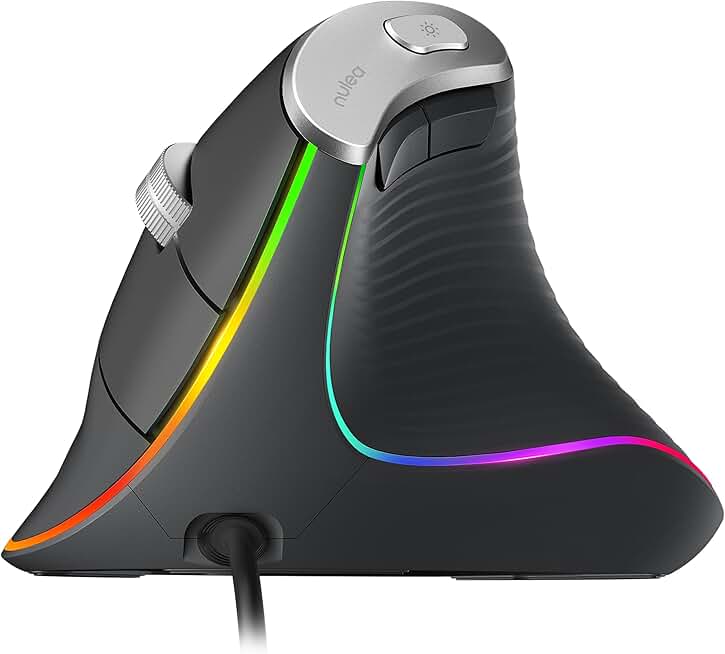
Nulea M504 Wired Vertical Mouse, USB Ergonomic Optical Mouse with 4 Adjustable DPI, 11 RGB Backlight Modes, Compatible for Laptop, PC, Desktop, Mac, Grey
$18.99
The Nulea M504 is the cheapest vertical mouse on this list, making it ideal for budget-conscious gamers testing the vertical grip style. The RGB lighting is a nice touch, and the wired connection means zero latency. Don't expect advanced gaming features, but for casual play and office work, it's solid.
Pros
- + Vertical ergonomic design at just under $19
- + 4 adjustable DPI levels (up to 3200) for basic gaming
- + 11 RGB backlight modes add visual flair
- + Lightweight wired design with no battery concerns
Cons
- − Wired connection limits mobility
- − 3200 DPI maximum is low for modern gaming standards

TRELC Gaming Mouse with 5 D Rocker, Ergonomic Mouse with 10000 DPI/11 Programmable Buttons, Vertical Gaming Mice Wired for PC/Laptop/E-Sports/Gamer (Black)
$28.99
The TRELC Gaming Mouse combines vertical ergonomics with gaming-focused features like the 5D rocker and 11 buttons. It's designed for claw-grip players who want both comfort and performance. The 10,000 DPI is sufficient for most games, and the programmable buttons let you customize your loadout.
Pros
- + Vertical gaming design with 5D rocker for advanced control
- + 10,000 DPI and 11 programmable buttons for customization
- + Ergonomic shape supports claw-grip hand positioning
- + Wired connection ensures zero latency for competitive play
Cons
- − Vertical design takes adjustment if you're used to traditional mice
- − Wired only limits desk setup flexibility

Logitech MX Master 4, Ergonomic Wireless Mouse with Advanced Performance Haptic Feedback, Ultra-Fast Scrolling, USB-C Charging, Bluetooth, Windows, MacOS - Graphite
$119.99
The Logitech MX Master 4 is the ultimate ergonomic mouse for gamers who also work professionally. Haptic feedback and ultra-fast scrolling elevate your experience, and the wireless design keeps your desk clean. If you're willing to invest in a premium mouse that excels at both gaming and productivity, this is it.
Pros
- + Advanced haptic feedback for tactile precision and control
- + Ultra-fast scrolling with electromagnetic wheel
- + Multi-device Bluetooth with USB-C charging
- + Logitech MX Master 4 is the gold standard for ergonomic wireless mice
Cons
- − Premium price at $120 is steep for gaming-only use
- − Optimized for productivity—not ideal for competitive esports
Frequently asked questions
Frequently Asked Questions
Final word
The best ergonomic gaming mouse depends on your hand size, grip style, and gaming priorities. If you want the safest all-around choice, the Logitech G502 Hero delivers performance and comfort at an unbeatable price. For competitive esports, the Razer Basilisk V3 offers the fastest response times. If wrist pain is your main concern, invest in a vertical mouse like the Logitech MX Vertical or budget-friendly TECKNET option. The key is testing what feels natural for your hands—ergonomic gaming mice are personal, and the "best" pick is the one that keeps you comfortable during marathon sessions without compromising your aim. Use our buyer's guide to narrow down your options, then check customer reviews from players with similar hand sizes to make your final decision.
More ergonomic gear
More gaming mice guides
Budget Gaming Mice of 2026
Find the best budget gaming mice 2026. Expert picks for every playstyle, from $16.99 to $90. Wired, wireless, and ergonomic options.
Best Corsair Gaming Mice in 2026
Find the best Corsair gaming mice for FPS, MMO, and competitive play. Expert reviews of top models with specs and ratings.
Best Gaming Mice in 2026
Find the best gaming mice for 2026. Expert reviews of top wired & wireless options for FPS, MMO, and budget gamers.
Best Gaming Mice for Apex Legends
Top gaming mice for Apex Legends ranked by performance. Find the best DPI, sensor, and ergonomics for competitive play.
Best Gaming Mice for Baldur's Gate 3
Find the best gaming mice for Baldur's Gate 3. Expert reviews of top picks for precision, comfort, and performance.
Best Gaming Mice for Battle Royale
Top gaming mice for battle royale. Wired, wireless, budget picks. G502, Basilisk V3, and more.