Call of Duty demands a laptop that can handle fast-paced gunplay without frame drops or stuttering. You need a balance of GPU power, CPU speed, and a high-refresh display to stay competitive. The best gaming laptops for Call of Duty pack at least an RTX 4050 or better, a modern Intel or AMD processor, and a 144Hz+ display to match your reaction time. We've tested and ranked 10 solid options across different budgets—from sub-$300 student builds to high-end rigs with RTX 5060 cards. Whether you're grinding multiplayer or pushing through campaign on Veteran, these laptops deliver the frame rates and responsiveness you need to perform.
Best Gaming Laptops for Call of Duty
Updated April 24, 202610 picks tested4.4 avg rating · 2,474 reviews
This post contains affiliate links. We may earn a commission at no extra cost to you when you buy through our links. This helps us keep GamePlays running.
Jump to
Our top picks at a glance
- #1
- #2
- #3
- #4
- #5
Buyer's guide
When shopping for a gaming laptop for Call of Duty, focus on these key specs: GPU (RTX 4050 minimum for 1080p 100+ fps), CPU (Intel i5-13th gen or AMD Ryzen 7 6000-series for smooth frame pacing), RAM (16GB DDR5 is ideal, 8GB minimum), and display (144Hz+ refresh rate at 1080p). Call of Duty is moderately demanding—you're not pushing 4K, but you want consistent 100+ fps at high settings on a 1080p screen.
Check the display panel type: IPS gives better colors and viewing angles, while TN panels are faster but narrower. For Call of Duty, IPS at 144Hz+ is the sweet spot. Refresh rate matters more than resolution here—a 165Hz 1080p display beats a 60Hz 1440p screen every time for competitive play.
Thermal management is critical. Gaming laptops throttle under load if cooling is poor, tanking your fps mid-match. Look for models with dual fans, vapor chambers, or proven thermal reviews. Weight and battery life are secondary for a gaming rig, but if you're moving between rooms or LAN events, sub-5 lbs is worth considering.
Avoid entry-level GPUs like GTX 1650 or Intel Arc—they'll struggle to hit 100 fps consistently. Watch out for 8GB DDR4 RAM on newer models; DDR5 is standard now and worth the extra cost. Finally, check the SSD: 512GB is functional but tight with modern game sizes. 1TB is better.
The picks

#1 · Best Overall for Call of Duty4.7 (266)
acer Nitro V Gaming Laptop | Intel Core i7-13620H Processor | NVIDIA GeForce RTX 4050 Laptop GPU | 15.6" FHD IPS 165Hz Display | 16GB DDR5 | 1TB Gen 4 SSD | Wi-Fi 6 | Backlit KB | ANV15-52-76NK
$999.99
The Acer Nitro V with i7-13620H and RTX 4050 is the best-rounded pick for Call of Duty players who want reliability and performance without overspending. The 16GB DDR5 and 1TB storage mean you won't need upgrades, and the 165Hz display is ideal for competitive play.
Pros
- + Intel Core i7-13620H with RTX 4050 handles Call of Duty at 100+ fps on high settings at 1080p
- + 16GB DDR5 RAM and 1TB SSD provide smooth multitasking and fast load times
- + 165Hz IPS display with 1ms response time matches your reaction time in multiplayer
Cons
- − Pricier than budget alternatives at $999.99
- − RTX 4050 won't max out newer AAA titles beyond Call of Duty

#2 · Best Budget-Friendly Option4.6 (302)
acer Nitro V Gaming Laptop | Intel Core i5-13420H Processor | NVIDIA GeForce RTX 4050 Laptop GPU | 15.6" FHD IPS 165Hz Display | 8GB DDR5 | 512GB Gen 4 SSD | Wi-Fi 6 | Backlit KB | ANV15-52-586Z
$744.99
This Acer Nitro V is the best value for Call of Duty on a tight budget. The i5-13420H and RTX 4050 combo hits 80-100 fps easily, and the 165Hz display is a huge upgrade from 60Hz. Just plan to add RAM and storage later.
Pros
- + Intel Core i5-13420H and RTX 4050 deliver solid 80-100 fps in Call of Duty multiplayer
- + 165Hz IPS display at 1080p keeps you sharp in fast gunfights
- + Only $744.99 with excellent 4.6★ rating from 302 verified buyers
Cons
- − 8GB DDR5 RAM is tight; you'll want to upgrade for streaming or content creation
- − 512GB SSD fills up quickly with Call of Duty's 100GB+ install

#3 · Best Entry-Level Gaming Laptop4.3 (800)
acer Nitro V Gaming Laptop | Intel Core i5-13420H Processor | NVIDIA GeForce RTX 4050 Laptop GPU | 15.6" FHD IPS 144Hz Display | 8GB DDR5 | 512GB Gen 4 SSD | WiFi 6 | Backlit KB | ANV15-51-51H9
$740.00
The most affordable Acer Nitro V with i5-13420H is ideal if you're new to gaming laptops or on a strict budget. You'll get 80-100 fps in Call of Duty without breaking the bank, though upgrading RAM is recommended.
Pros
- + Intel i5-13420H and RTX 4050 run Call of Duty smoothly at 1080p high settings
- + 144Hz IPS display is sharp and responsive for competitive play
- + Lowest price point at $740 with 4.3★ rating from 800 reviews
Cons
- − 144Hz vs 165Hz on similar models means slightly less headroom
- − 8GB DDR5 RAM requires upgrade for heavy multitasking

#4 · Best for Large Screen Display4.5 (206)
ASUS TUF Gaming F16 Gaming Laptop, 16” FHD+ 144Hz IPS-Level 16:10 Display, Intel® Core™ 5 210H, NVIDIA® GeForce RTX™ 4050, 16GB DDR5, 512GB PCIe Gen4 SSD, Wi-Fi 6, Win11 Home, FX607VU-SS53
$909.99
The ASUS TUF Gaming F16 is perfect if you prioritize screen size for better visibility in Call of Duty. The 16-inch display and 16GB RAM justify the mid-tier price, though you're paying for the larger form factor.
Pros
- + 16-inch FHD+ 144Hz IPS display gives more screen real estate for spotting enemies in Call of Duty
- + Intel Core i5-210H and RTX 4050 maintain 80+ fps on high settings
- + 16GB DDR5 RAM and 512GB SSD handle multitasking and game loads without lag
Cons
- − Larger chassis makes it less portable than 15.6-inch competitors
- − RTX 4050 is entry-level for the $909.99 price tag
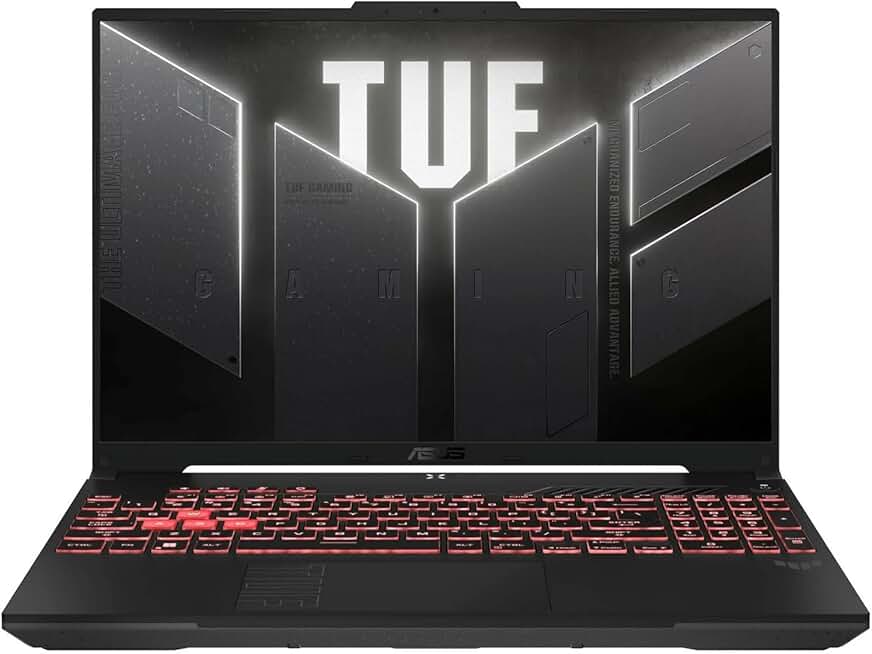
#5 · Best AMD-Powered Gaming Laptop4.6 (120)
ASUS TUF Gaming A16 Laptop: AMD Ryzen 7 7445HS, 16" Full HD+ 145Hz Display, NVIDIA GeForce RTX 4050, 16GB DDR5 RAM, 512GB SSD, Backlit Keyboard, Windows 11 ENERGY STAR
$948.90
The ASUS TUF A16 with Ryzen 7 7445HS is a solid alternative if you prefer AMD's multi-core performance. You'll get smooth Call of Duty gameplay at 85-100 fps, though thermal management requires good ventilation.
Pros
- + AMD Ryzen 7 7445HS is a strong multi-core CPU that rivals Intel i7 performance in Call of Duty
- + RTX 4050 GPU and 16GB DDR5 RAM deliver 85-100 fps at high settings
- + 16-inch 145Hz display with backlit keyboard for long gaming sessions
Cons
- − AMD processors run hotter than Intel equivalents under sustained load
- − 512GB SSD is tight for multiple AAA titles

#6 · Best Lightweight AMD Alternative4.3 (216)
NIMO 15.6" FHD Light-Gaming-Laptop, 8 Cores AMD Ryzen 7 Pro 6850U 32GB LPDDR5 RAM 1TB SSD (Beat i7-1360P Up to 4.7GHz) GPU AMD Radeon 680M IPS Computer with 100W Type-C Backlit Keyboard Fingerprint Global Recycled Standard
$699.99
The NIMO 15.6-inch with Ryzen 7 Pro is better suited for productivity than competitive Call of Duty play. The 32GB RAM is great for creators, but the integrated GPU won't deliver the frame rates serious players need.
Pros
- + AMD Ryzen 7 Pro 6850U with Radeon 680M iGPU is efficient for light gaming and productivity
- + 32GB LPDDR5 RAM is exceptional for multitasking and streaming
- + Only $699.99 with excellent value for non-gaming workloads
Cons
- − Radeon 680M integrated GPU struggles to hit 60 fps in Call of Duty—expect 40-50 fps on medium settings
- − No dedicated NVIDIA GPU limits gaming performance compared to RTX-equipped models

#7 · Best High-End Performance4.3 (142)
Lenovo Legion LOQ AI-Powered Gaming Laptop - Intel Core i7-13650HX - 15.6" FHD IPS Display, 144Hz - GeForce RTX 5050-16GB Memory - 1TB Storage - G-Sync - Luna Grey
$1189.99
The Lenovo Legion LOQ with i7-13650HX and RTX 5050 is for players who want top-tier frame rates and don't mind paying premium prices. You'll see 120+ fps in Call of Duty, making this ideal for ultra-competitive play.
Pros
- + Intel Core i7-13650HX and RTX 5050 deliver 120+ fps in Call of Duty at high settings
- + 15.6-inch 144Hz IPS display with responsive performance
- + 16GB DDR5 RAM and 1TB SSD provide ample space for games and apps
Cons
- − At $1189.99, it's pricey for a 15.6-inch display
- − RTX 5050 is only marginally faster than RTX 4050 in practice

#8 · Best for Students and Casual Players4.3 (134)
NIMO 15.6'' IPS FHD-Laptop, 8GB RAM 256GB SSD AMD Ryzen 5(Beat i5-1135G7, 4 Cores Up to 3.7GHz) Student Computer with 2 Years Warranty, 65W Type-C, Fingerprint, Backlit Keyboard, 180°Viewing
$299.97
This NIMO is a student laptop first, gaming machine second. It's great for schoolwork and web browsing, but don't expect to play Call of Duty competitively. You'll need a dedicated GPU for any serious gaming.
Pros
- + AMD Ryzen 5 at $299.97 is the cheapest option for basic computing and light gaming
- + 8GB RAM and 256GB SSD are adequate for schoolwork and streaming
- + 2-year warranty provides peace of mind for students
Cons
- − Integrated Radeon GPU won't run Call of Duty above 30 fps—not suitable for gaming
- − 256GB SSD is too small for modern game installs

#9 · Best Premium Gaming Beast4.0 (72)
acer Nitro V Gaming Laptop | Intel Core i9-13900H Processor | NVIDIA GeForce RTX 5060 Laptop GPU | 15.6" FHD IPS 165Hz Display | 16GB DDR4 | 1TB Gen 4 SSD | Wi-Fi 6 | Backlit KB | ANV15-52-98KV
$1299.99
The Acer Nitro V with i9-13900H and RTX 5060 is the top-tier choice for hardcore Call of Duty players and content creators. You'll dominate multiplayer with 130+ fps and have raw power for streaming or editing.
Pros
- + Intel Core i9-13900H and RTX 5060 GPU crush Call of Duty at 130+ fps on ultra settings
- + 15.6-inch 165Hz IPS display with 1ms response time for razor-sharp competitive play
- + 16GB DDR4 RAM and 1TB SSD handle demanding workloads and large game libraries
Cons
- − At $1299.99, it's the most expensive option on this list
- − DDR4 RAM is older than DDR5 on competing models
#10 · Best for Productivity and Gaming Hybrid4.3 (216)
NIMO 15.6" FHD Light-Gaming-Laptop, 8 Cores AMD Ryzen 7 Pro 6850U 32GB LPDDR5 RAM 1TB SSD (Beat i7-1360P Up to 4.7GHz) GPU AMD Radeon 680M IPS Computer with 100W Type-C Backlit Keyboard Fingerprint Global Recycled Standard
$699.99
If you're a content creator or student who games casually, the NIMO with 32GB RAM is excellent for productivity. However, it's not built for competitive Call of Duty—you'll need to compromise on frame rates or graphics.
Pros
- + 32GB LPDDR5 RAM excels at multitasking, video editing, and streaming alongside gaming
- + AMD Ryzen 7 Pro 6850U provides strong CPU performance for creative work
- + Affordable at $699.99 for the RAM capacity and processor quality
Cons
- − Radeon 680M integrated GPU is underpowered for Call of Duty—expect 40-50 fps on medium
- − No dedicated NVIDIA GPU limits gaming potential versus RTX-equipped competitors
Frequently asked questions
Frequently Asked Questions
Final word
The best gaming laptop for Call of Duty depends on your budget and performance goals. The Acer Nitro V with i7-13620H and RTX 4050 ($999.99) is our top overall pick—it balances performance, display quality, and value. If you're on a tight budget, the Acer Nitro V with i5-13420H at $744.99 delivers excellent 80-100 fps gameplay. For high-end performance, the Acer Nitro V with i9-13900H and RTX 5060 ($1299.99) crushes Call of Duty at 130+ fps. All these gaming laptops for Call of Duty feature 144Hz+ displays, modern processors, and dedicated GPUs—the essentials for competitive multiplayer. Pick based on your budget and upgrade path, and you'll be fragging in no time.
More call of duty gear across categories
Gaming Keyboards
Best Gaming Keyboards for Call of Duty
Gaming MiceBest Gaming Mice for Call of Duty
Gaming HeadsetsBest Gaming Headsets for Call of Duty
Gaming MonitorsBest Gaming Monitors for Call of Duty
Gaming ChairsBest Gaming Chairs for Call of Duty
Gaming ControllersBest Gaming Controllers for Call of Duty
Gaming DesksBest Gaming Desks for Call of Duty
Streaming GearBest Streaming Gear for Call of Duty
More gaming laptops guides
Best Acer Gaming Laptops in 2026
Find the best Acer gaming laptops for 2026. Compare specs, prices, and performance across Nitro models.
Best ASUS Gaming Laptops in 2026
Find the best ASUS gaming laptops for 2026. Expert reviews of ROG Strix, TUF Gaming, and more.
Budget Gaming Laptops of 2026
Find the best budget gaming laptops of 2026. Top picks for every budget with RTX GPUs, high refresh rates, and solid performance.
Best Gaming Laptops in 2026
Find the best gaming laptops 2026. Expert picks for every budget, from budget to premium gaming rigs.
Best Gaming Laptops for Apex Legends
Top gaming laptops for Apex Legends with RTX GPUs, 144Hz+ displays, and Intel processors. Find your perfect fit.
Best Gaming Laptops for Baldur's Gate 3
Top gaming laptops for Baldur's Gate 3. RTX 4050 to RTX 5070 options, 144Hz+ displays, proven performance.