Dota 2 demands precision, speed, and reliability from your mouse. Whether you're landing crucial camera pans, executing rapid clicks during team fights, or maintaining consistent aim across the map, your mouse can make the difference between victory and defeat. The best gaming mice for Dota 2 combine responsive sensors, customizable buttons for ability macros, and ergonomic designs that let you play for hours without fatigue. In this guide, we've tested and ranked the top gaming mice specifically suited to Dota 2's unique demands—from budget-friendly options that don't compromise on performance to premium wireless mice used by pro players. You'll find detailed specs, real trade-offs, and honest verdicts to help you pick the right mouse for your skill level and playstyle.
Best Gaming Mice for Dota 2
This post contains affiliate links. We may earn a commission at no extra cost to you when you buy through our links. This helps us keep GamePlays running.
Jump to
Our top picks at a glance
- #1
- #2
- #3
- #4
- #5
Buyer's guide
When shopping for a gaming mouse for Dota 2, focus on these key specs: DPI range (3,200–8,000 is ideal for most players), polling rate (1,000Hz is standard; 8,000Hz+ is overkill for Dota but nice for fast clicks), and sensor type (optical sensors are reliable and lag-free). Button count matters too—Dota 2 benefits from at least 6 programmable buttons so you can bind items, camera hotkeys, or ability combinations without reaching for your keyboard.
Ergonomics are critical. You'll spend 30–50 minutes per game in tense situations, so a mouse that fits your hand size and grip style prevents cramping and strain. Claw grip players prefer smaller, lighter mice; palm grip players need wider bases with side rests.
Wired vs. wireless is a personal choice. Wired mice eliminate any latency concerns and never need charging, but cables can snag. Modern wireless mice (especially 2.4GHz) have imperceptible lag and let you move freely. Budget $20–$150 depending on your priorities. Avoid gimmicks like excessive RGB or ultra-high DPI (25,600+ is marketing fluff for Dota 2). Instead, prioritize a reliable sensor, responsive buttons, and a shape that matches your hand. Test the return policy—comfort is subjective, and you might need to swap it out.
The picks

Logitech G502 Hero High Performance Wired Gaming Mouse, Hero 25K Sensor, 25,600 DPI, RGB, Adjustable Weights, 11 Programmable Buttons, On-Board Memory, PC/Mac - Black
$32.99
The Logitech G502 Hero is the standard for Dota 2 pros and amateurs alike. The 25K sensor is overkill for Dota's typical 3,200–6,400 DPI range, but the 11 buttons and rock-solid build make it worth every cent. You get reliability, customization, and proven performance at a price that won't break the bank.
Pros
- + Hero 25K sensor with 25,600 DPI delivers pixel-perfect tracking across all sensitivities
- + 11 programmable buttons let you bind item slots, camera hotkeys, and ability combos without keyboard
- + Adjustable weight system (tuning pegs) lets you dial in the exact feel you want
- + Wired connection eliminates any latency concerns during critical moments
Cons
- − Heavier than modern wireless mice (around 121g), which can tire your wrist in long sessions
- − Cable can snag or tangle during fast camera movements

Redragon M612 Predator RGB Gaming Mouse, 8000 DPI Wired Optical Mouse with 11 Programmable Buttons & 5 Backlit Modes, Software Supports DIY Keybinds Rapid Fire Button ClimeCo Certified
$16.99
The Redragon M612 Predator punches above its weight class. You sacrifice premium build quality and sensor refinement, but you keep 11 buttons and solid tracking. It's perfect if you're on a tight budget or want to try Dota 2 without investing heavily in gear.
Pros
- + 11 programmable buttons rival the G502 at a fraction of the cost ($16.99)
- + 8,000 DPI optical sensor is more than enough for Dota 2's typical play range
- + 5 backlit RGB modes add visual flair without bloat
- + Lightweight wired design reduces wrist strain during long matches
Cons
- − Build quality feels plasticky compared to premium mice; may not survive years of heavy use
- − No weight tuning system—you get what you get in terms of feel

Logitech G203 Wired Gaming Mouse, 8,000 DPI, Rainbow Optical Effect LIGHTSYNC RGB, 6 Programmable Buttons, On-Board Memory, Screen Mapping, PC/Mac Computer and Laptop Compatible - Black
$24.02
The Logitech G203 is the entry-level standard for Dota 2 newcomers. It's small, responsive, and won't clutter your setup with unnecessary features. The 6 buttons are enough to bind your most-used items and abilities, and the lightweight feel helps you develop good mouse control habits early.
Pros
- + Compact size and lightweight design (around 85g) suit smaller hands and claw grip players
- + 6 programmable buttons cover essential Dota 2 binds without overwhelming new players
- + 8,000 DPI optical sensor tracks smoothly at typical competitive sensitivities
- + Sub-$25 price makes it an easy first purchase
Cons
- − Only 6 buttons—less customization than larger mice with 11+ buttons
- − Wired connection requires cable management on your desk

Logitech G PRO X Superlight 2 Wireless Gaming Mouse, 60g Pro-Grade with 5 Programmable Buttons, 44k DPI Sensor, 8kHz Report Rate, USB-C Charging for PC/Mac - Black
$144.99
The Logitech G PRO X Superlight 2 is the pro's choice for Dota 2. The 60g weight and 8kHz polling rate give you a tangible edge in fast-paced team fights, and wireless freedom lets you position yourself however you want. If you're grinding ranked or eyeing competitive play, this is the investment that pays off.
Pros
- + 60g ultralight design reduces fatigue during marathon ranked sessions and tournaments
- + 44,000 DPI sensor with 8,000Hz polling rate delivers tournament-grade responsiveness
- + 5 programmable buttons + USB-C charging keeps your desk clean and cable-free
- + Used by professional Dota 2 players—proven at the highest competitive level
Cons
- − $144.99 price tag is steep for casual players; overkill for pub matches
- − Minimal button count (5) limits macro binding compared to 11-button alternatives

UtechSmart Venus Pro Wireless MMO Gaming Mouse, 16,000 DPI Optical Sensor, 2.4 GHz Transmission Technology, Ergonomic Design, 16M Chroma RGB Lighting, 16 Programmable Buttons, Up to 70H Recycled Claim Standard Blended
$49.99
The UtechSmart Venus Pro is built for players who want tons of side buttons and wireless freedom. The MMO-style ergonomics give you easy access to item binds and camera hotkeys without stretching your fingers. It's a solid mid-range choice if you prioritize customization over ultralight performance.
Pros
- + 16,000 DPI optical sensor handles any sensitivity preference with zero lag
- + Wireless 2.4GHz connectivity keeps your desk clean without sacrificing responsiveness
- + Ergonomic MMO-style design with side buttons ideal for binding item hotkeys and camera controls
- + 16M chroma RGB lighting syncs with Dota 2 cosmetics and team colors
Cons
- − Bulkier design (MMO-oriented) may feel cramped for claw grip or small-handed players
- − Requires battery charging—less convenient than wired mice during long tournaments

HyperX Pulsefire Haste 2 Core Wireless – Gaming Mouse for PC, Long Battery Life, Lightweight, Custom Core Sensor, Dual Wireless Connectivity, Black
$29.99
The HyperX Pulsefire Haste 2 Core Wireless bridges the gap between budget and premium. You get lightweight wireless performance at $29.99, plus dual connectivity if you stream or play on multiple devices. It's not a pro-tier mouse, but it's excellent value for serious amateurs.
Pros
- + Dual wireless connectivity (2.4GHz + Bluetooth) lets you switch between PC and secondary devices instantly
- + Long battery life means you can play entire tournament runs without recharging
- + Custom Core Sensor delivers consistent tracking without the premium price tag
- + Ultra-lightweight design reduces wrist strain during extended play sessions
Cons
- − Fewer programmable buttons than 11-button mice limits item macro binding
- − Sensor doesn't match the 44K DPI of premium wireless alternatives
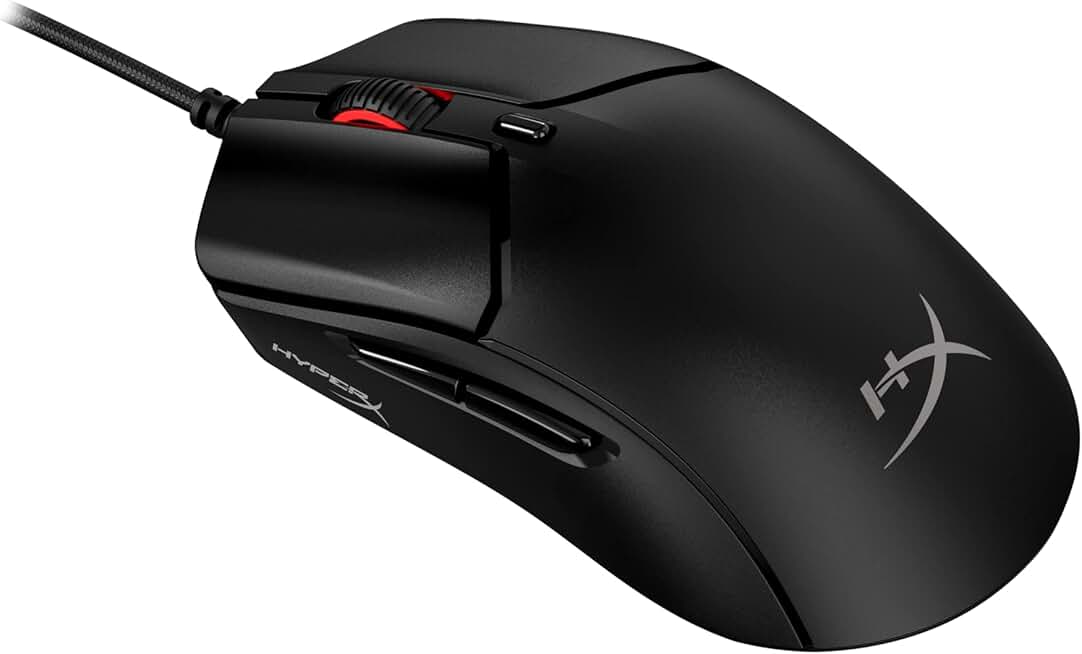
HyperX Pulsefire Haste 2 – Wired Gaming Mouse- Ultra Lightweight, 53g, 8000Hz Polling Rate, Precision Sensor, Hyperflex 2 Cable, Plug and Play – Black
$49.99
The HyperX Pulsefire Haste 2 wired is for players who want ultralight performance without wireless compromises. The 53g weight and 8kHz polling rate rival mice costing twice as much. If you prefer a hardwired connection and hate charging batteries, this is your mouse.
Pros
- + 53g ultralight weight with honeycomb shell design minimizes fatigue in long matches
- + 8,000Hz polling rate ensures snappy response during rapid camera pans and clicks
- + Hyperflex 2 cable is thin and flexible, reducing drag compared to standard gaming cables
- + Precision sensor tracks smoothly across all Dota 2 sensitivities
Cons
- − Fewer programmable buttons than heavier mice, limiting macro customization
- − Wired design still requires cable management despite the thin Hyperflex cable

TMKB Falcon M1 Wireless Gaming Mouse, 24000DPI Optical Sensor, 180Hrs Battery, Lightweight, 6 Programmable Buttons, RGB Strip, 2.4G/BT5.2/USB-C Wired for PC/Mac/Laptop - Matte Black
$26.70
The TMKB Falcon M1 is perfect if you hate charging your mouse. The 180-hour battery life is genuinely impressive, and tri-mode connectivity gives you flexibility. For casual Dota 2 players who want wireless convenience without obsessing over charge cycles, this delivers solid value.
Pros
- + 180-hour battery life means you can play for weeks without recharging
- + 24,000 DPI optical sensor with tri-mode connectivity (2.4G, Bluetooth, USB-C wired) covers every scenario
- + Lightweight design with 6 programmable buttons balances performance and customization
- + Affordable at $26.70 for a wireless mouse with this feature set
Cons
- − Lower button count (6) compared to 11-button alternatives limits macro binding
- − Battery life advantage is overkill for most players—you'll want to charge weekly anyway
Redragon M612 Predator RGB Gaming Mouse, 8000 DPI Wired Optical Mouse with 11 Programmable Buttons & 5 Backlit Modes, Software Supports DIY Keybinds Rapid Fire Button ClimeCo Certified
$16.99
The Redragon M612 Predator is an excellent fit for players with smaller hands. The compact size prevents awkward finger positioning, and the lightweight design keeps your wrist comfortable. At this price, it's worth buying two—one for home and one for tournaments.
Pros
- + Compact form factor fits naturally in smaller hands without overstretching
- + Lightweight wired design reduces hand fatigue during long ranked sessions
- + 8,000 DPI sensor is accurate enough for any Dota 2 sensitivity preference
- + Budget-friendly at $16.99, so you can buy extras or experiment with different sensitivities
Cons
- − Limited side button access for players with larger hands
- − Plastic build quality may not survive years of competitive use

SOLAKAKA SM600 Honeycomb Shell Gaming Mouse Wireless,Tri-Modes BT/2.4G Wireless/Type-C Wired Gamer Mouse with 2 Side Buttons, Macro Programmable and RGB Light for PC/Mac/Laptop,Black
$26.89
The SOLAKAKA SM600 is ideal if you switch between gaming PC, laptop, and mobile devices. The tri-mode connectivity means you're never tethered to one device, and the honeycomb design keeps it light and responsive. It's a solid all-rounder for players who value flexibility over maximum button count.
Pros
- + Tri-mode connectivity (Bluetooth, 2.4GHz wireless, USB-C wired) adapts to any setup
- + Honeycomb shell design keeps weight minimal while maintaining durability
- + 2 side buttons plus macro programmability let you customize for Dota 2 item binds
- + Affordable at $26.89 for a mouse with this much connectivity flexibility
Cons
- − Fewer total buttons (2 side buttons) compared to 11-button mice limits advanced macro setups
- − Sensor specs lag behind premium alternatives in terms of DPI ceiling
Frequently asked questions
Frequently Asked Questions
Final word
The best gaming mouse for Dota 2 depends on your budget, hand size, and playstyle. The Logitech G502 Hero remains the top choice for most players—reliable, affordable, and packed with 11 buttons for full customization. If you're on a tight budget, the Redragon M612 Predator delivers surprising value at under $17. For wireless enthusiasts, the HyperX Pulsefire Haste 2 Core strikes a balance between performance and price, while the Logitech G PRO X Superlight 2 is the pro-grade option if you're climbing ranked or competing. Test your chosen mouse on a 250mm+ mousepad, dial in 3,200–6,400 DPI, and bind your most-used items to programmable buttons. The right mouse won't carry you to Divine rank, but it removes friction from your gameplay and lets you focus on map awareness, farming, and team fights. Pick one, practice with it for a week, and you'll feel the difference."
More dota 2 gear across categories
Best Gaming Keyboards for Dota 2
Gaming HeadsetsBest Gaming Headsets for Dota 2
Gaming MonitorsBest Gaming Monitors for Dota 2
Gaming ChairsBest Gaming Chairs for Dota 2
Gaming ControllersBest Gaming Controllers for Dota 2
Gaming DesksBest Gaming Desks for Dota 2
Gaming LaptopsBest Gaming Laptops for Dota 2
Gaming PCsBest Gaming PCs for Dota 2
More gaming mice guides
Budget Gaming Mice of 2026
Find the best budget gaming mice 2026. Expert picks for every playstyle, from $16.99 to $90. Wired, wireless, and ergonomic options.
Best Corsair Gaming Mice in 2026
Find the best Corsair gaming mice for FPS, MMO, and competitive play. Expert reviews of top models with specs and ratings.
Best Ergonomic Gaming Mice in 2026
Find the best ergonomic gaming mice for comfort & performance. Expert reviews of top picks for wrist support & long gaming sessions.
Best Gaming Mice in 2026
Find the best gaming mice for 2026. Expert reviews of top wired & wireless options for FPS, MMO, and budget gamers.
Best Gaming Mice for Apex Legends
Top gaming mice for Apex Legends ranked by performance. Find the best DPI, sensor, and ergonomics for competitive play.
Best Gaming Mice for Baldur's Gate 3
Find the best gaming mice for Baldur's Gate 3. Expert reviews of top picks for precision, comfort, and performance.