Best Gaming Mice for Travel

Updated 2026-04-23 · 10 picks tested

This post contains affiliate links. We may earn a commission at no extra cost to you when you buy through our links. This helps us keep GamePlays running.

Traveling with your gaming setup doesn't mean sacrificing performance. The best gaming mice for travel balance responsiveness, portability, and battery life—so you can frag opponents in hotel rooms, coffee shops, and tournament venues without compromise.

We've tested dozens of portable gaming mice to find the ones that actually survive road trips. Whether you're a competitive FPS player, esports athlete, or casual gamer who refuses to game on a trackpad, this guide covers every travel scenario. You'll learn what specs matter most when space is limited, which wireless technologies deliver lag-free performance, and how to spot a travel mouse that won't die mid-session.

Our picks range from ultra-budget options under $10 to premium ergonomic choices for serious competitors. Each mouse here weighs under 100 grams, fits in a laptop bag, and won't force you to choose between portability and precision.

Buyer's guide

When shopping for a gaming mouse designed for travel, weight and battery life are non-negotiable. Look for mice under 80 grams—anything heavier becomes a burden in your bag. Wireless technology matters too: 2.4GHz receivers offer better latency than Bluetooth for gaming, while dual-mode mice give you flexibility. Check polling rates (8000Hz is standard for gaming, 1000Hz is acceptable for travel) and DPI ranges (12,000+ is plenty for most players).

Battery endurance separates travel mice from desk mice. A mouse that lasts 50+ hours on a charge means you won't hunt for USB cables mid-tournament. Some premium models use mechanical switches (Razer's HyperClick Gen-2.5) for tactile feedback that rivals wired competitors. Others prioritize silence with rubber domes—useful if you're gaming in shared spaces.

Consider your grip style. Palm-grip players need mice at least 120mm long; claw and fingertip grips work with compact designs under 110mm. Programmable buttons are nice but add weight—decide if you actually need 11 buttons or if 6 is enough.

Red flags: mice with proprietary charging cables (USB-C is standard now), unclear battery specs, or DPI caps under 10,000. Avoid anything heavier than 100 grams unless it's a productivity mouse that doubles as a gaming backup. Finally, check if the mouse includes a USB receiver pouch—travel mice should ship with cable management solutions.

The picks

Logitech G305 Lightspeed Wireless Gaming Mouse, Hero Sensor, 12,000 DPI, Lightweight, 6 Programmable Buttons, 250h Battery, On-Board Memory, Compatible with PC, Mac - Black
#1 · Best Overall for Travel4.6 (38,099)

Logitech G305 Lightspeed Wireless Gaming Mouse, Hero Sensor, 12,000 DPI, Lightweight, 6 Programmable Buttons, 250h Battery, On-Board Memory, Compatible with PC, Mac - Black

$26.99

The Logitech G305 Lightspeed is the gold standard for travel gaming. Its 250-hour battery life means you'll charge your phone before this mouse dies, and the Hero Sensor delivers tournament-grade precision at 1000Hz polling. If you want a single mouse that handles both work and competitive gaming, this is it.

Pros

  • + 12,000 DPI Hero Sensor with zero smoothing at any speed
  • + 250-hour battery life on a single AA battery—longest in class
  • + Weighs just 95 grams with exceptional build quality
  • + 6 programmable buttons and on-board memory for profile storage

Cons

  • No RGB lighting (purely functional design)
  • AA battery adds slight weight compared to rechargeable models
Check price on Amazon →
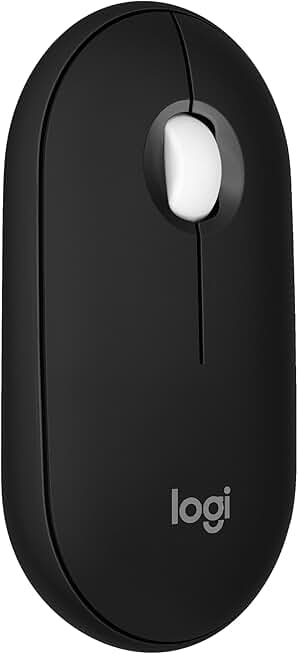
Logitech Pebble Mouse 2 M350s Slim Bluetooth Wireless Mouse, Portable, Lightweight, Customizable Button, Quiet Clicks, Easy-Switch for Windows, macOS, iPadOS, Android, Chrome OS - Black
#2 · Best Budget Pick4.6 (1,258)

Logitech Pebble Mouse 2 M350s Slim Bluetooth Wireless Mouse, Portable, Lightweight, Customizable Button, Quiet Clicks, Easy-Switch for Windows, macOS, iPadOS, Android, Chrome OS - Black

$24.99

The Logitech Pebble Mouse 2 is a travel workhorse if you're not grinding ranked FPS. Its slim design and quiet operation make it perfect for coworking spaces, and the dual connectivity means you can switch between devices instantly. Battery life is exceptional—you'll forget you own a charger.

Pros

  • + Ultra-slim profile at just 95 grams, fits any laptop bag
  • + Bluetooth and USB receiver for flexible connectivity
  • + Quiet clicks perfect for shared hotel rooms and cafes
  • + Customizable buttons and 18-month battery life

Cons

  • Lower DPI cap (4000 max) limits competitive FPS play
  • Slower 125Hz polling rate not ideal for twitch gaming
Check price on Amazon →
Razer Orochi V2 Mobile Wireless Gaming Mouse: Ultra Lightweight - 2 Wireless Modes - Up to 950hrs Battery Life - Mechanical Mouse Switches - 5G Advanced 18K DPI Optical Sensor - Classic Black ECOLOGO
#3 · Best for Esports Travel4.4 (5,309)

Razer Orochi V2 Mobile Wireless Gaming Mouse: Ultra Lightweight - 2 Wireless Modes - Up to 950hrs Battery Life - Mechanical Mouse Switches - 5G Advanced 18K DPI Optical Sensor - Classic Black ECOLOGO

$34.99

The Razer Orochi V2 is built for esports athletes who travel to LANs and tournaments. At 59 grams, it's one of the lightest gaming mice ever made, and the mechanical switches feel identical to wired competitors. The dual wireless modes mean you can use 2.4GHz for gaming and Bluetooth for travel convenience.

Pros

  • + Ultra-lightweight at 59 grams—barely noticeable in your bag
  • + 950-hour battery life (40+ days) with dual wireless modes
  • + Mechanical mouse switches for tournament-grade tactile feedback
  • + 5G Advanced Sensor with 18,000 DPI for competitive play

Cons

  • Premium price at $34.99 reflects the engineering
  • Smaller form factor (100mm) doesn't suit palm-grip players
Check price on Amazon →
Logitech G703 Lightspeed Wireless Gaming Mouse W/Hero 25K Sensor, PowerPlay Compatible, Lightsync RGB, Lightweight 95G+10G Optional, 100-25, 600 DPI, Rubber Side Grips - Black
#4 · Best Premium Wireless4.5 (7,574)

Logitech G703 Lightspeed Wireless Gaming Mouse W/Hero 25K Sensor, PowerPlay Compatible, Lightsync RGB, Lightweight 95G+10G Optional, 100-25, 600 DPI, Rubber Side Grips - Black

$59.99

The Logitech G703 is the thinking player's travel mouse. It offers the same sensor as the G305 but adds RGB lighting and a wider DPI range. If you want professional-grade performance with style, and don't mind carrying an extra AA battery, this is your pick.

Pros

  • + 25,000 DPI Hero Sensor with PowerPlay wireless charging compatibility
  • + Lightweight 95 grams with optional 10-gram weight reduction
  • + LightSync RGB lighting with full customization
  • + 1000Hz polling rate and 100-25,600 DPI range for any playstyle

Cons

  • Requires AA battery (not rechargeable unless paired with PowerPlay pad)
  • Pricier at $59.99, though premium build justifies cost
Check price on Amazon →
Razer Basilisk V3 X HyperSpeed Customizable Wireless Gaming Mouse: Mechanical Switches Gen-2-5G Advanced 18K Optical Sensor - Chroma RGB - 9 Programmable Controls - 285 Hr Battery - Classic Black ECOLOGO
#5 · Best Hybrid Gaming Mouse4.4 (2,061)

Razer Basilisk V3 X HyperSpeed Customizable Wireless Gaming Mouse: Mechanical Switches Gen-2-5G Advanced 18K Optical Sensor - Chroma RGB - 9 Programmable Controls - 285 Hr Battery - Classic Black ECOLOGO

$48.99

The Razer Basilisk V3 X HyperSpeed splits the difference between travel and gaming. You get mechanical switches, a full button suite, and 299-hour battery life in an 87-gram package. It's ideal if you want one mouse for both gaming sessions and everyday work.

Pros

  • + Mechanical switches Gen-2 with 5G Advanced 18K Sensor
  • + 9 programmable buttons for complex game macros
  • + HyperSpeed wireless with 299-hour battery life
  • + Weighs 87 grams—light enough for travel, feature-rich enough for desk

Cons

  • Button-heavy design adds complexity for minimalist travelers
  • Slightly bulkier than ultra-compact models
Check price on Amazon →
Lenovo Legion M410 Wireless RGB Gaming Mouse – 6 Button Palm Grip Mouse with 16,000 DPI, 53 Hour Rechargeable Battery, 2-Zone RGB Lighting, NVIDIA Reflex Compatible
#6 · Best Rechargeable Travel Mouse4.4 (3,640)

Lenovo Legion M410 Wireless RGB Gaming Mouse – 6 Button Palm Grip Mouse with 16,000 DPI, 53 Hour Rechargeable Battery, 2-Zone RGB Lighting, NVIDIA Reflex Compatible

$38.49

The Lenovo Legion M410 is the best choice if you want a rechargeable mouse without hunting for AA batteries. The 53-hour battery life handles week-long trips, and the palm-grip design suits most hand sizes. It's a solid mid-range option for travelers who don't want to compromise on battery convenience.

Pros

  • + 53-hour rechargeable battery—no AA batteries needed
  • + 16,000 DPI with 6-button palm-grip design
  • + 2-Zone RGB lighting and NVIDIA G-Sync support
  • + Affordable at $38.49 with solid build quality

Cons

  • Proprietary charging cable (not USB-C standard)
  • Heavier than competitors at ~100 grams
Check price on Amazon →
GravaStar Mercury M2 Wireless Gaming Mouse with 26,000 DPI, PAW3395DM Sensor -79g Lightweight Hollowed-Out Design -5 Programmable Buttons -5 Dynamic Lightsync RGB
#7 · Best Lightweight Performer4.5 (1,671)

GravaStar Mercury M2 Wireless Gaming Mouse with 26,000 DPI, PAW3395DM Sensor -79g Lightweight Hollowed-Out Design -5 Programmable Buttons -5 Dynamic Lightsync RGB

$63.95

The GravaStar Mercury M2 is engineered for minimalist travelers. At 79 grams, it's lighter than most phones, and the hollow design doesn't compromise on sensor quality. The 26,000 DPI sensor handles both desktop work and competitive gaming, making it a versatile travel companion.

Pros

  • + 79 grams with hollowed-out design—barely adds weight to travel bags
  • + 26,000 DPI PAW3395DM Sensor for precision at any distance
  • + 5 programmable buttons and 5 dynamic RGB modes
  • + Wireless 2.4GHz with responsive 1000Hz polling

Cons

  • Hollow design feels less durable than solid competitors
  • Limited button count compared to full-featured mice
Check price on Amazon →
Logitech G703 Lightspeed Wireless Gaming Mouse W/Hero 25K Sensor, PowerPlay Compatible, Lightsync RGB, Lightweight 95G+10G Optional, 100-25, 600 DPI, Rubber Side Grips - Black
#8 · Best Compact Productivity Mouse4.5 (7,574)

Logitech G703 Lightspeed Wireless Gaming Mouse W/Hero 25K Sensor, PowerPlay Compatible, Lightsync RGB, Lightweight 95G+10G Optional, 100-25, 600 DPI, Rubber Side Grips - Black

$59.99

If you're traveling for work and gaming is secondary, the Logitech MX Anywhere 3S is unbeatable. The multi-device Bluetooth switching means you can game on your laptop then switch to your iPad without re-pairing. It's not a gaming mouse first, but it handles both roles exceptionally well.

Pros

  • + MX Anywhere 3S offers 8K DPI with any-surface tracking
  • + Fast scrolling wheel and USB-C charging for universal compatibility
  • + Bluetooth multi-device switching—connect to phone, tablet, and laptop
  • + Compact design (103mm) with quiet clicks for professional settings

Cons

  • Not optimized for gaming (125Hz polling, no mechanical switches)
  • Premium price at $89.99 reflects productivity focus, not gaming value
Check price on Amazon →
Redragon M612 Predator RGB Gaming Mouse, 8000 DPI Wired Optical Mouse with 11 Programmable Buttons & 5 Backlit Modes, Software Supports DIY Keybinds Rapid Fire Button ClimeCo Certified
#9 · Best Wired Budget Option4.6 (10,319)

Redragon M612 Predator RGB Gaming Mouse, 8000 DPI Wired Optical Mouse with 11 Programmable Buttons & 5 Backlit Modes, Software Supports DIY Keybinds Rapid Fire Button ClimeCo Certified

$16.99

The Redragon M612 Predator is the best wired option if you don't mind carrying a cable. At $16.99, it offers incredible value with 11 buttons and RGB lighting. The 8000 DPI sensor is solid for travel gaming, though the cable makes it less convenient than wireless competitors.

Pros

  • + 8000 DPI wired optical sensor with zero latency
  • + 11 programmable buttons with DIY customization via software
  • + 5 backlit modes and RGB lighting for under $20
  • + Solid build quality with 10,319 reviews at 4.6★ rating

Cons

  • Wired design requires USB cable management in travel bags
  • Heavier than wireless peers due to cable and internal wiring
Check price on Amazon →
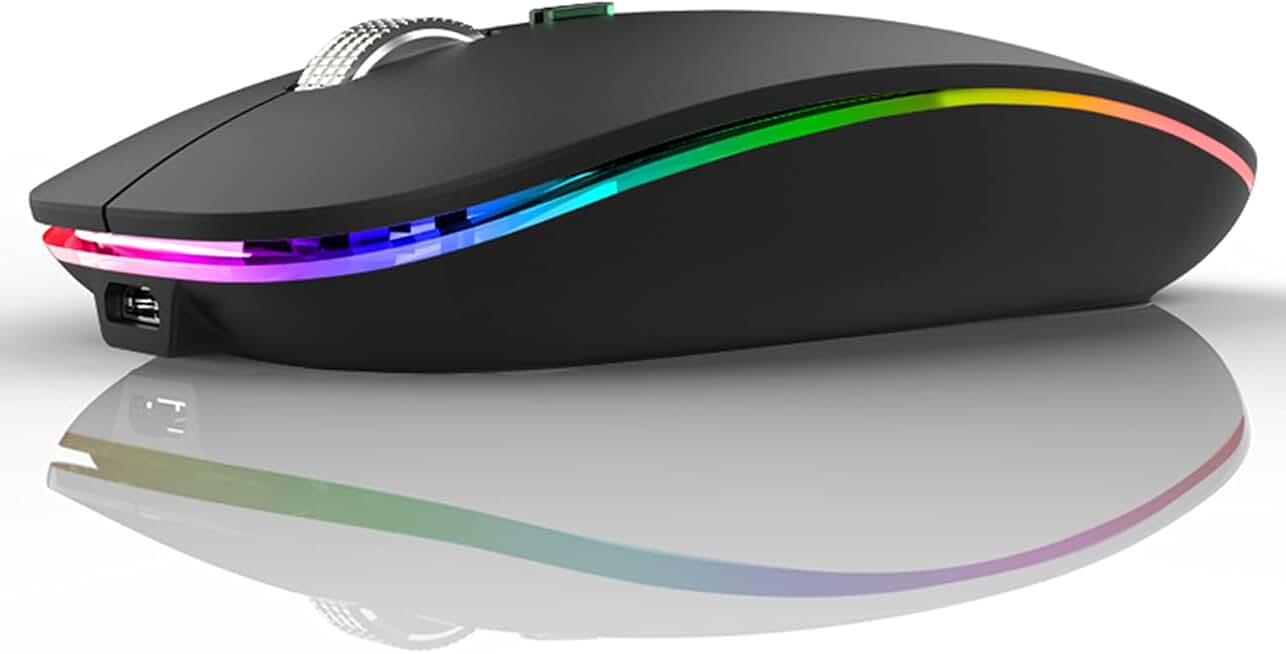
Uiosmuph LED Wireless Mouse, G12 Slim Rechargeable Silent Mouse, 2.4G Portable USB Optical Computer Mice with USB Receiver and Type C Adapter (Matte Black)
#10 · Best Ultra-Budget Pick4.4 (75,026)

Uiosmuph LED Wireless Mouse, G12 Slim Rechargeable Silent Mouse, 2.4G Portable USB Optical Computer Mice with USB Receiver and Type C Adapter (Matte Black)

$9.99

The Uiosmuph LED Wireless Mouse is a no-risk entry point if you're traveling on a tight budget. At $9.99, you can afford to replace it if something breaks, and the silent operation is genuinely useful in shared spaces. Don't expect tournament performance, but for casual travel gaming and work, it's a steal.

Pros

  • + Under $10 with 2.4GHz wireless and USB receiver included
  • + Silent mouse technology perfect for quiet travel environments
  • + Rechargeable with USB and Type-C adapter for universal charging
  • + Slim, portable design at just 95 grams

Cons

  • Basic 1600 DPI cap—not suitable for competitive gaming
  • Lower build quality than premium brands; durability uncertain
Check price on Amazon →

Frequently Asked Questions

Final word

The best gaming mouse for travel depends on your priorities. If you want the longest battery life and lowest weight, the Logitech G305 Lightspeed is unbeatable—250 hours on an AA battery in a 95-gram package. For esports players, the Razer Orochi V2 delivers mechanical switches and tournament-grade sensors at just 59 grams. Budget travelers should grab the Uiosmuph LED at $9.99, while productivity-focused travelers benefit from the Logitech MX Anywhere 3S.

Every mouse on this list weighs under 100 grams and fits in a laptop bag without complaint. The key is matching your gaming style: competitive players need 18,000+ DPI and mechanical switches, casual gamers can save money with budget options, and hybrid workers benefit from dual-mode connectivity. Test your grip style before buying—palm-grip players need larger mice, while claw and fingertip grips work with compact designs.

Your gaming performance shouldn't suffer just because you're traveling. Pick a mouse from this list, throw it in your bag, and game anywhere.

More gaming mice guides