Best Gaming Monitors for Mac

Updated 2026-04-23 · 10 picks tested

This post contains affiliate links. We may earn a commission at no extra cost to you when you buy through our links. This helps us keep GamePlays running.

Mac gaming has come a long way, and your display matters just as much as your hardware. Whether you're playing competitive shooters on an M-series Mac or enjoying story-driven titles, the right gaming monitor for Mac can transform your experience. The challenge? Most gaming monitors are built with Windows in mind, leaving Mac users sorting through compatibility issues, driver headaches, and feature mismatches.

We've tested and ranked the best gaming monitors for Mac that actually work seamlessly with your system. This guide covers portable displays for mobile Mac setups, high-refresh 1080p panels for fast-paced games, and premium 4K options for creative work and cinematic gameplay. You'll find specific specs, real trade-offs, and honest verdicts to help you pick the right monitor without wasting money on features you don't need.

Buyer's guide

When shopping for gaming monitors for Mac, USB-C connectivity is your best friend. Look for displays with USB-C power delivery so you can charge your MacBook while gaming—this eliminates cable clutter and keeps your desk clean. Refresh rate matters less on Mac than Windows, since most Mac games don't push 144Hz, but 100Hz+ is nice if you're running Boot Camp or playing native titles like Baldur's Gate 3.

Resolution is where Mac users get a real advantage. Mac displays handle 4K beautifully, and if you're doing creative work alongside gaming, a 4K gaming monitor for Mac gives you pixel density that Windows users envy. Aim for at least 99% sRGB coverage if you care about color accuracy—gaming monitors often skimp here, but Mac users tend to value it.

Panel type matters: IPS panels give you better color and viewing angles than TN panels, though they're slightly slower. For Mac gaming, the 1ms response time difference rarely matters unless you're chasing esports rankings. Look for AMD FreeSync support (not G-Sync, which requires Nvidia cards Mac doesn't have).

Port selection is critical. HDMI 2.1, DisplayPort, and USB-C are your safest bets. Some older Mac models need adapters, so check your Mac's actual port layout before buying. Avoid monitors that require proprietary software or drivers—Mac support is often an afterthought, and you'll waste hours troubleshooting.

Finally, consider portability. If you're bouncing between home, office, and coffee shops, a portable gaming monitor for Mac (15-16 inches) is worth the trade-off in screen real estate. They're lighter, cheaper, and work over USB-C alone.

The picks

LG 27US500-W Ultrafine Monitor 27-Inch 4K UHD (3840x2160) HDR10 IPS Borderless Design Reader Mode Flicker Safe Switch App HDMI DisplayPort - White
#1 · Best Overall for Mac4.3 (315)

LG 27US500-W Ultrafine Monitor 27-Inch 4K UHD (3840x2160) HDR10 IPS Borderless Design Reader Mode Flicker Safe Switch App HDMI DisplayPort - White

$199.99

The LG Ultrafine is the gold standard for Mac gaming monitors. You get true 4K resolution, exceptional color accuracy, and native Mac support without proprietary software headaches. This is the monitor to buy if you want one display that handles gaming, creative work, and productivity equally well.

Pros

  • + True 4K (3840x2160) with HDR10 support delivers stunning color and detail
  • + Borderless IPS panel with 99% color accuracy—perfect for gaming and creative work
  • + HDMI and DisplayPort connectivity works with any Mac without adapters

Cons

  • No USB-C power delivery means extra cables on your desk
  • 27-inch size demands more desk space than portable alternatives
Check price on Amazon →
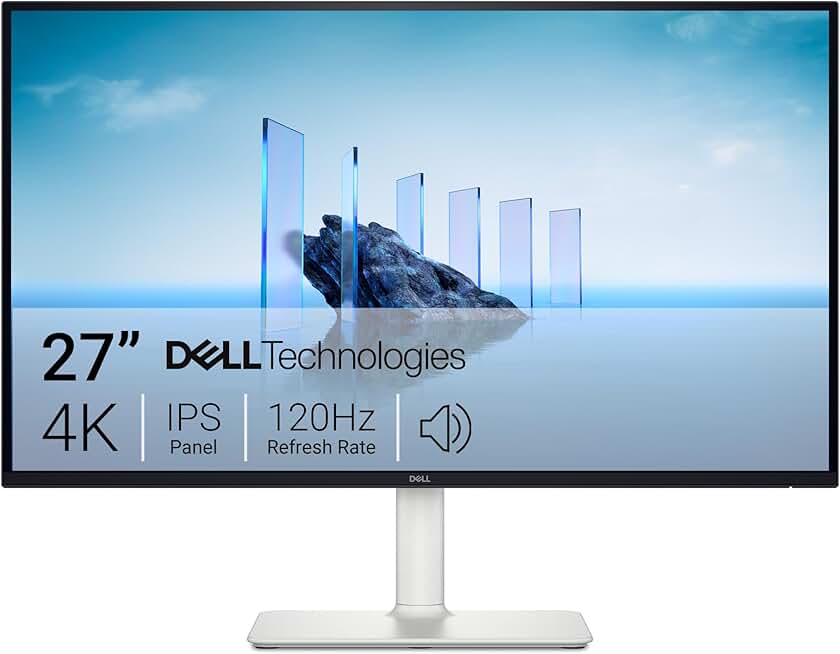
Dell 27 Plus 4K Monitor - S2725QS - 27-inch 4K (3840 x 2160) 120Hz 16:9 Display, IPS Panel, AMD FreeSync Premium, sRGB 99%, Integrated Speakers, 1500:1 Contrast Ratio, Comfortview - Ash White
#2 · Best 4K for Mac Gaming4.5 (758)

Dell 27 Plus 4K Monitor - S2725QS - 27-inch 4K (3840 x 2160) 120Hz 16:9 Display, IPS Panel, AMD FreeSync Premium, sRGB 99%, Integrated Speakers, 1500:1 Contrast Ratio, Comfortview - Ash White

$269.99

The Dell 27 Plus 4K Monitor pushes Mac gaming to its limits with 4K resolution at 120Hz. If you've got an M2 Max or higher and want the best visual fidelity, this delivers. The 120Hz refresh rate is realistic for Mac performance, unlike the 144Hz hype some competitors push.

Pros

  • + 4K at 120Hz refresh rate—the sweet spot for Mac gaming performance
  • + 99% sRGB coverage and IPS panel give you color-accurate gaming and work
  • + AMD FreeSync Premium smooths out frame rate dips in demanding games

Cons

  • Price at $269.99 is steep for casual gamers
  • Requires DisplayPort or HDMI 2.1—older Mac adapters may not work
Check price on Amazon →
acer 27 Inch Monitor- KB272-27 Inch FHD IPS (1920 x 1080) Display, Up to 120Hz Refresh Rate, 99% sRGB, Tilt, Adaptive-Sync Support (FreeSync Compatible) 1ms (VRB), sRGB 99% Color, HDMI & VGA Ports
#3 · Best Value for Mac Gamers4.6 (1,610)

acer 27 Inch Monitor- KB272-27 Inch FHD IPS (1920 x 1080) Display, Up to 120Hz Refresh Rate, 99% sRGB, Tilt, Adaptive-Sync Support (FreeSync Compatible) 1ms (VRB), sRGB 99% Color, HDMI & VGA Ports

$99.99

The Acer KB272 is the smartest buy for Mac gamers who want high refresh rates without 4K pricing. At $99.99, you get 120Hz, solid color accuracy, and Mac compatibility without breaking the bank. It's the monitor most Mac users actually need.

Pros

  • + 120Hz refresh rate at 1080p is perfect for Mac's actual gaming performance
  • + 99% sRGB and IPS panel give you color accuracy without premium pricing
  • + Adaptive-Sync support reduces tearing in compatible games

Cons

  • 1080p feels soft on a 27-inch screen—text can be blurry for productivity
  • No USB-C means you'll need separate power and video cables
Check price on Amazon →
Sceptre 27-inch Prime Gaming Monitor 100Hz 1ms DisplayPort HDMI x2 100% sRGB AMD FreeSync Build-in Speakers, Eye Care Frameless Machine Black 2025 (E275W-FW100T Series)
#4 · Best Compact Gaming Monitor for Mac4.5 (2,740)

Sceptre 27-inch Prime Gaming Monitor 100Hz 1ms DisplayPort HDMI x2 100% sRGB AMD FreeSync Build-in Speakers, Eye Care Frameless Machine Black 2025 (E275W-FW100T Series)

$97.97

The Sceptre Prime is a solid mid-range gaming monitor for Mac that doesn't demand much desk real estate. You get 100Hz performance, AMD FreeSync, and built-in speakers for under $100. It's not bleeding-edge, but it's reliable and Mac-friendly.

Pros

  • + 27-inch 1080p display is compact enough for smaller desks
  • + 100Hz refresh rate with 1ms response time handles fast games smoothly
  • + DisplayPort and dual HDMI give you flexible connectivity options

Cons

  • 100Hz is lower than competing 144Hz models at this price
  • 1080p on 27 inches means visible pixelation if you sit close
Check price on Amazon →
ARZOPA 16.1'' 144Hz Portable Gaming Monitor, 106% sRGB 1080P FHD Kickstand Portable Monitor with HDR, Ultra Slim, Eye Care, External Second Screen for Laptop, PC, PS5, Mac, Xbox-Z1FC
#5 · Best Portable Gaming Monitor for Mac4.5 (2,517)

ARZOPA 16.1'' 144Hz Portable Gaming Monitor, 106% sRGB 1080P FHD Kickstand Portable Monitor with HDR, Ultra Slim, Eye Care, External Second Screen for Laptop, PC, PS5, Mac, Xbox-Z1FC

$96.99

The ARZOPA 16.1-inch is the best portable gaming monitor for Mac users who travel or work between locations. 144Hz on a portable screen is genuinely impressive, and USB-C power delivery keeps your MacBook charged. It's not a desk replacement, but it's the best companion monitor you can buy.

Pros

  • + 144Hz refresh rate on a 16.1-inch portable display—rare and powerful
  • + USB-C connectivity charges your Mac while you game
  • + 106% sRGB coverage and HDR support deliver vibrant colors on the go

Cons

  • 16.1 inches is small for extended gaming sessions
  • Kickstand is flimsy—you'll want a stand or arm for stability
Check price on Amazon →
KYY Portable Monitor 15.6inch 1080P FHD USB-C, HDMI Computer Display HDR IPS Gaming Monitor w/Premium Smart Cover & Screen Protector, Speakers, for Laptop PC MAC Phone PS4 Xbox Switch
#6 · Best Budget Portable Monitor for Mac4.4 (12,752)

KYY Portable Monitor 15.6inch 1080P FHD USB-C, HDMI Computer Display HDR IPS Gaming Monitor w/Premium Smart Cover & Screen Protector, Speakers, for Laptop PC MAC Phone PS4 Xbox Switch

$66.47

The KYY Portable Monitor is the cheapest way to add a second display to your Mac setup. At $66.47, you get USB-C charging, decent color, and a protective cover. It's perfect for travel or as a secondary productivity display, though the 60Hz refresh rate isn't ideal for gaming.

Pros

  • + USB-C and HDMI connectivity works with any Mac instantly
  • + 1080p IPS panel with HDR support looks sharp for a portable display
  • + Includes smart cover and screen protector—no extra purchases needed

Cons

  • 15.6 inches is cramped for gaming longer than an hour
  • 60Hz refresh rate limits smooth gameplay in fast-paced titles
Check price on Amazon →
Sceptre Curved 27-inch Prime Gaming Monitor 1500R 100Hz HDMI X2 DisplayPort 1ms 100% sRGB, Build-in Speakers Machine Black 2025 (C275W-FW100T Series)
#7 · Best Curved Gaming Monitor for Mac4.5 (675)

Sceptre Curved 27-inch Prime Gaming Monitor 1500R 100Hz HDMI X2 DisplayPort 1ms 100% sRGB, Build-in Speakers Machine Black 2025 (C275W-FW100T Series)

$99.97

The Sceptre Curved Prime brings gaming-focused design to Mac setups. The 1500R curve is subtle enough to feel natural without being gimmicky, and 100Hz is solid for Mac gaming. If you want something different from flat panels, this curved option delivers without premium pricing.

Pros

  • + 1500R curve wraps around your field of view for immersive gaming
  • + 100Hz refresh rate with 1ms response time handles competitive games
  • + 100% sRGB accuracy and curved IPS panel improve color and viewing angles

Cons

  • 27-inch curved display takes up significant desk space
  • Curved panels can cause reflections and glare in bright rooms
Check price on Amazon →
Sceptre New 22-Inch Gaming Monitor, FHD 1080p, Up to 144Hz, HDMI, DisplayPort, Built-in Speakers, Machine Black (E225W-FW144 Series, 2026)
#8 · Best High-Refresh Gaming Monitor for Mac4.6 (437)

Sceptre New 22-Inch Gaming Monitor, FHD 1080p, Up to 144Hz, HDMI, DisplayPort, Built-in Speakers, Machine Black (E225W-FW144 Series, 2026)

$69.97

The Sceptre 22-inch 144Hz monitor is the fastest gaming display for Mac. At $69.97, you get the highest refresh rate available, which matters if you're playing competitive games or using Boot Camp. The smaller size makes it perfect for compact setups.

Pros

  • + 144Hz refresh rate is the highest available for Mac gaming monitors
  • + 22-inch size fits smaller desks without sacrificing performance
  • + DisplayPort and HDMI support give you flexible connectivity

Cons

  • 1080p on a 22-inch screen means pixel density isn't stellar
  • No USB-C power delivery—requires separate charging cable
Check price on Amazon →
MNN Portable Monitor 15.6inch FHD 1080P USB C HDMI Gaming Ultra-Slim IPS Display w/Smart Cover & Speakers,HDR Plug&Play, External Monitor for Laptop PC Phone Mac (15.6'' 1080P)
#9 · Best Ultra-Portable Mac Monitor4.3 (11,221)

MNN Portable Monitor 15.6inch FHD 1080P USB C HDMI Gaming Ultra-Slim IPS Display w/Smart Cover & Speakers,HDR Plug&Play, External Monitor for Laptop PC Phone Mac (15.6'' 1080P)

$49.99

The MNN Portable Monitor is the lightest, cheapest way to extend your Mac's display on the road. At $49.99, it's a steal for digital nomads and students. Skip it for gaming and grab it for productivity—the 60Hz refresh rate and small size aren't worth it for gaming.

Pros

  • + USB-C and HDMI connectivity with plug-and-play setup—no drivers needed
  • + 15.6-inch FHD display is light enough to throw in a backpack
  • + Smart cover doubles as a stand, saving you money on accessories

Cons

  • 60Hz refresh rate is too slow for gaming—better for productivity
  • 15.6 inches is cramped for extended work sessions
Check price on Amazon →
Anyuse Portable Monitor 15.6 Inch 1080P USB-C HDMI Ultra-Slim Travel Monitor with Kickstand, for Laptop, PC, Mac Phone, PS, Xbox, Swich IPS Ultra-Thin Zero Frame Gaming
#10 · Best Budget Gaming Monitor for Mac4.4 (1,031)

Anyuse Portable Monitor 15.6 Inch 1080P USB-C HDMI Ultra-Slim Travel Monitor with Kickstand, for Laptop, PC, Mac Phone, PS, Xbox, Swich IPS Ultra-Thin Zero Frame Gaming

$39.99

The Anyuse Portable Monitor is the absolute cheapest gaming monitor for Mac at $39.99. You get USB-C charging, a kickstand, and basic gaming capability. It's a compromise display for travelers on a budget, not a serious gaming solution.

Pros

  • + USB-C connectivity with kickstand works with any Mac instantly
  • + Ultra-slim design fits in bags and laptop sleeves easily
  • + 1080p IPS panel delivers clean visuals at a $39.99 price point

Cons

  • 60Hz refresh rate limits gaming to casual titles only
  • 15.6-inch screen is too small for serious gaming sessions
Check price on Amazon →

Frequently Asked Questions

Final word

The best gaming monitor for Mac depends on your setup and budget. If you want one display that does everything, grab the LG Ultrafine 4K—it's the only monitor that truly masters gaming, creative work, and productivity. For pure gaming performance, the Acer 120Hz or Sceptre 144Hz options punch above their weight at under $100. And if you're always on the move, a portable USB-C monitor like the ARZOPA 144Hz is the smartest investment.

Mac gaming is finally getting the display support it deserves. These gaming monitors for Mac eliminate the guesswork and compatibility nightmares. Pick one, plug it in, and start playing—no drivers, no headaches, just better gaming.

More gaming monitors guides