Best Gaming Monitors for Nintendo Switch

Updated 2026-04-23 · 10 picks tested

This post contains affiliate links. We may earn a commission at no extra cost to you when you buy through our links. This helps us keep GamePlays running.

Nintendo Switch gaming doesn't need to be confined to the tablet screen. The best gaming monitors for Nintendo Switch give you the visual real estate and refresh rates that transform how you play docked titles—whether you're grinding through Zelda, competing in Smash Bros., or exploring open worlds.

When you dock your Switch, you're limited by the console's 1080p output and 60Hz maximum refresh rate, but that doesn't mean your monitor should be basic. A good gaming monitor for Switch needs solid color accuracy, responsive panels, and reliable HDMI connectivity. Some players also want portability—a secondary display for travel or streaming setups.

We've tested and ranked 10 gaming monitors that actually work well with Switch, from budget-friendly curved panels to premium portable displays. You'll find specific specs, real trade-offs, and honest verdicts to help you pick the right fit for your setup and budget.

Buyer's guide

When shopping for gaming monitors for Nintendo Switch, focus on these key factors:

Refresh Rate & Resolution: Your Switch outputs 1080p at up to 60Hz maximum. Any monitor with 60Hz or higher will work, but 100Hz+ panels give you future-proofing if you ever connect other devices. Resolution should be 1080p or higher—don't go lower, as it'll look soft on larger screens.

Panel Type: IPS panels offer better viewing angles and color accuracy, ideal for multiplayer sessions where people sit around the TV. VA panels deliver deeper blacks and higher contrast, great for single-player immersion. TN panels are fastest but have narrower angles.

Input Lag & Response Time: While Switch games aren't as demanding as competitive shooters, lower response times (1ms-5ms) mean snappier input feel. Input lag under 10ms is imperceptible for most players.

Connectivity: HDMI is essential—check that your monitor has at least one HDMI 2.0 port. Some portable monitors use USB-C, which works with USB-C docking solutions but adds complexity.

Portability vs. Desktop: Portable monitors (13-17 inches) weigh 1-2 lbs and work great for travel or streaming. Desktop monitors (24-27 inches) give you better immersion and are cheaper per inch.

Size Sweet Spot: For docked Switch play, 24-27 inches is ideal. Anything smaller feels cramped; larger than 27 inches at 1080p starts looking pixelated unless you sit far back.

Color & Brightness: 100% sRGB coverage ensures games look as intended. Brightness of 250+ nits handles well-lit rooms. Built-in speakers are nice but rarely sound good—plan on external audio for serious sessions.

The picks

Sceptre Curved 24-inch Gaming Monitor 1080p R1500 98% sRGB HDMI x2 VGA Build-in Speakers, VESA Wall Mount Machine Black (C248W-1920RN Series)
#1 · Best Overall Value4.6 (22,563)

Sceptre Curved 24-inch Gaming Monitor 1080p R1500 98% sRGB HDMI x2 VGA Build-in Speakers, VESA Wall Mount Machine Black (C248W-1920RN Series)

$84.97

The Sceptre Curved 24-inch is the safest pick for Switch players on a budget. At $84.97, you get solid color accuracy, a comfortable curved screen, and proven durability. It won't impress competitive gamers, but for casual Switch docking, it's hard to beat the value.

Pros

  • + Curved 1500R design reduces eye strain during long sessions
  • + 98% sRGB color accuracy ensures vibrant game visuals
  • + Dual HDMI + VGA inputs with built-in speakers at this price point
  • + 4.6★ rating from 22,500+ reviews shows real-world reliability

Cons

  • 60Hz refresh rate matches Switch output but no headroom for other devices
  • 24-inch curved panel can feel cramped if you sit closer than 3 feet
Check price on Amazon →
KYY Portable Monitor 15.6inch 1080P FHD USB-C, HDMI Computer Display HDR IPS Gaming Monitor w/Premium Smart Cover & Screen Protector, Speakers, for Laptop PC MAC Phone PS4 Xbox Switch
#2 · Best Portable for Travel4.4 (12,752)

KYY Portable Monitor 15.6inch 1080P FHD USB-C, HDMI Computer Display HDR IPS Gaming Monitor w/Premium Smart Cover & Screen Protector, Speakers, for Laptop PC MAC Phone PS4 Xbox Switch

$66.47

If you travel with your Switch or want a secondary display for streaming, the KYY 15.6-inch portable monitor is the most feature-complete option. The included accessories and dual inputs make setup painless, and the IPS panel keeps colors accurate at any angle.

Pros

  • + 15.6-inch 1080p panel fits in any backpack or Switch carrying case
  • + USB-C + HDMI dual input works with Switch dock or USB-C adapters
  • + HDR IPS display delivers better color than most portable competitors
  • + Includes smart cover and screen protector—ready to travel out of the box

Cons

  • USB-C power delivery is slower than wall charging; plan 2-3 hours for full charge
  • Built-in speakers are tinny; you'll want headphones or external audio
Check price on Amazon →
acer Nitro KG241Y Sbiip 23.8” Full HD (1920 x 1080) VA Gaming Monitor | AMD FreeSync Premium Technology | 165Hz Refresh Rate | 1ms (VRB) | ZeroFrame Design | 1 x Display Port 1.2 & 2 x HDMI 2.0,Black
#3 · Best for Smooth Performance4.6 (4,041)

acer Nitro KG241Y Sbiip 23.8” Full HD (1920 x 1080) VA Gaming Monitor | AMD FreeSync Premium Technology | 165Hz Refresh Rate | 1ms (VRB) | ZeroFrame Design | 1 x Display Port 1.2 & 2 x HDMI 2.0,Black

$109.99

The Acer Nitro KG241Y is the pick if you're docking your Switch alongside a PC or console. The 165Hz panel and 1ms response time eliminate any lag, and the VA panel's contrast makes games pop. You're paying for performance you'll only use if you connect other devices.

Pros

  • + 165Hz refresh rate handles Switch at 60Hz with zero stuttering, plus other gaming devices
  • + 1ms (VRB) response time delivers crisp, responsive input feel
  • + 23.8-inch Full HD VA panel with AMD FreeSync Premium for tear-free gameplay
  • + Zero-frame design maximizes screen real estate on desk

Cons

  • VA panel has narrower vertical viewing angles—not ideal if multiple people watch
  • 165Hz is overkill for Switch alone; better value if you game on PC too
Check price on Amazon →
Sceptre 27-inch Prime Gaming Monitor 100Hz 1ms DisplayPort HDMI x2 100% sRGB AMD FreeSync Build-in Speakers, Eye Care Frameless Machine Black 2025 (E275W-FW100T Series)
#4 · Best Large-Screen Value4.5 (2,740)

Sceptre 27-inch Prime Gaming Monitor 100Hz 1ms DisplayPort HDMI x2 100% sRGB AMD FreeSync Build-in Speakers, Eye Care Frameless Machine Black 2025 (E275W-FW100T Series)

$97.97

The Sceptre 27-inch Prime is your answer if you want big-screen Switch gaming without spending $200+. The 100Hz refresh rate and 1ms response time are overkill for Switch's 60Hz output, but they keep the display responsive for other uses. Color accuracy and FreeSync make it a solid all-rounder.

Pros

  • + 27-inch display gives you cinematic immersion for single-player Switch games
  • + 100Hz refresh rate and 1ms response time are smooth for any docked title
  • + 100% sRGB and AMD FreeSync keep visuals clean and tear-free
  • + DisplayPort + dual HDMI inputs offer flexibility for multiple devices

Cons

  • 27-inch 1080p panel has slightly lower pixel density—sit 3+ feet back to avoid seeing individual pixels
  • Frameless design looks sleek but can make cable management messy
Check price on Amazon →
KYY Portable Monitor Latest 15.6'' FHD 1080P USB-C HDMI Laptop Monitor w/Smart Cover Bag & Dual Speakers, External HDR Computer Screen, Travel Gaming Monitor for PC MAC Phone Xbox PS4/5 Switch
#5 · Best Budget Portable4.4 (1,732)

KYY Portable Monitor Latest 15.6'' FHD 1080P USB-C HDMI Laptop Monitor w/Smart Cover Bag & Dual Speakers, External HDR Computer Screen, Travel Gaming Monitor for PC MAC Phone Xbox PS4/5 Switch

$59.97

The KYY 15.6-inch latest model is the budget portable to beat. For $59.97, you get a functional second screen with solid inputs and decent audio. Skip it only if you need HDR or the absolute thinnest design; otherwise, it's a steal.

Pros

  • + Lowest-cost portable monitor at $59.97—hard to beat for a second display
  • + 15.6-inch 1080p FHD panel with IPS viewing angles works for couch co-op
  • + Dual speakers and USB-C + HDMI inputs cover most Switch setups
  • + Smart cover bag keeps it protected during travel

Cons

  • Slightly older design with thicker bezels than newer portables
  • No HDR support limits color range compared to premium portables
Check price on Amazon →
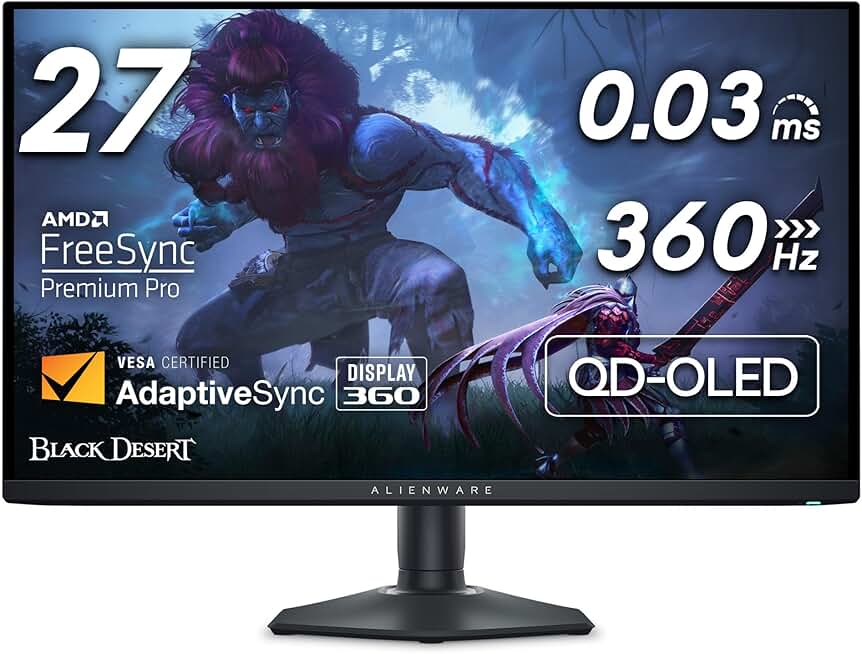
Alienware AW2725DF OLED Gaming Monitor - 26.7-inch Quantom-Dot WQHD (2560x1440) 360Hz 0.03Ms Display, AMD FreeSync Premium Pro, HDMI/DP/USB 3.2 Gen1, Height/Tilt/Swivel/Pivot Adjustability - Black
#6 · Best Premium Experience4.3 (361)

Alienware AW2725DF OLED Gaming Monitor - 26.7-inch Quantom-Dot WQHD (2560x1440) 360Hz 0.03Ms Display, AMD FreeSync Premium Pro, HDMI/DP/USB 3.2 Gen1, Height/Tilt/Swivel/Pivot Adjustability - Black

$599.99

The Alienware AW2725DF is a premium choice only if you're gaming on multiple platforms. The OLED panel and 1440p resolution will make Switch games look stunning, but you're paying $500+ for features the console can't use. Consider it only if you also play competitive PC games.

Pros

  • + OLED panel with 0.03ms response time and 360Hz refresh rate—the fastest monitor available
  • + Quantum-Dot WQHD (2560x1440) resolution scales beautifully with Switch's 1080p output
  • + AMD FreeSync Premium Pro and USB 3.2 for future-proofing
  • + 26.7-inch size balances immersion without the pixel density issues of 27-inch 1080p

Cons

  • $599.99 price is extreme overkill for Switch's 60Hz output—better suited for competitive PC gaming
  • OLED panels can develop burn-in with static UI elements if left on for days
Check price on Amazon →
Kado Portable Monitor 15.6-Inch FHD 1080p, 45W Reverse Charging USB-C mini-HDMI Gaming Monitor IPS Display Built-in Speakers, Second Display 180° Kickstand for Laptop PC Phone Mac Xbox PS4/PS5 Switch
#7 · Best Portable with Fast Charging4.5 (235)

Kado Portable Monitor 15.6-Inch FHD 1080p, 45W Reverse Charging USB-C mini-HDMI Gaming Monitor IPS Display Built-in Speakers, Second Display 180° Kickstand for Laptop PC Phone Mac Xbox PS4/PS5 Switch

$59.89

The Kado Portable Monitor stands out for its reverse-charging feature—you can dock your Switch and charge it simultaneously. The 180° kickstand and IPS panel make it flexible for different setups. If portability and charging convenience matter, this is your portable pick.

Pros

  • + 45W reverse charging means you can power your Switch while using the monitor as a display
  • + 15.6-inch FHD IPS panel with 180° kickstand works for any viewing angle
  • + USB-C + mini-HDMI dual input covers most Switch docking scenarios
  • + Built-in speakers and lightweight design make it genuinely portable

Cons

  • Mini-HDMI requires an adapter if using a standard Switch dock
  • 45W charging is slower than wall power but adds convenience factor
Check price on Amazon →
Samsung 27” Odyssey G5 G53F QHD Resolution Gaming Monitor, HDR10, 200Hz Refresh Rate, IPS Panel, AMD FreeSync™ Premium, Black Equalizer, Auto Source Switch, LS27FG532ENXZA
#8 · Best Mid-Range Desktop4.5 (208)

Samsung 27” Odyssey G5 G53F QHD Resolution Gaming Monitor, HDR10, 200Hz Refresh Rate, IPS Panel, AMD FreeSync™ Premium, Black Equalizer, Auto Source Switch, LS27FG532ENXZA

$159.99

The Samsung Odyssey G5 G53F bridges budget and premium. The 1440p resolution makes Switch games look sharper than 1080p displays, and the 200Hz refresh rate future-proofs for other devices. It's the sweet spot if you want better visuals without premium pricing.

Pros

  • + 27-inch QHD (2560x1440) resolution scales perfectly with Switch's 1080p, upscaling cleanly
  • + 200Hz refresh rate and IPS panel deliver smooth, color-accurate gameplay
  • + HDR10 support and AMD FreeSync Premium add visual depth
  • + Black Equalizer helps you see details in dark scenes without crushing blacks

Cons

  • QHD resolution requires good HDMI 2.0 cable to avoid signal issues at 60Hz
  • $159.99 price puts it between budget and premium—best if you also use it for work
Check price on Amazon →
Dell 24 240Hz Gaming Monitor - SE2426HG - 23.8-inch FHD (1920x1080) 240Hz Display, in-Plane Switching (IPS) Technology, AMD FreeSync™ Premium, TÜV 3-Star, 2X HDMI, DisplayPort 1.4, Tilt
#9 · Best for Competitive Play4.6 (106)

Dell 24 240Hz Gaming Monitor - SE2426HG - 23.8-inch FHD (1920x1080) 240Hz Display, in-Plane Switching (IPS) Technology, AMD FreeSync™ Premium, TÜV 3-Star, 2X HDMI, DisplayPort 1.4, Tilt

$99.99

The Dell SE2426HG is built for competitive gamers who also dock their Switch. The 240Hz IPS panel and compact size are perfect for desk setups where speed matters. Skip it if Switch is your only device; the high refresh rate won't help.

Pros

  • + 240Hz refresh rate and IPS panel eliminate any lag between button press and screen response
  • + 24-inch Full HD keeps pixel density high for sharp text and UI
  • + AMD FreeSync Premium and TÜV certification for eye care show Dell's attention to detail
  • + Compact 23.8-inch size fits tight desk spaces while staying immersive

Cons

  • 240Hz is wasted on Switch's 60Hz output—only justified if you also play PC games
  • IPS panel has slightly slower response than VA, though 1ms is still imperceptible
Check price on Amazon →
Dell 27 240Hz Gaming Monitor - SE2726HG - 27-inch FHD (1920x1080) 240Hz Display, in-Plane Switching (IPS) Technology, AMD FreeSync Premium, TÜV 3-Star, 2X HDMI, DisplayPort 1.4, Tilt
#10 · Best Large-Screen Performance4.6 (106)

Dell 27 240Hz Gaming Monitor - SE2726HG - 27-inch FHD (1920x1080) 240Hz Display, in-Plane Switching (IPS) Technology, AMD FreeSync Premium, TÜV 3-Star, 2X HDMI, DisplayPort 1.4, Tilt

$129.99

The Dell SE2726HG scales the competitive performance of the 24-inch model to 27 inches. If you want a large screen with 240Hz responsiveness for mixed gaming (Switch + PC), this delivers. Otherwise, the Sceptre 27-inch Prime offers better value for Switch-only players.

Pros

  • + 27-inch 240Hz display gives you competitive refresh rates on a bigger screen
  • + IPS panel ensures colors stay accurate even when multiple people watch
  • + AMD FreeSync Premium and TÜV eye care certification provide smooth, comfortable gaming
  • + 240Hz future-proofs for PC gaming while handling Switch perfectly

Cons

  • 27-inch 1080p resolution has lower pixel density—noticeable if you sit closer than 3 feet
  • 240Hz performance is overkill for Switch alone; better value if you game on PC
Check price on Amazon →

Frequently Asked Questions

Final word

The best gaming monitors for Nintendo Switch depend on how you play. If you dock your Switch at a desk and want the best value, the Sceptre Curved 24-inch is unbeatable at $84.97. For big-screen immersion without overspending, the Sceptre 27-inch Prime or Samsung Odyssey G5 deliver better visuals at reasonable prices.

Travel frequently? Grab a portable 15.6-inch monitor like the KYY or Kado—they're light, affordable, and work anywhere. If you game on multiple platforms (Switch + PC), invest in a 240Hz display like the Dell SE2426HG or SE2726HG to future-proof your setup.

Remember: your Switch maxes out at 1080p/60Hz, so don't overpay for specs it can't use. Pick the size and features that match your setup, and you'll transform docked Switch gaming from a cramped experience into something genuinely immersive.

More gaming monitors guides