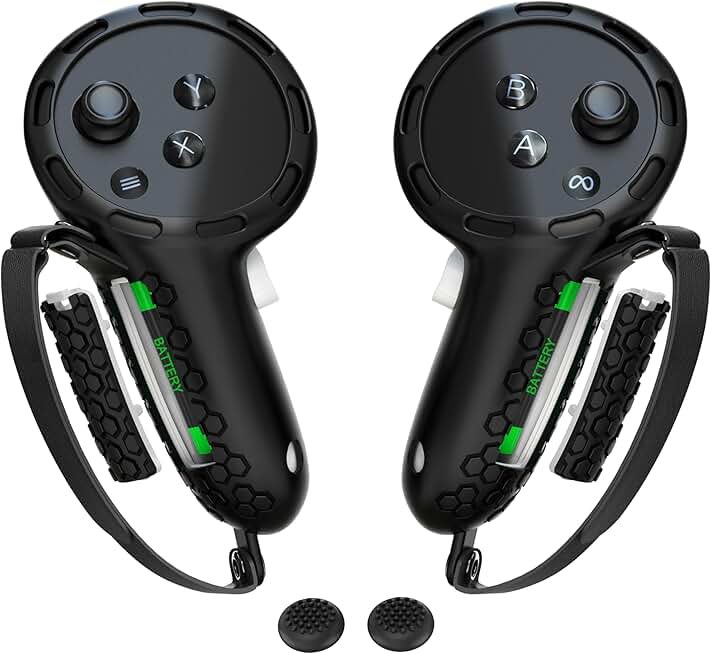
When shopping for VR gear to minimize wrist pain, focus on these key factors:
Grip Design & Material: Look for controller grips with cushioning and ergonomic contours that reduce grip fatigue. Soft silicone or neoprene materials distribute pressure more evenly than hard plastic. Grips with thumb rests and finger grooves keep your hand in a neutral position, not twisted or clenched.
Wrist Strap Support: Quality wrist straps should be adjustable, padded, and secure enough to hold controllers without you white-knuckling them. A good strap lets the controller hang from your wrist rather than forcing you to grip tightly. Look for reflective or durable materials that won't stretch out after weeks of use.
Headset Weight & Balance: Heavier headsets dump strain directly onto your neck and shoulders, which radiates down to your wrists. Lighter VR headsets with well-distributed weight and adjustable head straps reduce overall fatigue. A quality head strap with battery support shifts load from your hands to your head and shoulders—the stronger muscle groups.
Controller Polling Rate & Responsiveness: Lower latency means you don't over-grip or make compensatory movements. Controllers that respond instantly feel lighter and require less tension to control.
Red Flags to Avoid: Skip thin, non-padded wrist straps that dig into skin. Avoid grips made of hard plastic without cushioning. Don't buy headsets with poor weight distribution or cheap elastic straps—they'll leave your arms aching after 30 minutes.
How to Pick: Start with wrist strap replacements and controller grips if you already own a headset—they're cheap and often solve 70% of the problem. If you're buying new, prioritize a lighter headset with an excellent head strap. Combine both for maximum relief.