Building a professional Twitch stream requires more than just gameplay—you need the right gaming accessories for Twitch streaming to look and sound like a pro. Whether you're streaming for the first time or upgrading an existing setup, the difference between amateur and polished content often comes down to audio quality, lighting, and control. We've tested and ranked the best gaming accessories for Twitch streaming that actually deliver results without breaking the bank. From USB microphones with built-in mute buttons to studio lights and production consoles, these picks cover everything you need to attract viewers and keep them watching. You'll find options for every budget and setup size, so you can start streaming confidently today.
Best Gaming Accessories for Twitch Streaming
Updated April 23, 202610 picks tested4.5 avg rating · 121,963 reviews
This post contains affiliate links. We may earn a commission at no extra cost to you when you buy through our links. This helps us keep GamePlays running.
Jump to
Our top picks at a glance
- #1
- #2
- #3
- #4
- #5
Buyer's guide
When shopping for gaming accessories for Twitch streaming, prioritize audio quality first—viewers will tolerate mediocre video but won't stick around for bad sound. Look for USB condenser microphones with cardioid polar patterns, which reject background noise and focus on your voice. Check the specifications: a 16mm diaphragm or larger captures richer detail, while a 44.1kHz or 48kHz sampling rate ensures broadcast-quality audio. Tap-to-mute sensors and gain control let you adjust levels on the fly without breaking focus during gameplay.
Lighting transforms your on-camera presence dramatically. Studio lights with adjustable color temperature (measured in Kelvin) let you match your room's lighting and reduce harsh shadows. A minimum of 2000 lumens gives you enough brightness without blowing out your camera sensor. Desk clamps are more practical than stands for streamers with limited space.
For production control, consider a Stream Deck or mixer console if you're managing multiple audio sources, overlays, or scene transitions. These tools save you from fumbling with keyboard shortcuts mid-stream and look more professional to viewers.
Don't overlook mounting solutions. A boom arm keeps your microphone positioned consistently and frees up desk space. Pop filters reduce plosives (harsh "p" and "b" sounds) and cost under $15. Shock mounts isolate vibration from keyboard and mouse clicks.
Finally, test your setup with a friend before going live. Stream quality depends on your internet upload speed too—aim for 5-10 Mbps for 1080p 60fps streaming. The best gaming accessories for Twitch streaming work together as a system, not in isolation.
The picks

#1 · Best Overall4.6 (22,687)
HyperX SoloCast – USB Condenser Gaming Microphone, for PC, PS4, PS5 and Mac, Tap-to-Mute Sensor, Cardioid Polar Pattern, great for Streaming, Podcasts, Twitch, YouTube, Discord,Black
$59.99
The HyperX SoloCast delivers studio-grade audio in a compact form factor that works across all major platforms. At $59.99, it's the sweet spot between affordability and professional sound quality, making it our top pick for streamers who want plug-and-play reliability without compromise.
Pros
- + Tap-to-mute sensor eliminates accidental hot mics during gameplay
- + Cardioid polar pattern cuts background noise effectively
- + Works seamlessly with PC, PS4, PS5, and Mac via USB
- + Compact design saves desk space without sacrificing audio quality
Cons
- − No built-in boom arm—requires separate mounting solution
- − Higher price point than budget alternatives

#2 · Best for Production Control4.6 (4,235)
Elgato Stream Deck +, Audio Mixer, Production Console and Studio Controller for Content Creators, Streaming, Gaming, with customizable touch strip dials and LCD keys, works with Mac and PC
$199.99
The Elgato Stream Deck + transforms your streaming workflow by consolidating production tasks into one intuitive device. If you're managing multiple scenes, sound effects, and transitions during gameplay, this $199.99 investment pays for itself through smoother broadcasts and reduced technical fumbles.
Pros
- + Customizable touch strip handles audio mixing, scene switching, and overlay control
- + Eight programmable buttons let you automate repetitive tasks instantly
- + Built-in audio mixer with real-time monitoring and volume faders
- + LCD screen displays dynamic information like chat alerts and stream status
Cons
- − Requires learning curve for full feature utilization
- − Premium price reflects professional-grade functionality

#3 · Best Studio Lighting4.5 (4,190)
Elgato Key Light - Professional 2800 lumens Studio Light with Desk clamp for Streaming, Recording and Video Conferencing, Temperature and Brightness app-Adjustable on Mac, PC, iOS, Android
$179.99
The Elgato Key Light is the gold standard for Twitch streamers who want professional on-camera presence. At $179.99, it's a visible upgrade that viewers immediately notice—better lighting often generates more follows than any gameplay improvement alone.
Pros
- + 2800 lumens output eliminates shadows and flatters on-camera appearance
- + Adjustable color temperature (2900K–7000K) matches any room lighting
- + Desk clamp mount requires zero installation and saves space
- + App control lets you adjust brightness and color without touching the light
Cons
- − Single light may require a second unit for balanced three-point lighting
- − Heat output noticeable during extended streaming sessions
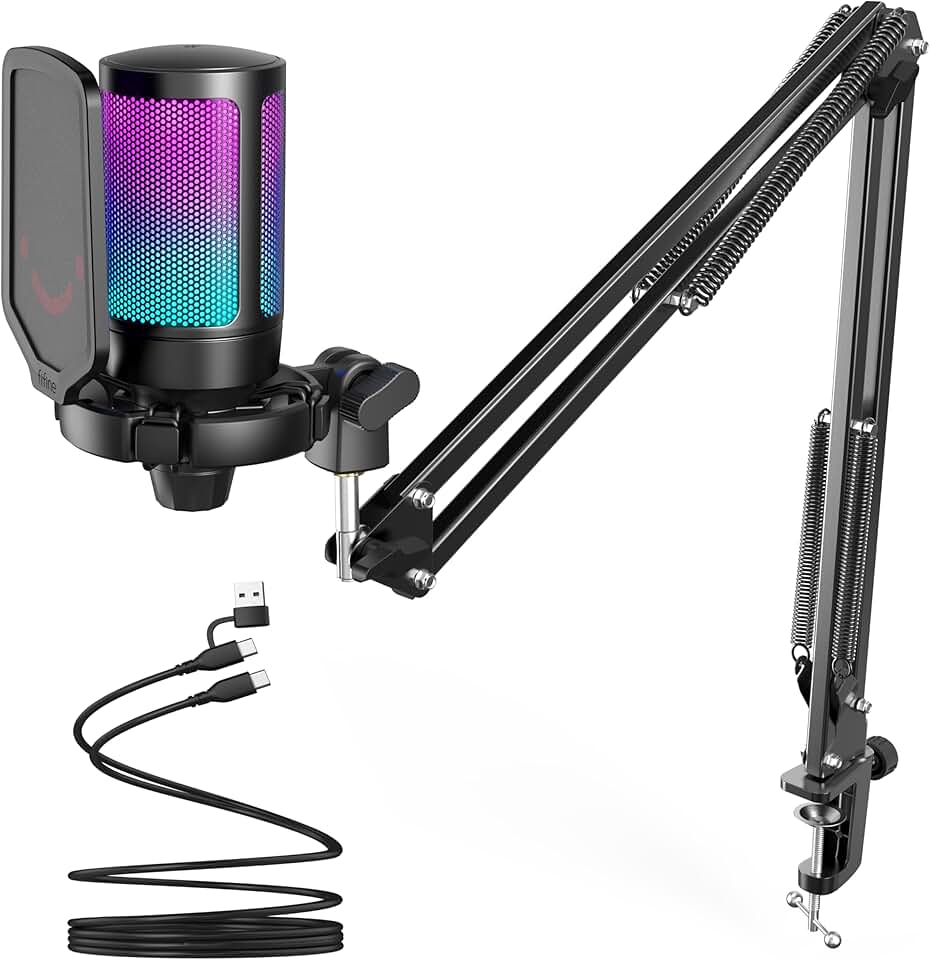
#4 · Best with Boom Arm Included4.6 (11,489)
FIFINE Gaming PC USB Microphone, Podcast Condenser Mic with Boom Arm, Pop Filter, Mute Button for Streaming, Twitch, Online Chat, RGB Computer Mic for PS4/5 PC Gamer Youtuber-AmpliGame A6T Global Recycled Standard
$49.99
The FIFINE Gaming PC USB Microphone with boom arm is the complete package at $49.99. You get everything needed to start streaming without hunting for compatible accessories, making it ideal for beginners who want a turnkey solution.
Pros
- + Boom arm and pop filter bundled—no additional purchases needed
- + RGB indicator gives visual feedback for mute status during streams
- + Gain control lets you dial in perfect input levels without software tweaking
- + Cardioid pattern focuses on your voice while rejecting keyboard clicks
Cons
- − Boom arm quality is adequate but not premium compared to standalone options
- − RGB lighting adds minimal practical value for streamers

#5 · Best with Noise Cancellation4.5 (5,499)
MAONO USB Gaming Microphone, Noise Cancellation Condenser Mic with Mute, Gain, Monitoring, Boom Arm Mic for Streaming, Podcast, Twitch, YouTube, Discord, PC, Computer, PS4, PS5, Mac, GamerWave DGM20S ClimatePartner certified
$43.99
The MAONO USB Gaming Microphone with noise cancellation ($43.99) is perfect if you stream in noisy environments—dorm rooms, offices, or homes with pets. The active noise cancellation keeps your voice clean without sounding robotic.
Pros
- + Active noise cancellation eliminates background hum and room noise
- + Monitoring feature lets you hear yourself in real-time to catch audio issues
- + Boom arm included for consistent microphone positioning
- + Mute button with visual feedback prevents accidental hot mics
Cons
- − Noise cancellation can sound slightly processed if over-adjusted
- − Requires USB power for noise cancellation features
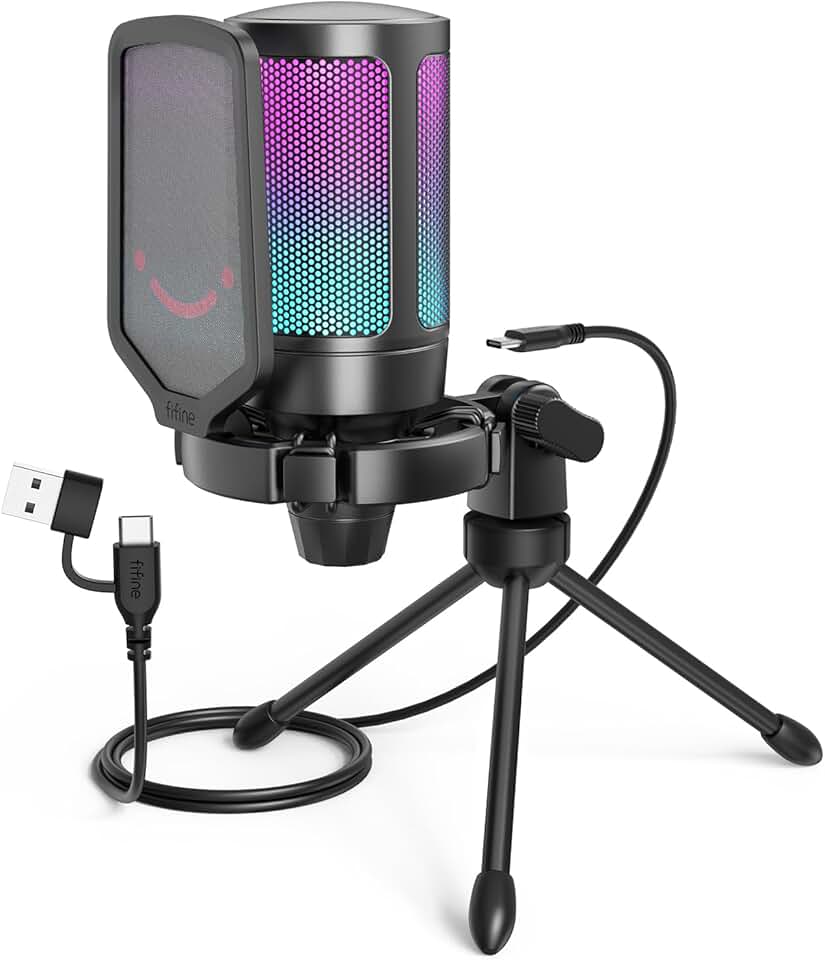
#6 · Best Budget-Friendly4.6 (14,199)
FIFINE Gaming USB Microphone for PC PS5, Condenser Mic with Quick Mute, RGB Indicator, Tripod Stand, Pop Filter, Shock Mount, Gain Control for Streaming Discord Twitch Podcasts Videos- AmpliGame Global Recycled Standard
$32.99
The FIFINE Gaming USB Microphone delivers surprising value at $32.99, including accessories that usually cost extra. If you're testing the waters before investing in premium gear, this is the no-regrets entry point.
Pros
- + Quick mute button with RGB indicator prevents accidental broadcast mishaps
- + Includes tripod stand, pop filter, and shock mount—complete streaming kit
- + Condenser microphone captures clear voice at $32.99
- + Works with PC and PS5 via USB
Cons
- − Tripod stand is less stable than a boom arm for extended sessions
- − RGB lighting is purely cosmetic

#7 · Best with RGB Customization4.5 (5,499)
MAONO USB Gaming Microphone with Noise Cancellation, RGB Condenser Microphone for Streaming, Podcasts, Twitch, YouTube, Discord, PC, Computer, Mac, PS4, PS5, DGM20S Purple
$44.99
The MAONO USB Gaming Microphone with RGB ($44.99) appeals to streamers who want their gear to match their setup's visual style. The noise cancellation is a practical bonus that keeps your stream clean even in chaotic environments.
Pros
- + RGB lighting syncs with streaming software for cohesive setup aesthetics
- + Noise cancellation reduces background interference during gameplay
- + Compact design fits tight desk spaces without dominating your setup
- + Works with PC, Mac, PS4, and PS5
Cons
- − RGB features are cosmetic and don't improve audio quality
- − Noise cancellation requires adjustment to sound natural

#8 · Best for Compact Setups4.6 (14,199)
FIFINE USB Gaming PC Microphone for Streaming Podcasts, AmpliGame RGB Computer Condenser Desktop Mic, Cardioid Pattern for YouTube Video, Plug and Play on PS4 PS5, with Quick Mute, Mic Gain-A6V Pink Global Recycled Standard
$34.99
The FIFINE AmpliGame RGB ($34.99) is purpose-built for streamers with minimal desk real estate. The compact form factor doesn't compromise audio quality, and the built-in gain control gives you professional-level adjustments without menu diving.
Pros
- + Cardioid pattern isolates your voice from surrounding noise
- + Gain control built into the microphone eliminates software tweaking
- + Works with PC and PS5 for console streamers
- + Plug-and-play USB connection requires zero drivers or configuration
Cons
- − No boom arm included—requires separate purchase for optimal positioning
- − Compact size means less surface area for physical controls

#9 · Best All-in-One Kit4.5 (5,499)
MAONO Gaming USB Microphone with Noise Cancellation, Streaming mic for PC Computer MAC PS4 PS5, All-in-One Kit with Mute, Monitor for Recording, Podcast, Twitch, YouTube, Discord, DGM20S Pink
$44.99
The MAONO Gaming USB Microphone All-in-One Kit ($44.99) eliminates decision paralysis by bundling everything you need. If you want to unbox, plug in, and start streaming without accessory shopping, this kit handles it.
Pros
- + Complete kit includes microphone, boom arm, pop filter, and monitoring
- + Noise cancellation handles noisy streaming environments effectively
- + Mute button with visual feedback prevents awkward broadcast moments
- + Works with PC, Mac, PS4, and PS5
Cons
- − All-in-one approach means you can't upgrade individual components easily
- − Boom arm quality is functional but not premium
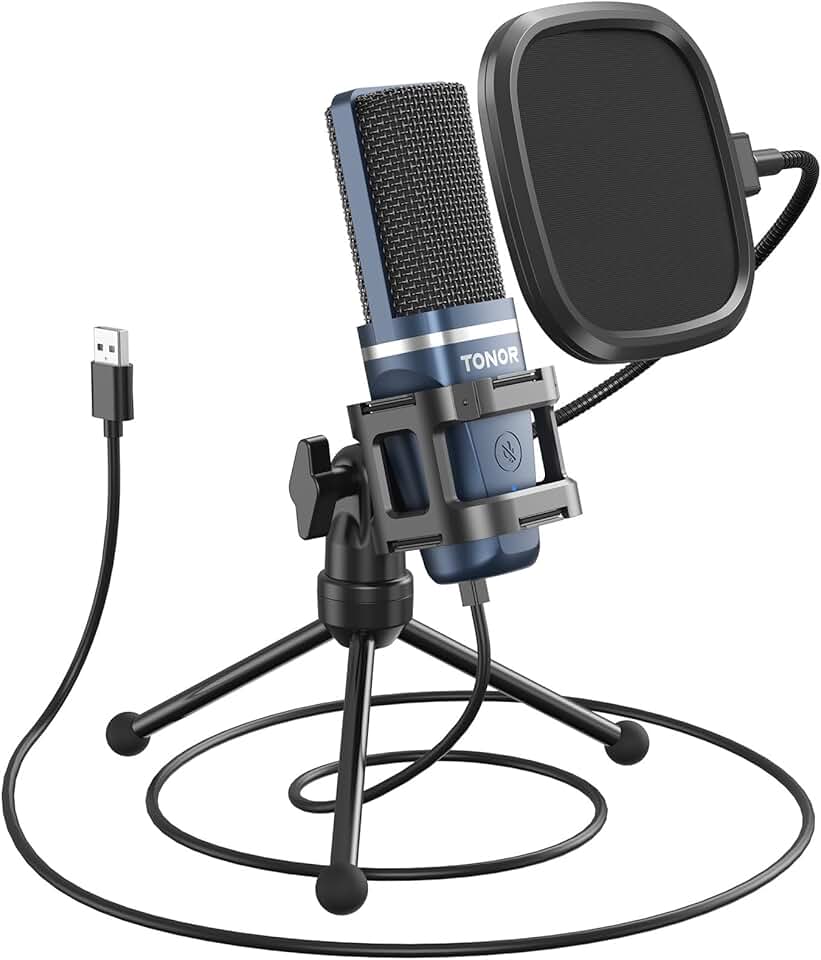
#10 · Best for Absolute Beginners4.3 (34,467)
TONOR TC-777 Podcast Microphone, USB Computer Microphone, Cardioid Condenser PC Mic with Tripod Stand and Pop Filter for Podcasting, Streaming, Vocal Recording, Compatible with PC & Laptop, PS4/5
$19.99
The TONOR TC-777 ($19.99) is the gateway drug to streaming. If you're testing whether Twitch streaming fits your schedule before spending real money, this mic proves you don't need premium gear to start—just the willingness to try.
Pros
- + Tripod stand and pop filter included for under $20
- + Cardioid condenser microphone captures clear voice despite low price
- + USB plug-and-play requires zero technical knowledge
- + Works with PC and Mac without driver installation
Cons
- − Tripod stand wobbles under aggressive keyboard use
- − Audio quality noticeably lower than $40+ alternatives
- − No mute button—requires software control to prevent hot mics
Frequently asked questions
Frequently Asked Questions
Final word
The best gaming accessories for Twitch streaming start with audio—a quality USB microphone is non-negotiable. The HyperX SoloCast or FIFINE options cover most budgets, while the Elgato Stream Deck + and Key Light elevate your production value beyond just sound. Don't overlook lighting; it's the fastest way to look more professional on camera. Build your setup incrementally rather than buying everything at once. Start with a microphone, add lighting when your schedule stabilizes, and invest in production control once you're streaming regularly. These gaming accessories for Twitch streaming work best as a system, so prioritize based on what viewers will notice first—audio quality, then lighting, then production control.
More twitch streaming gear across categories
Gaming Keyboards
Best Gaming Keyboards for Twitch Streaming
Gaming MiceBest Gaming Mice for Twitch Streaming
Gaming HeadsetsBest Gaming Headsets for Twitch Streaming
Gaming MonitorsBest Gaming Monitors for Twitch Streaming
Gaming ChairsBest Gaming Chairs for Twitch Streaming
Gaming ControllersBest Gaming Controllers for Twitch Streaming
Gaming DesksBest Gaming Desks for Twitch Streaming
Streaming GearBest Streaming Gear for Twitch Streaming
More gaming accessories guides
Budget Gaming Accessories of 2026
Top 10 affordable gaming accessories for PC, console, and desk setup. Quality gear under $50.
Best Corsair Gaming Accessories in 2026
Top-rated Corsair gaming accessories: mice, headsets, mouse pads, and RGB controllers. Expert reviews and buying guide.
Best Ergonomic Gaming Accessories in 2026
Top 10 ergonomic gaming accessories to reduce pain and boost comfort. Seat cushions, wrist rests, footrests, and more.
Best Gaming Accessories in 2026
Top 10 gaming accessories 2026: mice, stands, cushions & more. Expert reviews, real specs, honest verdicts.
Best Gaming Accessories for Apex Legends
Top gaming accessories for Apex Legends players: collectibles, controller holders, and KnM adapters to enhance your gameplay.
Best Gaming Accessories for Baldur's Gate 3
Top gaming accessories for Baldur's Gate 3 fans: collectibles, apparel, and decor to enhance your playtime.