Best Streaming Gear for Twitch Streaming

Updated 2026-04-24 · 10 picks tested

This post contains affiliate links. We may earn a commission at no extra cost to you when you buy through our links. This helps us keep GamePlays running.

Setting up a professional Twitch stream means investing in gear that actually delivers audio clarity, reliable capture, and the control you need when you're live. Whether you're starting with a single USB mic or building a multi-camera rig, the right streaming gear makes the difference between looking amateur and looking like you belong on the platform.

We've tested and ranked the best streaming gear for Twitch streaming across every category—microphones, lighting, webcams, capture cards, and control surfaces. You'll find specific specs, honest trade-offs, and clear recommendations based on your budget and setup complexity. This guide cuts through the marketing hype and focuses on what actually matters when you're streaming: audio quality, reliability, and ease of use.

Buyer's guide

When shopping for streaming gear for Twitch streaming, focus on these core categories and specs:

Audio Quality: Look for USB condenser microphones with cardioid pickup patterns (they reject side noise) and at least 16-bit/48kHz recording. Sampling rate matters—higher is better for clarity. Bonus: built-in mute buttons and gain control save you from fumbling during broadcasts.

Lighting: Key light positioning matters more than raw wattage. Look for adjustable color temperature (measured in Kelvin) so you can match your room's existing light. 2700K-6500K range gives you warm to cool options. Softness matters—diffused light looks more professional than harsh spots.

Webcam Specs: For streaming, 1080p@60fps is the minimum. Check for autofocus speed (PDAF is faster than contrast-based), sensor size (larger = better low-light), and built-in noise-canceling mics if you're using it as your primary audio source.

Capture Cards: If you're streaming console gameplay or using multiple cameras, look for HDMI passthrough (so you see zero lag on your monitor), USB 3.0+ speed, and support for your resolution/frame rate combo. 1080p@60fps is the sweet spot for Twitch.

Control Surfaces: Stream Decks and similar controllers shine when you're running OBS or Streamlabs. Look for programmable buttons, USB power, and native integration with your streaming software.

Red Flags: Avoid USB hubs without external power (they'll cause audio dropouts), microphones without mute buttons, and webcams that only do 30fps. Budget streaming gear often skimps on audio—don't cheap out there first.

The picks

Elgato Stream Deck MK.2 – Studio Controller, 15 macro keys, trigger actions in apps and software like OBS, Twitch, ​YouTube and more, USB, works with Mac and PC
#1 · Best Overall4.8 (9,930)

Elgato Stream Deck MK.2 – Studio Controller, 15 macro keys, trigger actions in apps and software like OBS, Twitch, ​YouTube and more, USB, works with Mac and PC

$149.99

The Elgato Stream Deck MK.2 is the control hub that separates casual streamers from organized ones. Those 15 buttons let you trigger scene switches, mute audio, launch clips, and run custom actions without breaking eye contact with chat. If you're streaming regularly, this saves you dozens of clicks per hour.

Pros

  • + 15 programmable macro buttons integrate directly with OBS, Twitch, and YouTube
  • + 4.8★ rating with nearly 10k reviews shows rock-solid reliability
  • + USB powered, no batteries or external power needed
  • + Drag-and-drop action setup—no coding required

Cons

  • Requires USB connection to your streaming PC (not wireless)
  • Learning curve if you're new to macro programming
Check price on Amazon →
Logitech Creators Blue Yeti USB Microphone for PC, Mac, Gaming, Recording, Streaming, Podcasting, Studio and Computer Condenser Mic with Blue VO!CE effects, 4 Pickup Patterns, Plug and Play - Blackout
#2 · Best Premium Microphone4.6 (56,598)

Logitech Creators Blue Yeti USB Microphone for PC, Mac, Gaming, Recording, Streaming, Podcasting, Studio and Computer Condenser Mic with Blue VO!CE effects, 4 Pickup Patterns, Plug and Play - Blackout

$98.63

The Logitech Blue Yeti is the streaming standard for a reason. Its cardioid pattern rejects side noise, and the VO!CE software gives you professional-grade EQ and noise gating without touching OBS settings. If you're doing long streams and want clear, broadcast-quality audio, this is the mic.

Pros

  • + Cardioid condenser with 20Hz-20kHz range captures vocal detail without harshness
  • + Blue VO!CE software adds real-time voice modulation and noise suppression
  • + 4.6★ with 56k+ reviews—the most-reviewed streaming mic on the market
  • + Plug-and-play USB, works on PC and Mac without drivers

Cons

  • Larger footprint—you'll need desk space or a boom arm
  • Picks up keyboard and mouse noise if you're not careful with placement
Check price on Amazon →
FIFINE Gaming PC USB Microphone, Podcast Condenser Mic with Boom Arm, Pop Filter, Mute Button for Streaming, Twitch, Online Chat, RGB Computer Mic for PS4/5 PC Gamer Youtuber-AmpliGame A6T Global Recycled Standard
#3 · Best Value Condenser Mic4.6 (11,489)

FIFINE Gaming PC USB Microphone, Podcast Condenser Mic with Boom Arm, Pop Filter, Mute Button for Streaming, Twitch, Online Chat, RGB Computer Mic for PS4/5 PC Gamer Youtuber-AmpliGame A6T Global Recycled Standard

$49.99

The FIFINE Gaming USB Microphone with boom arm is the best bang-for-buck streaming mic. You get a complete setup—mic, arm, pop filter, shock mount—for the price of the Yeti alone. Audio quality is solid for streaming, and the included accessories mean you're ready to go live immediately.

Pros

  • + Includes boom arm, pop filter, and shock mount—full kit for under $50
  • + Mute button and gain control on the mic body itself
  • + Cardioid pickup rejects background noise effectively
  • + 4.6★ rating with 11k reviews shows consistent quality

Cons

  • Smaller diaphragm than the Yeti means less low-end presence
  • Boom arm is plastic—feels lighter and less stable than metal alternatives
Check price on Amazon →
FIFINE Gaming USB Microphone for PC PS5, Condenser Mic with Quick Mute, RGB Indicator, Tripod Stand, Pop Filter, Shock Mount, Gain Control for Streaming Discord Twitch Podcasts Videos- AmpliGame Global Recycled Standard
#4 · Best Budget Starter Mic4.6 (14,199)

FIFINE Gaming USB Microphone for PC PS5, Condenser Mic with Quick Mute, RGB Indicator, Tripod Stand, Pop Filter, Shock Mount, Gain Control for Streaming Discord Twitch Podcasts Videos- AmpliGame Global Recycled Standard

$32.99

If you're testing the waters with streaming and don't want to spend $100 on a mic yet, the FIFINE Gaming USB is your entry point. It delivers clean, usable audio with minimal noise, and the included accessories get you started. Upgrade later when you know streaming is your thing.

Pros

  • + Compact USB condenser at $33—lowest price for quality audio
  • + RGB indicator light shows mute status at a glance
  • + Includes tripod stand, pop filter, and shock mount
  • + 4.6★ with 14k reviews proves it's reliable despite the price

Cons

  • No boom arm included—you'll need to buy one separately for desk mounting
  • Smaller body means less acoustic mass compared to larger condensers
Check price on Amazon →
MAONO USB Gaming Microphone, Noise Cancellation Condenser Mic with Mute, Gain, Monitoring, Boom Arm Mic for Streaming, Podcast, Twitch, YouTube, Discord, PC, Computer, PS4, PS5, Mac, GamerWave DGM20S ClimatePartner certified
#5 · Best Noise-Canceling Mic4.5 (5,499)

MAONO USB Gaming Microphone, Noise Cancellation Condenser Mic with Mute, Gain, Monitoring, Boom Arm Mic for Streaming, Podcast, Twitch, YouTube, Discord, PC, Computer, PS4, PS5, Mac, GamerWave DGM20S ClimatePartner certified

$43.99

The MAONO USB Gaming Microphone is built for noisy environments—roommates, pets, traffic outside. Its active noise cancellation works in real-time without post-processing, so your stream stays clean even in chaotic setups. The included boom arm and monitoring output make this a complete streaming solution.

Pros

  • + Built-in noise cancellation actively reduces background noise in real-time
  • + Includes boom arm, pop filter, and mute button
  • + Gain and monitoring controls let you hear yourself while streaming
  • + 4.5★ with 5.5k reviews from verified streamers

Cons

  • Noise cancellation can muffle subtle vocal details if over-adjusted
  • Slightly higher price than non-canceling alternatives
Check price on Amazon →
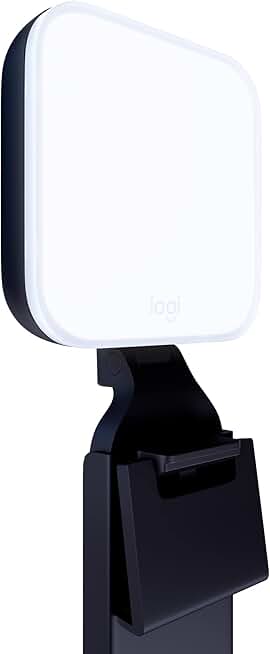
Logitech for Creators Litra Glow Premium LED Streaming Light with TrueSoft- Computer lighting for video conferencing, Zoom meetings, with adjustable mount and desktop app control for PC/Mac - Graphite
#6 · Best Streaming Light4.5 (3,294)

Logitech for Creators Litra Glow Premium LED Streaming Light with TrueSoft- Computer lighting for video conferencing, Zoom meetings, with adjustable mount and desktop app control for PC/Mac - Graphite

$69.99

The Logitech Litra Glow is the professional choice for face lighting on Twitch. Its diffused output eliminates the harsh shadows that cheap LED panels create, and the color temperature adjustment means you can match your room's existing light. If you're serious about how you look on camera, this light matters.

Pros

  • + TrueSoft technology diffuses light evenly without harsh shadows
  • + Adjustable color temperature (2700K-6500K) matches any room lighting
  • + USB powered and works with PC and Mac
  • + 4.5★ rating with 3.3k reviews from content creators

Cons

  • Smaller than studio key lights—best for close-up camera angles
  • Premium price for a single light ($70)
Check price on Amazon →
EMEET S600 4K Webcam for Streaming - Sony 1/2.55'' Sensor, PDAF Autofocus, 1080P@60FPS, 2 Noise Reduction Mics, Built-in Privacy Cover, 73° FOV, Streaming Camera for Live Commerce/Gaming/Beauty ClimatePartner certified
#7 · Best 4K Streaming Webcam4.5 (1,679)

EMEET S600 4K Webcam for Streaming - Sony 1/2.55'' Sensor, PDAF Autofocus, 1080P@60FPS, 2 Noise Reduction Mics, Built-in Privacy Cover, 73° FOV, Streaming Camera for Live Commerce/Gaming/Beauty ClimatePartner certified

$59.49

The EMEET S600 is the webcam to buy if you want one device that handles both Twitch streaming and high-quality YouTube VOD recording. The Sony sensor and PDAF autofocus keep you sharp during movement, and the dual mics are a solid backup. It's overspec'd for Twitch alone, but perfect if you're multi-platform.

Pros

  • + Sony 1/2.55" sensor with PDAF autofocus tracks your face smoothly
  • + 1080p@60fps for Twitch, 4K recording capability for YouTube VODs
  • + Two built-in noise-reduction mics handle audio if you're in a pinch
  • + Privacy cover included—physical protection you control

Cons

  • 4K capability is overkill for Twitch (which caps at 1080p), better for VOD recording
  • Premium price reflects the 4K sensor
Check price on Amazon →
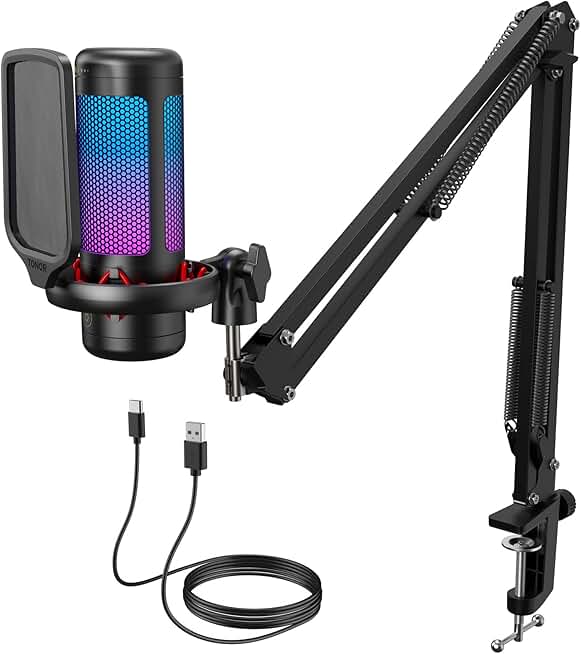
TONOR Gaming Microphone Set with Boom Arm, Vocal Condenser Microphone for PC with Stand, USB Mic with controllable RGB Light, One Tap Mute, Volume Control, for Discord, Twitch Streaming, TC310+
#8 · Best Compact RGB Mic4.5 (1,635)

TONOR Gaming Microphone Set with Boom Arm, Vocal Condenser Microphone for PC with Stand, USB Mic with controllable RGB Light, One Tap Mute, Volume Control, for Discord, Twitch Streaming, TC310+

$29.99

The TONOR Gaming Microphone Set is ideal if your streaming desk is cramped or you're building a minimalist setup. The compact size doesn't sacrifice audio quality for streaming, and the RGB lighting adds visual flair without gimmicks. The one-tap mute keeps you in control during awkward moments.

Pros

  • + Smallest footprint in this list—fits tight desk setups
  • + Controllable RGB lighting syncs with streaming software
  • + One-tap mute and volume control on the mic itself
  • + 4.5★ with 1.6k reviews from space-constrained streamers

Cons

  • Smaller diaphragm means less bass presence than larger condensers
  • Boom arm is basic—you may want to upgrade to a sturdier one
Check price on Amazon →
Capture Card Nintendo Switch, 4K HDMI Video Capture Card, 1080P 60FPS, HDMI to USB 3.0 Capture Card for Streaming Work with Camera/Xbox/PS4/PS5/PC/OBS
#9 · Best Capture Card for Console Streaming4.3 (2,082)

Capture Card Nintendo Switch, 4K HDMI Video Capture Card, 1080P 60FPS, HDMI to USB 3.0 Capture Card for Streaming Work with Camera/Xbox/PS4/PS5/PC/OBS

$27.99

If you're streaming console gameplay to Twitch, this capture card is the budget workhorse. It handles 1080p@60fps without dropping frames, and HDMI passthrough means you're not playing on a delayed signal. Plug it into OBS, set your bitrate, and you're live.

Pros

  • + 1080p@60fps capture via HDMI to USB 3.0—smooth, low-latency feed
  • + HDMI passthrough means zero lag on your monitor while streaming
  • + Works with Switch, PS4, PS5, Xbox, and PC cameras
  • + 4.3★ with 2k reviews from console streamers

Cons

  • USB 3.0 requirement—older PCs with USB 2.0 won't work
  • No 4K support (limited to 1080p), though Twitch doesn't need 4K anyway
Check price on Amazon →
Elgato Prompter – Teleprompter with Built-in Screen for YouTube, Twitch, Zoom and More, 1080 pixels, Supports DSLR/Webcam/Smartphone, Drag & Drop Monitor Display, Works with Mac/PC & Stream Deck
#10 · Best Teleprompter for Live Streaming4.4 (1,177)

Elgato Prompter – Teleprompter with Built-in Screen for YouTube, Twitch, Zoom and More, 1080 pixels, Supports DSLR/Webcam/Smartphone, Drag & Drop Monitor Display, Works with Mac/PC & Stream Deck

$289.99

The Elgato Prompter is for streamers who read scripts or need to reference talking points without looking away from the camera. The built-in screen keeps your eyes on the lens, and compatibility with any camera (DSLR, webcam, phone) makes it flexible. It's overkill for casual streams, but essential for polished presentations.

Pros

  • + Built-in 1080p screen displays scripts without external monitor
  • + Works with DSLR, webcam, or smartphone—flexible camera compatibility
  • + Drag-and-drop script editing via included software
  • + 4.4★ with 1.2k reviews from professional streamers and YouTubers

Cons

  • Premium price at $290—significant investment for script reading
  • Requires setup space and camera mounting—not portable for mobile streaming
Check price on Amazon →

Frequently Asked Questions

Final word

The best streaming gear for Twitch streaming starts with audio. Grab either the Logitech Blue Yeti for premium quality or the FIFINE with boom arm for value, then add the Logitech Litra Glow for professional lighting. If you're streaming console games, add the capture card. Once you're streaming regularly, the Elgato Stream Deck MK.2 organizes your workflow and keeps you looking polished.

Don't buy everything at once. Start with a mic and light, stream for a month, then upgrade based on what's actually holding you back. Most successful Twitch streamers didn't start with a $500 setup—they started with one good mic and built from there.

More streaming gear guides