If you're serious about streaming, Logitech has spent the last decade building a reputation for gear that just works. From podcasters to Twitch streamers to corporate video conferencing warriors, Logitech streaming gear shows up on thousands of setups because it balances reliability, audio/video quality, and price without requiring a second mortgage. This guide walks you through the best Logitech streaming gear available right now—microphones, webcams, lighting, and multi-camera rigs—so you can pick the right tools for your broadcast. Whether you're starting from scratch or upgrading a single component, you'll find specific specs and honest trade-offs to help you decide what fits your budget and streaming style.
Best Logitech Streaming Gear in 2026
Updated April 24, 202610 picks tested4.6 avg rating · 228,914 reviews
This post contains affiliate links. We may earn a commission at no extra cost to you when you buy through our links. This helps us keep GamePlays running.
Jump to
Our top picks at a glance
- #1
- #2
- #3
- #4
- #5
Buyer's guide
When shopping for Logitech streaming gear, focus on three core specs: audio quality (sample rate, bit depth, polar pattern), video resolution (1080p at 30fps is minimum; 60fps is better for fast-moving content), and connectivity (USB vs. wireless, latency tolerance). Start with your primary bottleneck. If your audio sounds thin or hollow, a dedicated microphone matters more than a fancy webcam. If your video looks grainy in low light, prioritize a camera with decent light correction or pair it with a Logitech Litra light. For microphones, the Blue Yeti series dominates streaming setups—they're cardioid condensers with built-in shock mounts and tap-to-mute buttons. The trade-off: they're desk-mounted, not lavalier or headset mics, so they pick up keyboard clicks and room noise if you don't manage gain carefully. For webcams, Logitech's C-series (C920, C920S) are workhorses, but the StreamCam adds 60fps for smoother motion in fast gameplay. The Brio 101 is the budget entry point—it won't blow you away, but it handles Zoom calls and casual streaming without complaints. Lighting matters more than most creators realize. A Litra Glow eliminates harsh shadows and makes you look professional on camera without breaking the bank. For multi-camera setups, the Mevo Start cameras are wireless, app-controlled, and designed for creators who want to cut between angles without hiring a technical director. Red flags: avoid older Logitech gear without auto-focus (check product images), and skip anything without a privacy shutter if you care about security. Finally, check compatibility—most Logitech streaming gear works with Windows, Mac, and major streaming platforms, but verify before buying if you're on Linux or using niche software.
The picks

#1 · Best Overall Streaming Microphone4.6 (56,598)
Logitech Creators Blue Yeti USB Microphone for PC, Mac, Gaming, Recording, Streaming, Podcasting, Studio and Computer Condenser Mic with Blue VO!CE effects, 4 Pickup Patterns, Plug and Play - Blackout
$98.63
The Blue Yeti is the streaming standard for a reason. It delivers studio-quality audio at a mid-range price, and the four polar patterns mean you're not locked into one recording style. If you're building a streaming setup from scratch, this is where your microphone budget should go.
Pros
- + Four cardioid, omnidirectional, bidirectional, and stereo polar patterns let you adapt to any recording scenario
- + 16-bit, 48kHz USB audio with tap-to-mute button and internal shock mount reduce handling noise
- + Blue VO!CE software includes voice effects, compressor, and noise gate—professional-grade tools without extra plugins
- + Desk mount included; works immediately with Windows, Mac, and most streaming software
Cons
- − Desk-mounted design means it picks up keyboard clicks and chair squeaks if gain is too high
- − USB-only connection limits portability; you're tethered to your PC or Mac

#2 · Best Premium Yeti Variant4.6 (56,598)
Logitech Creators Blue Yeti USB Microphone for PC, Mac, Gaming, Streaming, Podcasting, Studio and Computer Condenser Mic with Blue VO!CE Effects, 4 Pickup Patterns, Plug and Play - Midnight Blue
$104.49
This is the Yeti for creators who want a premium finish without sacrificing functionality. If you're streaming on camera and aesthetics matter, the upgraded look justifies the small price bump over the base model.
Pros
- + Identical audio specs to the standard Yeti with 16-bit, 48kHz USB capture and four polar patterns
- + Enhanced build quality and premium finish differentiate this from the base model
- + Blue VO!CE effects suite included for voice modulation and noise reduction
- + Tap-to-mute and internal shock mount minimize accidental audio artifacts
Cons
- − Minimal practical difference from the standard Yeti—you're paying for aesthetics and build polish
- − Still desk-mounted, so room noise and keyboard clicks remain a concern without proper gain management

#3 · Best Value Blue Yeti4.6 (56,598)
Logitech Creators Blue Yeti USB Microphone for PC, Mac, Gaming, Recording, Streaming, Podcasting, Studio and Computer Condenser Mic with Blue VO!CE Effects, 4 Pickup Patterns, Plug and Play - Silver
$98.99
If you want Blue Yeti audio quality without premium pricing, this is the sweet spot. You get the same microphone engine as the $100+ variants at a lower price point, making it ideal for budget-conscious streamers who won't compromise on sound.
Pros
- + Same 16-bit, 48kHz audio engine and four polar patterns as premium Yeti models
- + Blue VO!CE voice effects and noise suppression included at entry-level pricing
- + Shock mount and tap-to-mute standard; no compromises on core features
- + Works with PC, Mac, and all major streaming platforms out of the box
Cons
- − Desk-mounted design picks up ambient room noise if you don't control gain carefully
- − No wireless option—USB cable tethers you to your streaming PC
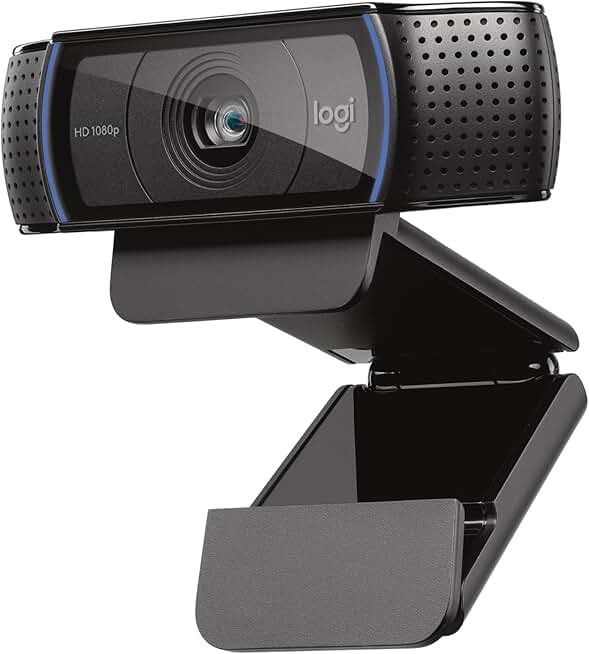
#4 · Best Workhorse Webcam4.6 (38,663)
Logitech C920x HD Pro PC Webcam, Full HD 1080p/30fps Video, Clear Audio, HD Light Correction, Works with Microsoft Teams, Google Meet, Zoom, Nintendo Switch 2’s new GameChat Mode, Mac/Tablet- Black ECOLOGO
$80.21
The C920x is the reliable choice for streamers who prioritize consistency over flashiness. It's been the industry standard for years because it simply works, handles variable lighting reasonably well, and costs less than premium alternatives.
Pros
- + Full HD 1080p at 30fps with H.264 compression keeps file sizes manageable for streaming platforms
- + HD Light Correction automatically adjusts for dim rooms and backlighting—no need for external lights if your room is reasonably lit
- + Universal USB connection works with Windows, Mac, Linux, and all major streaming software
- + Built-in stereo microphone handles basic audio if you're not using a dedicated mic yet
Cons
- − 30fps is adequate for talking heads but feels sluggish for fast-paced gaming or action content
- − Light correction helps but can't match dedicated lighting like the Litra Glow in truly dark rooms

#5 · Best Budget Webcam4.4 (5,527)
Logitech Brio 101 Full HD 1080p Webcam for Meetings, Streaming, Desktop, Laptop, PC - Built-in Mic, Shutter, Works with Zoom, Microsoft Teams, Nintendo Switch 2’s new GameChat Mode, USB-A,-Black ECOLOGO
$24.99
The Brio 101 is for streamers on a tight budget who want a functional webcam without extras. It won't blow you away, but it handles Zoom calls, casual streaming, and basic content creation without complaints.
Pros
- + 1080p at 30fps for the price of a coffee maker—exceptional value for casual streamers and video calls
- + Built-in microphone and privacy shutter included; you get a complete package
- + Works with Zoom, Microsoft Teams, Google Meet, and most streaming platforms without driver hassles
- + Compact design fits easily on any monitor or laptop without taking up desk space
Cons
- − Light correction is basic compared to the C920x; you'll need external lighting in dim rooms
- − 30fps and entry-level sensor mean video quality lags behind mid-range competitors in low light

#6 · Best Webcam with Privacy Shutter4.6 (3,434)
Logitech C920S HD Pro Webcam, Full HD 1080p/30fps Video Calling, Clear Stereo Audio, Light Correction, Privacy Shutter, Works with Skype, Zoom, FaceTime, Hangouts, PC/Mac/Laptop/Tablet/Xbox
$68.55
If privacy and security matter to you, the C920S adds a physical shutter that gives you peace of mind when the camera isn't in use. The audio and video quality match the C920x, so you're paying for the shutter and the mental comfort it provides.
Pros
- + Full HD 1080p at 30fps with HD Light Correction handles variable room lighting without extra gear
- + Privacy shutter physically blocks the lens when you're not streaming—no software tricks, just mechanical security
- + Clear stereo audio built-in; you can start streaming without a separate microphone if needed
- + Works seamlessly with Skype, Zoom, Facetime, and all major platforms
Cons
- − 30fps is fine for talking heads but feels choppy during fast motion or gaming
- − Stereo audio is convenient but won't match a dedicated microphone like the Blue Yeti
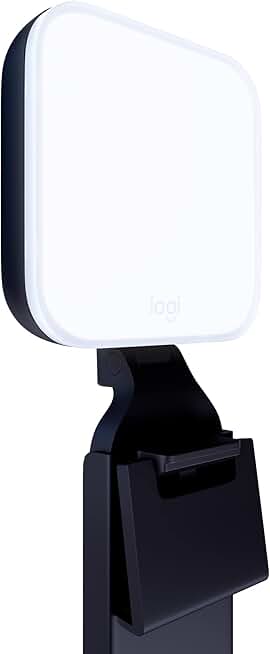
#7 · Best Streaming Light4.5 (3,294)
Logitech for Creators Litra Glow Premium LED Streaming Light with TrueSoft- Computer lighting for video conferencing, Zoom meetings, with adjustable mount and desktop app control for PC/Mac - Graphite
$69.99
The Litra Glow transforms your on-camera appearance without requiring a lighting rig. If your streaming setup lacks professional lighting, this is the single most impactful upgrade you can make after your microphone.
Pros
- + TrueSoft LED technology eliminates harsh shadows and flicker at any brightness level—you look professional on camera instantly
- + Adjustable color temperature (2700K-6500K) lets you match your room lighting or create warm, cool, or neutral tones
- + Clip mount works on monitors, stands, or shelves; no complicated rigging required
- + USB-powered with no battery hassle; cable runs directly to your PC or power bank
Cons
- − Doesn't include a stand in the box—you need to mount it on a monitor or buy a separate light stand
- − Single light source works best for solo streamers; multi-camera setups may need two units for balanced lighting

#8 · Best for Fast-Motion Streaming4.4 (2,960)
Logitech StreamCam Premium Webcam for Streaming and Content Creation, Full HD 1080p 60 fps, Works with Microsoft Teams, Google Meet, Zoom, Nintendo Switch 2’s new GameChat mode, for PC/Mac – Graphite
$149.99
The StreamCam is for creators who stream fast-paced content and need smooth motion capture. If you're doing gaming, esports, or action-heavy streams, the 60fps upgrade justifies the price over the C920x.
Pros
- + Full HD 1080p at 60fps captures smooth motion for gaming, esports, and action content—no motion blur or stuttering
- + Vertical mounting support lets you stream portrait-mode content for TikTok, Instagram Reels, or mobile-first platforms
- + USB-C connection and compact design make it portable for streaming events or LAN parties
- + Works with OBS, Streamlabs, and all major streaming software without proprietary drivers
Cons
- − 60fps requires more bandwidth and processing power than 30fps alternatives; ensure your PC and internet can handle it
- − Premium pricing reflects the 60fps capability; budget streamers might find the C920x sufficient

#9 · Best Single Multi-Camera Rig4.4 (2,621)
Logitech for Creators Mevo Start, Wireless Live Streaming Camera, 1080p HD Video Quality, Intelligent App Control, Stream via LTE or Wi-Fi - Black
$449.99
The Mevo Start is for creators who want flexibility beyond a desk-mounted setup. If you're streaming events, outdoor content, or need to move your camera around, the wireless freedom and app control make it worth the investment.
Pros
- + Wireless streaming via LTE or Wi-Fi means no cables tethering you to a desk—position cameras anywhere in your space
- + 1080p HD video with intelligent app control lets you switch angles, zoom, and pan from your smartphone or tablet
- + Built-in battery lasts hours per charge; perfect for outdoor streams, events, or roaming content
- + Compact and lightweight—you can mount it on a tripod, wall, or handheld gimbal without strain
Cons
- − Single camera; multi-angle streams require buying multiple units (see the 3-pack option below)
- − Wireless connectivity depends on Wi-Fi or LTE quality; weak signal can cause dropouts or lag

#10 · Best Multi-Camera Streaming System4.4 (2,621)
Logitech for Creators Mevo Start 3-Pack Wireless Live Streaming Cameras, for Multi-Camera HD Video,App Control and Stream via Smartphone or Wi-Fi
$1099.00
The Mevo Start 3-Pack is for professional streamers and content creators who need multi-camera capability without hiring a technical director. If you're streaming podcasts, interviews, or events where multiple angles add value, this system pays for itself in production quality.
Pros
- + Three wireless 1080p cameras with app-controlled switching let you cut between angles without a mixing console
- + LTE and Wi-Fi streaming support means you're not dependent on a single connection type
- + Intelligent app interface shows live previews of all three cameras so you can switch angles in real time
- + Perfect for podcasts, interviews, gaming with multiple angles, or event coverage
Cons
- − High upfront cost ($1100+) requires serious commitment to multi-camera streaming
- − Wireless reliability depends on your network; weak Wi-Fi or LTE coverage can cause sync issues across cameras
Frequently asked questions
Frequently Asked Questions
Final word
The best Logitech streaming gear depends on your priorities and budget. Start with the Blue Yeti microphone—it's the foundation of professional-sounding streams. Add the C920x or StreamCam for video, then layer in a Litra Glow for lighting. If you're streaming events or need multi-camera capability, the Mevo Start system handles that without expensive mixing hardware. All of these tools are proven, reliable, and widely used by creators across Twitch, YouTube, and corporate platforms. Pick your primary need, buy the matching Logitech gear, and upgrade incrementally as your streaming grows.
More logitech gear
More Logitech guides
See all 5 Logitech gear guides across 5 categories.
Browse Logitech gear →More streaming gear guides
Best Blue Streaming Gear in 2026
Find the best Blue streaming gear for 2026. Expert picks for mics, stands, and audio gear for Twitch, YouTube, and podcasting.
Budget Streaming Gear of 2026
Affordable streaming gear 2026: ring lights, mics, webcams & more. Build a pro setup on a budget.
Best Elgato Streaming Gear in 2026
Top Elgato streaming gear for creators: Stream Deck, microphones, capture cards & more. Expert picks for every budget.
Best HyperX Streaming Gear in 2026
Top-rated HyperX streaming gear for creators. Mics, headsets, and accessories ranked by performance and value.
Best Streaming Gear of 2026: Top Picks for Every Budget
Discover the best streaming gear of 2026. Expert roundup of microphones, webcams, lights, and controllers for every budget.
Premium Streaming Gear of 2026
Best premium streaming gear 2026: microphones, webcams, ring lights & controllers for pro-quality streams.