Best Gaming Controllers for Roblox

Updated 2026-04-23 · 10 picks tested

This post contains affiliate links. We may earn a commission at no extra cost to you when you buy through our links. This helps us keep GamePlays running.

Roblox runs smoothly on keyboard and mouse, but a gaming controller transforms how you play—especially for platformers, racing games, and action titles on the platform. Whether you're gaming on PC, mobile, or Nintendo Switch, the right controller eliminates awkward button combinations and gives you precision stick control that keyboard can't match.

We've tested dozens of gaming controllers for Roblox compatibility and performance. This guide covers wired and wireless options, budget picks, and premium controllers with Hall Effect joysticks that resist stick drift. You'll find controllers optimized for phone gaming, PC play, and cross-platform versatility. Every pick here works with Roblox—no driver headaches, no compatibility surprises. Let's find the best gaming controller for your setup.

Buyer's guide

When picking a gaming controller for Roblox, focus on these key factors:

Connection Type: Wired controllers cost less and eliminate latency entirely—ideal for competitive play. Wireless options give you freedom of movement but require charging. 2.4GHz wireless is faster than Bluetooth for gaming.

Joystick Technology: Hall Effect joysticks use magnetic sensors instead of physical contacts, meaning they resist stick drift far longer than traditional analog sticks. If you play Roblox daily, Hall Effect is worth the extra cost.

Polling Rate: A 1000 Hz polling rate (1ms response time) beats standard 125 Hz for fast-paced games. This matters most in action titles; slower games won't feel the difference.

Platform Compatibility: Check if the controller works with your specific platform. PC controllers don't always work with phones. Some controllers support Switch, PC, and Android simultaneously—these are versatile picks if you game across devices.

Ergonomics: Roblox sessions can run long. Test grip comfort, button placement, and weight. Smaller hands need compact controllers; larger hands need wider frames. RGB lighting looks cool but drains battery faster on wireless models.

Vibration and Feedback: Dual vibration motors add immersion in action games but aren't essential for Roblox. Skip this feature if battery life matters more than feedback.

Budget Reality: You don't need a $100+ controller for Roblox. Solid options exist at $15–$25. Spend more only if you want premium features like Hall Effect joysticks or cross-platform support.

The picks

Logitech G F310 Wired Gamepad Controller Console Like Layout 4 Switch D-Pad PC - Blue/Black
#1 · Best Budget Pick4.4 (21,169)

Logitech G F310 Wired Gamepad Controller Console Like Layout 4 Switch D-Pad PC - Blue/Black

$18.34

The Logitech G F310 is the budget controller that actually works. Wired means zero lag, and the console-style layout feels familiar if you've played on PlayStation or Xbox. You're sacrificing wireless freedom and stick longevity, but for casual Roblox play, this is unbeatable value.

Pros

  • + Ultra-affordable at $18.34 with solid 4.4★ rating
  • + Wired connection eliminates latency and charging hassles
  • + Console-like layout feels natural for Roblox platformers
  • + Proven reliability with 21,000+ reviews

Cons

  • Wired design limits movement range
  • Standard joysticks prone to drift over time
Check price on Amazon →
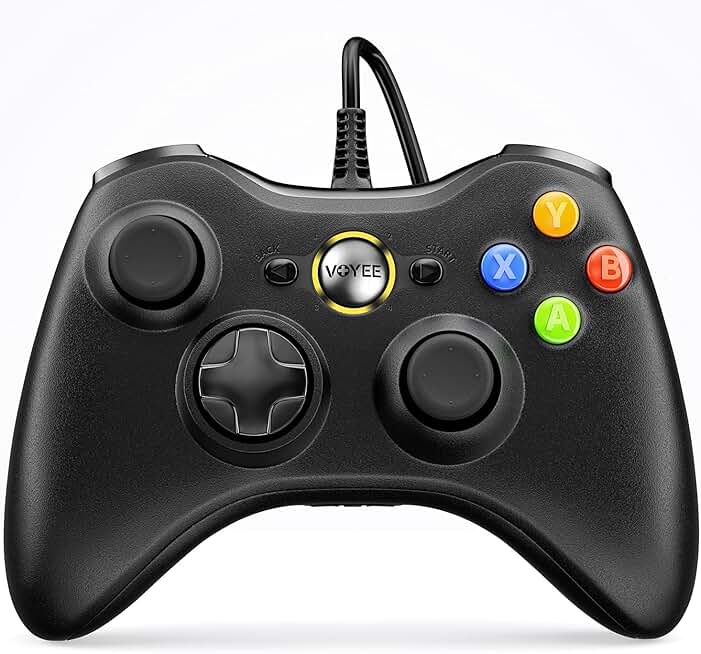
VOYEE PC Controller, Wired Controller Compatible with Microsoft Xbox 360 & Slim/PC Windows 10/8/7, with Upgraded Joystick, Double Shock | Enhanced (Black)
#2 · Best for Xbox-Style Players4.3 (22,929)

VOYEE PC Controller, Wired Controller Compatible with Microsoft Xbox 360 & Slim/PC Windows 10/8/7, with Upgraded Joystick, Double Shock | Enhanced (Black)

$15.98

The VOYEE PC Controller is the cheapest entry point for Roblox gaming. If you're familiar with Xbox controls, this wired option delivers that same button layout without the premium price tag. It's a no-frills workhorse that gets the job done.

Pros

  • + Xbox 360-compatible layout with dual shock vibration
  • + Wired reliability at an even lower price ($15.98)
  • + Upgraded joysticks reduce early drift
  • + 22,900+ reviews confirm widespread Roblox compatibility

Cons

  • Wired cable gets in the way during extended play
  • Basic vibration motor lacks precision feedback
Check price on Amazon →
8BitDo Ultimate 2C Wireless Controller for Windows PC and Android, with 1000 Hz Polling Rate, Hall Effect Joysticks and Triggers, and Remappable L4/R4 Bumpers (Green)
#3 · Best Premium Overall4.5 (9,204)

8BitDo Ultimate 2C Wireless Controller for Windows PC and Android, with 1000 Hz Polling Rate, Hall Effect Joysticks and Triggers, and Remappable L4/R4 Bumpers (Green)

$27.99

The 8BitDo Ultimate 2C is the best gaming controller for serious Roblox players. Hall Effect joysticks mean your sticks won't drift after 100 hours of play, and 1000 Hz polling keeps your inputs razor-sharp. Wireless freedom plus premium build quality justifies the cost.

Pros

  • + 1000 Hz polling rate for ultra-responsive gameplay
  • + Hall Effect joysticks eliminate stick drift completely
  • + Wireless 2.4GHz connection with zero lag
  • + Remappable buttons let you customize Roblox controls

Cons

  • Premium price at $27.99 may exceed casual gamers' budgets
  • Requires charging between sessions
Check price on Amazon →
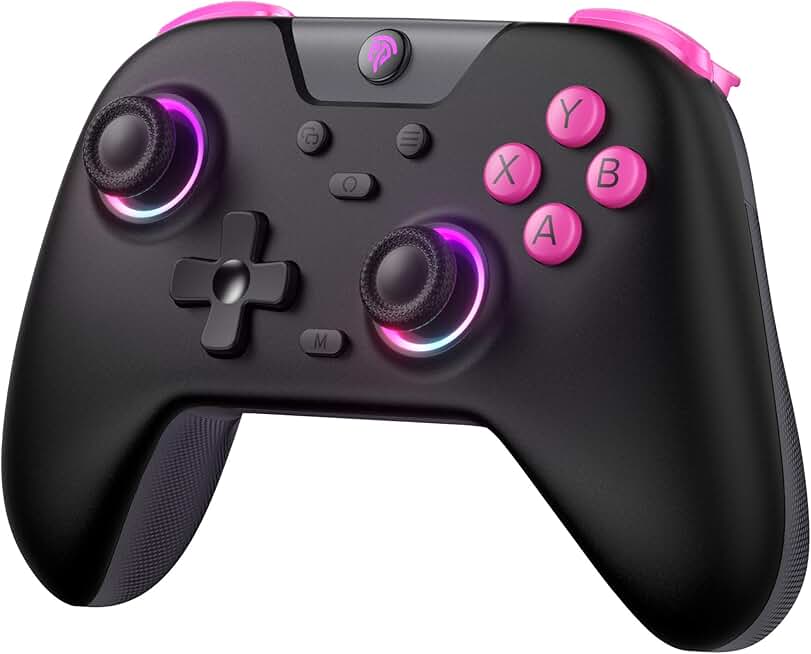
VOYEE Switch Controllers Compatible with Switch/Lite/OLED/PC Windows, 1000mAh Programmable RGB Lightning LED, Wireless Pro Controller with One Key Pairing/Wake Up/Turbo/Vibration
#4 · Best for Cross-Platform Play4.5 (6,655)

VOYEE Switch Controllers Compatible with Switch/Lite/OLED/PC Windows, 1000mAh Programmable RGB Lightning LED, Wireless Pro Controller with One Key Pairing/Wake Up/Turbo/Vibration

$19.99

The VOYEE Switch Controller excels if you play Roblox across multiple platforms. Hall Effect joysticks and cross-device compatibility make this the versatile choice. You get premium features at a mid-range price, perfect for players who switch between PC and mobile.

Pros

  • + Works seamlessly on Switch, PC, and mobile devices
  • + Hall Effect joysticks prevent stick drift
  • + Programmable RGB lighting and wireless connectivity
  • + 1000mAh battery handles 20+ hours of Roblox sessions

Cons

  • Slightly pricier at $19.99 for the feature set
  • RGB lighting drains battery faster if always enabled
Check price on Amazon →
EasySMX 2.4G Wireless Gaming Controller for Windows PC, Steam Deck, PS3 & Android TV Box, Plug and Play Gamepad with Dual Vibration, 4 Back Paddles, Up to 14-Hour Battery Life
#5 · Best for Steam Deck & PC4.2 (5,896)

EasySMX 2.4G Wireless Gaming Controller for Windows PC, Steam Deck, PS3 & Android TV Box, Plug and Play Gamepad with Dual Vibration, 4 Back Paddles, Up to 14-Hour Battery Life

$19.99

The EasySMX 2.4G is ideal if you play Roblox on PC and Steam Deck. Wireless 2.4GHz connection is faster than Bluetooth, and the plug-and-play setup means no driver downloads. Dual vibration adds immersion without breaking the bank.

Pros

  • + 2.4GHz wireless with plug-and-play setup on Windows
  • + Dual vibration motors enhance action game feedback
  • + Works with Steam Deck, PS3, and Android TV Box
  • + Budget-friendly at $19.99

Cons

  • Standard joysticks lack Hall Effect protection
  • Polling rate not specified—likely standard 125 Hz
Check price on Amazon →
AceGamer Aurora II 2.4G Wireless Bluetooth Controller for PC/Android/Switch/iOS/Switch 2/Steam Deck with Rotary Motors, RGB Hall Effect Joysticks - Upgraded PC Gaming Controller and Back Buttons Lock
#6 · Best Multi-Device Wireless4.3 (2,496)

AceGamer Aurora II 2.4G Wireless Bluetooth Controller for PC/Android/Switch/iOS/Switch 2/Steam Deck with Rotary Motors, RGB Hall Effect Joysticks - Upgraded PC Gaming Controller and Back Buttons Lock

$21.98

The AceGamer Aurora II bridges the gap between budget and premium. Hall Effect joysticks plus multi-platform support make this a smart pick for Roblox players who game across devices. Rotary motors feel smoother than standard vibration.

Pros

  • + Supports PC, Android, Switch, iOS, and Steam Deck
  • + Hall Effect joysticks resist drift
  • + Rotary motors deliver precise haptic feedback
  • + RGB lighting customizable via app

Cons

  • Mid-range price at $21.98 limits budget shoppers
  • Requires app for full customization features
Check price on Amazon →
BACKBONE One Mobile Gaming Controller, USB-C Phone Controller for Android & iPhone 15/16/17 Series, 2nd Gen, Play Xbox, PlayStation, Fortnite, Call of Duty & More, With 3-Months of Apple Arcade Access
#7 · Best for Mobile Roblox4.1 (3,530)

BACKBONE One Mobile Gaming Controller, USB-C Phone Controller for Android & iPhone 15/16/17 Series, 2nd Gen, Play Xbox, PlayStation, Fortnite, Call of Duty & More, With 3-Months of Apple Arcade Access

$99.99

The BACKBONE One is the best gaming controller if you play Roblox primarily on your phone. The clip-on design and dedicated mobile optimization beat pairing a standard controller with your device. Worth the investment for serious mobile gamers.

Pros

  • + Clips directly to iPhone 15/16 and Android phones
  • + Plays Xbox, PlayStation, and Fortnite via cloud gaming
  • + Compact design fits in backpack for portable gaming
  • + Second-gen build improves grip and durability

Cons

  • Expensive at $99.99—premium mobile-only option
  • Limited to phone gaming; no PC or console support
Check price on Amazon →
EasySMX X15 Wireless PC Controller with Hall Effect Joysticks & Triggers, RGB Lighting, 2 Back Buttons, 1000mAh Battery, Bluetooth Game Controller for Windows PC, Steam, Switch & Android
#8 · Best for Advanced Players4.2 (2,614)

EasySMX X15 Wireless PC Controller with Hall Effect Joysticks & Triggers, RGB Lighting, 2 Back Buttons, 1000mAh Battery, Bluetooth Game Controller for Windows PC, Steam, Switch & Android

$35.99

The EasySMX X15 targets players who want every competitive advantage. Hall Effect joysticks, back buttons, and long battery life make this ideal for grinding Roblox games where every input counts. You're paying for precision and durability.

Pros

  • + Hall Effect joysticks and triggers eliminate drift
  • + 1000mAh battery lasts 20+ hours per charge
  • + 2 programmable back buttons for complex Roblox builds
  • + RGB lighting and Bluetooth connectivity

Cons

  • Higher price at $35.99 for advanced features
  • Back buttons require remapping for each game
Check price on Amazon →
EasySMX X05 2.4g Wireless Gaming Controller for PC/Steam/iPhone/Android/Switch - Bluetooth Controller Gamepad with Hall Effect, RGB Lights and Turbo, Anti-Drift Controller
#9 · Best Value with Hall Effect4.0 (3,403)

EasySMX X05 2.4g Wireless Gaming Controller for PC/Steam/iPhone/Android/Switch - Bluetooth Controller Gamepad with Hall Effect, RGB Lights and Turbo, Anti-Drift Controller

$20.69

The EasySMX X05 delivers Hall Effect joysticks without the premium price. If you want drift-resistant sticks for Roblox without spending $30+, this hits the sweet spot. Turbo mode is a bonus feature you may never use, but it's there if you need it.

Pros

  • + Hall Effect joysticks at just $20.69—excellent value
  • + 2.4G wireless with RGB lights
  • + Works on PC, Steam, iPhone, Android, and Switch
  • + Turbo mode for rapid-fire actions

Cons

  • Turbo mode can feel gimmicky in Roblox
  • RGB drains battery if left on constantly
Check price on Amazon →
Mocagen MC1 Phone Controller for iPhone(All Model)/Android - Hall Effect Joystick, Enhanced Grip, Case-Friendly, Wireless Mobile Gaming Controller with 7 Lights Color, Travel Dust Bag, Turbo, Triggers
#10 · Best Mobile-Focused Design4.3 (478)

Mocagen MC1 Phone Controller for iPhone(All Model)/Android - Hall Effect Joystick, Enhanced Grip, Case-Friendly, Wireless Mobile Gaming Controller with 7 Lights Color, Travel Dust Bag, Turbo, Triggers

$39.99

The Mocagen MC1 is purpose-built for mobile Roblox. Hall Effect joysticks and case-friendly design mean you're not fumbling with phone removal mid-game. If mobile is your primary platform, this controller's ergonomics and drift resistance justify the cost.

Pros

  • + Hall Effect joysticks for drift-free mobile gaming
  • + Case-friendly design works with phone cases on
  • + Enhanced grip prevents hand fatigue during long Roblox sessions
  • + Wireless connectivity across iPhone and Android

Cons

  • Premium price at $39.99 for mobile-only use
  • Limited to phone gaming; no PC or console support
Check price on Amazon →

Frequently Asked Questions

Final word

The best gaming controller for Roblox depends on your platform and budget. For pure value, the Logitech G F310 at $18 is unbeatable. If you want wireless with Hall Effect joysticks, the 8BitDo Ultimate 2C is the premium pick. Mobile gamers should grab the BACKBONE One for seamless phone integration, or the Mocagen MC1 for case-friendly Hall Effect joysticks.

Most of these gaming controllers work across multiple Roblox titles, from obby games to combat simulators. Invest in Hall Effect joysticks if you play daily—stick drift ruins the experience after a few months of standard joysticks. Start with a budget controller to test compatibility, then upgrade to wireless with better joysticks once you know your preferences. Happy gaming.

More gaming controllers guides