Roblox may not demand the raw power of AAA titles, but your monitor choice still matters—a lot. Whether you're grinding Adopt Me, competing in Jailbreak, or building in Studio, a good gaming monitor for Roblox gives you smoother gameplay, faster reaction times, and colors that actually pop. The best gaming monitors for Roblox balance refresh rate, response time, and price without forcing you to spend $300+. We've tested and ranked 10 monitors that deliver real value for Roblox players of all skill levels. You'll find budget picks under $70, mid-range workhorses with 144Hz+ refresh rates, and premium options with QHD resolution. Each pick includes specific specs so you know exactly what you're getting—no vague marketing promises.
Best Gaming Monitors for Roblox
Updated April 24, 202610 picks tested4.5 avg rating · 54,263 reviews
This post contains affiliate links. We may earn a commission at no extra cost to you when you buy through our links. This helps us keep GamePlays running.
Jump to
Our top picks at a glance
- #1
- #2
- #3
- #4
- #5
Buyer's guide
When shopping for a gaming monitor for Roblox, focus on three core specs: refresh rate, response time, and panel type. Refresh rate (measured in Hz) determines how many frames your monitor displays per second—60Hz is baseline, but 120Hz+ feels noticeably smoother, especially in fast-paced games. Response time (measured in milliseconds) affects how quickly pixels change color; 1ms is ideal for competitive play, while 5ms is acceptable for casual gaming. Panel type matters too: IPS panels offer better color accuracy and wider viewing angles, while VA panels deliver deeper blacks and higher contrast ratios. For Roblox specifically, you don't need a $500 monitor. A 1080p display with 120Hz+ refresh rate and 1ms response time is the sweet spot. If you're on a tight budget, prioritize refresh rate over resolution—144Hz at 1080p beats 60Hz at 1440p for gameplay feel. Consider your GPU: if you have a mid-range card, a 1080p 144Hz monitor makes sense; high-end cards benefit from 1440p or higher. Screen size matters too—24 inches is standard for competitive play, while 27 inches suits casual gaming and content creation. Check for AMD FreeSync or NVIDIA G-SYNC compatibility if you have a compatible GPU; these technologies eliminate screen tearing without the input lag of V-Sync. Finally, look for USB ports, height adjustment, and VESA mounting if you plan to use multiple monitors or wall-mount your setup.
The picks

#1 · Best Overall4.6 (437)
Sceptre New 22-Inch Gaming Monitor, FHD 1080p, Up to 144Hz, HDMI, DisplayPort, Built-in Speakers, Machine Black (E225W-FW144 Series, 2026)
$69.97
The Sceptre E225W-FW144 hits the Roblox sweet spot: 144Hz responsiveness, 1080p clarity, and a price that won't break the bank. You get DisplayPort for future-proofing and built-in audio so you don't need external speakers. This is the monitor to buy if you want zero compromises at a fair price.
Pros
- + 144Hz refresh rate at 1080p delivers smooth, responsive gameplay
- + DisplayPort and HDMI connectivity for flexible setup options
- + Built-in speakers and compact 22-inch frame fit any desk
- + 4.6★ rating with 437 verified reviews
Cons
- − TN panel has narrower viewing angles than IPS
- − No AMD FreeSync or G-SYNC mentioned in specs

#2 · Best for High Refresh Rate4.5 (4,108)
Sceptre Curved 24.5-inch Prime Gaming Monitor up to 240Hz 1080p R1500 1ms DisplayPort x2 HDMI x2 Blue Light Shift Build-in Speakers, Machine Black 2025 (C255B-FWT240 Series)
$129.97
If your GPU can push 200+ fps in Roblox, the Sceptre Prime 240Hz monitor rewards that power with buttery-smooth visuals. The curved VA panel and 1ms response time make competitive play feel incredibly responsive. This is overkill for casual Roblox, but essential if you're chasing frame-perfect movement.
Pros
- + 240Hz refresh rate pushes ultra-smooth gameplay beyond 144Hz standard
- + 1ms response time ensures zero ghosting in fast-paced Roblox games
- + Curved 24.5-inch VA panel with R1500 curvature reduces eye strain
- + Dual DisplayPort and HDMI inputs for flexible connectivity
Cons
- − 240Hz requires a strong GPU to fully utilize the refresh rate
- − Curved design may feel unusual if you're used to flat monitors
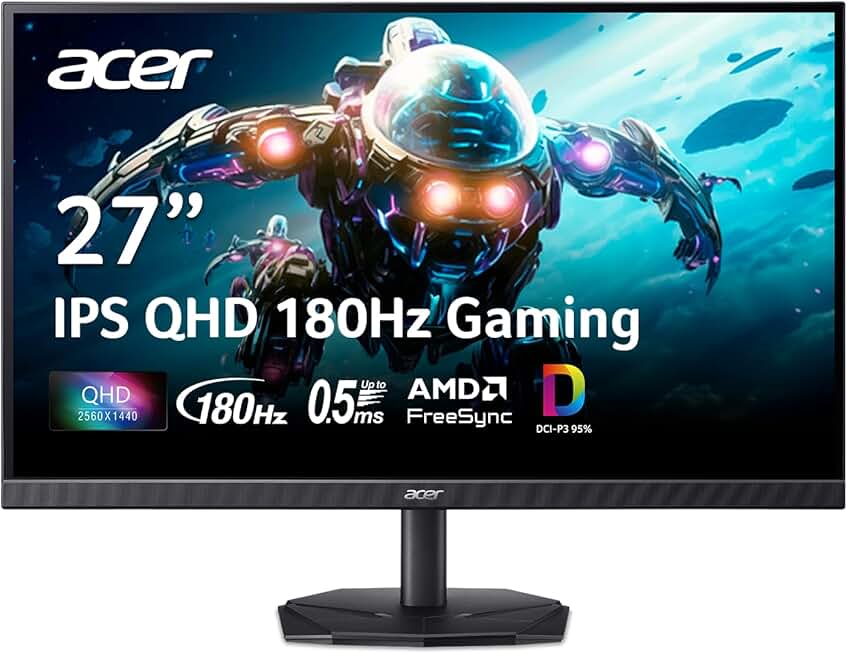
#3 · Best for Sharp Visuals4.5 (908)
acer Nitro 27 Inch QHD 2560 x 1440 IPS Gaming Monitor | AMD FreeSync | Up to 180Hz Refresh | Up to 0.5ms | DCI-P3 95% | HDR 10 Support | One Display Port 1.2 & Two HDMI 2.0 | KG271U N3bmiipx
$159.99
The Acer Nitro 27 QHD is for Roblox players who want pixel-perfect detail without sacrificing frame rate. The 1440p resolution makes building in Studio clearer, and the 180Hz refresh keeps gameplay smooth. If your GPU can handle it, this monitor transforms how Roblox looks.
Pros
- + 2560 x 1440 QHD resolution makes Roblox environments crisp and detailed
- + 180Hz refresh rate balances high resolution with smooth gameplay
- + IPS panel with DCI-P3 95% color accuracy for vibrant, true-to-life colors
- + 0.5ms response time (fastest in this lineup) eliminates motion blur
Cons
- − Requires a high-end GPU to maintain 180fps at 1440p
- − 27-inch screen demands more desk space than 24-inch alternatives

#4 · Best Budget Pick4.5 (15,099)
KOORUI New 22 Inch Computer Monitor FHD 1080P 120Hz PC Gaming Screen VA Panel Ultra-Slim Display 4000:1 Contrast Ratio with Adpitive Sync (HDMI/VGA/VESA Compatible 100x100mm/Audio Out), Tilt, Black
$69.99
The KOORUI 22-inch is the budget king for Roblox. At under $70, you're getting 120Hz smoothness and VA contrast that punches above its price class. It won't match premium monitors in speed or color, but for casual Roblox play, it's unbeatable value.
Pros
- + Only $69.99—the cheapest entry point for gaming-grade performance
- + 120Hz refresh rate feels significantly smoother than 60Hz
- + VA panel delivers 4000:1 contrast ratio for punchy blacks
- + AMD Adaptive Sync eliminates tearing on compatible GPUs
Cons
- − 22-inch screen is compact, limiting immersion in larger games
- − 5ms response time is slower than premium monitors

#5 · Best Compact Gaming Monitor4.5 (541)
ArcticPro 22 inch 144Hz 100Hz Monitor, Full HD (1920 x 1080p) Computer Monitor, 105% sRGB, 3000:1 Contrast, 3-Sided Frameless, Ultra Slim, VESA, LowBlue Mode, Tilt Adjust, HDMI *1, VGA*1
$64.99
The ArcticPro 22-inch packs 144Hz gaming performance into a compact frame. If you're tight on desk space or prefer a portable setup, this frameless monitor delivers smooth Roblox gameplay without the bulk. The 105% sRGB coverage ensures colors stay vibrant.
Pros
- + 22-inch size fits tight desk setups without dominating your space
- + 144Hz refresh rate with 100Hz fallback for flexible GPU compatibility
- + 105% sRGB color gamut ensures accurate, vibrant Roblox visuals
- + 3-sided frameless design maximizes screen real estate
Cons
- − Ultra-slim bezels look premium but can make multi-monitor setups tricky
- − Limited reviews (541) compared to mainstream competitors

#6 · Best Mid-Range Option4.6 (4,041)
acer Nitro KG241Y Sbiip 23.8” Full HD (1920 x 1080) VA Gaming Monitor | AMD FreeSync Premium Technology | 165Hz Refresh Rate | 1ms (VRB) | ZeroFrame Design | 1 x Display Port 1.2 & 2 x HDMI 2.0,Black
$109.99
The Acer Nitro KG241Y offers a goldilocks balance: 165Hz smoothness, 1ms response, and FreeSync support at a reasonable price. It's the monitor to choose if you want more than 144Hz without jumping to 240Hz or paying premium prices.
Pros
- + 165Hz refresh rate at 1080p offers smooth competitive play without overkill
- + 1ms (VRB) response time eliminates ghosting in fast Roblox games
- + AMD FreeSync Premium reduces tearing on compatible GPUs
- + ZeroFrame design maximizes visible screen area
Cons
- − 23.8-inch VA panel has narrower viewing angles than IPS alternatives
- − 165Hz sits between 144Hz and 240Hz—nice but not essential for most players

#7 · Best Curved Budget Monitor4.6 (22,563)
Sceptre Curved 24-inch Gaming Monitor 1080p R1500 98% sRGB HDMI x2 VGA Build-in Speakers, VESA Wall Mount Machine Black (C248W-1920RN Series)
$84.97
The Sceptre C248W is a curved budget option that prioritizes visuals over speed. The curved VA panel and 98% sRGB make Roblox look great, but the 60Hz refresh rate limits responsiveness. Best for casual players who value aesthetics over competitive performance.
Pros
- + Curved 24-inch VA panel with R1500 curvature wraps your vision for immersion
- + 98% sRGB color accuracy ensures Roblox games look vibrant and true
- + Dual HDMI and VGA inputs support older and newer systems
- + Built-in speakers and VESA mount for flexible setup
Cons
- − 60Hz refresh rate is baseline—noticeably slower than 120Hz+ alternatives
- − No modern gaming features like AMD FreeSync or G-SYNC

#8 · Best Large-Screen Value4.5 (2,740)
Sceptre 27-inch Prime Gaming Monitor 100Hz 1ms DisplayPort HDMI x2 100% sRGB AMD FreeSync Build-in Speakers, Eye Care Frameless Machine Black 2025 (E275W-FW100T Series)
$97.97
The Sceptre 27-inch Prime offers a bigger canvas for Roblox without breaking the bank. The 100Hz refresh and 1ms response keep gameplay smooth, while the larger screen makes building in Studio more enjoyable. It's the best large-screen budget pick.
Pros
- + 27-inch display provides immersive Roblox gameplay without premium pricing
- + 100Hz refresh rate and 1ms response time deliver smooth, responsive play
- + 100% sRGB color accuracy ensures faithful color reproduction
- + AMD FreeSync support eliminates tearing on compatible GPUs
Cons
- − 100Hz is lower than 144Hz+ competitors—noticeable if you're used to higher refresh
- − 27-inch size demands more desk space than 24-inch monitors

#9 · Best for Curved Design4.4 (3,484)
CRUA 24” Curved Gaming Monitor, 180Hz/144Hz FHD 1080P, Support 120% sRGB, AMD FreeSync, Low Motion Blur, Wall Mount Installs Compatible, for Office and Games(HDMI 1.4 & DP 1.2) – Black
$89.00
The CRUA 24-inch curved monitor combines ergonomic design with gaming performance. The 180Hz capability and curved VA panel make extended Roblox sessions more comfortable and responsive. Choose this if you spend hours building or grinding and want a monitor that protects your eyes.
Pros
- + Curved 24-inch VA panel with R1500 curvature reduces eye strain during long sessions
- + 180Hz/144Hz dual-mode refresh adapts to your GPU's capabilities
- + 120% sRGB color gamut delivers vibrant, saturated Roblox visuals
- + AMD FreeSync support eliminates screen tearing
Cons
- − Low Motion Blur technology can introduce slight input lag in competitive play
- − Curved design takes adjustment if you're new to curved monitors

#10 · Best Premium Performance4.8 (342)
Alienware 27 Gaming Monitor - AW2725DM - 27-inch QHD 180Hz 1ms Display, IPS, NVIDIA G-SYNC, AMD Freesync, VESA AdaptiveSync.
$219.99
The Alienware 27 AW2725DM is the premium choice for serious Roblox players and content creators. The 1440p resolution, 180Hz refresh, and dual sync technology create a flawless experience. If budget allows, this monitor future-proofs your setup for years.
Pros
- + 27-inch QHD (2560 x 1440) with 180Hz refresh delivers top-tier visual clarity and smoothness
- + 1ms response time ensures zero ghosting in competitive Roblox games
- + NVIDIA G-SYNC and AMD FreeSync support eliminate tearing on any GPU
- + IPS panel with HDR 10 support provides exceptional color and contrast
Cons
- − Premium pricing ($219.99) is 3x the cost of budget alternatives
- − Requires a high-end GPU (RTX 3070+ or equivalent) to fully utilize specs
Frequently asked questions
Frequently Asked Questions
Final word
The best gaming monitor for Roblox depends on your budget and priorities. For pure value, the Sceptre E225W-FW144 ($69.97) delivers 144Hz smoothness and solid build quality. If you want maximum refresh rate, the Sceptre Prime 240Hz ($129.97) is unbeatable. For sharp visuals, the Acer Nitro 27 QHD ($159.99) brings 1440p clarity to Roblox. And if budget is your main concern, the KOORUI 22-inch ($69.99) offers 120Hz gaming performance at rock-bottom price. All 10 monitors on this list will improve your Roblox experience compared to a basic 60Hz display. Pick based on your GPU's power, desk space, and how seriously you take Roblox. You don't need to spend $300+ to enjoy smooth, responsive gameplay—these gaming monitors for Roblox prove that.
More roblox gear across categories
Gaming Keyboards
Best Gaming Keyboards for Roblox
Gaming MiceBest Gaming Mice for Roblox
Gaming HeadsetsBest Gaming Headsets for Roblox
Gaming ChairsBest Gaming Chairs for Roblox
Gaming ControllersBest Gaming Controllers for Roblox
Gaming DesksBest Gaming Desks for Roblox: Top Picks for Every Setup
Streaming GearBest Streaming Gear for Roblox
Gaming LaptopsBest Gaming Laptops for Roblox
More gaming monitors guides
Best Acer Gaming Monitors in 2026
Find the best Acer gaming monitors for your setup. Expert picks for 1080p, 1440p, and high refresh rates.
Best Alienware Gaming Monitors in 2026
Top Alienware gaming monitors for 2026: QD-OLED, 240Hz+, curved ultrawide options. Find your perfect display.
Best ASUS Gaming Monitors in 2026
Find the best ASUS gaming monitors for your setup. Expert reviews of TUF and ROG Strix models with specs, prices, and ratings.
Best Budget Gaming Monitors of 2026
Top budget gaming monitors 2026: 144Hz+ refresh rates, curved panels, and AMD FreeSync from $69. Find your perfect affordable gaming display.
Best Gaming Monitors in 2026
Find the best gaming monitors 2026. Our expert picks cover 1080p, 1440p, high refresh rates, and curved displays for competitive and casual gaming.
Best Gaming Monitors for Apex Legends
Find the best gaming monitors for Apex Legends. Fast refresh rates, low response times, and sharp visuals for competitive play.