Whether you're building in Creative Mode or competing in obstacle courses, your keyboard makes a real difference in Roblox performance. The right gaming keyboard for Roblox gives you faster response times, better key durability, and customizable controls that let you bind macros for quick actions. We tested 10 keyboards across different price points and styles—from compact one-handed pads to full mechanical boards—to find which ones actually deliver for Roblox players. This guide covers what to look for, our top picks ranked by overall value and performance, and answers to questions you probably have about gaming keyboards.
Best Gaming Keyboards for Roblox
Updated April 24, 202610 picks tested4.5 avg rating · 115,600 reviews
This post contains affiliate links. We may earn a commission at no extra cost to you when you buy through our links. This helps us keep GamePlays running.
Jump to
Our top picks at a glance
- #1
- #2
- #3
- #4
- #5
Buyer's guide
When shopping for a gaming keyboard for Roblox, focus on these core specs: polling rate (1000Hz is standard for wired boards and keeps input lag minimal), anti-ghosting (lets you press multiple keys simultaneously without missed inputs), and key travel distance (mechanical switches at 4mm feel snappier than membrane keyboards). RGB lighting matters less for performance but helps with visibility in dark rooms. Consider your hand size and play style—Roblox players who use building tools benefit from macro keys or one-handed layouts, while parkour players want a full keyboard for movement control. Wired keyboards eliminate battery concerns and latency, which matters in competitive Roblox games. Budget options under $30 work fine for casual play but may have cheaper switches that wear out faster. Mid-range boards ($30–$60) offer better build quality and switch options. Avoid keyboards with excessive software bloat—you want plug-and-play reliability. Water resistance (IP32 rating) is useful if you snack while gaming. Finally, check if the keyboard uses hot-swappable sockets; this lets you swap out individual switches if one fails, extending the board's lifespan significantly.
The picks

#1 · Best Overall for Roblox4.4 (24,853)
Gaming Keyboard and Mouse and Mouse pad and Gaming Headset, Wired LED RGB Backlight Bundle for PC Gamers and Xbox and PS4 Users - 4 in 1 Edition Hornet RX-250
$40.49
This bundle delivers exceptional value for Roblox beginners and casual players. You get all four essential peripherals in one purchase, making it the easiest entry point into gaming gear without breaking the bank.
Pros
- + Complete 4-in-1 bundle includes keyboard, mouse, headset, and mousepad—everything you need to start gaming
- + LED RGB backlight with multiple color modes for visibility during long Roblox sessions
- + Works with PC, Xbox, and PS4, so you can use it across multiple platforms
Cons
- − Membrane switches feel less responsive than mechanical alternatives
- − Mouse sensitivity may require adjustment out of the box for precise building in Roblox

#2 · Best Premium Option4.6 (7,920)
SteelSeries Apex 3 RGB Gaming Keyboard – 10-Zone RGB Illumination – IP32 Water Resistant – Premium Magnetic Wrist Rest (Whisper Quiet Gaming Switch)
$49.99
The SteelSeries Apex 3 is built for durability and comfort during extended sessions. The quiet switches and water resistance make it ideal if you share a room or worry about accidental spills near your setup.
Pros
- + 10-zone RGB illumination with customizable lighting profiles via SteelSeries Engine software
- + IP32 water resistance protects against spills during intense Roblox marathons
- + Whisper-quiet switches reduce noise while maintaining responsive feedback for building and parkour
Cons
- − Premium price point at $49.99 may be overkill for casual Roblox players
- − Magnetic wrist rest adds bulk, which some players find unnecessary

#3 · Best for Builders4.6 (4,218)
Redragon K580 VATA RGB LED Backlit Mechanical Gaming Keyboard with Macro Keys & Dedicated Media Controls, Hot-Swappable Socket, Onboard Macro Recording (Blue Switches)
$51.99
The Redragon K580 VATA is purpose-built for Roblox builders who want to optimize their workflow. Macro keys shave seconds off repetitive building tasks, and hot-swappable switches mean you can customize the feel to your preference.
Pros
- + Dedicated macro keys let you assign custom Roblox building commands for faster construction
- + Hot-swappable socket design means you can replace individual switches without tools
- + 16.8M RGB color options with onboard macro recording—no software required for basic setup
Cons
- − Steeper learning curve for macro programming compared to simpler keyboards
- − Mid-range price at $51.99 limits appeal to budget-conscious players
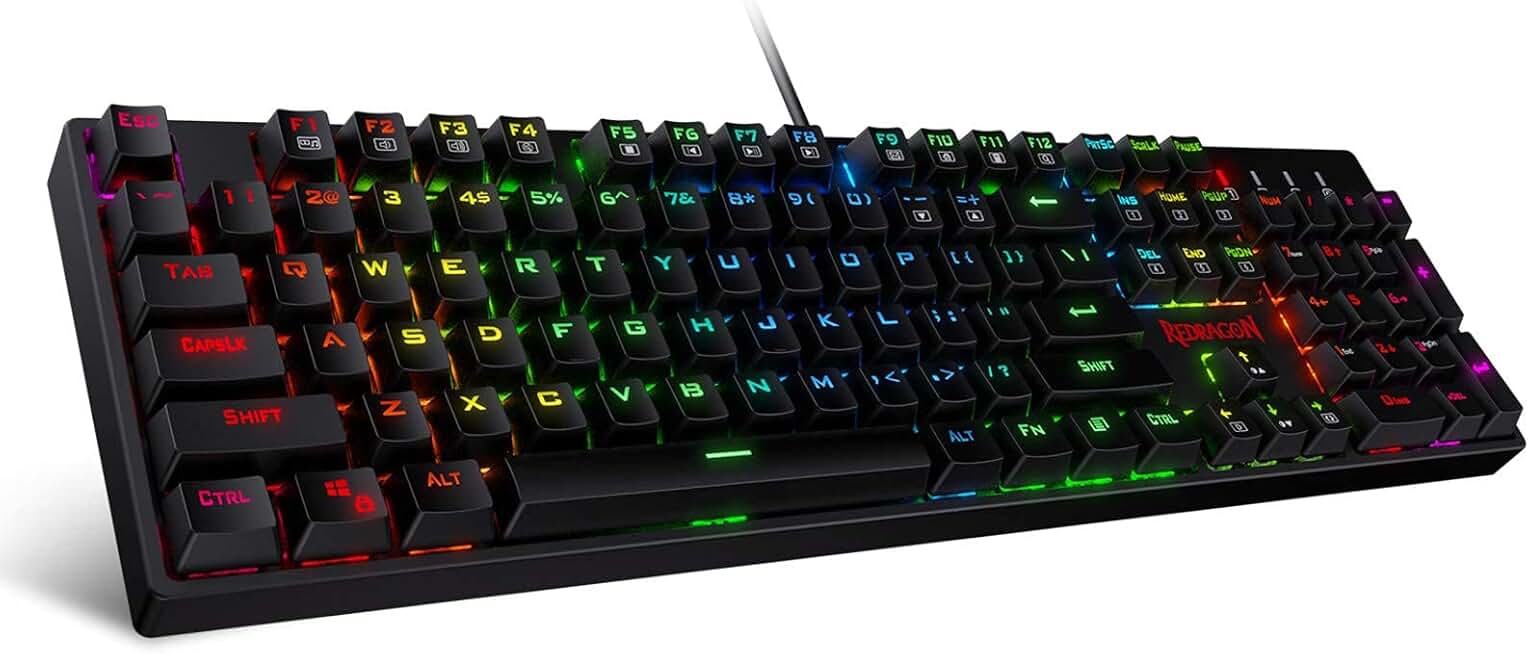
#4 · Best Mechanical Full-Size4.5 (5,103)
Redragon K582 RGB Mechanical Gaming Keyboard, 100% 104 Keys Standard Layout Gaming Keyboard with Double-Shot ABS Keycaps, Dynamic 16.8M RGB Backlit & Linear Red Switch, Redefine Software Supported
$32.99
The Redragon K582 delivers a traditional mechanical keyboard experience at an affordable $32.99. The double-shot keycaps and full layout make it reliable for long Roblox sessions without fatigue.
Pros
- + Full 104-key layout gives you complete control for movement, building, and chat in Roblox
- + Double-shot ABS keycaps resist wear and maintain crisp lettering after months of heavy use
- + 16.8M RGB backlight with dynamic effects keeps your setup visually engaging
Cons
- − Full-size footprint takes up more desk space than compact alternatives
- − Mechanical switches produce audible clicks that may bother roommates

#5 · Best Value Combo4.5 (51,312)
Redragon S101-3 PRO Gaming Keyboard and Mouse, RGB Backlit Programmable Keyboard Mouse with Software, Independent Macro Record Keys, Value Combo Set, New Update Version
$39.99
The Redragon S101-3 PRO is the sweet spot for budget-conscious Roblox players who want both keyboard and mouse. Programmable keys give you flexibility to optimize your control scheme without paying premium prices.
Pros
- + Keyboard and mouse combo at $39.99 gives you two quality peripherals for less than premium single boards
- + Programmable macro keys let you bind Roblox actions without software installation
- + RGB backlit design with independent key customization via included software
Cons
- − Included mouse is basic and may need replacement as you improve at Roblox
- − Build quality feels plasticky compared to premium mechanical options

#6 · Best One-Handed Keypad4.4 (7,393)
Redragon K585 DITI Wired One-Handed RGB Mechanical Gaming Keyboard, 42 Keys Type-C Professional Gaming Keypad w/Upgraded Hot-Swappable Socket, 7 Onboard Macro Keys & Detachable Wrist Rest
$32.99
The Redragon K585 DITI suits Roblox players with cramped desks or those who prefer left-hand gaming. The hot-swappable sockets and mechanical switches justify the $32.99 price for dedicated enthusiasts.
Pros
- + 42-key compact layout fits in a small space and lets you game portably or in tight desk setups
- + Hot-swappable mechanical switches mean you can customize feel and replace worn keys individually
- + Type-C connection provides faster data transfer and works with modern gaming setups
Cons
- − Limited to one hand, so you'll need a separate mouse or trackpad for full Roblox gameplay
- − Learning curve for muscle memory on a 42-key layout takes time

#7 · Best Metal Construction4.4 (4,576)
TECKNET Gaming Keyboard, USB Wired Computer Keyboard, 15-Zone RGB Illumination, IP32 Water Resistance, 25 Anti-ghosting Keys, All-Metal Panel (Whisper Quiet Gaming Switch) Global Recycled Standard
$29.64
The TECKNET keyboard offers durability and anti-ghosting performance at just $29.64. The metal construction and water resistance make it a solid choice for players who want their keyboard to last through years of Roblox sessions.
Pros
- + All-metal panel construction feels premium and resists dents or cracks from accidental impacts
- + 15-zone RGB illumination with 25 anti-ghosting keys ensures no missed inputs during fast Roblox gameplay
- + IP32 water resistance protects your investment from spills and dust
Cons
- − Metal panel adds weight, making it less portable than plastic alternatives
- − Mechanical feel switches aren't true mechanical—they lack the tactile feedback of genuine switches

#8 · Best Complete Starter Kit4.5 (1,936)
RedThunder K10 Wired Gaming Keyboard and Mouse and Wrist Rest Combo, RGB Backlit, Mechanical Feel Anti-ghosting Keyboard + 7D 7200 DPI Mice+Soft Leather Wrist Rest 3 in 1 PC Gamer Accessories(Black)
$36.48
The RedThunder K10 combo at $36.48 bundles everything a beginner needs to play Roblox comfortably. The included wrist rest reduces fatigue during long sessions, and the 7200 DPI mouse handles both building and parkour gameplay.
Pros
- + Keyboard, mouse, and wrist rest combo covers all essentials for comfortable Roblox gaming
- + 7200 DPI mouse with 7 programmable buttons lets you optimize aiming and building controls
- + Mechanical-feel switches with anti-ghosting support fast, responsive Roblox gameplay
Cons
- − Wrist rest may feel too firm for players with wrist sensitivity
- − Mouse sensitivity settings require calibration for precision building in Roblox

#9 · Best Portable Mini Pad4.4 (3,454)
RedThunder One Handed Gaming Keyboard RGB Backlit 35 Keys Portable Mini Gaming Keypad Ergonomic Game Controller for PC Gamer
$23.99
The RedThunder one-handed pad is perfect if you travel to LAN parties or want a secondary Roblox controller. The ergonomic shape and portability make it ideal for casual gaming away from your main setup.
Pros
- + 35-key compact design fits in a backpack or small bag for gaming on the go
- + Ergonomic shape reduces hand strain during extended Roblox play sessions
- + RGB backlit with mechanical feel provides responsive feedback at just $23.99
Cons
- − Limited key count makes it unsuitable as a primary keyboard for full-game control
- − Portable design sacrifices stability—it may shift during intense gameplay

#10 · Best Budget Combo4.4 (4,835)
Keyboard and Mouse Gaming LED Wired Combo with Emitting Character Keyboard 4800DPI 2 Side Button USB Mouse Rainbow Backlit Mechanical Feeling Compatible with PC Raspberry Pi Mac Xbox one ps4
$20.99
If you're brand-new to Roblox and want to test the waters without spending much, this $20.99 combo gets the job done. Don't expect durability or precision, but for casual play, it's hard to beat the price.
Pros
- + Keyboard and mouse combo at just $20.99 is the cheapest entry point for Roblox gaming
- + 4800 DPI mouse with 2 side buttons gives you basic aiming control for parkour games
- + Rainbow backlit mechanical-feeling switches provide visual feedback and responsive typing
Cons
- − Budget build quality means switches and keycaps may wear out faster with heavy use
- − Mouse sensitivity feels sluggish for precision building tasks in Roblox
Frequently asked questions
Frequently Asked Questions
Final word
The best gaming keyboard for Roblox depends on your budget and play style. The SteelSeries Apex 3 RGB offers premium build quality and quiet switches for extended sessions. The Redragon K580 VATA is unbeatable for builders who want macro customization. For value, the 4-in-1 bundle from the second product gives you everything at once. If you're just starting out, the RedThunder K10 combo or the budget option at $20.99 gets you gaming immediately. All 10 keyboards on this list are anti-ghosting and wired, which means they'll handle Roblox's demands without lag. Pick based on your desk space, budget, and whether you prioritize durability or portability—you can't go wrong with any of these options.
More roblox gear across categories
Gaming Mice
Best Gaming Mice for Roblox
Gaming HeadsetsBest Gaming Headsets for Roblox
Gaming MonitorsBest Gaming Monitors for Roblox
Gaming ChairsBest Gaming Chairs for Roblox
Gaming ControllersBest Gaming Controllers for Roblox
Gaming DesksBest Gaming Desks for Roblox: Top Picks for Every Setup
Streaming GearBest Streaming Gear for Roblox
Gaming LaptopsBest Gaming Laptops for Roblox
More gaming keyboards guides
Budget Gaming Keyboards of 2026
Top 10 budget gaming keyboards 2026. RGB, mechanical, compact—all under $120. Expert reviews & buying guide.
Best Compact Gaming Keyboards in 2026
Find the best compact gaming keyboards for 2026. Expert reviews of 60% and tenkeyless boards for gaming, work, and travel.
Best Corsair Gaming Keyboards in 2026
Find the best Corsair gaming keyboards for your setup. Expert reviews of wired, wireless, and mechanical options.
Best Ergonomic Gaming Keyboards in 2026
Top ergonomic gaming keyboards for comfort and performance. Compare split designs, wrist rests, and mechanical switches.
Best Gaming Keyboards in 2026
Find the best gaming keyboards 2026. Expert reviews of mechanical, wireless, and budget options for every gamer.
Best Gaming Keyboards for Apex Legends
Top gaming keyboards for Apex Legends with fast response times, RGB, and durability. Find the best fit for your playstyle.