Final Fantasy XIV demands precision during raids, smooth rotations during dungeons, and reliable inputs during marathon crafting sessions. Your keyboard is the bridge between your brain and your character's actions—whether you're executing a flawless tank rotation or spamming Synthesis macros, you need a keyboard that won't let you down. This guide covers the best gaming keyboards for FFXIV players across every budget and playstyle. We've ranked them by real-world performance, durability, and how well they handle the specific demands of FFXIV's fast-paced combat and macro-heavy systems. Whether you want a compact 60% board for your desk setup or a full-size keyboard with a number pad for crafting macros, you'll find your next FFXIV keyboard here.
Best Gaming Keyboards for Final Fantasy XIV
This post contains affiliate links. We may earn a commission at no extra cost to you when you buy through our links. This helps us keep GamePlays running.
Jump to
Our top picks at a glance
- #1
- #2
- #3
- #4
- #5
Buyer's guide
When shopping for a gaming keyboard for Final Fantasy XIV, focus on three core factors: key rollover, macro programmability, and switch type.
Key Rollover & Anti-Ghosting: FFXIV combat requires you to press multiple keys simultaneously during ability rotations. Look for keyboards with at least 6-key rollover, though N-key rollover (full rollover) is ideal. Anti-ghosting ensures that when you hit multiple keys at once, every input registers—critical for DPS jobs like Dragoon or Ninja where timing and rotation speed matter.
Macro Support: FFXIV players live and die by macros. Check if your keyboard supports programmable keys or if the manufacturer provides software for custom key mapping. Some boards offer dedicated macro keys, while others let you reprogram any key. This is especially important for crafters who need quick access to synthesis rotations.
Switch Type Matters: Mechanical switches (red, blue, brown) offer tactile feedback and durability for long gaming sessions. Membrane keyboards are quieter and cheaper but feel mushy during fast rotations. For FFXIV, linear red switches provide smooth, uninterrupted keypresses—perfect for rapid ability spam. Avoid clicky blues if you're raiding late at night with guildmates on voice chat.
Size Consideration: Full-size keyboards give you a number pad for crafting macros and extra space for your mouse. Compact 60-65% boards save desk real estate but sacrifice the number pad. Tenkeyless (TKL) splits the difference with a familiar layout minus the numpad.
Wireless vs. Wired: Wireless keyboards reduce cable clutter but introduce a tiny input lag (usually imperceptible). For casual content, wireless is fine. For savage raiding where milliseconds matter, wired is safer. Check the polling rate—1000Hz (1ms response) is the gaming standard.
Budget Reality: You don't need a $200 keyboard for FFXIV. Solid mechanical boards start at $25-30. Spend more if you want RGB customization, wireless connectivity, or premium build quality, but the core performance difference plateaus quickly.
The picks
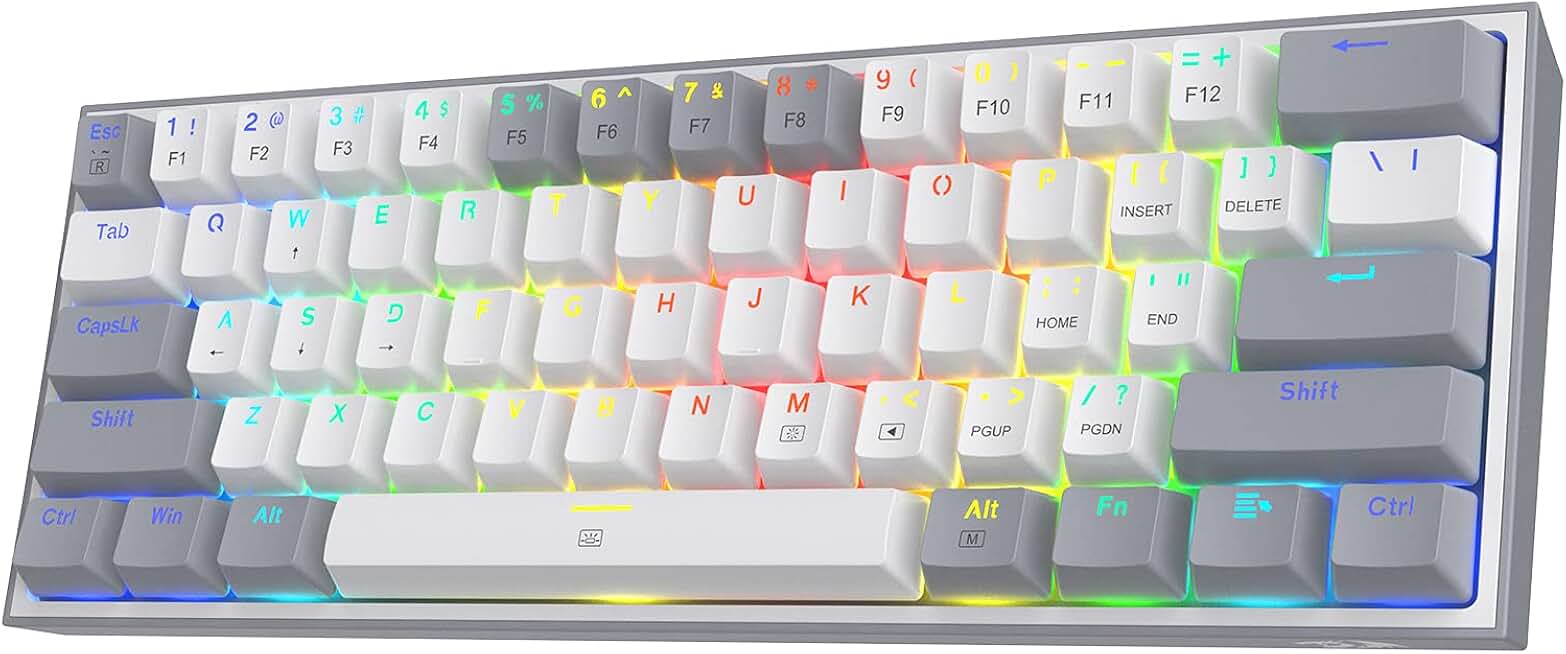
Redragon K617 Fizz 60% Wired RGB Gaming Keyboard, 61 Keys Hot-Swap Compact Mechanical Keyboard w/White and Grey Color Keycaps, Linear Red Switch, Pro Driver/Software Supported
$26.99
The Redragon K617 Fizz is the sweet spot for FFXIV raiders. Its hot-swap mechanical switches and compact form factor make it easy to customize for your playstyle, while the linear reds keep up with fast rotations. You lose the number pad, but for combat-focused players, this is the best value.
Pros
- + Hot-swappable mechanical switches let you customize feel without soldering
- + Compact 60% size saves desk space while keeping all essential keys
- + Linear red switches provide smooth, rapid keypresses for ability spam
- + Affordable price point with solid build quality and 4.6★ rating
Cons
- − No number pad limits macro accessibility for crafters
- − Wired only—no wireless option for cable management

Rii RK100+ Multiple Color Rainbow LED Backlit Large Size USB Wired Mechanical Feeling Multimedia PC Gaming Keyboard,Office Keyboard for Working or Primer Gaming,Office Device
$12.73
The Rii RK100+ proves you don't need to spend big for a functional FFXIV keyboard. The full-size layout with number pad is ideal for crafters, and while the membrane switches won't last as long as mechanical, the price makes it a solid entry point for casual players.
Pros
- + Ultra-affordable at $12.73 with 4.4★ rating across 7,800+ reviews
- + Full-size layout includes number pad for crafting macros
- + Rainbow LED backlit for customizable aesthetics
- + Mechanical-feeling membrane switches provide decent tactile feedback
Cons
- − Membrane switches wear out faster than mechanical under heavy use
- − No programmable macro keys—limited customization
![Redragon Updated S107 Gaming Keyboard and Mouse, RGB Gaming Keyboard and 10000 DPI Mouse Combo with 25-Key Anti-Ghosting, 1K Hz Programmable Mice with Software, Plug & Play to PC, Laptop [Upgrade]](https://m.media-amazon.com/images/I/71aECRRv3vL._AC_UY654_QL65_.jpg)
Redragon Updated S107 Gaming Keyboard and Mouse, RGB Gaming Keyboard and 10000 DPI Mouse Combo with 25-Key Anti-Ghosting, 1K Hz Programmable Mice with Software, Plug & Play to PC, Laptop [Upgrade]
$29.99
If you're building a complete setup, the Redragon S107 combo saves money and hassle. The 25-key anti-ghosting handles FFXIV's simultaneous keypresses, and the bundled mouse eliminates the need for separate purchases. Just know you're getting membrane switches, not mechanical.
Pros
- + Includes a matched 10,000 DPI mouse—saves money versus buying separately
- + 25-key anti-ghosting ensures clean ability rotations during raids
- + Programmable RGB with 1K Hz polling rate for responsive gameplay
- + Solid 4.5★ rating with over 6,100 reviews
Cons
- − Keyboard is membrane-based, not mechanical—less durable for long-term use
- − Mouse may not suit players with larger hands or specific grip preferences

Redragon Mechanical Gaming Keyboard Wired, 11 Programmable Backlit Modes, Hot-Swappable Red Switch, Anti-Ghosting, Double-Shot PBT Keycaps, Light Up Keyboard for PC Mac
$29.99
Redragon's mechanical board with programmable modes is built for FFXIV crafters who live in the workshop. The PBT keycaps won't get shiny from thousands of macro presses, and the 11 backlit modes let you visually organize your rotation steps. The lack of a number pad is the only real compromise.
Pros
- + Double-shot PBT keycaps resist shine and wear from macro spam
- + 11 programmable backlit modes let you color-code your crafting rotations
- + Hot-swappable red switches deliver smooth, consistent inputs
- + Anti-ghosting ensures no missed keypresses during synthesis
Cons
- − Wired only—cable management required on desk
- − No number pad, so crafters lose dedicated numpad macro keys

AULA F75 Pro Wireless Mechanical Keyboard,75% Hot Swappable Custom Keyboard with Knob,RGB Backlit,Pre-lubed Reaper Switches,Side Printed PBT Keycaps,2.4GHz/USB-C/BT5.0 Mechanical Gaming Keyboards Global Recycled Standard
$65.54
The AULA F75 Pro is for FFXIV players who want premium build quality without the full-size footprint. The pre-lubed switches feel buttery out of the box, and the tri-mode wireless keeps your desk clean. Save this for casual content; hardcore raiders should stick with wired.
Pros
- + 75% layout balances compactness with arrow keys and function row
- + Tri-mode wireless (Bluetooth, 2.4GHz, USB-C) works with PC, Mac, and mobile
- + Pre-lubed Reaper switches feel smooth from day one—no break-in period
- + Programmable knob for quick macro access or volume control
Cons
- − Higher price ($65.54) compared to budget boards
- − Wireless introduces minimal input lag—not ideal for savage raiding

GEODMAER 65% Gaming Keyboard, LED Backlit Mini Wired Gaming Keyboard, Ultra-Compact Anti-Ghosting No-Conflict 68 Keys Gaming Wired Keyboard for PC Laptop Gamer
$16.12
GEODMAER's 65% mechanical keyboard splits the difference between ultra-compact and functional. You keep your arrow keys and function row for FFXIV's UI navigation, while the wired connection guarantees responsive ability execution. Best for raiders with limited desk space.
Pros
- + 65% mechanical layout keeps your desk minimal while preserving arrow keys
- + LED backlit with anti-ghosting for reliable raid performance
- + Ultra-compact design fits tight spaces without sacrificing functionality
- + Wired connection ensures zero input lag during combat
Cons
- − No number pad limits crafting macro access
- − Smaller form factor means fewer dedicated keys overall

GEODMAER 65% Gaming Keyboard, Wired Backlit Mini Keyboard, Ultra-Compact Anti-Ghosting No-Conflict 68 Keys Membrane Gaming Wired Keyboard for PC Laptop Windows Gamer
$16.12
This GEODMAER 65% membrane board is perfect for FFXIV players on a tight budget who value quiet gameplay. The compact size keeps your desk clean, and the anti-ghosting handles dungeon runs reliably. You're trading durability for price, but it's a solid starter board.
Pros
- + 65% form factor saves desk space while keeping essential navigation keys
- + Membrane switches are quiet—ideal for late-night raids with guildmates
- + Ultra-affordable at $16.12 with solid 4.4★ rating
- + Anti-ghosting prevents missed keypresses during dungeons
Cons
- − Membrane construction wears faster than mechanical under heavy use
- − No number pad for crafting macro organization

AULA S99 Gaming Keyboard, Wireless Computer Keyboards, Tri-Mode Bluetooth/2.4GHz/USB-C Custom Creamy Keyboard with Number Pad, RGB Backlit Media Knob Cute Programmable Keyboard for PC Gamer - Green Global Recycled Standard
$27.99
The AULA S99 is designed for FFXIV crafters and raiders who need organized macro access. The full-size layout with number pad lets you dedicate numpad keys to specific synthesis steps, while the tri-mode wireless keeps your setup flexible. Skip this for hardcore raiding.
Pros
- + Full-size layout with dedicated number pad for crafting macros
- + Tri-mode wireless (Bluetooth, 2.4GHz, USB-C) connects to multiple devices
- + Media control knob for quick volume adjustments during raids
- + Creamy aesthetic with RGB backlit keys for customization
Cons
- − Wireless connection adds imperceptible lag—not for savage content
- − Larger footprint requires more desk space than compact boards

AULA 99 Wireless Keyboard, Custom Computer Keyboard, Tri-Mode Bluetooth 5.0/2.4GHz/USB-C Cute Creamy Gaming Keyboards with Number Pad, RGB Backlit Media Knob Programmable Keybaord for PC Gamer - Grey Global Recycled Standard
$27.99
AULA's 99-key wireless board is ideal for FFXIV crafters who value flexibility and organization. The number pad lets you create dedicated macro rows for synthesis rotations, and the tri-mode wireless works seamlessly across devices. Keep this for casual crafting, not raid content.
Pros
- + Full-size layout includes number pad for dedicated crafting macros
- + Bluetooth 5.0 with 2.4GHz and USB-C gives you three connectivity options
- + Creamy switch feel provides satisfying tactile feedback without mechanical noise
- + RGB backlit with media controls for in-game convenience
Cons
- − Wireless introduces slight input lag unsuitable for savage raiding
- − Larger size demands significant desk real estate

AULA 99 Key Keyboard, Wireless Gaming Keyboard Bluetooth Computer Keyboards Creamy Cute with Number Pad RGB Backlit Tri-Mode BT/2.4GHz/USB-C - Pink Global Recycled Standard
$27.99
If you're building an FFXIV-themed setup, the AULA 99 in pink delivers style without sacrificing function. The full-size layout supports your crafting macros, and the aesthetic matches the game's Crystalline Conflict and housing vibes. Use it for casual content and crafting, not raids.
Pros
- + Creamy pink colorway matches FFXIV's aesthetic and popular keycap trends
- + Full-size layout with number pad supports organized macro systems
- + Tri-mode wireless (Bluetooth, 2.4GHz, USB-C) for flexible connectivity
- + RGB backlit keys let you customize colors to match your character's theme
Cons
- − Wireless connection adds lag—unsuitable for high-end raiding
- − Creamy switches feel mushy compared to mechanical alternatives
Frequently asked questions
Frequently Asked Questions
Final word
The best gaming keyboard for Final Fantasy XIV depends on your playstyle. For raiding, the Redragon K617 Fizz offers mechanical switches and anti-ghosting at an unbeatable price. Crafters should grab the AULA S99 or AULA 99 Wireless for full-size layouts with number pads. If you're on a budget, the Rii RK100+ delivers surprising value, while the AULA F75 Pro is your premium wireless option. Every board here handles FFXIV's simultaneous keypresses and macro demands. Pick based on your desk space, budget, and whether you're raiding or crafting—you can't go wrong with any of these gaming keyboards for FFXIV.
More final fantasy 14 gear across categories
Best Gaming Mice for Final Fantasy XIV
Gaming HeadsetsBest Gaming Headsets for Final Fantasy XIV
Gaming MonitorsBest Gaming Monitors for Final Fantasy XIV
Gaming ChairsBest Gaming Chairs for Final Fantasy XIV
Gaming ControllersBest Gaming Controllers for Final Fantasy XIV
Gaming DesksBest Gaming Desks for Final Fantasy XIV
Streaming GearBest Streaming Gear for Final Fantasy XIV
Gaming LaptopsBest Gaming Laptops for Final Fantasy XIV
More gaming keyboards guides
Budget Gaming Keyboards of 2026
Top 10 budget gaming keyboards 2026. RGB, mechanical, compact—all under $120. Expert reviews & buying guide.
Best Compact Gaming Keyboards in 2026
Find the best compact gaming keyboards for 2026. Expert reviews of 60% and tenkeyless boards for gaming, work, and travel.
Best Corsair Gaming Keyboards in 2026
Find the best Corsair gaming keyboards for your setup. Expert reviews of wired, wireless, and mechanical options.
Best Ergonomic Gaming Keyboards in 2026
Top ergonomic gaming keyboards for comfort and performance. Compare split designs, wrist rests, and mechanical switches.
Best Gaming Keyboards in 2026
Find the best gaming keyboards 2026. Expert reviews of mechanical, wireless, and budget options for every gamer.
Best Gaming Keyboards for Apex Legends
Top gaming keyboards for Apex Legends with fast response times, RGB, and durability. Find the best fit for your playstyle.