League of Legends demands split-second reactions and precision inputs—your keyboard needs to keep up. Whether you're landing skill shots in mid lane or kiting as ADC, a responsive gaming keyboard makes the difference between a pentakill and a teamfight loss. The best gaming keyboards for League of Legends combine mechanical switches (usually red or brown for fast actuation), anti-ghosting technology to handle multiple simultaneous key presses, and reliable build quality that survives months of spam-clicking. We've tested and ranked 10 keyboards across different budgets and form factors, from compact 87-key boards to one-handed gaming pads for macro-heavy play. Read on to find the right keyboard for your LoL setup.
Best Gaming Keyboards for League of Legends
Updated April 24, 202610 picks tested4.4 avg rating · 86,416 reviews
This post contains affiliate links. We may earn a commission at no extra cost to you when you buy through our links. This helps us keep GamePlays running.
Jump to
Our top picks at a glance
- #1
- #2
- #3
- #4
- #5
Buyer's guide
When shopping for a gaming keyboard for League of Legends, focus on three core specs: switch type, polling rate, and anti-ghosting capability.
Red mechanical switches are the LoL standard—they actuate at 45g with a 2mm travel distance, giving you the speed needed for quick ability rotations and item actives. Brown switches add tactile feedback without the noise, ideal if you share space with teammates or roommates. Avoid membrane or chiclet keyboards; they introduce input lag and fatigue your fingers during long ranked sessions.
Polling rate matters more than most players realize. A 1000Hz polling rate (1ms response time) is the minimum for competitive play—this means your keyboard reports key presses to your PC 1000 times per second. Some premium boards hit 8000Hz, but 1000Hz is sufficient for LoL.
Anti-ghosting prevents key rollover issues when you're mashing multiple keys at once (like Q+E+R combos). Look for "n-key rollover" in the specs, which means every key press registers independently, no matter how many you hit simultaneously.
Form factor depends on your playstyle. Full-size keyboards (104+ keys) give you the numpad for item hotkeys if you use them. Tenkeyless (87 keys) saves desk space and keeps your mouse closer. One-handed gaming pads (35-42 keys) are niche but excellent if you bind abilities to macros and want minimal hand movement.
RGB lighting is purely aesthetic—it won't improve your rank—but programmable backlighting helps you see keybinds in low light. Budget $25–$100 for a solid League keyboard; anything beyond that is premium build quality or wireless convenience, not raw performance.
The picks

#1 · Best Overall4.5 (49,596)
Redragon K552 Mechanical Gaming Keyboard, 87-Key Compact, LED Gaming Keyboard with Red Switches, Anti-Ghosting, Metal Frame for PC Gaming & Typing, Beginner-Friendly (Black)
$36.99
The Redragon K552 is the gold standard for League players on a budget. Red switches, anti-ghosting, and a durable build make it reliable for ranked play without breaking the bank at $36.99. Thousands of LoL players trust this board.
Pros
- + Red mechanical switches with 45g actuation force for fast ability combos
- + Full 87-key compact layout saves desk space without sacrificing numpad alternatives
- + Metal frame and double-shot keycaps withstand months of ranked grinding
- + Anti-ghosting supports full n-key rollover for simultaneous ability presses
Cons
- − No wireless option—USB cable only
- − Basic blue LED backlighting with no RGB customization
#2 · Best for Competitive Play4.6 (910)
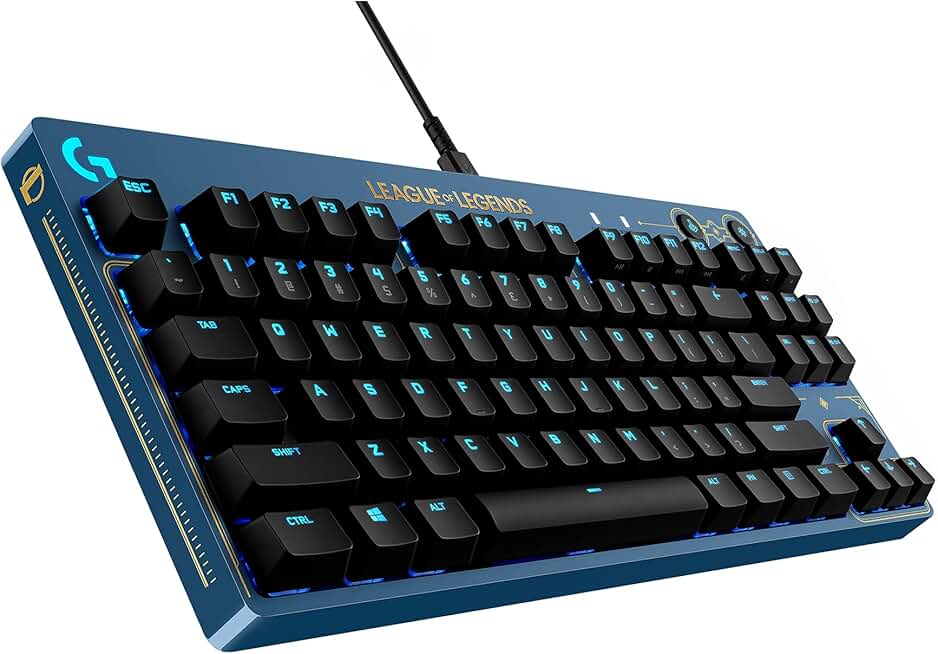
Logitech G PRO Mechanical Gaming Keyboard - Ultra-Portable Tenkeyless Design, Detachable USB Cable, LIGHTSYNC RGB Backlit Keys, Official League of Legends Edition
$95.99
The Logitech G PRO is the keyboard of choice for LoL esports. Its tenkeyless form factor, pro-grade switches, and official LoL partnership make it the top pick if you're serious about competitive gaming. The portability is a bonus for LAN tournaments.
Pros
- + Official League of Legends esports keyboard used by pro players
- + Tenkeyless design (87 keys) keeps your mouse arm closer for faster repositioning
- + GX mechanical switches with 45g actuation match red switch performance
- + Ultra-portable at 2.2 lbs—easy to transport to LANs or tournaments
Cons
- − Premium price at $95.99 limits budget-conscious players
- − Detachable USB cable adds complexity during setup

#3 · Best Wireless4.6 (1,045)
Redragon K686 PRO SE 98 Keys Wireless Gasket RGB Gaming Keyboard, 3-Mode Anime Mechanical Keyboard w/Hot-Swap Socket, Dedicated Knob Control & 5-Layer Noise Dampening, Custom Hi-Fi Linear Switch
$74.99
The Redragon K686 PRO SE balances wireless freedom with competitive performance. The gasket mounting and hot-swap sockets add refinement, making it ideal for LoL players who want a clean desk setup without cable clutter.
Pros
- + Three-mode connectivity: 2.4GHz wireless, Bluetooth, and USB-C wired for flexibility
- + Gasket mounting system reduces vibration and improves typing feel during intense sessions
- + 98-key layout with dedicated knob control for in-game volume or ability cooldowns
- + Hot-swappable sockets let you swap switches without soldering if you want to experiment
Cons
- − Wireless latency may add 1-2ms compared to wired boards—negligible but noticeable to pros
- − Higher price point at $74.99 reflects premium wireless features

#4 · Best Premium Build4.5 (1,536)
Logitech G413 SE Full-Size Mechanical Gaming Keyboard - Backlit Keyboard with Tactile Mechanical Switches, Anti-Ghosting, Compatible with Windows, macOS - Black Aluminum
$79.99
The Logitech G413 SE delivers professional-grade build quality and reliability. If you want a full-size keyboard that feels premium and lasts years of LoL grinding, this is worth the investment.
Pros
- + Tactile mechanical switches with smooth actuation and satisfying feedback
- + Aluminum frame and double-shot keycaps ensure durability through ranked seasons
- + Full-size layout (104+ keys) with numpad for binding item actives to dedicated keys
- + Logitech's LIGHTSYNC RGB with per-key customization via G HUB software
Cons
- − Wired only—no wireless option for cable-free gaming
- − At $79.99, it's pricier than budget alternatives without wireless convenience
#5 · Best Budget Wireless4.3 (14,354)
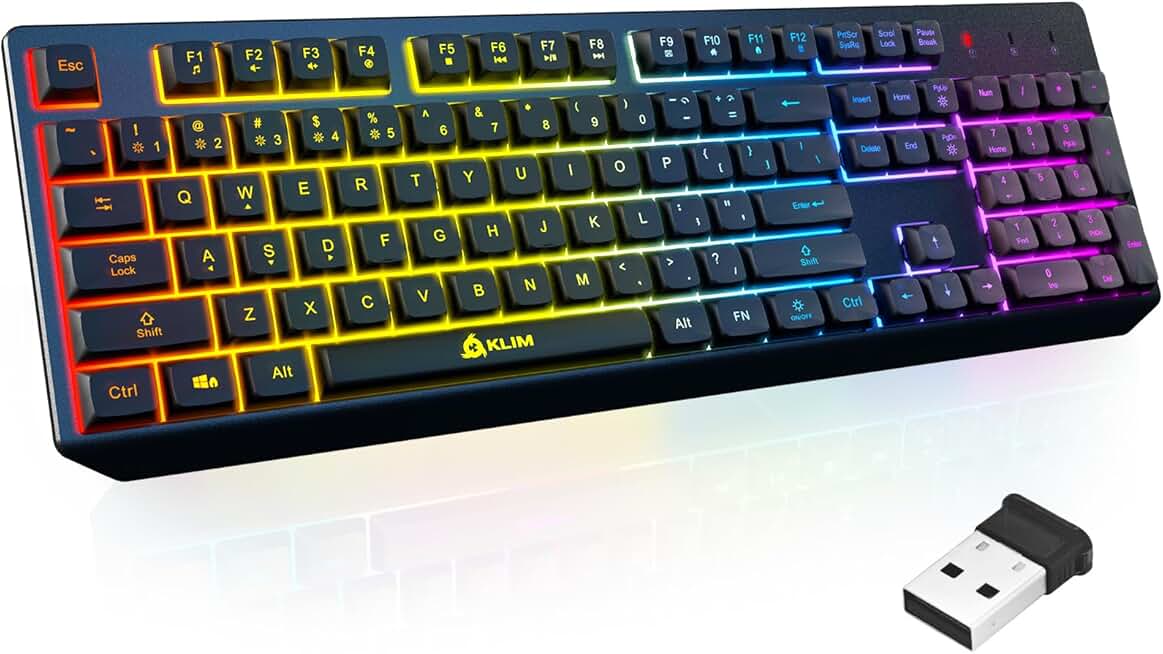
KLIM Chroma Wireless Keyboard – RGB Backlit Gaming, Rechargeable Battery, PC Keyboard, Durable & Water-Resistant, Compatible with PS4, PS5 & Mac - Black
$26.97
The KLIM Chroma is the best wireless option if you prioritize cable-free convenience over mechanical precision. At $26.97, it's cheap and cheerful, but the membrane switches make it less ideal for high-level ranked play.
Pros
- + Wireless with rechargeable battery—no cables or AA batteries needed
- + Water-resistant design handles accidental spills during intense ranked sessions
- + RGB backlighting with multiple color modes adds visual appeal at a low price
- + Compatible with PC, PS4, and PS5 for versatility beyond LoL
Cons
- − Membrane switches feel mushy compared to mechanical alternatives
- − Battery life requires regular charging, adding maintenance overhead

#6 · Best One-Handed Pad4.4 (7,393)
Redragon K585 DITI Wired One-Handed RGB Mechanical Gaming Keyboard, 42 Keys Type-C Professional Gaming Keypad w/Upgraded Hot-Swappable Socket, 7 Onboard Macro Keys & Detachable Wrist Rest
$32.99
The Redragon K585 DITI is for players who want to optimize hand movement and reduce travel distance during fights. If you're willing to rebind your entire ability set to macros, this pad cuts response time significantly.
Pros
- + 42 hot-swappable mechanical keys fit in your left hand for macro-heavy gameplay
- + RGB backlighting with 7 programmable modes lets you color-code ability groups
- + Type-C connection with upgrade path to swap switches without soldering
- + Portable 5.5-inch form factor fits in a backpack for LAN tournaments
Cons
- − Steep learning curve if you're used to full keyboards—requires rebinding all abilities
- − Wired only with no wireless option for portability

#7 · Best Value Mechanical4.3 (6,468)
Redragon Mechanical Gaming Keyboard Wired, 11 Programmable Backlit Modes, Hot-Swappable Red Switch, Anti-Ghosting, Double-Shot PBT Keycaps, Light Up Keyboard for PC Mac
$29.99
This Redragon mechanical board hits the sweet spot between price and performance. At $29.99, you get genuine red switches and anti-ghosting without paying for wireless or premium aesthetics.
Pros
- + Red mechanical switches with 45g actuation at just $29.99—excellent price-to-performance
- + Double-shot PBT keycaps resist shine from months of spam-clicking
- + 11 programmable backlit modes let you customize lighting without software
- + Anti-ghosting with full n-key rollover for ability combos
Cons
- − Compact layout may feel cramped if you use the numpad for item hotkeys
- − No wireless option—USB wired connection only

#8 · Best Portable One-Handed4.4 (3,454)
RedThunder One Handed Gaming Keyboard RGB Backlit 35 Keys Portable Mini Gaming Keypad Ergonomic Game Controller for PC Gamer
$23.99
The RedThunder one-handed pad is a budget-friendly option if you want to experiment with one-handed gameplay without investing $50+. The membrane switches are a trade-off, but portability and price make it worth trying.
Pros
- + 35 RGB-backlit keys fit in a small bag for LAN or tournament travel
- + Ergonomic design reduces hand fatigue during long ranked marathons
- + Affordable at $23.99 with solid build quality for the price
- + Wired connection ensures zero latency during competitive matches
Cons
- − Membrane switches lack the responsiveness of mechanical alternatives
- − Limited macro support compared to dedicated gaming pads

#9 · Best Tri-Mode Connectivity4.3 (1,456)
AULA 99 Key Keyboard, Wireless Gaming Keyboard Bluetooth Computer Keyboards Creamy Cute with Number Pad RGB Backlit Tri-Mode BT/2.4GHz/USB-C - Pink Global Recycled Standard
$27.99
The AULA 99 Key is perfect if you want wireless flexibility without committing to a single connection method. The tri-mode system and numpad make it versatile for both LoL and general computing, though the membrane switches compromise competitive edge.
Pros
- + Three connection modes: Bluetooth, 2.4GHz wireless, and USB-C wired for maximum flexibility
- + 99-key layout with numpad keeps your setup compact yet functional
- + Creamy aesthetic with customizable RGB backlighting appeals to players who care about desk setup
- + Rechargeable battery eliminates the need for disposable AAs
Cons
- − Membrane switches feel less responsive than mechanical alternatives
- − Wireless latency may introduce slight delay compared to wired boards

#10 · Best Budget One-Handed4.3 (204)
MageGee One Handed Professional Gaming Keyboard, RGB Backlit 35 Keys Mini Wired Mechanical Keyboard with Blue Switch for PC Gamer, Support 6 Macro Keys - Black/Red
$22.79
The MageGee is the cheapest mechanical keyboard on this list. If you want to try one-handed gaming on a shoestring budget, the blue switches and macro support make it a solid entry point, despite the noise.
Pros
- + Blue mechanical switches with tactile feedback at just $22.79—cheapest mechanical option here
- + 35-key layout optimizes hand positioning for ability-heavy champions
- + Supports 6 macro keys for binding complex ability combos to single presses
- + Wired connection guarantees zero latency during ranked play
Cons
- − Blue switches are clicky and loud—not ideal if you stream or share space
- − Minimal RGB customization compared to higher-end one-handed pads
Frequently asked questions
Frequently Asked Questions
Final word
The best gaming keyboard for League of Legends depends on your budget and playstyle. The Redragon K552 offers unbeatable value at $36.99 with red switches and anti-ghosting—perfect for ranked grind. If you want pro-level performance, the Logitech G PRO is the official esports choice at $95.99. For wireless freedom, the Redragon K686 PRO SE balances competitive specs with cable-free convenience. One-handed pads like the Redragon K585 DITI excel if you optimize for macro gameplay. All 10 keyboards on this list feature mechanical switches, anti-ghosting, and RGB backlighting—pick the form factor and price point that matches your LoL ambitions. Your next pentakill starts with the right keyboard.
More league of legends gear across categories
Gaming Mice
Best Gaming Mice for League of Legends
Gaming HeadsetsBest Gaming Headsets for League of Legends
Gaming MonitorsBest Gaming Monitors for League of Legends
Gaming ChairsBest Gaming Chairs for League of Legends
Gaming ControllersBest Gaming Controllers for League of Legends
Gaming DesksBest Gaming Desks for League of Legends
Streaming GearBest Streaming Gear for League of Legends
Gaming LaptopsBest Gaming Laptops for League of Legends
More gaming keyboards guides
Budget Gaming Keyboards of 2026
Top 10 budget gaming keyboards 2026. RGB, mechanical, compact—all under $120. Expert reviews & buying guide.
Best Compact Gaming Keyboards in 2026
Find the best compact gaming keyboards for 2026. Expert reviews of 60% and tenkeyless boards for gaming, work, and travel.
Best Corsair Gaming Keyboards in 2026
Find the best Corsair gaming keyboards for your setup. Expert reviews of wired, wireless, and mechanical options.
Best Ergonomic Gaming Keyboards in 2026
Top ergonomic gaming keyboards for comfort and performance. Compare split designs, wrist rests, and mechanical switches.
Best Gaming Keyboards in 2026
Find the best gaming keyboards 2026. Expert reviews of mechanical, wireless, and budget options for every gamer.
Best Gaming Keyboards for Apex Legends
Top gaming keyboards for Apex Legends with fast response times, RGB, and durability. Find the best fit for your playstyle.