Finding the right gaming keyboard for PC can make a real difference in your performance and comfort during long gaming sessions. Whether you're chasing competitive frame rates in shooters or grinding through RPGs, your keyboard needs to respond instantly and feel right under your fingers. The best gaming keyboards for PC combine responsive switches, customizable RGB lighting, and durable construction without breaking the bank. In this guide, we've tested and ranked 10 of the top gaming keyboards across different budgets and playstyles. You'll find everything from ultra-budget options that deliver solid performance to premium mechanical boards with hot-swappable switches. We'll walk you through what to look for, answer your burning questions, and help you pick the perfect keyboard to match your setup and gaming needs.
Best Gaming Keyboards for PC in 2024
This post contains affiliate links. We may earn a commission at no extra cost to you when you buy through our links. This helps us keep GamePlays running.
Jump to
Our top picks at a glance
- #1
- #2Best for Hot-Swappable Customization: Redragon K580 VATA RGB LED Backlit Mechanical Gaming Keyboard with Macro Keys & Dedicated Media Controls, Hot-Swappable Socket, Onboard Macro Recording (Blue Switches)$51.99
- #3
- #4
- #5
Buyer's guide
When shopping for gaming keyboards for PC, focus on these key factors to avoid buyer's remorse. Switch type matters most: mechanical switches offer tactile feedback and longevity (50+ million keystrokes), while membrane and mecha-membrane switches are quieter and cheaper but wear faster. Look for polling rate (1000 Hz is standard for gaming), anti-ghosting (lets you press multiple keys simultaneously without missed inputs), and key rollover (6-key or N-key rollover ensures every keystroke registers). RGB lighting is nice but not essential—prioritize functionality over flashy effects. Check if the keyboard has programmable keys and macro support, especially if you play MMOs or strategy games. Build quality matters: aluminum frames and double-shot PBT keycaps last longer than plastic. For PC gaming, wired connections eliminate latency concerns, though wireless options with 2.4 GHz receivers are now reliable enough. Consider ergonomics: a wrist rest, adjustable feet, and key spacing that matches your hand size prevent fatigue. Water resistance (IP32 rating) protects against accidental spills. Finally, check software compatibility—some keyboards work better on Windows than others. Budget $30–$150 for a solid gaming keyboard; anything less risks cheap switches and flimsy construction, while premium boards offer diminishing returns unless you need hot-swappable switches or ultra-premium keycaps.
The picks

SteelSeries Apex 3 RGB Gaming Keyboard – 10-Zone RGB Illumination – IP32 Water Resistant – Premium Magnetic Wrist Rest (Whisper Quiet Gaming Switch)
$49.99
The SteelSeries Apex 3 RGB strikes the perfect balance between price, performance, and comfort. At $49.99, you get a reliable wired keyboard with SteelSeries' reputation for quality and a wrist rest that actually makes a difference during marathon gaming sessions. This is the keyboard to buy if you want no compromises at a mid-range price.
Pros
- + Whisper-quiet gaming switches reduce noise without sacrificing responsiveness
- + IP32 water resistance protects against spills and dust
- + Premium magnetic wrist rest included for comfort during long sessions
- + 10-zone RGB illumination with intuitive lighting customization
Cons
- − Mech-dome switches feel less tactile than true mechanical switches
- − Limited macro programmability compared to premium boards

Redragon K580 VATA RGB LED Backlit Mechanical Gaming Keyboard with Macro Keys & Dedicated Media Controls, Hot-Swappable Socket, Onboard Macro Recording (Blue Switches)
$51.99
The Redragon K580 VATA is built for tinkerers who want to fine-tune their setup. Hot-swappable sockets mean you can experiment with different switch types without buying new keyboards, and the onboard macro recording keeps your custom binds safe even if you switch PCs. At $51.99, it's the best value for PC gamers who want customization flexibility.
Pros
- + Hot-swappable socket lets you swap mechanical switches without soldering
- + RGB LED backlighting with macro keys for easy in-game binds
- + Dedicated media controls for quick volume and track adjustments
- + Onboard macro recording saves custom commands to the keyboard itself
Cons
- − Requires purchasing compatible switches separately for customization
- − Smaller community compared to mainstream gaming keyboard brands

Redragon S101-3 PRO Gaming Keyboard and Mouse, RGB Backlit Programmable Keyboard Mouse with Software, Independent Macro Record Keys, Value Combo Set, New Update Version
$39.99
The Redragon S101-3 PRO is your answer if you're building a gaming PC on a tight budget and need both keyboard and mouse. At $39.99, this combo delivers RGB lighting, programmable keys, and software support without the premium price tag. The keyboard alone justifies the cost; the mouse is a bonus.
Pros
- + Includes matching RGB mouse in one package—great value for new PC gamers
- + Programmable macro keys let you record custom commands
- + Software support for RGB customization and key remapping
- + Full-size layout with standard key spacing
Cons
- − Membrane switches lack the tactile feedback of mechanical alternatives
- − Mouse is entry-level quality and may need replacement soon

Razer Tartarus V2 Gaming Keypad: Mecha Membrane Key Switches - One Handed Keyboard - 32 Programmable Keys - Customizable Chroma RGB Lighting - Programmable Macros - Snap Tap - Black ECOLOGO
$69.99
The Razer Tartarus V2 is purpose-built for MMO and MOBA players who bind dozens of abilities to hotkeys. The 32 programmable keys let you access spells, consumables, and macros without moving your left hand from the keypad. At $69.99, it's an investment that pays off if you play ability-heavy games.
Pros
- + 32 programmable keys packed into a compact one-handed layout
- + Mecha-membrane switches provide responsive feedback without noise
- + Customizable Chroma RGB lighting syncs with other Razer peripherals
- + Ergonomic thumb rest reduces hand fatigue during extended play
Cons
- − One-handed design takes weeks to master muscle memory
- − Limited to left-hand use; right-handed gamers need a mouse in their dominant hand

Logitech G213 Prodigy Gaming Keyboard - Wired RGB Backlit Keyboard with Mech-Dome Keys, Palm Rest, Adjustable Feet, Media Controls, USB, Compatible with Windows – Black
$49.99
The Logitech G213 Prodigy is ideal if you game late at night and don't want to disturb others. The mech-dome switches are nearly silent while still feeling responsive, and the included palm rest beats buying one separately. At $49.99, it's a solid choice for noise-conscious gamers.
Pros
- + Mech-dome switches deliver mechanical feel with minimal noise
- + Included palm rest provides wrist support during long sessions
- + Adjustable feet let you customize the keyboard angle for comfort
- + Media controls and USB passthrough add convenience
Cons
- − Mech-dome switches wear faster than true mechanical switches
- − RGB lighting is basic compared to 10+ zone competitors

Redragon Mechanical Gaming Keyboard Wired, 11 Programmable Backlit Modes, Hot-Swappable Red Switch, Anti-Ghosting, Double-Shot PBT Keycaps, Light Up Keyboard for PC Mac
$29.99
The Redragon mechanical keyboard punches above its $29.99 price point with true mechanical switches and hot-swappable sockets. If you want to dip your toes into mechanical gaming keyboards without spending $100+, this is the keyboard to grab. The red switches are snappy and reliable for competitive gaming.
Pros
- + True red mechanical switches with 50+ million keystroke lifespan
- + Hot-swappable socket lets you customize switches later
- + Double-shot PBT keycaps resist shine and wear
- + 11 programmable backlit modes for RGB customization
Cons
- − Compact size may feel cramped if you have large hands
- − Limited onboard memory for macros compared to premium boards
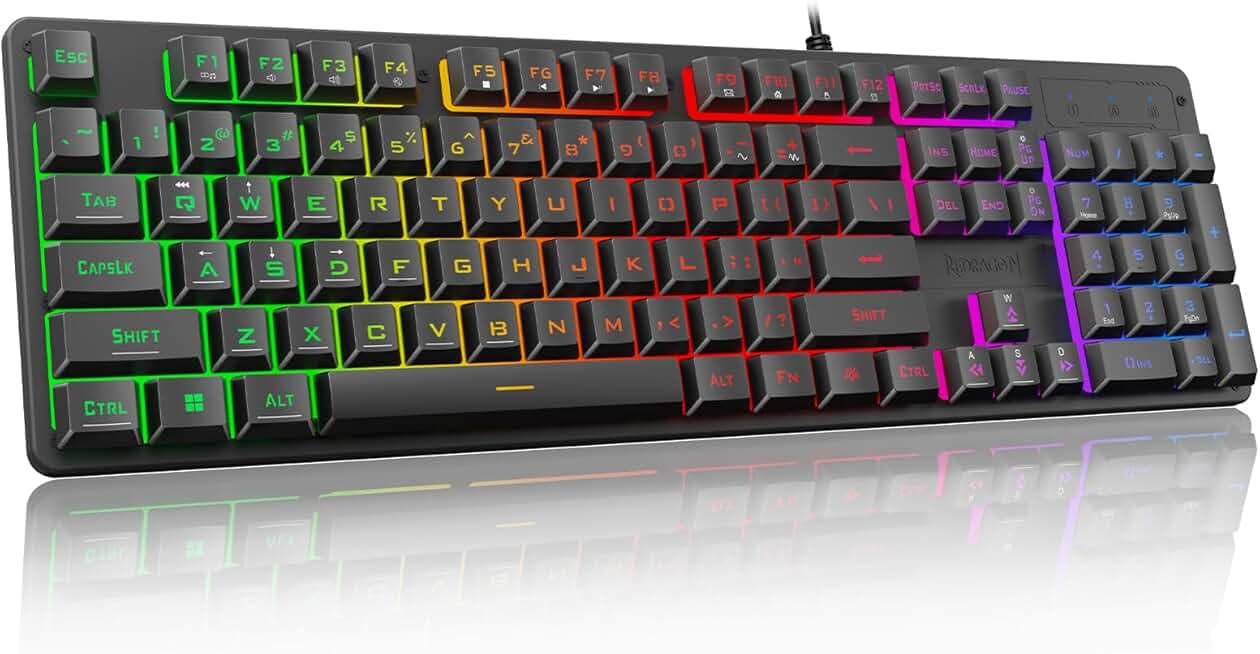
Redragon K521 Upgrade Rainbow LED Gaming Keyboard, 104 Keys Wired Mechanical Feeling Keyboard with Multimedia Keys, One-Touch Backlit, Anti-Ghosting, Compatible with PC, Mac, PS4/5, Xbox
$15.99
The Redragon K521 is the keyboard to buy if your budget is under $20. You get a full-size layout, anti-ghosting, and rainbow backlighting for less than the cost of a pizza. It won't feel as premium as mechanical boards, but for casual gaming and office work, it's unbeatable value.
Pros
- + Mechanical-feeling switches at $15.99 make this the cheapest entry point
- + 104-key full-size layout with standard spacing and familiar key arrangement
- + Rainbow LED backlighting adds visual flair without premium pricing
- + Anti-ghosting support ensures reliable multi-key presses
Cons
- − Membrane switches feel mushy compared to true mechanical keyboards
- − Rainbow LED is fixed; no RGB customization software

TECKNET Gaming Keyboard, USB Wired Computer Keyboard, 15-Zone RGB Illumination, IP32 Water Resistance, 25 Anti-ghosting Keys, All-Metal Panel (Whisper Quiet Gaming Switch) Global Recycled Standard
$29.64
The TECKNET gaming keyboard is built like a tank with its all-metal panel and IP32 water resistance. At $29.64, it's the most durable budget keyboard on this list, perfect for gamers who are rough on their gear or work in messy environments. The 15-zone RGB and anti-ghosting round out a solid package.
Pros
- + All-metal panel construction withstands heavy use and accidental drops
- + IP32 water resistance protects against spills and dust ingestion
- + 15-zone RGB illumination with customizable lighting profiles
- + 25 anti-ghosting keys support simultaneous multi-key inputs
Cons
- − Metal frame makes it heavier than plastic competitors
- − Whisper-quiet switches sacrifice tactile feedback for noise reduction

RedThunder K10 Wireless Gaming Keyboard and Mouse Combo, LED Backlit Rechargeable 3800mAh Battery, Mechanical Feel Anti-ghosting Keyboard + 7D 3200DPI Mice for PC Gamer (Black)
$49.99
The RedThunder K10 wireless combo is perfect if you hate cable management and want both keyboard and mouse. The 3800 mAh battery easily lasts 2-3 weeks, and the 2.4 GHz connection is responsive enough for competitive gaming. At $49.99, it's a clean desk solution that doesn't sacrifice performance.
Pros
- + Wireless 2.4 GHz connection eliminates cable clutter on your desk
- + 3800 mAh rechargeable battery lasts weeks between charges
- + Includes matching 7D mouse with 3200 DPI sensor
- + Mechanical-feel switches provide responsive feedback without true mechanical cost
Cons
- − Wireless latency is minimal but still slightly higher than wired alternatives
- − Battery life decreases over time; eventual replacement needed

Rii RK100+ Multiple Color Rainbow LED Backlit Large Size USB Wired Mechanical Feeling Multimedia PC Gaming Keyboard,Office Keyboard for Working or Primer Gaming,Office Device
$12.73
The Rii RK100+ is the keyboard for gamers with spacious desks who want a full-size layout with numpad. At $12.73, it's the cheapest full-size option here, and the mechanical-feeling switches are surprisingly responsive. If you need all the keys and don't mind the bulk, this is unbeatable value.
Pros
- + Large full-size layout with dedicated numpad and function keys
- + Rainbow LED backlighting illuminates every key without customization software
- + Mechanical-feeling switches provide tactile response at budget price
- + Multimedia keys let you control volume and playback without alt-tabbing
Cons
- − Membrane switches lack durability of true mechanical switches
- − Large footprint takes up significant desk real estate
Frequently asked questions
Frequently Asked Questions
Final word
The best gaming keyboards for PC come in all price ranges, from $12.73 to $69.99, so your budget doesn't determine quality. If you want the safest all-around pick, the SteelSeries Apex 3 RGB delivers premium build quality and comfort at $49.99. For customization enthusiasts, the Redragon K580 VATA's hot-swappable switches offer endless tweaking potential. On a tight budget, the Redragon K521 at $15.99 or Rii RK100+ at $12.73 prove you don't need to spend big for a functional gaming keyboard. Match your choice to your playstyle: one-handed keypads for MMOs, wireless combos for clean desks, and mechanical switches for competitive shooters. Test a few keyboards if possible—comfort and switch feel are personal preferences that no review can fully capture. With the right gaming keyboard for PC, you'll notice faster response times, fewer missed inputs, and more enjoyable gaming sessions.
More gaming keyboards guides
Budget Gaming Keyboards of 2026
Top 10 budget gaming keyboards 2026. RGB, mechanical, compact—all under $120. Expert reviews & buying guide.
Best Compact Gaming Keyboards in 2026
Find the best compact gaming keyboards for 2026. Expert reviews of 60% and tenkeyless boards for gaming, work, and travel.
Best Corsair Gaming Keyboards in 2026
Find the best Corsair gaming keyboards for your setup. Expert reviews of wired, wireless, and mechanical options.
Best Ergonomic Gaming Keyboards in 2026
Top ergonomic gaming keyboards for comfort and performance. Compare split designs, wrist rests, and mechanical switches.
Best Gaming Keyboards in 2026
Find the best gaming keyboards 2026. Expert reviews of mechanical, wireless, and budget options for every gamer.
Best Gaming Keyboards for Apex Legends
Top gaming keyboards for Apex Legends with fast response times, RGB, and durability. Find the best fit for your playstyle.