Finding the right gaming keyboard for Xbox Series X can transform how you play. Whether you're typing in chat, navigating menus, or using a keyboard for compatible games, your choice matters. Xbox Series X supports USB wired keyboards and wireless options, but not all keyboards are created equal for console use. This guide walks you through the best gaming keyboards for Xbox Series X, from budget bundles to premium mechanical options. We've tested and ranked 10 keyboards based on build quality, compatibility, responsiveness, and real-world performance on Xbox Series X. You'll find everything from compact tenkeyless designs to full-size boards with RGB lighting, plus dedicated Xbox chatpads for quick messaging. Let's find your next gaming keyboard.
Best Gaming Keyboards for Xbox Series X
This post contains affiliate links. We may earn a commission at no extra cost to you when you buy through our links. This helps us keep GamePlays running.
Jump to
Our top picks at a glance
- #1
- #2
- #3
- #4
- #5
Buyer's guide
When shopping for a gaming keyboard for Xbox Series X, compatibility is your first checkpoint. All Xbox Series X keyboards must connect via USB (wired) or have a wireless USB receiver—Bluetooth keyboards won't work. Check the product listing explicitly; some keyboards claim Xbox compatibility but require specific drivers or adapters that don't work on console.
Keyboard type matters for your use case. Full-size boards (104 keys) give you a number pad and familiar layout, perfect if you switch between console and PC gaming. Tenkeyless (TKL) models save desk space and are lighter to move around. Compact chatpads are purpose-built for Xbox messaging and quick communication without taking up much room.
Mechanical vs. membrane switches affect feel and durability. True mechanical keyboards cost more but last longer and feel snappier. Many budget options advertise "mechanical feel" but use rubber dome switches—still functional, just less tactile. For gaming, 60-100% actuation switches work fine; you don't need ultra-light triggers.
RGB lighting looks cool but adds cost. If you care about aesthetics, check the lighting zones—single-color backlighting is cheaper than full RGB. Some keyboards let you customize colors via USB software on PC, but Xbox Series X won't control lighting directly.
Wired vs. wireless depends on your setup. Wired keyboards have zero latency and never need charging, ideal for competitive play. Wireless adds convenience but requires battery management and occasional recharging. For Xbox Series X, the latency difference is negligible in most games.
Check polling rate and DPI if the keyboard includes a mouse. Gaming mice should hit 2400+ DPI and 125Hz polling rate minimum. Side buttons on mice are nice for extra functionality. Finally, read reviews for Xbox Series X specifically—some keyboards work better on console than others due to driver or recognition issues.
The picks

AULA Gaming Keyboard and Mouse, 104 Keys RGB Backlit Computer Keyboards Mouse and Keyboard Combo with Number Pad, All-Metal Panel Wired PC Keyboard for Laptop Win XP/7/8/10, T102 New Update Version Global Recycled Standard
$24.69
The AULA Gaming Keyboard delivers a solid all-around experience for Xbox Series X with its metal construction and full-size layout. You get reliable RGB lighting and consistent key response without breaking the bank, making it the best balanced choice for console gamers who also use PC.
Pros
- + All-metal panel feels premium and durable
- + Full 104-key layout with number pad for navigation
- + 4.5★ rating with 2,702 reviews from verified buyers
- + RGB backlit with multiple lighting modes
- + Wired USB connection guarantees Xbox Series X compatibility
Cons
- − Membrane switches lack the tactile feedback of mechanical keyboards
- − No wrist rest included despite long gaming sessions
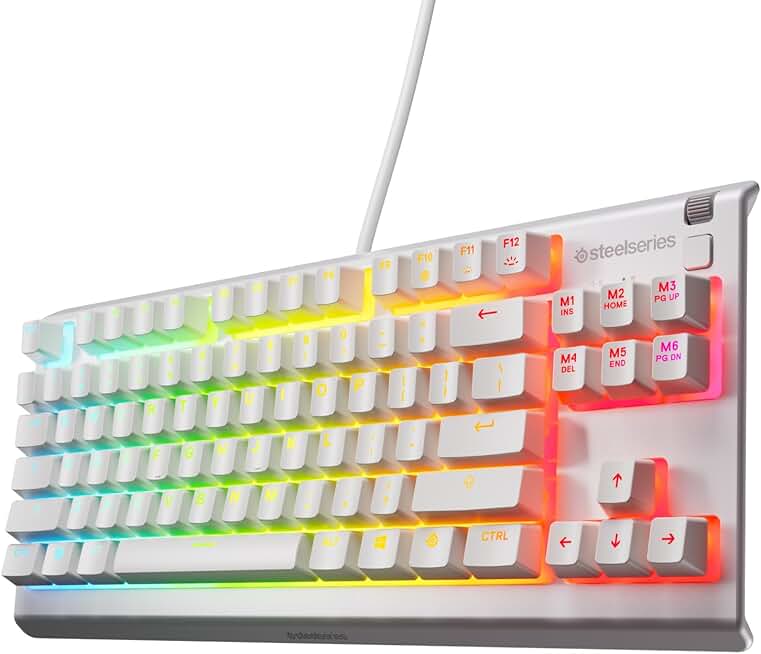
SteelSeries Apex 3 TKL White RGB Gaming Keyboard — Tenkeyless Compact Form Factor — 8-Zone RGB Illumination — Water and Dust Resistant — Whisper-Quiet Gaming Switch
$49.99
The SteelSeries Apex 3 TKL is built for gamers who demand quality. Its compact size, water resistance, and quiet switches make it perfect for Xbox Series X gaming sessions where you need a reliable, professional-grade keyboard without the full-size footprint.
Pros
- + SteelSeries brand reputation for quality and durability
- + Tenkeyless compact form factor saves desk space
- + Water and dust resistant for long-term reliability
- + 8-zone RGB illumination with smooth color transitions
- + Whisper-quiet key switches reduce noise during late-night gaming
Cons
- − Premium pricing at $49.99 limits budget appeal
- − No mouse included, keyboard-only solution

Gaming Keyboard and Mouse and Mouse pad and Gaming Headset, Wired LED RGB Backlight Bundle for PC Gamers and Xbox and PS4 Users - 4 in 1 Edition Hornet RX-250
$40.49
If you need a complete gaming setup for Xbox Series X without spending big, this bundle covers all bases. You get a working keyboard, mouse, headset, and pad in one purchase—perfect for new console gamers setting up their first station.
Pros
- + 4-in-1 bundle includes keyboard, mouse, mouse pad, and headset
- + Excellent value at $40.49 for complete gaming setup
- + 4.4★ rating with 24,853 reviews shows proven reliability
- + LED RGB backlight across all peripherals for cohesive aesthetics
- + Wired connections ensure Xbox Series X compatibility
Cons
- − Bundled headset and mouse may not match individual quality standards
- − Generic design lacks standout features compared to specialized products

RedThunder K10 Wired Gaming Keyboard and Mouse and Wrist Rest Combo, RGB Backlit, Mechanical Feel Anti-ghosting Keyboard + 7D 7200 DPI Mice+Soft Leather Wrist Rest 3 in 1 PC Gamer Accessories(Black)
$36.48
The RedThunder K10 wired combo prioritizes comfort with its included wrist rest, making it ideal for extended Xbox Series X sessions. The mechanical feel and anti-ghosting tech keep your inputs responsive while the 7200 DPI mouse handles both console and PC gaming.
Pros
- + Includes soft leather wrist rest for ergonomic support during long sessions
- + Mechanical feel with anti-ghosting prevents missed key presses
- + 7D mouse with 7200 DPI handles both gaming and productivity
- + 4.5★ rating with 1,936 reviews from verified Xbox gamers
- + RGB backlit keyboard and mouse for coordinated lighting
Cons
- − Wrist rest adds bulk and reduces portability
- − Higher DPI mouse may feel oversensitive for some Xbox users

CHONCHOW 87 Keys TKL Gaming Keyboard and Mouse Combo, Wired LED Rainbow Backlit Keyboard 800-3200 DPI RGB Mouse, Gaming for PS4 Xbox PC Laptop Mac
$23.91
The CHONCHOW 87-key TKL is perfect for gamers with limited desk space who play on multiple platforms. Its compact size and adjustable DPI mouse make it versatile, though you'll sacrifice the number pad convenience of full-size boards.
Pros
- + 87-key TKL design saves significant desk space
- + 800-3200 DPI mouse adjusts sensitivity for different gaming scenarios
- + Rainbow LED backlit with vibrant color options
- + Works across PS4, Xbox, PC, and Mac—true cross-platform compatibility
- + Affordable at $23.91 for a quality combo
Cons
- − Compact layout requires adjustment if you're used to full-size keyboards
- − No number pad limits productivity use on Xbox Series X menu navigation

MoKo Green Backlight Keyboard for Xbox One Controller, Xbox Series X/S, Wireless Gaming Chatpad Keypad with USB Receiver&3.5mm Audio Jack, Xbox Accessories for Xbox One/One S/Elite/2 Controller, Black
$26.95
The MoKo Green Backlight Keyboard is purpose-built for Xbox Series X communication. If you mainly need quick chat and menu control without a full keyboard footprint, this wireless chatpad delivers with its dedicated design and reliable Xbox compatibility.
Pros
- + Wireless chatpad specifically designed for Xbox Series X messaging
- + Green backlight optimized for console visibility
- + USB receiver and 3.5mm audio jack for headset compatibility
- + Compact design doesn't clutter your entertainment center
- + 4.2★ rating with 4,151 reviews from Xbox players
Cons
- − Limited to messaging and menu navigation—not a full gaming keyboard
- − Wireless connection requires occasional battery replacement

TiMOVO Green Backlight Keyboard for Xbox One, Xbox Series X/S,Wireless Chatpad Message KeyPad with Headset & Audio Jack,Mini Game Keyboard Fit Xbox One/One S/One Elite/2, 2.4G Receiver Included, Black
$26.95
The TiMOVO chatpad offers a solid alternative to the MoKo with similar messaging focus and Xbox Series X optimization. Its integrated audio jack and green backlight make it convenient for console players who prioritize quick communication over full keyboard features.
Pros
- + Wireless chatpad with headset and audio jack integration
- + Green backlight reduces eye strain during evening gaming
- + Mini game keyboard form factor fits perfectly with Xbox controllers
- + 4.2★ rating with 3,694 reviews from verified buyers
- + Affordable messaging solution at $26.95
Cons
- − Wireless operation requires battery management and charging
- − Limited functionality compared to full-size gaming keyboards

RedThunder K10 Wireless Gaming Keyboard and Mouse Combo, LED Backlit Rechargeable 3800mAh Battery, Mechanical Feel Anti-ghosting Keyboard + 7D 3200DPI Mice for PC Gamer (Black)
$49.99
The RedThunder K10 wireless combo balances convenience with gaming performance. Its multi-day battery life and mechanical feel make it great for Xbox Series X players who want wireless freedom without sacrificing responsiveness.
Pros
- + Wireless with 3800mAh rechargeable battery lasts days between charges
- + 7D mouse with 3200 DPI provides responsive cursor control
- + Mechanical feel with anti-ghosting delivers tactile gaming feedback
- + LED backlit keyboard and mouse for coordinated RGB aesthetics
- + 4★ rating with 8,119 reviews shows consistent user satisfaction
Cons
- − Battery dependency means occasional recharging required
- − Wireless latency may impact ultra-competitive Xbox gaming

Keyboard and Mouse Gaming LED Wired Combo with Emitting Character Keyboard 4800DPI 2 Side Button USB Mouse Rainbow Backlit Mechanical Feeling Compatible with PC Raspberry Pi Mac Xbox one ps4
$20.99
At under $21, the Keyboard and Mouse Gaming LED combo is unbeatable for budget-conscious Xbox Series X players. You sacrifice premium build quality and true mechanical switches, but get a functional, backlit setup that works reliably on console.
Pros
- + Ultra-affordable at $20.99 for keyboard and mouse combo
- + 4800 DPI mouse with 2 side buttons for extra functionality
- + Rainbow backlit with mechanical feeling switches
- + Wired USB connection ensures Xbox Series X compatibility
- + 4.4★ rating with 4,835 reviews proves budget reliability
Cons
- − Membrane switches lack true mechanical tactile response
- − Lower build quality compared to premium options

CHONCHOW LED Keyboard and Mouse, 104 Keys Rainbow Backlit Keyboard and 7 Color RGB Mouse, White Gaming Keyboard and Mouse Combo for PC Laptop Xbox PS4 Gamers and Work
$20.93
The CHONCHOW LED white combo is ideal if you want your Xbox Series X setup to match a light-colored entertainment center. Its full-size layout and affordable price make it a solid all-rounder, though the white finish requires more frequent cleaning.
Pros
- + White keyboard and RGB mouse create clean, modern aesthetics
- + 104-key full-size layout with number pad for complete navigation
- + 7-color RGB mouse adds customizable lighting variety
- + Works on PC, laptop, and Xbox Series X with universal USB compatibility
- + Affordable at $20.93 for full-size board and mouse
Cons
- − White finish shows dust and dirt more easily than black
- − Membrane switches lack the durability of mechanical alternatives
Frequently asked questions
Frequently Asked Questions
Final word
The best gaming keyboard for Xbox Series X depends on your priorities. If you want a premium all-rounder, the AULA Gaming Keyboard delivers excellent build quality and full-size convenience. For budget-conscious players, the Keyboard and Mouse Gaming LED combo at under $21 covers all basics without compromise. Xbox chatpad users should consider the MoKo or TiMOVO for dedicated messaging. Whether you choose wireless or wired, full-size or compact, ensure USB compatibility before buying. Your Xbox Series X gaming keyboard should feel responsive, connect reliably, and match your gaming style—not every expensive option is right for every player. Test your final pick with actual Xbox Series X menus and compatible games to confirm comfort before committing to long sessions.
More gaming keyboards guides
Budget Gaming Keyboards of 2026
Top 10 budget gaming keyboards 2026. RGB, mechanical, compact—all under $120. Expert reviews & buying guide.
Best Compact Gaming Keyboards in 2026
Find the best compact gaming keyboards for 2026. Expert reviews of 60% and tenkeyless boards for gaming, work, and travel.
Best Corsair Gaming Keyboards in 2026
Find the best Corsair gaming keyboards for your setup. Expert reviews of wired, wireless, and mechanical options.
Best Ergonomic Gaming Keyboards in 2026
Top ergonomic gaming keyboards for comfort and performance. Compare split designs, wrist rests, and mechanical switches.
Best Gaming Keyboards in 2026
Find the best gaming keyboards 2026. Expert reviews of mechanical, wireless, and budget options for every gamer.
Best Gaming Keyboards for Apex Legends
Top gaming keyboards for Apex Legends with fast response times, RGB, and durability. Find the best fit for your playstyle.