Keychron has built a reputation for delivering quality mechanical keyboards that balance wireless convenience with gaming performance. Whether you're a competitive FPS player, a streamer, or someone who just wants a solid keyboard for work and play, Keychron's lineup offers something for every budget and use case. The best Keychron gaming keyboards combine responsive switches, solid build quality, and multi-device connectivity without breaking the bank. In this guide, we've tested and ranked the top Keychron gaming keyboards to help you find the right fit. We'll walk you through what makes each model stand out, what trade-offs you should know about, and how to pick the best Keychron keyboard for your setup.
Best Keychron Gaming Keyboards in 2026
Updated April 24, 202610 picks tested4.4 avg rating · 5,894 reviews
This post contains affiliate links. We may earn a commission at no extra cost to you when you buy through our links. This helps us keep GamePlays running.
Jump to
Our top picks at a glance
- #1
- #2
- #3
- #4
- #5
Buyer's guide
When shopping for a Keychron gaming keyboard, focus on a few key factors that directly impact your gaming experience. First, consider layout: 75% keyboards like the K2 and K3 offer a compact form factor without sacrificing arrow keys or function row, while full-size options give you a numpad for productivity. Tenkeyless (TKL) models like the K8 split the difference—smaller than full-size but still practical. Switch type matters significantly. Keychron's proprietary Super switches (Red, Brown, Blue) are reliable and affordable, while their newer Hall Effect switches offer rapid-trigger technology for competitive gaming. Linear switches (Red) feel smooth and responsive for fast-paced games, while tactile switches (Brown) provide feedback for typing and general use. Check polling rate and n-key rollover specs—you want at least 1000 Hz polling and full anti-ghosting for gaming. Wireless connectivity is a Keychron strength; most models support Bluetooth 5.1 or 5.2 plus wired USB-C fallback, so you're never stuck. Backlighting preference is personal—white LED is standard and gaming-friendly, while RGB adds customization. Finally, consider your OS. Some Keychron models are optimized for Mac but work fine on Windows, while others are universal. Don't overlook build quality: aluminum frames and stabilizer quality affect how the keyboard feels under your fingers. Budget ranges from $48 for wired entry-level to $218 for premium Hall Effect models, so know your ceiling before you start.
The picks

#1 · Best Overall4.5 (334)
Keychron K2 HE Rapid Trigger Wireless Custom Keyboard with Hall Effect Gateron Double-Rail Magnetic Switch, QMK 2.4 GHz Bluetooth 5.2 RGB Compatible with Mac Windows Linux (Aluminum + Wood) Global Recycled Standard
$139.99
The K2 HE is Keychron's most advanced 75% keyboard, delivering rapid-trigger performance and wireless flexibility in a compact form. If you play competitive shooters or want the best Keychron gaming keyboard money can buy, this is it.
Pros
- + Hall Effect Gateron Double-Rail Magnetic switches with rapid trigger for competitive gaming
- + 75% layout balances compactness with full functionality
- + Tri-mode connectivity: 2.4 GHz, Bluetooth 5.2, and wired USB-C
- + QMK firmware support for deep customization
- + 4.5★ rating with strong user feedback on switch responsiveness
Cons
- − Premium price at $139.99 puts it out of reach for casual users
- − Hall Effect switches may feel unnecessary for non-competitive gaming

#2 · Best Premium Pick4.4 (118)
Keychron Q1 HE Wireless Custom Keyboard Rapid Trigger QMK Launcher 2.4 GHz Bluetooth 5.2 with Gateron Double-Rail Magnetic Switch, RGB Compatible with Mac Windows Linux (Hot-swappable) Global Recycled Standard
$218.39
The Q1 HE is Keychron's flagship custom keyboard, designed for esports players and enthusiasts who demand the absolute best. The rapid-trigger Hall Effect switches and QMK support justify the premium price for competitive gaming.
Pros
- + Gateron Double-Rail Magnetic switches with rapid trigger for esports-level performance
- + Compact 65% layout with full-size functionality via QMK programming
- + 2.4 GHz, Bluetooth 5.2, and wired modes with minimal latency
- + RGB lighting with per-key customization
- + Aluminum frame and premium build quality
Cons
- − Highest price at $218.39 limits appeal to budget-conscious buyers
- − Smaller 65% layout may require macro programming for some users

#3 · Best for Competitive Gaming4.4 (430)
Keychron K10 HE Hall Effect Keyboard, Gateron Double-Rail Magnetic Nebula Switch, Full-Size Tri-Mode Wireless Keyboard with Rapid Trigger, Adjustable Actuation, RGB, Aluminum + Wooden Frame Global Recycled Standard
$144.99
The K10 HE brings Hall Effect rapid-trigger switches to a full-size form factor, making it ideal for competitive players who need a numpad. The adjustable actuation point lets you fine-tune response for different games.
Pros
- + Hall Effect Gateron Double-Rail Magnetic switches with rapid trigger technology
- + Full-size layout with numpad for productivity and gaming
- + Tri-mode wireless (2.4 GHz, Bluetooth 5.2, wired) with adjustable actuation
- + Aluminum frame and stabilizers tuned for consistency
- + 4.4★ rating from users praising switch performance
Cons
- − $144.99 price is steep for a full-size keyboard
- − Overkill for casual gaming or typing-focused users

#4 · Best Value 75%4.4 (1,622)
Keychron K2 75% Layout Bluetooth Wireless Mechanical Keyboard Super Switch/White LED Backlit/USB C/Anti Ghosting/N-Key Rollover, 84 Keys Gaming Keyboard for Mac Windows-Version 2 Global Recycled Standard
$79.99
The K2 is the sweet spot for most gamers: compact 75% layout, solid Keychron Super switches, and wireless convenience at a price that won't hurt your wallet. It's the best Keychron gaming keyboard for balanced performance and value.
Pros
- + 75% layout with white LED backlighting at an accessible $79.99 price point
- + Keychron Super switches deliver reliable gaming performance
- + Bluetooth wireless with USB-C wired fallback
- + Anti-ghosting and n-key rollover for gaming
- + 4.4★ rating with over 1,600 reviews showing proven reliability
Cons
- − Super switches lack the rapid-trigger tech of Hall Effect alternatives
- − White LED only—no RGB customization

#5 · Best for Compact Desks4.5 (991)
Keychron K4 96% Layout 100 Keys Wireless Bluetooth 5.1/Wired USB Mechanical Gaming Keyboard with Keychron Super Brown Switch White LED Backlight N-Key Rollover for Mac Windows PC-Version 2 Global Recycled Standard
$63.99
The K4 squeezes 100 keys into a tight footprint, making it ideal for desk space constraints. The tactile Brown switches are great for mixed typing and gaming, though FPS players might prefer linear alternatives.
Pros
- + 96% layout maximizes keys in minimal space—nearly full-size without the numpad
- + Keychron Super Brown switches offer tactile feedback for typing and gaming
- + Bluetooth 5.1 and wired USB connectivity with multitasking support
- + White LED backlight and anti-ghosting for gaming
- + 4.5★ rating with strong user satisfaction
Cons
- − 96% layout is less common, so keycap replacements are harder to find
- − Brown switches are slower than linear Red for fast-paced games
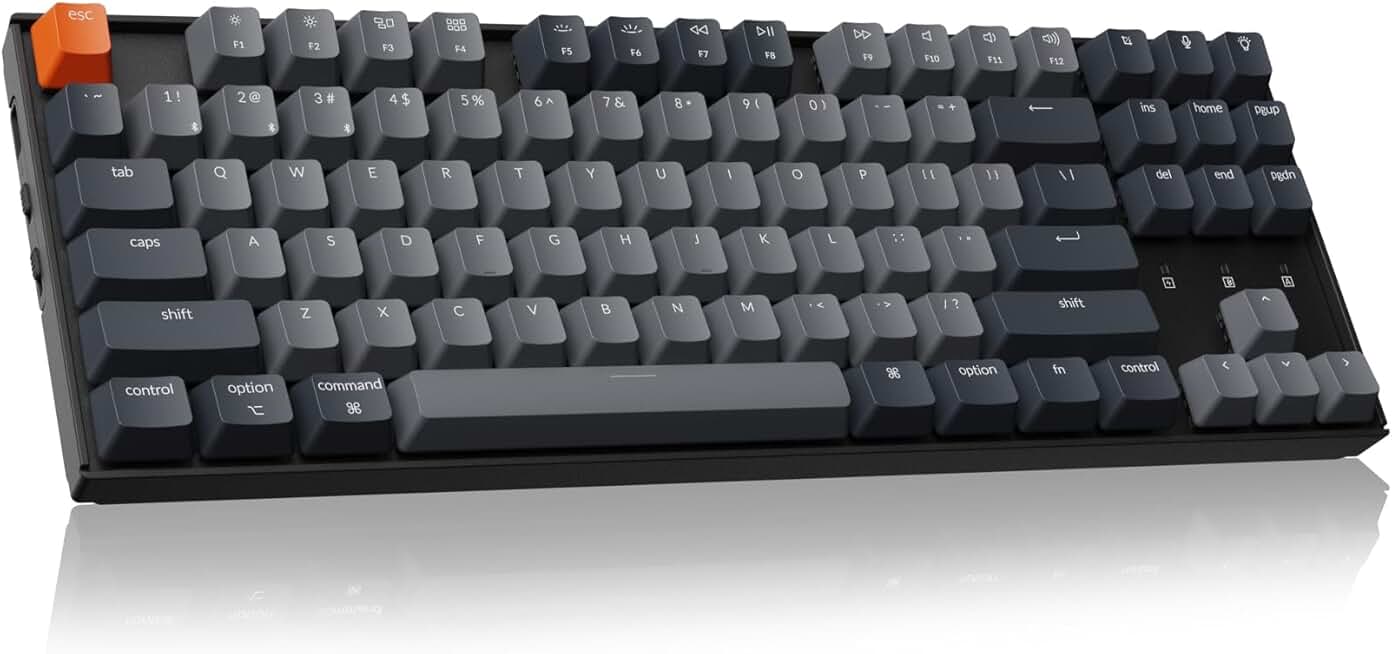
#6 · Best Tenkeyless4.3 (636)
Keychron K8 Tenkeyless Wireless Mechanical Keyboard for Mac, White Backlight, Bluetooth, Multitasking, Type-C Wired Gaming Keyboard for Windows with Brown Switch
$63.99
The K8 TKL is perfect if you want a smaller footprint than full-size but need more than a 75%. Mac users especially appreciate the optimized layout, though it works equally well on Windows.
Pros
- + Tenkeyless (TKL) form factor balances portability with full arrow keys and function row
- + Optimized for Mac with seamless Bluetooth pairing, works on Windows too
- + White LED backlighting and solid Keychron Super switches
- + Wired USB-C and wireless modes for flexibility
- + 4.3★ rating from users valuing the compact-yet-functional design
Cons
- − No numpad limits productivity for spreadsheet-heavy work
- − Slightly higher price ($63.99) than some 75% alternatives

#7 · Best Ultra-Slim Profile4.3 (747)
Keychron K3 Version 2, 84 Keys Ultra-Slim Wireless Bluetooth/USB Wired Mechanical Keyboard with White LED Backlit, Low-Profile Keychron Mechanical Brown Switch Compatible with Mac Windows
$58.64
The K3 V2 is the best Keychron gaming keyboard if you prefer a thin, ergonomic profile. The low-profile switches take adjustment, but they're responsive and reduce strain on your wrists.
Pros
- + Ultra-slim low-profile design reduces hand fatigue during long gaming sessions
- + 84-key 75% layout with white LED and wireless Bluetooth connectivity
- + Keychron's low-profile mechanical switches deliver responsive feel in a thin package
- + USB wired and Bluetooth dual modes for flexibility
- + Affordable at $58.64 with 4.3★ rating
Cons
- − Low-profile switches feel different from standard mechanical—not everyone likes the shallower travel
- − Fewer keycap options available for low-profile switches

#8 · Best Full-Size Wireless4.4 (368)
Keychron K10 Full Size 104 Keys Bluetooth Wireless Mechanical Gaming Keyboard for Mac Windows with Keychron Super Brown Switch, Multitasking/White LED Backlight/USB C Wired Computer Keyboard
$67.99
The K10 with Brown switches is the best full-size Keychron keyboard for users who need a numpad and prefer tactile feedback. It's a workhorse for gaming and productivity at a fair price.
Pros
- + Full-size 104-key layout with numpad for productivity and gaming
- + Keychron Super Brown switches offer tactile feedback without excessive noise
- + Bluetooth wireless and wired USB-C modes with multitasking support
- + White LED backlighting and anti-ghosting for gaming
- + 4.4★ rating and $67.99 price offer solid value for full-size
Cons
- − Brown switches are slower than linear Red for competitive FPS gaming
- − Full-size footprint takes up significant desk space

#9 · Best for Speed Gaming4.4 (188)
Keychron K10 Full Size 104 Keys Bluetooth Wireless Mechanical Gaming Keyboard for Mac Windows with Keychron Super Red Switch, Multitasking/White LED Backlight/USB C Wired Computer Keyboard Global Recycled Standard
$67.99
The K10 with Red switches is built for speed. If you play competitive shooters and want a full-size keyboard with linear switches, this is your best Keychron gaming keyboard option.
Pros
- + Keychron Super Red linear switches deliver fast, smooth actuation for FPS and fighting games
- + Full-size 104-key layout with numpad and white LED backlighting
- + Bluetooth and wired USB-C connectivity with multitasking features
- + Anti-ghosting and n-key rollover for gaming reliability
- + Same $67.99 price as Brown variant but optimized for speed
Cons
- − Linear Red switches provide no tactile feedback—not ideal for typing
- − Full-size form factor may be overkill for gaming-only users

#10 · Best Budget Wired4.4 (460)
Keychron C2 Full Size Wired Mechanical Keyboard Compatible with Mac, Keychron Brown Switch, 104 Keys ABS Retro Color Keycaps Gaming Keyboard for Windows, USB-C Type-C Braid Cable Global Recycled Standard
$48.44
The C2 is the best budget Keychron gaming keyboard if you don't need wireless. The full-size layout and reliable Brown switches deliver solid gaming performance at an unbeatable price.
Pros
- + Lowest price at $48.44 makes this the most affordable Keychron gaming keyboard
- + Full-size 104-key layout with Keychron Brown switches and white LED backlight
- + Wired USB connection eliminates latency concerns for competitive gaming
- + ABS retro-style keycaps add character to your setup
- + 4.4★ rating proves reliability doesn't require wireless or premium switches
Cons
- − Wired-only design limits flexibility and desk space management
- − No wireless option means you're tethered to your PC or Mac
Frequently asked questions
Frequently Asked Questions
Final word
The best Keychron gaming keyboard depends on your budget, layout preference, and gaming style. For most gamers, the K2 at $79.99 offers the best balance of performance, wireless convenience, and value. If you play competitive esports, the K2 HE or K10 HE with Hall Effect switches justify the premium. Budget-conscious buyers should consider the C2 wired keyboard at $48.44, while those with limited desk space will love the ultra-slim K3 V2. All of these keyboards deliver solid gaming performance, reliable wireless connectivity, and the build quality Keychron is known for. Pick the layout and switch type that matches your gaming needs, and you'll have a dependable keyboard that works across multiple devices for years to come.
More gaming keyboards guides
Budget Gaming Keyboards of 2026
Top 10 budget gaming keyboards 2026. RGB, mechanical, compact—all under $120. Expert reviews & buying guide.
Best Compact Gaming Keyboards in 2026
Find the best compact gaming keyboards for 2026. Expert reviews of 60% and tenkeyless boards for gaming, work, and travel.
Best Corsair Gaming Keyboards in 2026
Find the best Corsair gaming keyboards for your setup. Expert reviews of wired, wireless, and mechanical options.
Best Ergonomic Gaming Keyboards in 2026
Top ergonomic gaming keyboards for comfort and performance. Compare split designs, wrist rests, and mechanical switches.
Best Gaming Keyboards in 2026
Find the best gaming keyboards 2026. Expert reviews of mechanical, wireless, and budget options for every gamer.
Best Gaming Keyboards for Apex Legends
Top gaming keyboards for Apex Legends with fast response times, RGB, and durability. Find the best fit for your playstyle.