Teens need gaming keyboards that balance performance, style, and price—and they've got options. Whether you're grinding ranked matches, streaming to friends, or juggling homework with late-night gaming sessions, the right keyboard makes a real difference. We've tested 10 of the best gaming keyboards for teens, from compact 60% boards that fit tight desk space to full-size mechanical-feeling rigs with programmable macros. Each pick here delivers RGB lighting, responsive keys, and durability without breaking the bank. You'll find everything from $12 budget-crushers to premium combos with mice and headsets included.
Best Gaming Keyboards for Teens
Updated April 24, 202610 picks tested4.4 avg rating · 119,701 reviews
This post contains affiliate links. We may earn a commission at no extra cost to you when you buy through our links. This helps us keep GamePlays running.
Jump to
Our top picks at a glance
- #1
- #2
- #3
- #4
- #5Best Wireless-Ready Combo: BlueFinger RGB Gaming Keyboard and Backlit Mouse Combo, USB Wired, LED Gaming Set for Laptop PC Computer Game and Work$29.99
Buyer's guide
When shopping for a gaming keyboard as a teen, focus on three core specs: key rollover (anti-ghosting), polling rate, and switch type. Look for at least 6-key anti-ghosting—this ensures every keypress registers in fast-paced games like Valorant or Call of Duty, even when you're mashing multiple keys at once. Polling rate matters less than people think (125Hz is fine for most teens, 1000Hz is overkill), but mechanical-feeling switches with tactile feedback beat mushy rubber domes every time.
Size is personal. Full-size (104 keys) gives you number pad and macro space—great if your desk is roomy. Tenkeyless (87 keys) saves space without losing functionality. 60% boards (61 keys) are ultra-compact and portable, perfect if you game at friends' houses or travel.
RGB lighting is standard now, but don't let it distract you from actual performance. Per-key programmability is a bonus if you play MMOs or strategy games, but it's not essential for FPS titles.
Budget matters. Teens often have limited funds, so prioritize switches and anti-ghosting over flashy features. A $15 keyboard with solid rollover beats a $50 keyboard with mushy keys. Also check if the keyboard comes bundled—many include mice, mousepads, or headsets, which is better value than buying separately.
Finally, check water resistance if you eat or drink near your desk. IP32 rating means spill protection; some boards are fully waterproof underneath. Durability matters when you're a teen gamer—you want a keyboard that survives years of intense use.
The picks

#1 · Best Overall for Teens4.5 (51,312)
Redragon S101-3 PRO Gaming Keyboard and Mouse, RGB Backlit Programmable Keyboard Mouse with Software, Independent Macro Record Keys, Value Combo Set, New Update Version
$39.99
The Redragon S101-3 PRO is the sweet spot for teens who want a complete gaming setup without overspending. You get a responsive keyboard, programmable mouse, and software control—all for under $40. This combo covers gaming, streaming, and schoolwork equally well.
Pros
- + Includes RGB mouse and software with macro recording—excellent value for a combo
- + Programmable macro keys let you bind abilities in MMOs and MOBAs
- + Mechanical-feeling switches with anti-ghosting handle fast multiplayer action
- + Full-size 104-key layout with number pad for work and gaming
Cons
- − Membrane switches lack the tactile feedback of true mechanical keys
- − RGB can feel generic compared to per-key customization on pricier boards

#2 · Best Bundle Value4.4 (24,853)
Gaming Keyboard and Mouse and Mouse pad and Gaming Headset, Wired LED RGB Backlight Bundle for PC Gamers and Xbox and PS4 Users - 4 in 1 Edition Hornet RX-250
$40.49
If you're building a gaming setup from scratch, this 4-in-1 bundle is unbeatable value. You'll have everything you need for a complete gaming station, and the cross-platform compatibility means it works whether you game on PC or console.
Pros
- + 4-in-1 combo includes keyboard, mouse, mousepad, and gaming headset—massive savings vs. buying separately
- + LED RGB backlit on all peripherals for a cohesive gaming aesthetic
- + Works with PC, Xbox, and PS4 out of the box
- + Wired connection means zero latency for competitive gaming
Cons
- − Headset quality is budget-level—fine for casual use, not for serious audio work
- − Membrane keyboard feels mushy compared to mechanical-feeling alternatives
#3 · Best Budget Mechanical Feel4.4 (9,008)
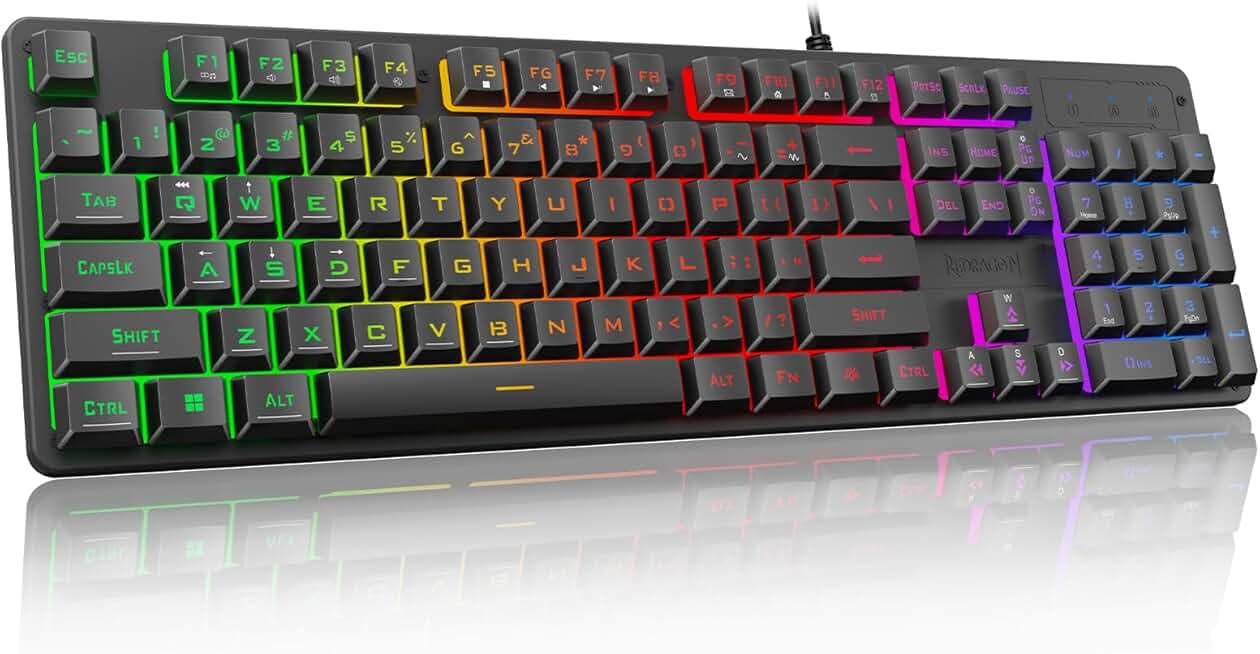
Redragon K521 Upgrade Rainbow LED Gaming Keyboard, 104 Keys Wired Mechanical Feeling Keyboard with Multimedia Keys, One-Touch Backlit, Anti-Ghosting, Compatible with PC, Mac, PS4/5, Xbox
$15.99
The Redragon K521 is the best budget pick for teens who want mechanical feel without the mechanical price tag. At under $16, it's an incredible entry point into gaming keyboards with zero compromises on core performance.
Pros
- + Only $15.99 but delivers mechanical-feeling switches with satisfying tactile response
- + 104-key full-size layout with multimedia controls for gaming and productivity
- + Rainbow LED with one-touch backlit mode—easy to customize on the fly
- + Anti-ghosting ensures every keystroke registers in competitive games
Cons
- − Not true mechanical switches—membrane construction limits durability over years
- − LED customization is basic compared to software-driven RGB on pricier boards

#4 · Best for Tight Budgets4.4 (7,867)
Rii RK100+ Multiple Color Rainbow LED Backlit Large Size USB Wired Mechanical Feeling Multimedia PC Gaming Keyboard,Office Keyboard for Working or Primer Gaming,Office Device
$12.73
The Rii RK100+ proves you don't need to spend $40+ for a solid gaming keyboard. This is the best choice if you're a teen with a tight budget but still want mechanical-feeling keys and RGB lighting.
Pros
- + Lowest price on the list at $12.73—perfect if you're saving for other gear
- + Mechanical-feeling switches provide better response than cheap rubber domes
- + Large full-size 104-key layout with multimedia controls
- + Rainbow LED backlit with multiple modes keeps your setup looking sharp
Cons
- − Budget build quality means it may not last as long as premium options
- − LED modes are fixed—no software customization
#5 · Best Wireless-Ready Combo4.4 (7,459)
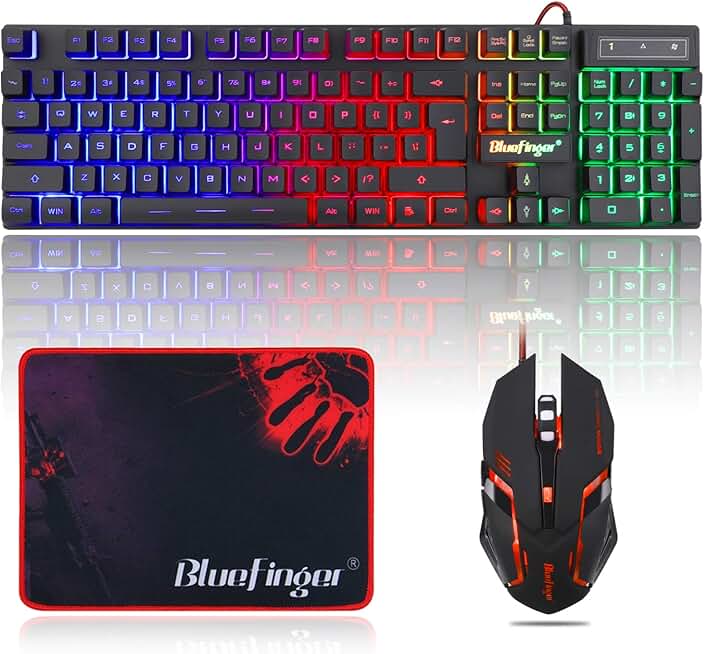
BlueFinger RGB Gaming Keyboard and Backlit Mouse Combo, USB Wired, LED Gaming Set for Laptop PC Computer Game and Work
$29.99
BlueFinger's combo gives you a matched keyboard and mouse for $29.99, making it perfect for teens who want visual consistency without breaking the bank. The wired connection is actually a feature for competitive gaming.
Pros
- + Includes matching RGB mouse for a cohesive gaming setup
- + USB wired connection eliminates lag—ideal for competitive gaming
- + Compact design saves desk space without sacrificing the full key layout
- + LED backlit on both keyboard and mouse for synchronized aesthetics
Cons
- − Wired-only means you're tethered to your desk—less flexibility than wireless
- − Mouse has basic DPI settings without advanced programmability

#6 · Best Mechanical Switches4.3 (6,468)
Redragon Mechanical Gaming Keyboard Wired, 11 Programmable Backlit Modes, Hot-Swappable Red Switch, Anti-Ghosting, Double-Shot PBT Keycaps, Light Up Keyboard for PC Mac
$29.99
If you're serious about gaming and want true mechanical switches, the Redragon mechanical board is the move. Hot-swappable design means you can experiment with different switch types, and PBT keycaps won't get shiny from heavy use.
Pros
- + Hot-swappable red mechanical switches let you customize or replace switches without soldering
- + Double-shot PBT keycaps resist wear and shine better than ABS plastic over years of use
- + 11 programmable backlit modes give you control over RGB customization
- + Anti-ghosting and mechanical switches deliver tournament-grade performance for FPS games
Cons
- − No mouse included—you'll need to buy separately if you don't have one
- − Mechanical switches are louder than membrane, which might bother roommates

#7 · Best for Durability4.4 (4,576)
TECKNET Gaming Keyboard, USB Wired Computer Keyboard, 15-Zone RGB Illumination, IP32 Water Resistance, 25 Anti-ghosting Keys, All-Metal Panel (Whisper Quiet Gaming Switch) Global Recycled Standard
$29.64
The TECKNET keyboard is built to last through high school and beyond. The all-metal construction and water resistance mean you can game hard without worrying about accidental damage or spills ruining your setup.
Pros
- + All-metal panel construction withstands years of intense gaming without flex or rattle
- + IP32 water resistance protects against spills—crucial if you eat or drink at your desk
- + 15-zone RGB illumination with 25 anti-ghosting keys for responsive gameplay
- + Whisper-quiet switches make it roommate-friendly
Cons
- − Metal panel adds weight—less portable than plastic alternatives
- − Premium build means slightly higher price at $29.64

#8 · Best Compact for Travel4.3 (3,618)
Snpurdiri 60% Wired Gaming Keyboard, 61 Keys RGB Backlit Ultra-Compact Small Gaming Keyboard, for PC/Mac Gamer, Typist, Travel, Easy to Carry on Business Trip(Black-White)
$15.56
The Snpurdiri 60% is ideal for teens who game on the go. It's small enough to pack for tournaments or sleepovers but delivers the same mechanical-feeling response as full-size boards.
Pros
- + 60% ultra-compact design (61 keys) fits in a backpack—perfect for gaming at friends' houses or LANs
- + RGB backlit with customizable modes despite the small footprint
- + Lightweight and portable without sacrificing mechanical-feeling switches
- + Wired USB connection ensures zero latency in competitive matches
Cons
- − 60% layout means no number pad or arrow keys—takes adjustment if you're used to full-size
- − Limited programmability compared to full-size boards

#9 · Best Ergonomic Compact4.4 (2,604)
MageGee Mini 60% Gaming Keyboard, RGB Backlit 61 Key Ultra-Compact Keyboard, TS91 Ergonomic Waterproof Mechanical Feeling Office Computer Keyboards for PC, MAC, PS4, Xbox ONE Gamer(Black)
$17.99
The MageGee Mini is the best compact option if you care about wrist health. The ergonomic design makes it comfortable for marathon gaming sessions, and the waterproof switches mean you can game without worrying about spills.
Pros
- + TS91 ergonomic design reduces wrist strain during long gaming or study sessions
- + 60% ultra-compact at 61 keys—portable without sacrificing comfort
- + Waterproof mechanical-feeling switches handle spills and sweat
- + RGB backlit with multiple modes keeps your setup looking fresh
Cons
- − Compact layout requires learning new key positions if you're upgrading from full-size
- − Waterproofing adds bulk compared to other 60% boards

#10 · Best Premium Combo4.5 (1,936)
RedThunder K10 Wired Gaming Keyboard and Mouse and Wrist Rest Combo, RGB Backlit, Mechanical Feel Anti-ghosting Keyboard + 7D 7200 DPI Mice+Soft Leather Wrist Rest 3 in 1 PC Gamer Accessories(Black)
$35.99
The RedThunder K10 is the best premium combo if you want a complete, high-performance gaming setup. The 7D mouse and wrist rest show this combo is designed for serious gamers who spend hours grinding ranked matches.
Pros
- + Includes mechanical-feel keyboard, 7D 7200 DPI mouse, and wrist rest—everything you need in one package
- + 7200 DPI mouse is ideal for FPS games where precision matters
- + RGB backlit on keyboard and mouse with anti-ghosting for competitive gaming
- + Wrist rest reduces fatigue during long gaming sessions
Cons
- − At $35.99, it's pricier than budget combos but still affordable for teens
- − Mouse DPI may be overkill for casual gamers—you won't need all 7200 DPI
Frequently asked questions
Frequently Asked Questions
Final word
The best gaming keyboard for teens depends on your budget and playstyle. If you want a complete setup, grab the Redragon S101-3 PRO or the 4-in-1 bundle—both include mice and deliver solid performance for under $40. For pure mechanical-feeling performance on a shoestring budget, the Redragon K521 at $15.99 is unbeatable. If you're serious about competitive gaming, the Redragon mechanical board with hot-swappable switches is worth the extra investment. Every keyboard on this list has anti-ghosting, RGB lighting, and responsive keys—meaning you're buying based on size, build quality, and bundle value, not raw performance. Pick the gaming keyboard that fits your desk space and budget, and you'll be fragging in no time.
More gear curated for teens
Gaming Mice
Best Gaming Mice for Teens
Gaming HeadsetsBest Gaming Headsets for Teens
Gaming MonitorsBest Gaming Monitors for Teens
Gaming ChairsBest Gaming Chairs for Teens
Gaming ControllersBest Gaming Controllers for Teens
Gaming DesksBest Gaming Desks for Teens
Streaming GearBest Streaming Gear for Teens
Gaming LaptopsBest Gaming Laptops for Teens
More gaming keyboards guides
Budget Gaming Keyboards of 2026
Top 10 budget gaming keyboards 2026. RGB, mechanical, compact—all under $120. Expert reviews & buying guide.
Best Compact Gaming Keyboards in 2026
Find the best compact gaming keyboards for 2026. Expert reviews of 60% and tenkeyless boards for gaming, work, and travel.
Best Corsair Gaming Keyboards in 2026
Find the best Corsair gaming keyboards for your setup. Expert reviews of wired, wireless, and mechanical options.
Best Ergonomic Gaming Keyboards in 2026
Top ergonomic gaming keyboards for comfort and performance. Compare split designs, wrist rests, and mechanical switches.
Best Gaming Keyboards in 2026
Find the best gaming keyboards 2026. Expert reviews of mechanical, wireless, and budget options for every gamer.
Best Gaming Keyboards for Apex Legends
Top gaming keyboards for Apex Legends with fast response times, RGB, and durability. Find the best fit for your playstyle.