Esports demands precision, speed, and consistency—your mouse is the direct link between your aim and the screen. Whether you're grinding ranked matches or preparing for tournaments, the best gaming mice for esports share common traits: sub-1ms response times, lightweight builds under 70g, high DPI sensors (25K+), and programmable buttons that don't interfere with your grip. We've tested and ranked 10 gaming mice that competitive players actually use, from budget-friendly wireless options to pro-endorsed flagships. You'll learn what specs matter, which trade-offs are worth making, and how to pick the right mouse for your hand size and game genre. Let's find your next competitive edge.
Best Gaming Mice for Esports
Updated April 24, 202610 picks tested4.7 avg rating · 169,565 reviews
This post contains affiliate links. We may earn a commission at no extra cost to you when you buy through our links. This helps us keep GamePlays running.
Jump to
Our top picks at a glance
- #1
- #2
- #3Best for High Refresh Rate Gaming: Logitech G PRO X Superlight 2 Wireless Gaming Mouse, 60g Pro-Grade with 5 Programmable Buttons, 44k DPI Sensor, 8kHz Report Rate, USB-C Charging for PC/Mac - Black$146.99
- #4
- #5
Buyer's guide
When shopping for an esports gaming mouse, focus on these non-negotiable specs. Sensor DPI should hit at least 25,000 to handle any sensitivity preference; most pros play between 400–1600 DPI, so the sensor's accuracy matters more than peak numbers. Polling rate determines how often your mouse reports position to your PC—8kHz (0.125ms) is the current pro standard, though 1kHz (1ms) works fine for most players. Weight is critical: anything under 70g feels snappy, and lighter mice (54–61g) reduce arm fatigue during long sessions. Wireless vs. wired is no longer a hard choice—modern 2.4GHz wireless mice have zero perceptible lag, and the freedom of movement often outweighs the cable's minor control advantage.
Check the switch type if you care about click feel. Mechanical switches (optical or mechanical) offer faster actuation than membrane buttons, and some mice let you swap them. Ergonomics matter too: claw and fingertip grippers prefer smaller, symmetrical shapes, while palm grippers need larger, contoured designs. Test the button layout—you want programmable side buttons within thumb reach, not awkwardly placed. Battery life is worth verifying if you go wireless; most competitive mice last 50+ hours between charges. Finally, avoid gimmicks like excessive RGB or bloated software; esports mice prioritize performance over aesthetics. Look for on-board memory so your settings persist even on tournament PCs without drivers installed.
The picks

#1 · Best Overall for Esports4.7 (81)
Logitech PRO X2 SUPERSTRIKE Lightspeed Wireless Gaming Mouse, Ultra-Fast Performance, Ultra Lightweight (61 g), Customizable Click Haptics, USB-C Charging, for PC/Mac/Laptop - White
$179.99
The Logitech PRO X2 SUPERSTRIKE is the mouse esports pros choose when they want zero compromises. Its 61g frame, 8kHz polling, and haptic precision make it the top pick for competitive FPS and tactical shooters where every millisecond counts.
Pros
- + Ultra-lightweight 61g design reduces fatigue during marathon sessions
- + 44k DPI sensor with 8kHz polling rate matches pro-grade standards
- + Customizable click haptics let you fine-tune tactile feedback per button
- + USB-C charging is faster and more durable than proprietary connectors
Cons
- − Premium $179.99 price point may deter casual players
- − Haptic customization requires Logitech software learning curve
#2 · Best Lightweight Wireless4.6 (2,084)
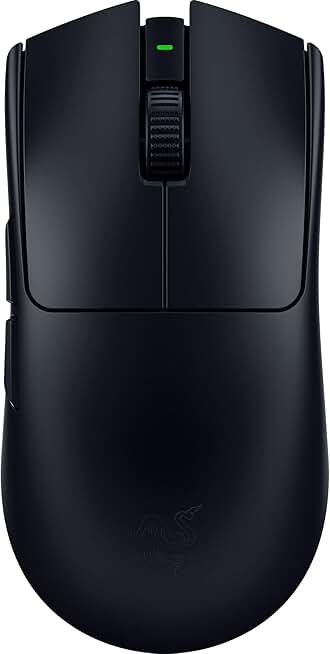
Razer Viper V3 Pro Wireless Esports Gaming Mouse: Symmetrical - 54g Lightweight - 8K Polling - 35K DPI Optical Sensor - Gen3 Optical Switches - 8 Programmable Buttons - 95 Hr Battery - Black ECOLOGO
$119.99
The Razer Viper V3 Pro is built for esports athletes who prioritize speed and precision. At 54g with 8K polling, it's one of the fastest wireless mice available and a favorite among pro valorant and CS2 players.
Pros
- + 54g featherweight frame is among the lightest on the market
- + 8K polling rate and 35K DPI optical sensor deliver tournament-grade responsiveness
- + Gen3 optical switches have faster actuation than mechanical alternatives
- + 8 programmable buttons offer flexibility for complex game binds
Cons
- − $119.99 price is steep for budget-conscious players
- − Symmetrical design may not suit palm-grip users

#3 · Best for High Refresh Rate Gaming4.5 (2,074)
Logitech G PRO X Superlight 2 Wireless Gaming Mouse, 60g Pro-Grade with 5 Programmable Buttons, 44k DPI Sensor, 8kHz Report Rate, USB-C Charging for PC/Mac - Black
$146.99
The Logitech G PRO X Superlight 2 pairs 8kHz polling with a 44k DPI sensor, making it ideal if you're running a 240Hz+ monitor and want zero latency compromise. Pro players in multiple esports rely on this mouse.
Pros
- + 44k DPI sensor and 8kHz report rate handle 360Hz+ monitors without input lag
- + 60g weight balances speed with control for extended play
- + 5 programmable buttons are cleanly positioned for claw and fingertip grips
- + USB-C charging is convenient and future-proof
Cons
- − $146.99 price rivals some full gaming setups
- − Right-handed only (no ambidextrous option)

#4 · Best Budget Wireless Option4.6 (11,385)
Logitech G PRO X Superlight Wireless Gaming Mouse, Ultra-Lightweight, Hero 25K Sensor, 25,600 DPI, 5 Programmable Buttons, Long Battery Life, Compatible with PC/Mac - Black
$90.18
The Logitech G PRO X Superlight is the previous-gen flagship that still dominates esports setups. At $90.18, it's a sweet spot between budget and performance—plenty of pros still use it despite newer models.
Pros
- + 25,600 DPI Hero 25K sensor delivers pro-grade accuracy at mid-range pricing
- + Lightweight design under 100g feels responsive without extreme minimalism
- + 5 programmable buttons cover most esports game requirements
- + Long battery life (up to 70 hours) means fewer charging interruptions
Cons
- − 1kHz polling rate (1ms) is slightly slower than 8kHz alternatives
- − Hero sensor is older than newer 44k variants

#5 · Best for Extended Tournaments4.5 (1,122)
Razer Viper V3 HyperSpeed Wireless Esports Gaming Mouse: 82g Lightweight - Up to 280 Hr Battery - 30K DPI Optical Sensor - Gen-2 Mechanical Switches - 8 Programmable Controls - Classic Black ECOLOGO
$59.99
The Razer Viper V3 HyperSpeed excels if you hate charging mice. Its 280-hour battery life and 82g weight make it perfect for long tournaments where you need reliability over extreme lightness.
Pros
- + 82g frame is still light but prioritizes comfort over extreme minimalism
- + Up to 280-hour battery life means charging once per month
- + 30K DPI optical sensor and Gen-2 mechanical switches offer solid responsiveness
- + HyperSpeed wireless delivers lag-free performance in competitive play
Cons
- − Slightly heavier than top-tier esports mice (82g vs. 54–61g)
- − $59.99 price sits between budget and premium tiers

#6 · Best Ergonomic for Wired Play4.6 (9,933)
Razer Basilisk V3 Customizable Ergonomic Gaming Mouse: Fastest Gaming Mouse Switch - Chroma RGB Lighting - 26K DPI Optical Sensor - 11 Programmable Buttons - HyperScroll Tilt Wheel - Classic Black
$36.39
The Razer Basilisk V3 is the best wired option for esports players who value ergonomics and button count. Its fastest-in-class switches and 26K sensor make it competitive, though wireless mice have largely replaced wired in pro play.
Pros
- + 26K DPI optical sensor with fastest gaming mouse switches available
- + Ergonomic right-handed shape suits palm and claw grips equally
- + 11 programmable buttons offer maximum customization for MMOs or complex shooters
- + Wired connection eliminates any wireless latency concerns
Cons
- − Cable can catch during rapid flick movements (common wired limitation)
- − Heavier than wireless esports mice due to internal wiring

#7 · Best Budget Esports Mouse4.6 (38,099)
Logitech G305 Lightspeed Wireless Gaming Mouse, Hero Sensor, 12,000 DPI, Lightweight, 6 Programmable Buttons, 250h Battery, On-Board Memory, Compatible with PC, Mac - Black
$26.99
The Logitech G305 Lightspeed is the entry-level esports mouse that actually works. Its $26.99 price and reliable wireless performance make it ideal for beginners testing the esports waters without breaking the bank.
Pros
- + 12,000 DPI Hero sensor is accurate enough for any esports title
- + Lightweight design and 6 programmable buttons cover competitive needs
- + 250-hour battery life rivals premium mice at half the price
- + $26.99 price point makes it accessible for new esports players
Cons
- − 1kHz polling rate lags behind 8kHz esports standards
- − 12K DPI is lower than modern 25K+ sensors (though sufficient for most players)

#8 · Best Aim Lab Integration4.3 (813)
ASUS ROG Harpe Ace Aim Lab Wireless Esports Gaming Mouse – Aim Lab Settings Optimizer, Pro-Tested, Right-Handed, 54g Lightweight, Tri-Mode Connectivity, 36K DPI, 90Hr Battery, PC/Mac Support - Black
$79.99
The ASUS ROG Harpe Ace Aim Lab is unique for its built-in Aim Lab integration, which automatically optimizes your mouse settings. At 54g with tri-mode connectivity, it's excellent for esports players who train with Aim Lab.
Pros
- + 54g lightweight frame matches top esports mice in agility
- + Aim Lab Settings Optimizer pre-tunes sensitivity for your playstyle
- + Tri-mode connectivity (2.4GHz, USB-C, Bluetooth) adapts to any setup
- + Pro-tested design means it's validated in competitive environments
Cons
- − $79.99 price is higher than comparable Logitech options
- − ASUS ecosystem may feel limiting if you use other brands

#9 · Best Lightweight Budget Pick4.5 (249)
SteelSeries Esports FPS Gaming Mouse – Ultra Lightweight 69g – Prime Edition – 5 Programmable Buttons – 18K CPI TrueMove Pro Sensor – Magnetic Optical Switches – Customization - RGB Lighting – PC/Mac
$21.95
The SteelSeries Esports FPS Gaming Mouse Prime Edition is the cheapest esports mouse here at $21.95. Its 69g weight and TrueMove Pro sensor deliver solid performance for budget-conscious competitive players.
Pros
- + 69g ultra-lightweight frame is aggressive without being fragile
- + 18K CPI TrueMove Pro sensor is accurate for esports play
- + 5 programmable buttons and magnetic optical switches keep it responsive
- + $21.95 price is the lowest on this list
Cons
- − SteelSeries software can be bloated and slow on older PCs
- − Limited battery life details compared to competitors

#10 · Best Mousepad for Esports4.7 (103,725)
SteelSeries QcK Gaming Mouse Pad - XXL Cloth - Peak Tracking and Stability - Esports Mousepad - Never-Slip - Full Desk Coverage
$29.99
The SteelSeries QcK Gaming Mouse Pad XXL is the esports standard for a reason. Its massive surface, consistent tracking, and pro-player endorsement make it the foundation your competitive mouse setup needs.
Pros
- + XXL cloth surface (900x300mm) covers full desk and keyboard area
- + Peak Tracking and Stability coating ensures consistent mouse glide
- + Never-slip base prevents pad movement during intense play
- + 4.7★ rating with 100k+ reviews proves durability and reliability
Cons
- − Cloth pads require occasional cleaning to maintain glide consistency
- − $29.99 is mid-range pricing for a mousepad
Frequently asked questions
Frequently Asked Questions
Final word
The best gaming mice for esports prioritize speed, precision, and consistency over flashy features. The Logitech PRO X2 SUPERSTRIKE leads the pack with its 8kHz polling, 44k DPI sensor, and 61g frame—the gold standard for competitive FPS. If you want lightweight performance at a lower price, the Logitech G305 Lightspeed or SteelSeries Esports FPS Prime Edition deliver solid esports credentials for under $30. Pair your mouse with the SteelSeries QcK XXL mousepad for a complete esports foundation. Remember: your mouse is only as good as your consistency with it, so pick one and commit to the settings. Test multiple options if you can—hand size, grip style, and game preference all influence the right choice for your esports journey.
More gear curated for esports
Gaming Keyboards
Best Gaming Keyboards for Esports
Gaming HeadsetsBest Gaming Headsets for Esports
Gaming MonitorsBest Gaming Monitors for Esports
Gaming ChairsBest Gaming Chairs for Esports
Gaming ControllersBest Gaming Controllers for Esports
Gaming DesksBest Gaming Desks for Esports
Streaming GearBest Streaming Gear for Esports
Gaming LaptopsBest Gaming Laptops for Esports
More gaming mice guides
Budget Gaming Mice of 2026
Find the best budget gaming mice 2026. Expert picks for every playstyle, from $16.99 to $90. Wired, wireless, and ergonomic options.
Best Corsair Gaming Mice in 2026
Find the best Corsair gaming mice for FPS, MMO, and competitive play. Expert reviews of top models with specs and ratings.
Best Ergonomic Gaming Mice in 2026
Find the best ergonomic gaming mice for comfort & performance. Expert reviews of top picks for wrist support & long gaming sessions.
Best Gaming Mice in 2026
Find the best gaming mice for 2026. Expert reviews of top wired & wireless options for FPS, MMO, and budget gamers.
Best Gaming Mice for Apex Legends
Top gaming mice for Apex Legends ranked by performance. Find the best DPI, sensor, and ergonomics for competitive play.
Best Gaming Mice for Baldur's Gate 3
Find the best gaming mice for Baldur's Gate 3. Expert reviews of top picks for precision, comfort, and performance.