Esports demands precision, speed, and reliability — your keyboard needs to keep up with your reflexes and stay consistent through marathon practice sessions. Whether you're grinding ranked matches or competing in tournaments, the right gaming keyboard for esports separates clean kills from missed clutches. We've tested and ranked the best gaming keyboards for esports, focusing on mechanical switches, polling rates, actuation response, and the durability pros rely on. You'll find options for every budget and hand size, from compact 60% boards to full-featured tenkeyless layouts. This guide cuts through marketing noise and gives you the specs that actually matter in competitive play.
Best Gaming Keyboards for Esports
Updated April 23, 202610 picks tested4.5 avg rating · 62,664 reviews
This post contains affiliate links. We may earn a commission at no extra cost to you when you buy through our links. This helps us keep GamePlays running.
Jump to
Our top picks at a glance
- #1
- #2
- #3
- #4
- #5
Buyer's guide
When shopping for gaming keyboards for esports, polling rate and switch type are your non-negotiables. Look for 8000 Hz polling rate minimum — this reduces input lag to 0.125ms, which matters in fast-paced shooters and fighting games. Mechanical switches are essential; optical and hall-effect switches offer faster actuation than membrane alternatives. Check the actuation distance (typically 1.5-2.0mm for esports-grade boards) and whether the keyboard supports adjustable actuation points. Rapid trigger modes let you re-actuate keys mid-press, a competitive advantage in games like Valorant and CS2.
Form factor depends on your setup. Tenkeyless (TKL) keyboards save desk space while keeping arrow keys and modifiers. 75% boards compress the layout further without sacrificing functionality. Compact 60% boards are ultra-portable but require function layers for numbers and arrows. Full-size boards give you a numpad but take up real estate.
Build quality matters for durability. Aluminum frames withstand years of aggressive play better than plastic. Stabilizers should feel smooth and not rattle — a sign of poor quality control. Hot-swappable switches let you customize your feel without soldering, a huge plus if you want to experiment.
RGB lighting is nice but secondary to performance. IP32 water and dust resistance protects against spilled energy drinks and keyboard crumbs during late-night sessions. Finally, check driver support — some keyboards need software for full functionality, while others work plug-and-play. Avoid keyboards with sketchy driver support or frequent connectivity issues.
The picks

#1 · Best Overall for Esports4.3 (979)
Razer Huntsman V3 Pro Esports Gaming Keyboard: Analog Optical Switches - Razer Snap Tap - Rapid Trigger - Adjustable Actuation - Media Keys & Dial - Doubleshot PBT Keycaps - Wrist Rest - Black ECOLOGO
$199.99
The Razer Huntsman V3 Pro is the gold standard for esports keyboards. Its analog optical switches and Snap Tap technology eliminate the input inconsistencies that cost you rounds. If you're serious about competitive play, this is the keyboard pros choose.
Pros
- + Analog optical switches with adjustable actuation down to 0.1mm for ultimate precision
- + Razer Snap Tap prevents accidental double-taps, critical in competitive FPS games
- + Rapid Trigger mode allows re-actuation mid-press for advanced tech play
- + Full-size layout with dedicated media keys and USB passthrough
- + Proven by professional esports players across multiple titles
Cons
- − Premium price at $199.99 puts it out of reach for casual players
- − Requires Razer Synapse software for full feature access and customization
- − Heavier than compact alternatives, less portable for LAN tournaments

#2 · Best Esports TKL4.3 (979)
Razer Huntsman V3 Pro TKL Esports Gaming Keyboard: Analog Optical Switches - Razer Snap Tap - Rapid Trigger - Adjustable Actuation - Media Keys & Dial - Doubleshot PBT Keycaps - Wrist Rest - Black ECOLOGO
$139.99
The Razer Huntsman V3 Pro TKL delivers the same competitive edge as its full-size sibling in a more portable package. You get analog optical switches and Snap Tap in a layout that fits tournament bags and cramped desk setups.
Pros
- + Tenkeyless form factor saves desk space without sacrificing functionality
- + Same analog optical switches and Snap Tap as the full-size model
- + Rapid Trigger and adjustable actuation for competitive advantage
- + Lighter and more portable than full-size for LAN events
- + Aircraft-grade aluminum frame built for tournament durability
Cons
- − No numpad limits productivity for non-gaming tasks
- − Still requires Razer Synapse software for optimal performance
- − $139.99 price is steep for a TKL layout

#3 · Best Wireless for Esports4.6 (1,442)
AULA F75 Pro Wireless Mechanical Keyboard,75% Hot Swappable Custom Keyboard with Knob,RGB Backlit,Pre-lubed Reaper Switches,Side Printed PBT Keycaps,2.4GHz/USB-C/BT5.0 Mechanical Gaming Keyboards Global Recycled Standard
$79.99
The AULA F75 Pro proves wireless can work for esports if you prioritize portability and clean desk aesthetics. The 75% layout and hot-swappable switches give you flexibility, though wired players may prefer the zero-latency guarantee.
Pros
- + 75% layout balances compactness with full functionality including arrow keys
- + 2.4GHz wireless with minimal latency for untethered competitive play
- + Hot-swappable switches let you customize feel without soldering
- + Pre-lubed Reaper switches provide smooth, consistent actuation out of the box
- + RGB backlit with multimedia knob for easy volume control during matches
Cons
- − Wireless introduces potential for connection drops during critical moments
- − Battery life not specified — you'll need to charge between tournament days
- − Less established in pro esports scene compared to wired alternatives

#4 · Best Budget TKL4.5 (2,423)
SteelSeries Apex 3 TKL RGB Gaming Keyboard – Tenkeyless Compact Form Factor - 8-Zone RGB Illumination – IP32 Water & Dust Resistant – Whisper Quiet Gaming Switch – Gaming Grade Anti-Ghosting,Black
$31.99
The SteelSeries Apex 3 TKL is your best entry point into competitive gaming keyboards. At $31.99, you get a durable, water-resistant TKL board that won't break the bank while you're learning esports fundamentals.
Pros
- + Tenkeyless layout at just $31.99 makes this exceptional value for competitive play
- + IP32 water and dust resistance protects against spilled drinks and tournament grime
- + 8-zone RGB illumination with multiple lighting modes for customization
- + Whisper-quiet switches minimize noise during online tournaments
- + Compact form factor ideal for LAN events and space-limited setups
Cons
- − Membrane-style switches lack the tactile feedback serious esports players prefer
- − Limited customization without dedicated software support
- − Lower polling rate than high-end esports keyboards may add input lag

#5 · Best Premium TKL4.7 (391)
SteelSeries Apex Pro TKL Gen 3 OmniPoint 3.0 HyperMagnetic Switches — Adjustable Actuation — Rapid Trigger — Game-Ready Presets — Protection Mode — Rapid Tap/SOCD — OLED — RGB — PBT Keycaps — USB-C
$176.81
The SteelSeries Apex Pro TKL Gen 3 combines adjustable HyperMagnetic switches with game-ready presets for serious competitors. This is the thinking player's esports keyboard, offering customization depth that rewards practice and optimization.
Pros
- + OmniPoint 3.0 HyperMagnetic switches offer adjustable actuation from 0.4mm to 4.0mm
- + Rapid Trigger mode for advanced competitive tech in fighting games and shooters
- + Game-Ready Presets optimize settings for popular esports titles automatically
- + Protection Mode prevents accidental keypresses during tense moments
- + SteelSeries reputation for reliability in professional esports
Cons
- − $176.81 price rivals some full-size alternatives despite losing the numpad
- − Requires SteelSeries Engine software for full feature access
- − Learning curve for adjustable actuation — beginners may not leverage its potential
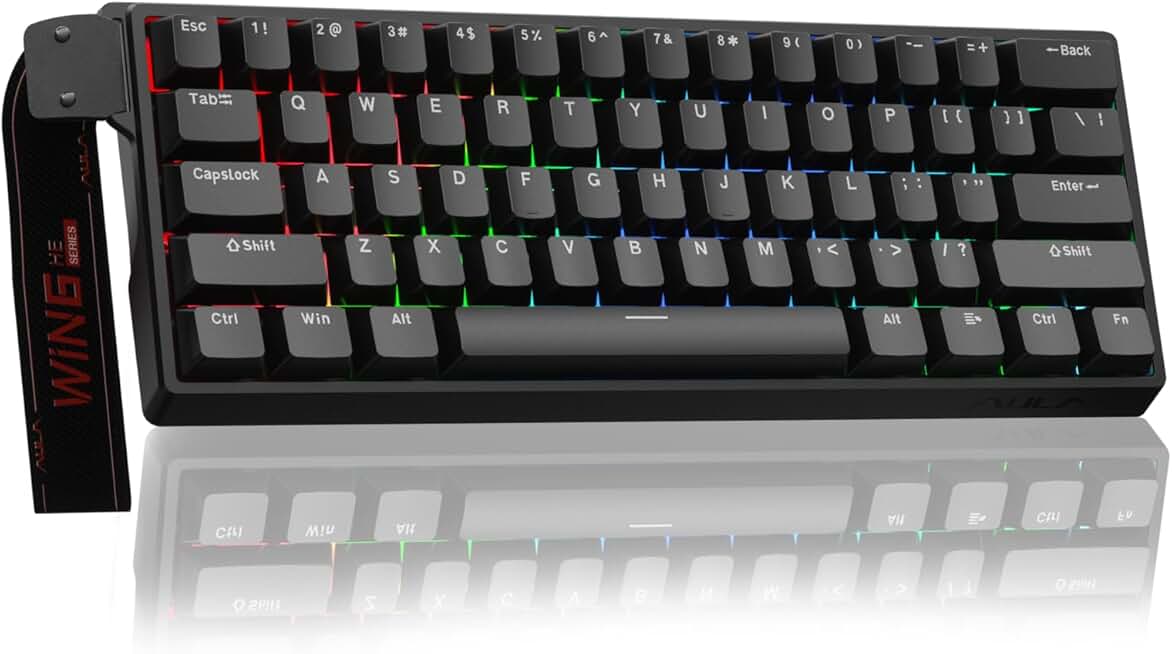
#6 · Best Compact for Esports4.5 (683)
Aula WIN60 HE - 60% Mechanical Gaming Keyboard Wired, Magnetic Switch Hot Swappable, Adjustable Actuation Rapid Trigger Mode, 8000 Hz Polling Rate, RGB Small Keyboard 60 Percent Compact Design for PC
$35.99
The Aula WIN60 HE packs esports-grade specs (8000 Hz, adjustable actuation, Rapid Trigger) into a 60% frame at $35.99. It's perfect for competitive players who prioritize portability and don't mind relearning key placement.
Pros
- + 60% layout maximizes portability for LAN tournaments and travel
- + 8000 Hz polling rate matches high-end esports boards at budget pricing
- + Hall Effect magnetic switches with adjustable actuation for competitive precision
- + Rapid Trigger mode enables advanced tech play in competitive titles
- + Magnetic switch design eliminates mechanical wear for tournament longevity
Cons
- − 60% layout requires function layers for numbers and arrow keys — steep learning curve
- − Smaller key cluster makes accidental misclicks more likely during high-stress play
- − Limited media controls compared to larger form factors

#7 · Best 75% for Esports4.7 (1,562)
Womier SK80 75% Keyboard with Color Multimedia Display Mechanical Gaming Keyboard Creamy Sound, Wired Hot Swappable Gasket Mount RGB Custom Key Board, Pre-lubed Stabilizer for Mac/Win, Black Kanagawa
$56.99
The Womier SK80 is a solid 75% choice for esports players who want a balanced layout and customizable switches. The multimedia display is a nice perk, though it won't improve your spray control or reaction time.
Pros
- + 75% layout keeps arrow keys and modifiers without full-size bulk
- + Color multimedia display shows game stats or stream info during matches
- + Creamy sound profile from gasket mount design minimizes distracting noise
- + Hot-swappable switches let you experiment with different feels
- + 4.7-star rating from 1562 reviews shows proven reliability
Cons
- − Multimedia display adds cost and complexity without direct competitive benefit
- − Gasket mount may feel mushy to players preferring stiff, direct feedback
- − Not explicitly marketed with esports specs like Rapid Trigger or adjustable actuation

#8 · Best Hybrid Mechanical4.6 (4,171)
SteelSeries USB Apex 5 Hybrid Mechanical Gaming Keyboard – Per-Key RGB Illumination – Aircraft Grade Aluminum Alloy Frame – OLED Smart Display (Hybrid Blue Switch)
$98.99
The SteelSeries Apex 5 bridges the gap between budget and premium esports keyboards. The hybrid switches and OLED display add character, though serious competitors may prefer dedicated optical or hall-effect alternatives.
Pros
- + Per-key RGB illumination with OLED smart display for in-game info overlay
- + Hybrid mechanical switches blend tactile feedback with smooth actuation
- + Aircraft-grade aluminum alloy frame withstands years of aggressive esports play
- + SteelSeries reputation and driver support ensure long-term reliability
- + 4.6-star rating from 4171 reviews proves widespread competitive adoption
Cons
- − $98.99 price is mid-tier but lacks Rapid Trigger or adjustable actuation of higher-end boards
- − OLED display requires software configuration — not a plug-and-play feature
- − Hybrid switches may not feel as responsive as pure optical alternatives in esports

#9 · Best Budget Mechanical4.5 (49,596)
Redragon K552 Mechanical Gaming Keyboard, 87-Key Compact, LED Gaming Keyboard with Red Switches, Anti-Ghosting, Metal Frame for PC Gaming & Typing, Beginner-Friendly (Black)
$36.99
The Redragon K552 is the gateway mechanical keyboard for esports on a shoestring budget. At $36.99 with a metal frame and anti-ghosting, it's a legitimate starter board, though you'll outgrow it as you climb the competitive ladder.
Pros
- + 87-key compact layout saves desk space while keeping number row and arrow keys
- + Red mechanical switches provide reliable actuation for budget esports play
- + Metal frame construction outlasts plastic alternatives in tournament environments
- + Anti-ghosting ensures every keypress registers during intense moments
- + 4.5-star rating from 49,596 reviews shows proven budget reliability
Cons
- − Red switches lack the tactile feedback some esports players prefer
- − No RGB customization — fixed LED lighting only
- − Polling rate and actuation specs not specified — likely below competitive standards

#10 · Best Value Rapid Trigger4.6 (438)
ATTACK SHARK X68 HE Rapid Trigger Mechanical Gaming Keyboard 60% Wired TKL with Adjustable Actuation,Hall Effect Magnetic Switch,8KHz Polling Rate,RGB Backlit,Top Mount for PC Mac Esport Gamer(Black)
$37.99
The Attack Shark X68 HE delivers Rapid Trigger and 8000 Hz polling at an unbeatable $37.99. If you can adapt to a 60% layout, this is the best value esports keyboard for serious players on a budget.
Pros
- + 8000 Hz polling rate and Hall Effect switches match keyboards costing 3x the price
- + Adjustable actuation point gives you esports-grade customization at $37.99
- + Rapid Trigger mode enables advanced tech play in competitive titles
- + 60% form factor maximizes portability for LAN tournaments
- + 4.6-star rating from 438 reviews shows solid reliability for the price
Cons
- − 60% layout requires function layers for numbers and arrows — not for everyone
- − Smaller key cluster increases misclick risk during high-pressure matches
- − Less established brand compared to Razer or SteelSeries in pro esports
Frequently asked questions
Frequently Asked Questions
Final word
The best gaming keyboards for esports prioritize polling rate, switch responsiveness, and durability over flashy RGB. If budget isn't a concern, the Razer Huntsman V3 Pro sets the professional standard with analog optical switches and Snap Tap technology. For competitive players on a budget, the Attack Shark X68 HE and Aula WIN60 HE deliver 8000 Hz polling and Rapid Trigger at under $40. Your choice depends on form factor preference and whether you value wireless convenience or wired reliability. Whichever esports keyboard you pick, focus on the specs that matter in competition — polling rate, actuation speed, and build quality — and you'll have a board that keeps pace with your skill growth.
More gear curated for esports
Gaming Mice
Best Gaming Mice for Esports
Gaming HeadsetsBest Gaming Headsets for Esports
Gaming MonitorsBest Gaming Monitors for Esports
Gaming ChairsBest Gaming Chairs for Esports
Gaming ControllersBest Gaming Controllers for Esports
Gaming DesksBest Gaming Desks for Esports
Streaming GearBest Streaming Gear for Esports
Gaming LaptopsBest Gaming Laptops for Esports
More gaming keyboards guides
Budget Gaming Keyboards of 2026
Top 10 budget gaming keyboards 2026. RGB, mechanical, compact—all under $120. Expert reviews & buying guide.
Best Compact Gaming Keyboards in 2026
Find the best compact gaming keyboards for 2026. Expert reviews of 60% and tenkeyless boards for gaming, work, and travel.
Best Corsair Gaming Keyboards in 2026
Find the best Corsair gaming keyboards for your setup. Expert reviews of wired, wireless, and mechanical options.
Best Ergonomic Gaming Keyboards in 2026
Top ergonomic gaming keyboards for comfort and performance. Compare split designs, wrist rests, and mechanical switches.
Best Gaming Keyboards in 2026
Find the best gaming keyboards 2026. Expert reviews of mechanical, wireless, and budget options for every gamer.
Best Gaming Keyboards for Apex Legends
Top gaming keyboards for Apex Legends with fast response times, RGB, and durability. Find the best fit for your playstyle.