Best Gaming Monitors for Home Office Setups

Updated 2026-04-24 · 10 picks tested

This post contains affiliate links. We may earn a commission at no extra cost to you when you buy through our links. This helps us keep GamePlays running.

Working from home doesn't mean sacrificing performance when you switch to gaming. The best gaming monitors for home office setups balance productivity features—USB-C charging, curved screens for ergonomics, built-in speakers—with the refresh rates and response times that make competitive gaming smooth. Whether you're bouncing between spreadsheets and shooters, a quality gaming monitor with the right specs transforms both your workday and your downtime.

This guide cuts through the noise to show you which gaming monitors actually work for dual-duty setups. We've tested and ranked options across budget, premium, and specialty categories, all with real specs you can compare. You'll find curved displays that reduce eye strain during long work sessions, high refresh rates for gaming without the premium price tag, and dual-monitor bundles that simplify your desk setup. Let's find the right fit for your home office gaming rig.
Buyer's guide

When shopping for gaming monitors that double as office displays, focus on these key specs and features:

Refresh Rate & Response Time: For gaming, 100Hz+ is the baseline; 144Hz+ feels noticeably smoother in fast-paced titles. Response time should be 1ms (MPRT) or lower to avoid ghosting. For pure office work, 60Hz is fine, but a 100Hz+ monitor costs only slightly more and makes scrolling and cursor movement feel snappier.

Panel Type & Curve: VA panels (1500R curve) offer better contrast than IPS and reduce eye strain during long work sessions. The 1500R curve mimics your natural field of view, making it easier to read text and track movement without head rotation. Flat screens work, but curved is worth the small premium for home office use.

Resolution & Size: 1080p (1920x1080) on 24–27" monitors is the sweet spot for home office gaming. It's sharp enough for text and spreadsheets, and doesn't crush frame rates in modern games. 32" monitors can feel cramped at 1080p—text gets small unless you sit far back.

Connectivity: Look for HDMI and DisplayPort (DP 1.4 preferred for higher refresh rates). USB-C with power delivery is a bonus if you use a laptop and want one cable to video, charge, and dock peripherals. Built-in speakers aren't critical but save desk space.

Eye Comfort Features: Flicker-free certification and low blue-light modes reduce fatigue during 8-hour work days. Adaptive sync (FreeSync or G-Sync) eliminates tearing without adding much cost.

VESA Mounting: Confirm the monitor supports 75x75 or 100x100 VESA so you can use an aftermarket arm or stand—crucial for ergonomic desk setup.

Red flags: Monitors under 75Hz often feel sluggish for office work. Avoid TN panels if you'll view from angles. Skip 1440p at 27" if you're not upgrading your GPU.

The picks

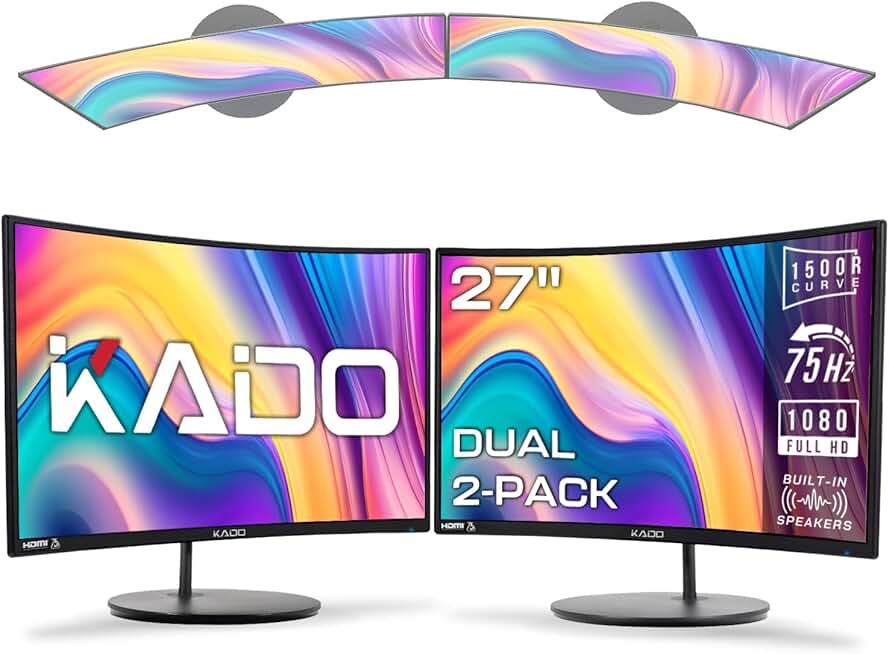
Kado Dual Monitor Setup - 2-Pack 27" Curved 1920x1080 Computer Monitor 1500R 75Hz VESA Mount HDMI Office Gaming Hybrid Built-in Speakers (C27X Dual Series)
#1 · Best Overall for Dual-Monitor Setup4.7 (295)

Kado Dual Monitor Setup - 2-Pack 27" Curved 1920x1080 Computer Monitor 1500R 75Hz VESA Mount HDMI Office Gaming Hybrid Built-in Speakers (C27X Dual Series)

$199.89

If you're setting up a home office that doubles as a gaming space, this 2-pack solves the monitor question in one purchase. The curved 27" screens and built-in speakers create a polished dual-monitor desk without breaking the budget. You trade gaming performance for practicality and value.

Pros

  • + 2-pack 27" curved monitors at $199.89 total—exceptional value for a dual-monitor home office rig
  • + 1500R curve and 75Hz refresh rate reduce eye strain during long work sessions without gaming overkill
  • + 1920x1080 resolution stays sharp on 27" screens, and built-in speakers eliminate desk clutter
  • + VESA 75x75 mounting lets you use a dual-arm stand for ergonomic positioning

Cons

  • 75Hz is lower than competing single monitors—fine for office work, but you'll notice the difference in fast-paced games
  • No USB-C or advanced connectivity; HDMI-only limits cable management flexibility
Check price on Amazon →
Kado Dual Monitor Setup - 2-Pack 27" Curved 1500R 1920x1080 Computer Monitor 75Hz VESA Mount HDMI Office Gaming Built-in Speakers (C27 Dual Series)
#2 · Best Budget Dual-Monitor Bundle4.6 (304)

Kado Dual Monitor Setup - 2-Pack 27" Curved 1500R 1920x1080 Computer Monitor 75Hz VESA Mount HDMI Office Gaming Built-in Speakers (C27 Dual Series)

$199.89

This is the practical choice if you need two screens immediately and don't want to hunt for matching monitors separately. The curved design and speaker integration make it feel like a purpose-built home office solution, even if gaming performance takes a backseat.

Pros

  • + Identical 2-pack value to the top pick at $199.89 for two 27" curved displays
  • + 1500R curve and 75Hz refresh rate provide comfortable viewing angles for office work and casual gaming
  • + Built-in speakers and VESA mounting keep your desk setup clean and flexible
  • + Solid 4.6★ rating across 300+ reviews confirms reliability

Cons

  • 75Hz refresh rate limits performance in competitive games compared to 100Hz+ alternatives
  • HDMI-only connectivity; no USB-C or DisplayPort for modern cable management
Check price on Amazon →
SANSUI 32 Inch Curved 240Hz Gaming Monitor High Refresh Rate, FHD 1080P Gaming PC Monitor HDMI DP1.4, Curved 1500R, 1Ms MPRT, HDR,Metal Stand,VESA Compatible(DP Cable Incl.)
#3 · Best for High-Refresh Gaming4.5 (4,747)

SANSUI 32 Inch Curved 240Hz Gaming Monitor High Refresh Rate, FHD 1080P Gaming PC Monitor HDMI DP1.4, Curved 1500R, 1Ms MPRT, HDR,Metal Stand,VESA Compatible(DP Cable Incl.)

$179.99

This is the monitor for gamers who take their competitive edge seriously and have desk space to spare. The 240Hz refresh rate and large curved screen make it exceptional for shooters and fast-paced games, while the 32" size gives you plenty of room for side-by-side work windows.

Pros

  • + 240Hz refresh rate and 1ms MPRT response time deliver buttery-smooth gameplay in competitive titles—noticeably faster than 144Hz
  • + 32" curved 1500R screen provides immense screen real estate for split-screen productivity (email on one side, spreadsheet on the other)
  • + FHD 1080p resolution at 32" requires less GPU power than 1440p, so older gaming rigs stay competitive
  • + Supports both HDMI and DisplayPort 1.4, plus HDR for richer colors in modern games

Cons

  • 32" at 1080p can feel pixelated up close—best for sitting 3+ feet away, which may not suit compact home offices
  • 240Hz is overkill for office work; you're paying for gaming performance you won't use during work hours
Check price on Amazon →
KTC 32 Inch FHD 1080p Curved Gaming Monitor - VA 1500R Curved Monitor, 165Hz 1ms MPRT, FreeSync & G-Sync, 122% sRGB, DP/HDMI, VESA, HDR10 for Gaming Home Office Business PC Monitor
#4 · Best Curved Gaming Monitor Under $1604.5 (2,542)

KTC 32 Inch FHD 1080p Curved Gaming Monitor - VA 1500R Curved Monitor, 165Hz 1ms MPRT, FreeSync & G-Sync, 122% sRGB, DP/HDMI, VESA, HDR10 for Gaming Home Office Business PC Monitor

$151.99

At $151.99, this KTC monitor punches above its price tier with 165Hz performance and universal sync compatibility. It's ideal if you want gaming-grade refresh rates without paying premium prices, and the large curved screen works well for split-screen office tasks.

Pros

  • + 165Hz refresh rate and 1ms MPRT response time strike the sweet spot between gaming smoothness and office practicality
  • + 32" curved 1500R design reduces neck strain during long work sessions and gaming marathons
  • + Supports both FreeSync and G-Sync, so it works with any graphics card without adaptive sync conflicts
  • + 122% sRGB color accuracy makes it suitable for photo editing or design work alongside gaming

Cons

  • 32" at 1080p can feel soft at normal viewing distances—text and UI elements aren't as crisp as a 27" 1440p display
  • 165Hz is powerful but sits between 144Hz (common) and 240Hz (premium), so driver support varies by game
Check price on Amazon →
SANSUI Curved Monitor 24 inch 100Hz USB Type-C Computer Monitor with Built-in Speakers- MPRT 1ms,Adaptive Sync,HDR,1500R,VESA 75x75mm Compatible, for Home and Office(ES-24C1)
#5 · Best USB-C Monitor for Laptop Users4.5 (7,224)

SANSUI Curved Monitor 24 inch 100Hz USB Type-C Computer Monitor with Built-in Speakers- MPRT 1ms,Adaptive Sync,HDR,1500R,VESA 75x75mm Compatible, for Home and Office(ES-24C1)

$89.99

If you work from a laptop and want a single monitor that charges your device, this SANSUI is the practical pick. The USB-C integration and curved design make it feel like a premium all-in-one solution, even if gaming performance is modest.

Pros

  • + USB Type-C with power delivery charges your laptop while delivering video—one cable replaces three
  • + 24" curved 1500R screen and 100Hz refresh rate balance office comfort with light gaming
  • + 1ms MPRT response time and adaptive sync keep motion smooth in competitive games
  • + Built-in speakers and HDR support round out a feature-rich package at under $90

Cons

  • 24" screen is smaller than competing options—less real estate for side-by-side office windows
  • 100Hz is entry-level for gaming; you'll notice stuttering in fast-paced AAA titles compared to 144Hz+
Check price on Amazon →
Samsung 27" Essential S3 (S36GD) Series FHD 1800R Curved Computer Monitor, 100Hz, Game Mode, Advanced Eye Comfort, HDMI and D-sub Ports, LS27D366GANXZA, 2024
#6 · Best for Eye Comfort During Work4.6 (2,019)

Samsung 27" Essential S3 (S36GD) Series FHD 1800R Curved Computer Monitor, 100Hz, Game Mode, Advanced Eye Comfort, HDMI and D-sub Ports, LS27D366GANXZA, 2024

$129.99

This Samsung Essential monitor prioritizes your health over gaming specs. The tighter 1800R curve and eye-comfort features make it the best choice if you're spending 8+ hours at your desk and gaming is secondary. It's a productivity monitor that happens to support gaming, not the other way around.

Pros

  • + Samsung's Advanced Eye Comfort tech includes flicker-free certification and low blue-light mode—reduces fatigue during 8-hour work days
  • + 27" 1800R curve (tighter than typical 1500R) wraps around your field of view, minimizing head rotation and neck strain
  • + 100Hz refresh rate and Game Mode make it snappy for office work without gaming overhead
  • + FHD 1920x1080 resolution stays sharp on 27", and HDMI/D-sub ports ensure compatibility with older systems

Cons

  • 100Hz is modest for gaming; you'll feel the difference in shooters compared to 144Hz+ alternatives
  • D-sub (VGA) port is outdated—most modern GPUs lack this connector, limiting backward compatibility
Check price on Amazon →
Sceptre New 22-Inch Gaming Monitor, FHD 1080p, Up to 144Hz, HDMI, DisplayPort, Built-in Speakers, Machine Black (E225W-FW144 Series, 2026)
#7 · Best Budget Gaming Monitor Under $704.6 (439)

Sceptre New 22-Inch Gaming Monitor, FHD 1080p, Up to 144Hz, HDMI, DisplayPort, Built-in Speakers, Machine Black (E225W-FW144 Series, 2026)

$69.97

This Sceptre is the budget champion if you're upgrading from a basic office monitor and want gaming performance without spending $150+. The 144Hz refresh rate and compact size make it perfect for a secondary gaming monitor or a tight desk setup, though the flat panel isn't ideal for all-day office work.

Pros

  • + 144Hz refresh rate at $69.97 is exceptional value—matches gaming monitors costing $100+ elsewhere
  • + 22" compact size fits tight home office spaces without sacrificing gaming performance
  • + DisplayPort and HDMI connectivity give you flexibility, and built-in speakers save desk real estate
  • + 1080p resolution keeps frame rates high on mid-range GPUs

Cons

  • 22" screen is small for split-screen office work—less room to tile windows side-by-side
  • Flat panel design (not curved) increases eye strain during long work sessions compared to curved alternatives
Check price on Amazon →
Sceptre Curved 24-inch Gaming Monitor 1080p R1500 98% sRGB HDMI x2 VGA Build-in Speakers, VESA Wall Mount Machine Black (C248W-1920RN Series)
#8 · Best 24-Inch Curved Monitor4.6 (22,564)

Sceptre Curved 24-inch Gaming Monitor 1080p R1500 98% sRGB HDMI x2 VGA Build-in Speakers, VESA Wall Mount Machine Black (C248W-1920RN Series)

$84.97

If you want a curved screen for office comfort without gaming performance, this Sceptre delivers. At under $85, it's a practical choice for home office setups where gaming is occasional, and the 24" size keeps text sharp and readable all day.

Pros

  • + 24" curved 1500R screen at $84.97 is an affordable entry point to curved gaming monitors
  • + 1080p resolution at 24" is crisp for text and spreadsheets, and the curve reduces eye strain during work
  • + 98% sRGB color accuracy is solid for office work and casual content creation
  • + Dual HDMI ports and built-in speakers provide flexibility without extra cables

Cons

  • No DisplayPort—HDMI-only limits high-refresh-rate support on newer GPUs
  • No refresh rate listed in specs, suggesting it's 60Hz—adequate for office work but limiting for gaming
Check price on Amazon →
Philips New 24 inch Frameless Full HD (1920 x 1080) 100Hz Monitor, VESA, HDMI x1, VGA Port x1, Eye Care, 4 Year Advance Replacement Warranty, 241V8LB, Black
#9 · Best Flat-Panel Office Monitor with Gaming Features4.6 (1,710)

Philips New 24 inch Frameless Full HD (1920 x 1080) 100Hz Monitor, VESA, HDMI x1, VGA Port x1, Eye Care, 4 Year Advance Replacement Warranty, 241V8LB, Black

$74.99

This Philips is the professional's choice if you prioritize office work and want gaming as a secondary feature. The frameless design and warranty confidence make it feel like a premium office monitor, even though gaming performance is modest.

Pros

  • + 24" frameless 1920x1080 design maximizes screen real estate and looks clean on a desk
  • + 100Hz refresh rate and VESA mounting support add gaming capability without premium pricing
  • + Eye Care certification and flicker-free tech reduce strain during long office work sessions
  • + 4-year advance replacement warranty shows Philips' confidence in durability

Cons

  • Flat panel (not curved) doesn't reduce eye strain as effectively as curved alternatives during extended work
  • 100Hz is entry-level for gaming; competitive titles will feel slower than 144Hz+ monitors
Check price on Amazon →
HUANUO FlowLift™ Dual Monitor Stand, Fully Adjustable Gaming Monitor Desk Mount for 13–32″ Computer Screens, Full Motion VESA 75x75/100x100 with C-Clamp & Grommet Base, Each Arm Holds 4.4 to 19.8 lbs
#10 · Best Monitor Stand for Dual-Monitor Setups4.6 (33,894)

HUANUO FlowLift™ Dual Monitor Stand, Fully Adjustable Gaming Monitor Desk Mount for 13–32″ Computer Screens, Full Motion VESA 75x75/100x100 with C-Clamp & Grommet Base, Each Arm Holds 4.4 to 19.8 lbs

$54.99

If you're building a dual-monitor home office setup, this HUANUO stand is essential. It transforms two separate monitors into an ergonomic, professional-looking dual-display rig without the desk footprint of individual stands. Pair it with any two VESA-compatible monitors from this list.

Pros

  • + Fully adjustable dual-monitor arm supports 13–32" screens up to 17.6 lbs each—fits nearly any gaming monitor
  • + Full motion (tilt, swivel, rotate, height adjust) lets you dial in ergonomic positioning for office work and gaming
  • + VESA 75x75/100x100 compatibility covers most modern monitors, and C-clamp mount doesn't require desk holes
  • + At $54.99, it's cheaper than buying a second monitor stand separately

Cons

  • This is a stand accessory, not a monitor—you'll need to pair it with actual displays
  • Installation requires some patience; arm assembly and cable routing take 20–30 minutes
Check price on Amazon →

Frequently Asked Questions

Final word

The best gaming monitors for home office setups balance refresh rates, curved ergonomics, and practical features like built-in speakers and VESA mounting. The Kado 2-pack ($199.89) is the top pick if you want dual monitors for split-screen productivity without overspending. For high-refresh gaming, the SANSUI 32" 240Hz monitor delivers competitive performance. If you're using a laptop, the SANSUI 24" USB-C curved monitor charges your device while gaming. Budget-conscious buyers should grab the Sceptre 22" 144Hz monitor at under $70.

Pair any of these gaming monitors with the HUANUO dual-monitor stand to create an ergonomic, professional-looking home office rig. Focus on 100Hz+ refresh rates, 1500R curves, and VESA mounting—these specs matter more than brand hype. Your home office gaming monitor should feel as good during an 8-hour work day as it does during a gaming session.

More gaming monitors guides