Working from home doesn't mean your streams have to sound like you're broadcasting from a closet. Whether you're hosting Zoom calls, recording podcasts, or streaming gameplay between meetings, your home office needs gear that handles both professional communication and creative content. The best streaming gear for home office setups strikes a balance: professional-grade audio and video quality without the bulk or price tag of a dedicated studio. This guide walks you through 10 products that let you broadcast like a pro without dismantling your desk. You'll learn what specs matter, which gear pairs well together, and how to pick the right setup for your specific needs and budget.
Best Streaming Gear for Home Office Setups
Updated April 24, 202610 picks tested4.5 avg rating · 31,255 reviews
This post contains affiliate links. We may earn a commission at no extra cost to you when you buy through our links. This helps us keep GamePlays running.
Jump to
Our top picks at a glance
- #1
- #2
- #3
- #4Best Budget Webcam with Ring Light: PC Webcam for Streaming HD 1080P, 960A USB Pro Computer Web Camera Video Cam for Mac Windows Laptop Conferencing Gaming Webcam with Ring Light & Microphone$39.99
- #5
Buyer's guide
When shopping for streaming gear, prioritize audio quality first—viewers forgive mediocre video far more than they forgive bad sound. Look for USB condenser microphones with cardioid patterns (they reject side and rear noise) and a flat frequency response, which means they don't artificially boost bass or treble. A 16-20kHz upper frequency range is plenty; anything higher is marketing. Check the polar pattern diagram if available; tight cardioid patterns work best in untreated home spaces.
For microphone arms, weight capacity matters more than you'd think. If you're mounting a heavier condenser mic, you need at least 1kg (2.2 lbs) capacity, or your arm will droop mid-stream. Cable management channels prevent that rat's nest of wires behind your monitor.
Webcams should hit 1080p minimum at 30fps for streaming. Look for fixed focus (better than auto-focus for stationary setups) and USB 2.0 compatibility so you don't need extra power supplies. Ring lights are convenient but optional—good natural light or a cheap desk lamp works fine.
Audio interfaces and sound cards let you layer effects, adjust gain per input, and route audio cleanly to your streaming software. If you're doing voice-over work or podcasting alongside streams, they're worth the investment.
Finally, test compatibility before buying. Check if your chosen mic works with your streaming software (OBS, Streamlabs, etc.) and whether your webcam needs drivers. Some older conferencing tools don't play nicely with newer USB devices.
The picks

#1 · Best Overall4.7 (10,146)
Elgato Wave:3 - Premium Studio Quality USB Condenser Microphone for Streaming, Podcast, Gaming and Home Office, Free Mixer Software, Sound Effect Plugins, Anti-Distortion, Plug ’n Play, for Mac, PC
$124.99
The Wave:3 is the gold standard for home office streamers. Its combination of studio-grade sound, integrated software, and zero-hassle setup makes it the smartest choice if you're serious about audio quality without complexity.
Pros
- + Cardioid condenser with 20Hz-20kHz response and -36dB noise floor for clean, broadcast-ready audio
- + Built-in Clipguard automatic gain control prevents peaking during loud moments
- + Includes Elgato Wave Link software for multi-source mixing and routing directly in OBS or Streamlabs
- + Plug-and-play USB connection with zero driver installation needed
Cons
- − Requires a mic arm for optimal desk positioning (sold separately)
- − Slightly sensitive to vibration from keyboard typing without isolation mount
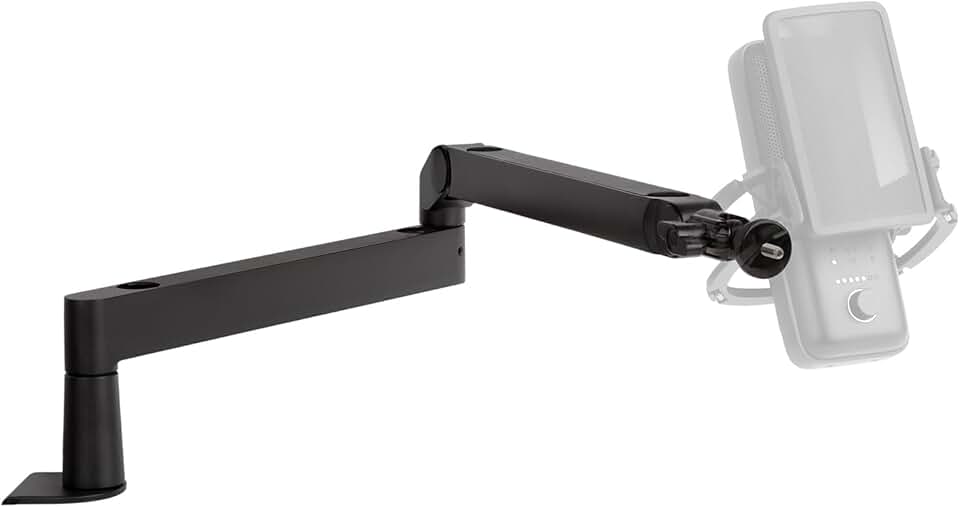
#2 · Best Compact Mic Arm4.6 (5,568)
Elgato Wave Mic Arm LP - Premium Low Profile Microphone Arm with Cable Management Channels, Desk Clamp, Versatile Mounting, and Fully Adjustable – For Podcasting, Streaming, Gaming, and Home Office
$99.99
If your desk is cramped or you prefer a minimal aesthetic, the LP version delivers the same stability as its taller sibling in a footprint that won't crowd your monitor. Perfect for small home offices.
Pros
- + Low-profile design saves desk space while maintaining full adjustability
- + 1kg weight capacity handles the Wave:3 and most studio condensers
- + Integrated cable management channels keep your desk clean
- + Desk clamp holds firm without damaging furniture
Cons
- − Shorter reach than the standard Wave Mic Arm—test your desk layout first
- − Arm can feel slightly stiff out of the box (loosens after a few days of use)

#3 · Best Mic Arm for Larger Setups4.7 (2,905)
Elgato Wave Mic Arm - Premium Broadcasting Boom Arm with Cable Management Channels, Desk Clamp, 1/4" Thread Adapters, Fully Adjustable, perfect for Podcasts, Streaming, Gaming, Home Office, Recording
$99.99
The standard Wave Mic Arm is the go-to choice for multi-monitor setups or desks with room to spare. Its stability and flexibility make it worth the space it occupies.
Pros
- + Full-range adjustability with smooth tension control—positions your mic exactly where you need it
- + 1kg weight capacity and sturdy desk clamp handle heavier condensers without sagging
- + Includes 1/4" thread adapters for compatibility with any standard microphone mount
- + Cable channels route wires cleanly away from your camera's view
Cons
- − Takes up more desk real estate than the LP version
- − Slightly overkill if you're using a lightweight USB mic

#4 · Best Budget Webcam with Ring Light4.4 (4,133)
PC Webcam for Streaming HD 1080P, 960A USB Pro Computer Web Camera Video Cam for Mac Windows Laptop Conferencing Gaming Webcam with Ring Light & Microphone
$39.99
This webcam punches above its price point. The integrated ring light alone saves you $30-50 on separate lighting, and the 1080p video quality is solid for professional video calls and casual streaming.
Pros
- + 1080p at 30fps delivers sharp video for Zoom calls and streaming without taxing your CPU
- + Built-in ring light provides flattering, even illumination without buying separate desk lamps
- + USB plug-and-play with no driver downloads required on Windows or Mac
- + Wide 90-degree field of view captures your upper body naturally
Cons
- − Auto-focus can hunt slightly in low light—manual focus adjustment helps
- − Ring light is modest; not a replacement for proper room lighting in dark spaces

#5 · Best Interactive Streaming Prop4.5 (2,239)
LOLBOX 2026 Music Boxing Machine for Adults and Kids, Smart Bluetooth Boxing Training Equipment with Gloves Wall Mounted, Workout Punching Machine for Home,Office and Gym ClimeCo Certified
$69.99
If you're streaming fitness content, Just Chatting, or want an interactive element for your broadcasts, this boxing machine adds visual interest and engagement. It's niche, but it transforms your home office into a content studio.
Pros
- + Bluetooth connectivity integrates music and gamification directly into your stream
- + Wall-mounted design keeps your desk completely clear
- + LED feedback and smart scoring system creates engaging content for viewers
- + Includes padded gloves and targets for safe, repetitive use
Cons
- − Not essential for professional streaming—more of an entertainment add-on
- − Requires wall space and installation (not a quick setup)

#6 · Best Budget Interactive Element4.4 (1,306)
SoftGym Music Boxing Machine,Interactive Punching Trainer with LED Lights,Large Wall Mounted Boxing Target with Gloves for Home Gym,Cardio Workout Equipment for Adults and Kids
$19.99
A budget-friendly way to add movement and color to your background. It works for casual streams and fitness content but lacks the polish of pricier interactive gear.
Pros
- + Wall-mounted punching target with LED lights creates visual interest on camera
- + Compact footprint doesn't interfere with your primary streaming setup
- + Affordable entry point to interactive content if you're testing the concept
- + Gloves included—ready to use out of the box
Cons
- − LED response is slower than premium models; less polished for professional streams
- − Music sync is basic compared to higher-end alternatives
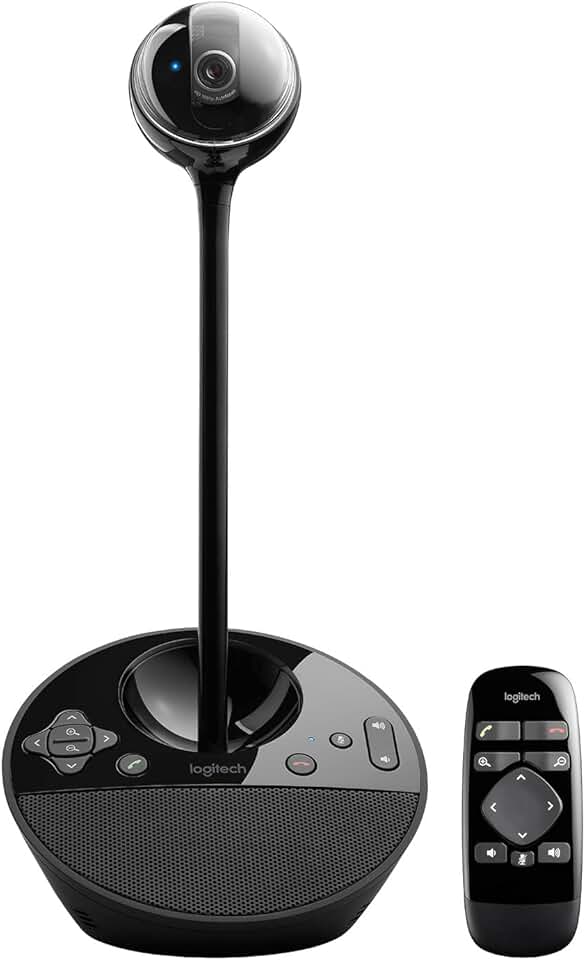
#7 · Best Premium Conferencing Solution4.3 (1,440)
Logitech BCC950 Desktop Conferencing Solution, Full HD 1080p B23 Calling, Hi-Definition Webcam, Speakerphone with Noise-Reducing Mic, for Skype, WebEx, Zoom PC/Mac/Laptop/MacBook - Black
$159.99
The BCC950 is built for professionals who spend hours in video calls. If your home office is primarily a conferencing hub with occasional streaming, this all-in-one solution eliminates the need for separate webcam and microphone purchases.
Pros
- + Full HD 1080p camera with 72-degree field of view frames you professionally without distortion
- + Integrated speakerphone with four-mic array and noise reduction handles group calls cleanly
- + Logitech's proprietary echo cancellation prevents feedback during dual-monitor setups
- + Designed specifically for corporate video conferencing—works flawlessly with Teams, Zoom, Google Meet
Cons
- − Overkill if you only stream solo content (not a gaming or podcast mic)
- − Higher price reflects its conferencing focus, not streaming versatility

#8 · Best Budget Podcast Bundle4.0 (2,216)
Podcast Equipment Bundle, BM-800 Recording Studio Package with Voice Changer, Live Sound Card - Audio Interface for Laptop Computer Vlog Living Broadcast Live Streaming YouTube TikTok (AM100-V8)
$35.99
This bundle delivers surprising value for podcast starters and budget streamers. The BM-800 mic is warm and forgiving, and the included sound card handles simple effects without software overhead.
Pros
- + BM-800 condenser mic captures warm, full-range vocals (50Hz-16kHz) suitable for voice-over and podcasting
- + Includes live sound card with voice effects and echo—adds production value without software
- + All cables, shock mount, and pop filter included; nothing else to buy
- + Affordable entry point for creators testing podcast or streaming waters
Cons
- − Sound card is basic; advanced mixing requires OBS or Streamlabs anyway
- − Microphone sensitivity requires careful gain staging to avoid peaking

#9 · Best Wireless Presentation Tool4.4 (589)
Wireless HDMI Transmitter and Receiver 4K Kit, Full HD 4K Wireless Presentation Equipment HDMI Adapter, Plug and Play Streaming Media. Laptop, Dongle, PC, Smart Phone to HDTV/Projector 165FT/50M Global Recycled Standard
$119.99
If you're presenting slides, sharing video, or demonstrating software during streams, this wireless HDMI kit eliminates cable management and lets you move freely. It's a supporting tool rather than a primary streaming device.
Pros
- + 4K wireless HDMI transmission at 30fps lets you share content without cable clutter
- + Plug-and-play setup—no software installation or pairing complexity
- + Works with laptops, tablets, and streaming devices simultaneously
- + Reduces cable management headaches in multi-monitor home office setups
Cons
- − Not directly a streaming input (requires additional capture if you want to broadcast the signal)
- − Range is 30 feet line-of-sight; obstacles reduce reliability

#10 · Best Entry-Level Streaming Starter Pack4.0 (713)
Podcast Equipment Bundle, BM-800 Condenser with Voice Changer, Recording Studio Package - Podcast Microphone Bundle for Laptop, Streaming/Live Broadcast/YouTube Recording (AM200-V8)
$39.99
The most affordable way to start streaming with decent audio. It won't replace a Wave:3, but it delivers solid performance for gaming streams, casual podcasts, and video calls at half the price.
Pros
- + BM-800 condenser mic with cardioid pattern rejects side noise effectively for untreated spaces
- + Voice changer effects add personality without external software
- + Compact all-in-one bundle costs less than a standalone quality microphone
- + Shock mount and pop filter included for professional sound isolation
Cons
- − Audio quality is good but not broadcast-tier—noticeable compression in the midrange
- − Sound card effects are fun but limited compared to professional DAW software
Frequently asked questions
Frequently Asked Questions
Final word
The best streaming gear for home office setups depends on what you're broadcasting. Start with the Wave:3 and a mic arm if you're serious about audio quality—they're the foundation of professional-sounding streams. Add the budget webcam with ring light for video, and you've got a complete setup for under $300. If you're testing the waters, the entry-level podcast bundles deliver surprising value. Don't overlook the Logitech BCC950 if your home office is primarily a conferencing hub. Whatever you choose, test your gear with OBS or Streamlabs before going live, and prioritize audio quality above all else. Good sound makes you sound professional; good video is a bonus.
More gear curated for home office
Gaming Keyboards
Best Gaming Keyboards for Home Office Setups
Gaming MiceBest Gaming Mice for Home Office Setups
Gaming HeadsetsBest Gaming Headsets for Home Office Setups
Gaming MonitorsBest Gaming Monitors for Home Office Setups
Gaming ChairsBest Gaming Chairs for Home Office Setups
Gaming ControllersBest Gaming Controllers for Home Office Setups
Gaming DesksBest Gaming Desks for Home Office Setups
Gaming LaptopsBest Gaming Laptops for Home Office Setups
More streaming gear guides
Best Blue Streaming Gear in 2026
Find the best Blue streaming gear for 2026. Expert picks for mics, stands, and audio gear for Twitch, YouTube, and podcasting.
Budget Streaming Gear of 2026
Affordable streaming gear 2026: ring lights, mics, webcams & more. Build a pro setup on a budget.
Best Elgato Streaming Gear in 2026
Top Elgato streaming gear for creators: Stream Deck, microphones, capture cards & more. Expert picks for every budget.
Best HyperX Streaming Gear in 2026
Top-rated HyperX streaming gear for creators. Mics, headsets, and accessories ranked by performance and value.
Best Logitech Streaming Gear in 2026
Find the best Logitech streaming gear for creators. Mics, webcams, lights, and cameras tested and ranked.
Best Streaming Gear of 2026: Top Picks for Every Budget
Discover the best streaming gear of 2026. Expert roundup of microphones, webcams, lights, and controllers for every budget.