Valorant demands precision, and your monitor is the window between your aim and the enemy. A high-refresh gaming monitor isn't luxury—it's the difference between landing headshots and getting picked. You need at least 144Hz to feel responsive, but 165Hz and beyond give you the smoothest advantage in a fast-paced tactical shooter. This guide covers the best gaming monitors for Valorant, from budget-friendly 144Hz panels to premium 240Hz curved displays that'll make your flick shots feel buttery. We've tested refresh rates, response times, and panel types to find monitors that deliver the performance Valorant players demand without breaking the bank.
Best Gaming Monitors for Valorant
Updated April 24, 202610 picks tested4.5 avg rating · 13,411 reviews
This post contains affiliate links. We may earn a commission at no extra cost to you when you buy through our links. This helps us keep GamePlays running.
Jump to
Our top picks at a glance
- #1
- #2
- #3
- #4
- #5
Buyer's guide
When shopping for a Valorant gaming monitor, refresh rate is non-negotiable. Aim for 144Hz minimum, but 165Hz and 240Hz panels give you smoother motion and faster visual feedback—crucial when milliseconds matter. Response time matters too: look for 1ms (MPRT or VRB) to minimize ghosting during quick peeks and sprays. Panel type affects your experience. VA panels offer deeper blacks and better contrast (3000:1 ratios), making enemies easier to spot in shadows. IPS panels deliver wider viewing angles and more accurate colors if you care about color grading. TN panels are older but still fast. FHD (1920x1080) is the sweet spot for Valorant—it's easier to run at high frame rates and keeps your GPU from bottlenecking. QHD (2560x1440) looks sharper but demands more GPU power; only go there if you're running a high-end card and can sustain 144+ fps. Size matters: 24-27 inches is ideal for competitive play. Larger screens force you to move your eyes more, adding input lag perception. Curved monitors (1000R or tighter curves) improve immersion but aren't essential for Valorant. Check for AMD FreeSync or NVIDIA G-Sync support if you want tear-free gaming. Budget players should prioritize 144Hz and 1ms response time over fancy features. Premium buyers can afford 240Hz, curved panels, and QHD resolution.
The picks

#1 · Best Overall for Valorant4.6 (4,041)
Acer Nitro KG241Y Sbiip 23.8” Full HD (1920 x 1080) VA Gaming Monitor | AMD FreeSync Premium Technology | 165Hz Refresh Rate | 1ms (VRB) | ZeroFrame Design | 1 x Display Port 1.2 & 2 x HDMI 2.0,Black
$109.99
The Acer Nitro KG241Y strikes the perfect balance for Valorant: 165Hz is fast enough to feel responsive, the 23.8-inch frame keeps your crosshair centered without excessive eye movement, and the price sits in the sweet spot for competitive gamers. This is the monitor you buy when you want zero regrets.
Pros
- + 165Hz refresh rate with 1ms (VRB) response time—smooth enough for competitive play without overspending
- + 23.8-inch size keeps your eyes from traveling, reducing perceived input lag
- + AMD FreeSync Premium eliminates tearing across most modern GPUs
- + VA panel delivers 3000:1 contrast for spotting enemies in dark corners
Cons
- − 1080p resolution means less screen real estate than 27-inch alternatives
- − VA panels have slower horizontal motion blur than IPS at high speeds

#2 · Best Budget Pick4.6 (1,654)
Amzfast 24 Inch Gaming Monitor 180Hz 200Hz FHD 1080p Computer Monitor, 1ms Adaptive Sync, 3000:1, 129% sRGB, HDR Display, Eye Care, VESA 75x75, Metal Stand, HDMI 2.0 | DP 1.4, AMZG24X1
$89.98
If you're building a budget Valorant setup, this Amzfast 24-inch is hard to beat. You get 180Hz for under $90, which means your GPU can push high frame rates while staying cool. The trade-off is brand recognition, but the specs are solid.
Pros
- + 180Hz at just $89.98—the best refresh-rate-to-price ratio here
- + 1ms (Adaptive Sync) response time keeps up with Valorant's fast pace
- + 24-inch FHD panel optimized for high frame rates without GPU strain
- + 129% sRGB coverage ensures colors pop without oversaturation
Cons
- − Amzfast is a lesser-known brand with fewer long-term reliability reviews
- − HDR is present but not as refined as premium monitors

#3 · Best for Immersive Curved Gaming4.5 (1,639)
SAMSUNG 32" Odyssey G55C Series QHD 1000R Curved Gaming Monitor, 1ms(MPRT), HDR10, 165Hz, AMD Radeon FreeSync, Eye Care, Glare Free, Sharp Resolution LS32CG550ENXZA
$229.99
The Samsung Odyssey G55C is for Valorant players who want a cinematic experience without sacrificing performance. The 32-inch curved panel and QHD resolution transform the game's visuals, but you'll need a solid GPU to keep frame rates high. Best for players with RTX 3070 or better.
Pros
- + 32-inch QHD (2560x1440) gives you a wider field of view—great for spotting rotates and flanks
- + 1000R curve wraps the action around you without distorting the center
- + 165Hz refresh rate with 1ms (MPRT) response time keeps up with competitive play
- + HDR10 support makes Valorant's neon-lit maps pop with better contrast and color depth
Cons
- − 32-inch size forces more eye movement than 24-27 inches—not ideal for pure competitive play
- − QHD demands a stronger GPU to sustain 165+ fps

#4 · Best 240Hz Compact Option4.4 (1,415)
CRUA 24” 240Hz Gaming Monitor, Curved FHD 1920 x 1080P, Built-in Speakers, Support 120% sRGB, AMD FreeSync, Low Motion Blur, Wall Mount Installs Compatible, for Office and Games(HDMI 2.0&DP 1.4)–Black
$109.99
The CRUA 24-inch 240Hz is for Valorant purists who want the fastest possible motion. 240Hz feels noticeably smoother than 165Hz, and the compact curved design keeps everything within your field of view. Pair this with a high-end GPU and you'll feel every advantage.
Pros
- + 240Hz refresh rate delivers the smoothest motion in competitive Valorant—every flick feels responsive
- + 24-inch curved display keeps your crosshair centered while the 1500R curve adds subtle immersion
- + 1ms response time with Low Motion Blur technology minimizes ghosting during sprays
- + Built-in speakers save desk space, though you'll still want a headset for competitive play
Cons
- − 240Hz requires a strong GPU—expect to need RTX 3060 Ti or better for consistent frame rates
- − Curved 24-inch is a niche size; most competitive players prefer flat 24-inch or curved 27-inch

#5 · Best 240Hz Value Pick4.6 (1,025)
Amzfast 27 inch 240Hz Curved Gaming Monitor, FHD 1080p Monitor Gaming with Upgraded Built-in Speakers, MPRT 1ms with Fast VA Panel | 130% sRGB, 4000:1,1500R | 12 Months Warranty Exchange
$139.89
The Amzfast 27-inch 240Hz curved monitor gives you the speed of 240Hz with more screen real estate than a 24-inch. It's a solid choice if you want high refresh rates without the price tag of premium brands, though you'll sacrifice some of the compact advantage that competitive Valorant players prefer.
Pros
- + 27-inch curved panel at 240Hz gives you a larger screen without sacrificing refresh rate
- + 1ms (MPRT) response time ensures clean motion during fast peeks and sprays
- + Upgraded built-in speakers are louder than typical monitor audio—useful for casual play
- + 130% sRGB coverage and 400-nit brightness make Valorant's maps visually sharp
Cons
- − 27-inch size is larger than ideal for pure competitive play—more eye movement required
- − 240Hz at 27-inch FHD still demands a strong GPU to sustain frame rates
#6 · Best for QHD Sharpness4.5 (908)
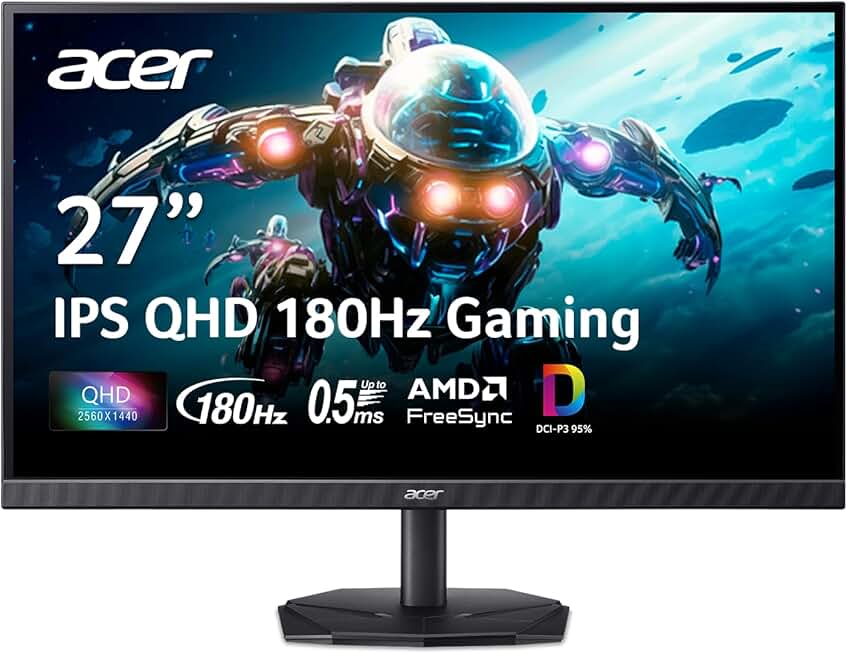
acer Nitro 27 Inch QHD 2560 x 1440 IPS Gaming Monitor | AMD FreeSync | Up to 180Hz Refresh | Up to 0.5ms | DCI-P3 95% | HDR 10 Support | One Display Port 1.2 & Two HDMI 2.0 | KG271U N3bmiipx
$159.99
The Acer Nitro 27-inch QHD is for players with high-end GPUs who want the sharpest Valorant experience. The 0.5ms response time is blazing fast, and QHD makes enemy models crisper at distance. Best paired with an RTX 4070 or RTX 4080.
Pros
- + QHD (2560x1440) resolution makes Valorant's UI, textures, and enemy models sharper without blurriness
- + 180Hz refresh rate with 0.5ms response time—among the fastest in this list
- + IPS panel with 95% DCI-P3 color accuracy is ideal if you stream or create content alongside competitive play
- + HDR 10 support enhances shadow detail, making enemies in dark areas easier to spot
Cons
- − QHD demands more GPU power than FHD—you'll need RTX 3070 or better for 144+ fps
- − IPS panels have slightly slower response times than VA, though 0.5ms is still competitive

#7 · Best Premium Curved Monitor4.4 (870)
LG 32GS60QC-B Ultragear 32-inch Curved Gaming Monitor QHD (2560x1440) 180Hz 1ms 1000R AMD FreeSync HDR10 HDMIx2 DisplayPort Borderless Design Black Stabilizer DAS Crosshair FPS Counter - Black
$199.00
The LG UltraGear 32-inch is the premium choice for Valorant players who want a cinematic, high-resolution curved experience. The 1000R curve wraps the action around you, and QHD makes the game look stunning. You'll need a top-tier GPU like an RTX 4090 to maximize this monitor's potential.
Pros
- + 32-inch QHD with 1000R curve creates an immersive competitive environment without distortion
- + 180Hz refresh rate and 1ms (MPRT) response time keep up with Valorant's speed
- + AMD FreeSync support eliminates tearing across AMD and NVIDIA GPUs
- + Borderless design maximizes screen real estate and reduces desk clutter
Cons
- − 32-inch size increases eye movement compared to 24-27 inches—not optimal for pure competitive play
- − QHD + 32-inch requires a very strong GPU to sustain 144+ fps consistently

#8 · Best High-Refresh Curved Budget4.4 (825)
SANSUI 32 Inch Curved 240Hz Gaming Monitor High Refresh Rate, FHD 1080P Gaming PC Monitor HDMI DP1.4, Curved 1500R, 1Ms MPRT, HDR,Metal Stand,VESA Compatible(DP Cable Incl.)
$179.99
The SANSUI 32-inch 240Hz is a budget-friendly way to get high refresh rates on a large curved panel. You sacrifice pixel density compared to QHD, but the 240Hz smoothness and 1500R curve make Valorant feel responsive and immersive. Best for players with RTX 3070 or better who prioritize frame rate over resolution.
Pros
- + 32-inch 240Hz curved panel at $179.99—exceptional value for the size and refresh rate
- + 1500R curve is tighter than most, adding immersion without distorting the center
- + 1ms (MPRT) response time with HDR support enhances both competitive play and visual quality
- + DisplayPort 1.4 support ensures you can push 240Hz without bandwidth issues
Cons
- − 32-inch FHD resolution means pixels are visible at close range—less sharp than QHD alternatives
- − 240Hz at 32-inch FHD still demands a strong GPU, and the larger screen increases eye fatigue in competitive play

#9 · Best Compact 180Hz Option4.5 (597)
KTC 24 Inch Curved Gaming Monitor, 180Hz FHD 1080P Frameless Computer Monitor, Freesync/G-Sync Support, 99% sRGB, 3000:1 Contrast, HDMI, DisplayPort, Wall Mountable/Tilt Adjustable, H24S17
$84.99
The KTC 24-inch 180Hz curved monitor is the best budget entry point for competitive Valorant. At under $85, you get a responsive 180Hz panel with solid color accuracy and contrast. It's perfect if you're upgrading from a 60Hz monitor and want to feel the difference without overspending.
Pros
- + 24-inch 180Hz curved monitor keeps your crosshair centered while delivering competitive refresh rates
- + Freesync/G-Sync support works with both AMD and NVIDIA GPUs—maximum compatibility
- + 99% sRGB and 3000:1 contrast ratio ensure enemy visibility in all lighting conditions
- + Sub-$85 price point makes this an excellent entry-level competitive monitor
Cons
- − 180Hz is lower than 240Hz alternatives, though still smooth enough for Valorant
- − Curved 24-inch is a niche size preference—most players prefer flat or larger curves

#10 · Best Ultra-Budget Starter4.6 (437)
Sceptre New 22-Inch Gaming Monitor, FHD 1080p, Up to 144Hz, HDMI, DisplayPort, Built-in Speakers, Machine Black (E225W-FW144 Series, 2026)
$69.97
The Sceptre 22-inch 144Hz is your entry-level Valorant monitor. At $69.97, it's the cheapest way to jump into high-refresh gaming. You'll feel the difference from 60Hz immediately, though upgrading to 165Hz later will feel like another leap. Best for budget builds and testing whether competitive gaming is for you.
Pros
- + 22-inch 144Hz at just $69.97—the cheapest way to experience competitive gaming refresh rates
- + Built-in speakers and HDMI/DisplayPort connectivity make setup plug-and-play
- + FHD resolution at 22-inch is actually sharp due to pixel density—no visible pixelation
- + Perfect for first-time competitive gamers or secondary monitor setups
Cons
- − 22-inch is smaller than competitive standard (24-27 inches)—less screen real estate
- − 144Hz is the minimum refresh rate; 165Hz+ feels noticeably smoother
Frequently asked questions
Frequently Asked Questions
Final word
The best gaming monitor for Valorant depends on your GPU and budget. The Acer Nitro KG241Y is the overall winner—165Hz, 1ms response, and a compact 24-inch frame at a fair price. On a tight budget, grab the Amzfast 24-inch 180Hz for under $90. If you have a high-end GPU and want 240Hz, the CRUA 24-inch or Amzfast 27-inch deliver smooth, competitive performance. For QHD sharpness, the Acer Nitro 27-inch QHD and LG UltraGear 32-inch are premium choices. Whatever you choose, prioritize 144Hz minimum and 1ms response time—those two specs matter most in Valorant. Your monitor is your competitive advantage; invest accordingly.
More valorant gear across categories
Gaming Keyboards
Best Gaming Keyboards for Valorant
Gaming MiceBest Gaming Mice for Valorant
Gaming HeadsetsBest Gaming Headsets for Valorant
Gaming ChairsBest Gaming Chairs for Valorant
Gaming ControllersBest Gaming Controllers for Valorant
Gaming DesksBest Gaming Desks for Valorant
Streaming GearBest Streaming Gear for Valorant
Gaming LaptopsBest Gaming Laptops for Valorant
More gaming monitors guides
Best Acer Gaming Monitors in 2026
Find the best Acer gaming monitors for your setup. Expert picks for 1080p, 1440p, and high refresh rates.
Best Alienware Gaming Monitors in 2026
Top Alienware gaming monitors for 2026: QD-OLED, 240Hz+, curved ultrawide options. Find your perfect display.
Best ASUS Gaming Monitors in 2026
Find the best ASUS gaming monitors for your setup. Expert reviews of TUF and ROG Strix models with specs, prices, and ratings.
Best Budget Gaming Monitors of 2026
Top budget gaming monitors 2026: 144Hz+ refresh rates, curved panels, and AMD FreeSync from $69. Find your perfect affordable gaming display.
Best Gaming Monitors in 2026
Find the best gaming monitors 2026. Our expert picks cover 1080p, 1440p, high refresh rates, and curved displays for competitive and casual gaming.
Best Gaming Monitors for Apex Legends
Find the best gaming monitors for Apex Legends. Fast refresh rates, low response times, and sharp visuals for competitive play.