Building a streaming setup doesn't mean maxing out your credit card. Whether you're launching your first Twitch channel, scaling a YouTube presence, or upgrading your podcast rig, the best streaming gear in 2026 balances performance with your budget. We've tested and ranked 10 essential tools that streamers actually use—from affordable ring lights that look professional on camera to studio-grade microphones that make your voice stand out. Each pick solves a real problem: better lighting, clearer audio, easier scene switching, or wireless freedom. Skip the hype and get gear that works.
Best Streaming Gear in 2026
Updated April 24, 202610 picks tested4.5 avg rating · 341,529 reviews
This post contains affiliate links. We may earn a commission at no extra cost to you when you buy through our links. This helps us keep GamePlays running.
Jump to
Our top picks at a glance
- #1
- #2
- #3
- #4
- #5
Buyer's guide
When shopping for streaming gear, start with audio. Your audience will forgive mediocre video but not muddy, tinny, or background-heavy sound. A USB condenser mic or dynamic mic with a pop filter beats built-in laptop audio every time. Look for mics with 48kHz+ sample rates and cardioid pickup patterns that reject side noise.
Lighting transforms your stream instantly. Ring lights are the streamer standard—they're cheap, flattering, and eliminate harsh shadows. Aim for 3000K–5600K color temperature (adjustable is better) and at least 2000 lux output. Cheap lights feel cheap on camera; mid-range ($25–$40) options offer the best ROI.
Your webcam matters less if you're using a DSLR or mirrorless camera, but if you're streaming from a desk, grab a 1080p/30fps minimum. Look for autofocus and low-light correction. Full HD at 60fps is overkill for most platforms.
Audio interfaces and wireless mics are upgrades for serious streamers. An interface like the Focusrite Scarlett lets you connect professional XLR mics, add phantom power, and route multiple inputs. Wireless lavalier systems free you from desk cables—ideal for mobile content or gaming streams where you move around.
Stream Decks and control surfaces aren't essential but save hours of setup time. They trigger scenes, sounds, and alerts with one button press. Finally, don't underestimate cable quality and mic stands. A cheap stand wobbles on camera; quality cables prevent buzzing and dropouts. Budget 10–15% of your gear spend on accessories.
The picks

#1 · Best Professional Microphone4.8 (12,046)
Shure SM7B Dynamic Studio Microphone - XLR Mic for Podcasting, Streaming, Vocal Recording & Broadcasting, Wide Frequency Range, Smooth Warm Audio, Detachable Windscreen, Black
$395.00
The SM7B is the gold standard for serious streamers and podcasters. If you're investing in an interface and treating audio as a core part of your brand, this mic delivers broadcast-quality sound that rivals $500+ alternatives. It's a one-time buy that lasts years.
Pros
- + Iconic Shure quality with warm, presence-rich sound ideal for vocals and spoken word
- + Rugged XLR dynamic mic handles high SPL without distortion—built for broadcast studios
- + Supercardioid pickup rejects side and rear noise, keeping your stream clean even in untreated rooms
Cons
- − Requires XLR cable, audio interface, and phantom power—not plug-and-play
- − $395 price tag is steep for beginners; overkill if you're just starting out
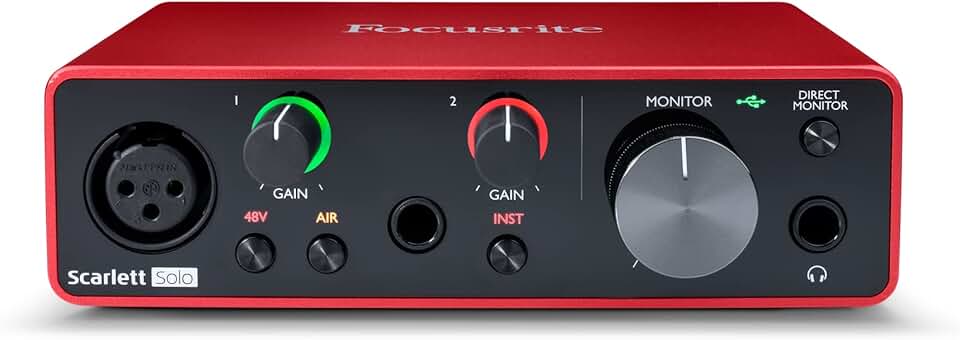
#2 · Best Audio Interface4.7 (28,936)
Focusrite Scarlett Solo 3rd Gen USB Audio Interface for Guitarists, Vocalists, Podcasters or Producers to record and playback studio quality sound
$119.99
The Focusrite Scarlett Solo is the bridge between USB mics and full studio rigs. Pair it with the SM7B or any XLR condenser, and you've got professional-grade audio routing for under $120. Essential if you're upgrading from basic USB mics.
Pros
- + Scarlett Solo 3rd Gen adds phantom power and XLR input for professional mics without breaking the bank
- + Class-compliant USB means zero-latency monitoring and works on Mac, Windows, and Linux out of the box
- + Compact footprint fits tight desk setups; 24-bit/192kHz recording quality for future-proof audio
Cons
- − Single XLR input limits multi-mic setups—you'll need a mixer if you want multiple guests or instruments
- − Requires external power supply; not ideal for portable streaming rigs

#3 · Best Stream Control Deck4.8 (9,930)
Elgato Stream Deck MK.2 – Studio Controller, 15 macro keys, trigger actions in apps and software like OBS, Twitch, YouTube and more, USB, works with Mac and PC
$149.99
The Stream Deck MK.2 saves you seconds per action, which adds up to minutes per stream. If you're managing multiple scenes, overlays, and alerts, this deck pays for itself in workflow efficiency. Highly recommended for mid-tier and pro streamers.
Pros
- + 15 programmable macro keys trigger OBS scenes, Twitch alerts, and custom actions instantly—no alt-tabbing
- + USB plug-and-play works with Windows, Mac, and most streaming software including YouTube, Discord, and Elgato apps
- + Customizable LCD screen on each key shows icons and labels; responsive tactile buttons feel premium
Cons
- − Requires Elgato Control Center software; limited customization without a learning curve
- − $150 is a luxury item—not necessary if you're using basic scene switching

#4 · Best Wireless Lavalier System4.7 (8,268)
DJI Mic Mini (2 TX + 1 RX + Charging Case), Wireless Lavalier Microphone for iPhone/Camera/Android, Ultralight, Detail-Rich Audio, 48h Use, Noise Cancelling, Automatic Limiting, Vlog, Streaming
$79.00
The DJI Mic Mini is perfect for mobile streamers, outdoor content creators, and anyone who hates being tethered to a desk. The audio quality and battery life punch well above the $79 price point. Ideal upgrade if you're tired of XLR cables limiting your movement.
Pros
- + DJI Mic Mini weighs just 13.5g per transmitter—barely noticeable on shirt or lapel during gameplay or outdoor content
- + 48-hour battery life on a single charge; 250m range keeps you untethered anywhere in your home or studio
- + Built-in noise cancellation and 48kHz/24-bit audio quality rival wired lavaliers costing 3x more
Cons
- − Requires charging case management; easy to lose tiny transmitters if you're not organized
- − Wireless latency can be noticeable in fast-paced gaming if your receiver isn't positioned optimally

#5 · Best Long-Range Wireless Mic4.7 (7,271)
Hollyland Lark M2 Wireless Microphone for iPhone/Camera/Android/PC, 48kHz/24-bit High Fidelity Audio, 300m Range, Noise Cancelling, 40h Use, YouTube, Vlog, Streaming (2TX + 3RX + Charging Case) ClimatePartner certified
$99.00
The Lark M2 is the choice for streamers who roam—outdoor gaming, multi-location content, or large studio setups. The 300m range and 40-hour battery are genuine advantages over competitors. Pick this if you value freedom and reliability over minimalist design.
Pros
- + Hollyland Lark M2 delivers 300m range and 40-hour battery life—overkill for most home setups but unmatched for outdoor or multi-room streaming
- + 48kHz/24-bit high-fidelity audio with active noise cancellation removes keyboard clicks and ambient hum
- + Works with iPhone, Android, cameras, and PC—genuinely universal compatibility
Cons
- − Slightly bulkier transmitters than DJI Mic Mini; more noticeable on camera if you're in tight framing
- − $99 is higher than entry-level wireless options; overkill if you stay in one room

#6 · Best USB Condenser Microphone4.6 (56,598)
Logitech Creators Blue Yeti USB Microphone for PC, Mac, Gaming, Recording, Streaming, Podcasting, Studio and Computer Condenser Mic with Blue VO!CE effects, 4 Pickup Patterns, Plug and Play - Blackout
$98.63
The Blue Yeti is the streamer's default USB mic for good reason: it sounds professional, requires zero setup, and includes software that handles basic audio cleanup. At $99, it's the sweet spot between budget and quality. Best pick if you want to skip the audio interface entirely.
Pros
- + Blue Yeti's cardioid mode rejects side noise while capturing warm, detailed vocal tone—perfect for streaming and podcasting
- + Blue VO!CE software adds noise suppression and voice modulation without third-party plugins
- + Plug-and-play USB; no interface or phantom power needed. Works immediately on Mac or Windows
Cons
- − Larger desktop footprint than smaller USB mics; requires a boom arm or stand for optimal positioning
- − Cardioid pickup still picks up some keyboard noise; you'll want a pop filter and acoustic treatment for best results

#7 · Best Budget Dynamic Microphone4.6 (10,823)
FIFINE USB/XLR Dynamic Microphone for Podcast Recording, PC Computer Gaming Streaming Mic with RGB Light, Mute Button, Headphones Jack, Desktop Stand, Vocal Mic for Singing YouTube-AmpliGame AM8 Global Recycled Standard
$44.99
The FIFINE is the best value dynamic mic for budget streamers. You get USB convenience now and XLR upgrade path later. The included accessories and hybrid design make it smarter than cheaper alternatives. Solid choice if you're under $100 and want room to grow.
Pros
- + FIFINE USB/XLR hybrid mic gives you flexibility—start USB, upgrade to XLR with an interface later without replacing it
- + RGB lighting and mute button add visual feedback; cardioid pickup keeps background noise minimal for gaming streams
- + Desktop stand and headphone jack included; $45 price point undercuts most USB mics without sacrificing audio quality
Cons
- − RGB lighting is gimmicky and distracting on camera if you don't disable it
- − Dynamic mic requires closer mouth positioning than condensers; less forgiving if you're far from the mic
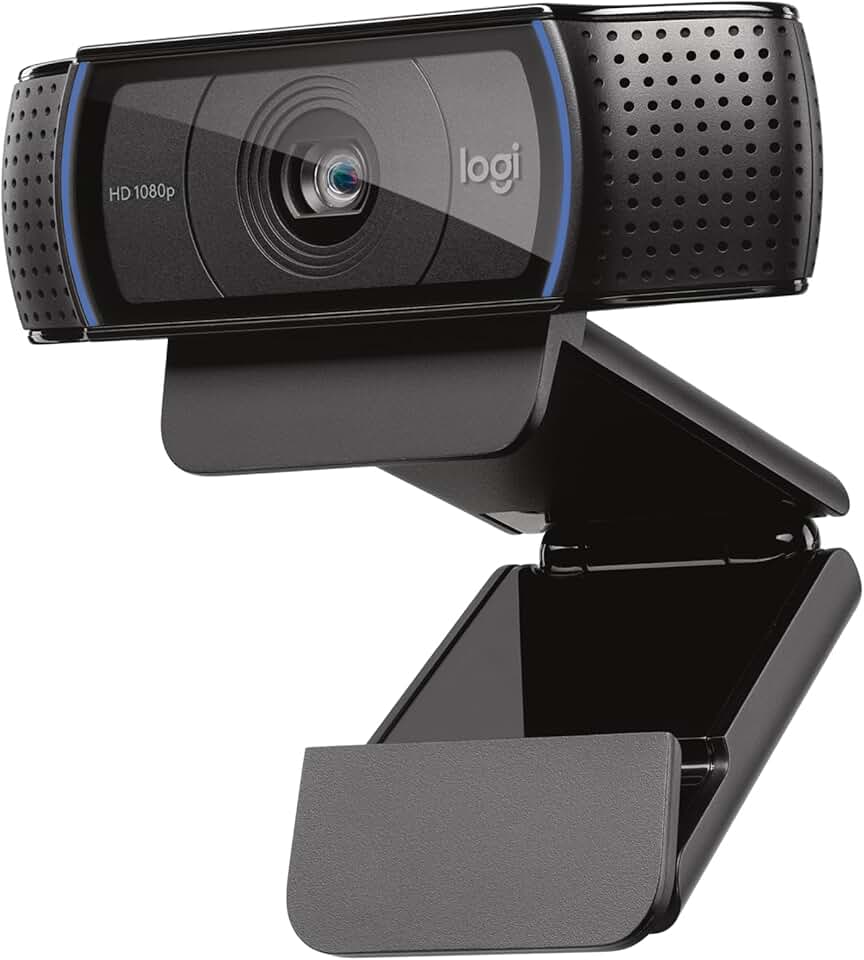
#8 · Best Webcam4.6 (38,651)
Logitech C920x HD Pro PC Webcam, Full HD 1080p/30fps Video, Clear Audio, HD Light Correction, Works with Microsoft Teams, Google Meet, Zoom, Nintendo Switch 2’s new GameChat Mode, Mac/Tablet- Black ECOLOGO
$80.21
The C920x is the reliable workhorse webcam for streamers who don't have a DSLR or mirrorless camera. It's not fancy, but it works every time without fuss. Pick this if you need a plug-and-play 1080p solution and don't want to troubleshoot drivers.
Pros
- + Logitech C920x delivers 1080p/30fps with autofocus and automatic light correction—no fiddling with settings
- + Works natively with Zoom, Teams, Google Meet, and OBS without driver headaches on Windows or Mac
- + Compact design mounts on any monitor; full HD is the minimum standard for professional-looking streams
Cons
- − 30fps is dated in 2026; 60fps is becoming standard for desk streams
- − Fixed wide-angle lens can make you look distorted if you're close to the camera

#9 · Best Budget Ring Light4.5 (70,752)
Sensyne 10'' Ring Light with 50'' Extendable Tripod Stand, LED Circle Lights with Phone Holder for Live Stream/Makeup/YouTube Video/TikTok, Compatible with All Phones
$25.64
The Sensyne ring light is the budget king. At $26, it's a no-brainer first upgrade if you're streaming with harsh overhead lighting or a dark room. The color temperature adjustment and phone holder make it versatile for multiple content types. Best value in this roundup.
Pros
- + Sensyne 10-inch ring light with 50-inch extendable tripod costs $26 and looks professional on camera—exceptional value
- + Adjustable brightness and color temperature (3000K–6500K) let you dial in flattering light for any skin tone or time of day
- + Phone holder included; perfect for TikTok, Instagram, and mobile streaming without buying extra mounts
Cons
- − Plastic construction feels cheap; tripod wobbles slightly under weight if you add accessories
- − No remote control; you'll adjust brightness manually or via the included control box

#10 · Best Premium Ring Light Setup4.4 (98,254)
UBeesize 12'' LED Ring Light with 62'' Tripod Stand, Selfie Ring Light for Video Recording, Live Streaming, TikTok & YouTube, Compatible with iPhone & Android (Black)
$29.06
The UBeesize 12-inch is the premium budget ring light. The larger diameter and remote control justify the extra cost over smaller alternatives. If you're serious about lighting but not ready for $300+ professional setups, this is the pick. Ideal for YouTube creators and Twitch streamers who care about thumbnail quality.
Pros
- + UBeesize 12-inch LED ring light with 62-inch tripod stand gives you studio-grade lighting at a fraction of studio prices
- + Dimmable brightness and color temperature control (3000K–6500K) with remote control—adjust on the fly without breaking frame
- + Large 12-inch diameter flatters your face from multiple angles; professional enough for YouTube thumbnails and Twitch overlays
Cons
- − Larger footprint requires more desk space or studio room to position properly
- − $29 is still budget, but you're paying for the larger diameter and remote—basic 10-inch lights are cheaper
Frequently asked questions
Frequently Asked Questions
Final word
The best streaming gear in 2026 starts with audio and lighting. Grab a USB mic like the Blue Yeti ($99) or budget dynamic FIFINE ($45), add a ring light like the Sensyne ($26), and you've got a functional setup for under $170. As you grow, upgrade to an audio interface (Focusrite Scarlett, $120) and professional XLR mic (Shure SM7B, $395). Add wireless freedom with the DJI Mic Mini ($79) or Lark M2 ($99), and streamline your workflow with the Stream Deck MK.2 ($150). Every pick on this list solves a real streaming problem. Start small, upgrade intentionally, and avoid gear you don't need yet.
More streaming gear guides
Best Blue Streaming Gear in 2026
Find the best Blue streaming gear for 2026. Expert picks for mics, stands, and audio gear for Twitch, YouTube, and podcasting.
Budget Streaming Gear of 2026
Affordable streaming gear 2026: ring lights, mics, webcams & more. Build a pro setup on a budget.
Best Elgato Streaming Gear in 2026
Top Elgato streaming gear for creators: Stream Deck, microphones, capture cards & more. Expert picks for every budget.
Best HyperX Streaming Gear in 2026
Top-rated HyperX streaming gear for creators. Mics, headsets, and accessories ranked by performance and value.
Best Logitech Streaming Gear in 2026
Find the best Logitech streaming gear for creators. Mics, webcams, lights, and cameras tested and ranked.
Best Streaming Gear of 2026: Top Picks for Every Budget
Discover the best streaming gear of 2026. Expert roundup of microphones, webcams, lights, and controllers for every budget.