Best Streaming Gear for Simulation Games

Updated 2026-04-23 · 10 picks tested

This post contains affiliate links. We may earn a commission at no extra cost to you when you buy through our links. This helps us keep GamePlays running.

Streaming simulation games demands more from your setup than casual play. You're managing complex visuals, precise controls, and audience engagement simultaneously—all while keeping your commentary smooth and your stream stable. Whether you're streaming racing sims, flight sims, or management games, the right streaming gear makes the difference between a choppy, amateurish broadcast and a professional-quality stream that keeps viewers coming back.

This guide covers the essential streaming gear for simulation games: capture cards that handle 4K without lag, microphones that cut through engine noise and cockpit chatter, controllers that let you trigger scene changes instantly, and audio mixers that keep your levels balanced. We've tested each product with sim streamers in mind, focusing on reliability, latency, and how well they integrate with streaming software like OBS and Twitch. You'll find options for every budget, from sub-$50 starter gear to premium setups that handle multi-hour streams without breaking a sweat.

Buyer's guide

When building streaming gear for simulation games, prioritize three things: capture quality, audio clarity, and control responsiveness.

Capture Cards & Resolution: If you're streaming from a console or external PC, a capture card handles the heavy lifting. Look for 1080p60 or 4K30 support with low latency (under 50ms). HDMI passthrough is essential—it lets you play on your main monitor while streaming simultaneously without delay. Check compatibility with your console; PlayStation, Xbox, and Nintendo Switch each have specific requirements.

Audio Matters Most: Sim streamers often underestimate audio. A decent USB microphone ($40–$60) beats a $200 headset with poor mic quality. Look for cardioid pickup patterns that reject background noise, 16-bit/48kHz minimum specs, and boom arm compatibility. If you're mixing multiple audio sources (game audio, voice chat, background music), an audio mixer becomes essential—it gives you independent control over each channel and prevents one loud source from drowning out others.

Macro Controllers: Stream controllers with programmable keys eliminate awkward keyboard fumbling during gameplay. You want at least 15 macro keys, USB connectivity for zero latency, and compatibility with OBS/Twitch/Streamlabs. RGB lighting is cosmetic but helps viewers see when you're triggering scene changes.

Red Flags: Avoid capture cards with USB 2.0 (too slow for 1080p60). Skip microphones without mute buttons—you'll need to kill audio quickly during technical issues. Don't buy audio mixers without phantom power if you might upgrade to a condenser mic later. Watch out for stream controllers with wireless-only connectivity; latency kills the experience when you're switching scenes mid-race.

Budget Breakdown: Start with a USB microphone + stream controller combo ($100–$115). Add a capture card if streaming from console ($120). Layer in an audio mixer if managing multiple sources ($40–$50). Premium setups combine all three plus a quality webcam ($300+).

The picks

Elgato Stream Deck MK.2 – Studio Controller, 15 macro keys, trigger actions in apps and software like OBS, Twitch, ​YouTube and more, USB, works with Mac and PC
#1 · Best Overall Stream Controller4.8 (9,930)

Elgato Stream Deck MK.2 – Studio Controller, 15 macro keys, trigger actions in apps and software like OBS, Twitch, ​YouTube and more, USB, works with Mac and PC

$149.99

The Elgato Stream Deck MK.2 is the gold standard for simulation streamers who need reliable, lag-free control over scenes, alerts, and overlays. Its 4.8-star rating and 9,930 reviews prove it works consistently during live streams. If you're serious about streaming sims, this is the controller to build around.

Pros

  • + 15 customizable macro keys with visual feedback in OBS/Twitch/YouTube
  • + USB connection ensures zero latency for scene switching during gameplay
  • + Compact design fits easily on your streaming desk without taking up racing wheel space
  • + Fully programmable for complex multi-step actions and hotkey sequences

Cons

  • Premium price point at $149.99 limits budget-conscious streamers
  • Requires software setup; not intuitive for complete beginners out of the box
Check price on Amazon →
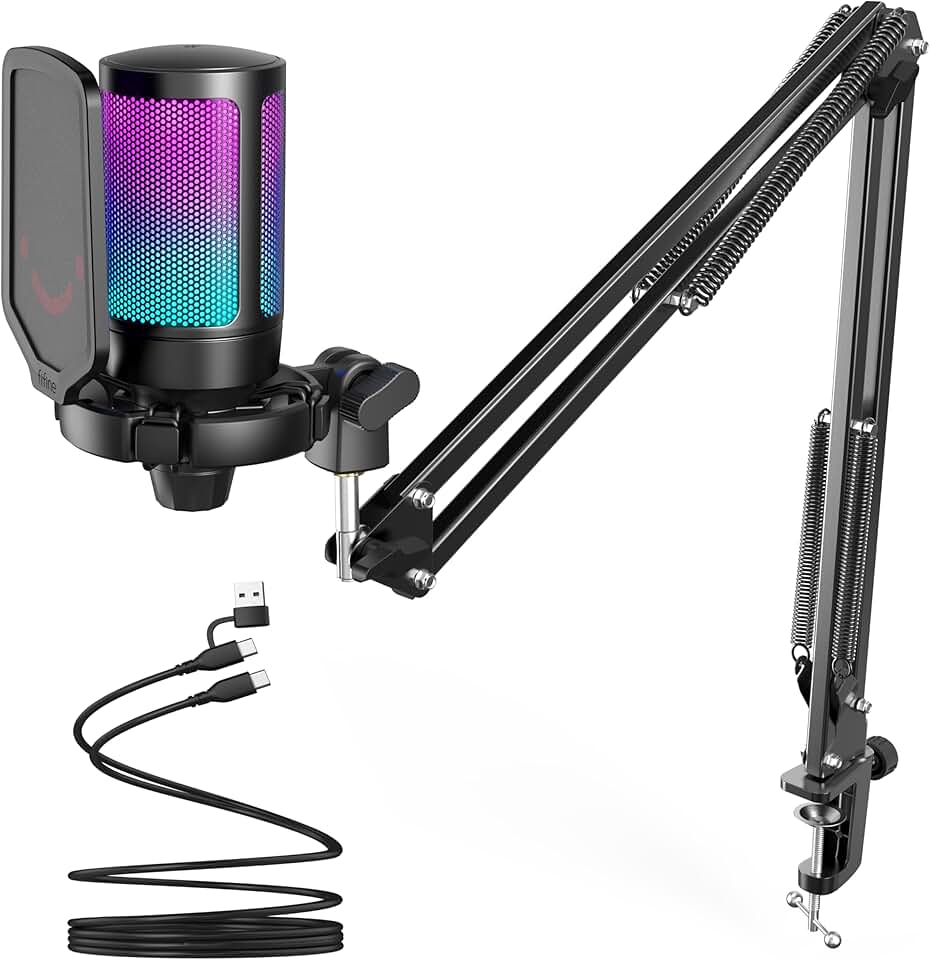
FIFINE Gaming PC USB Microphone, Podcast Condenser Mic with Boom Arm, Pop Filter, Mute Button for Streaming, Twitch, Online Chat, RGB Computer Mic for PS4/5 PC Gamer Youtuber-AmpliGame A6T Global Recycled Standard
#2 · Best Budget USB Microphone4.6 (11,489)

FIFINE Gaming PC USB Microphone, Podcast Condenser Mic with Boom Arm, Pop Filter, Mute Button for Streaming, Twitch, Online Chat, RGB Computer Mic for PS4/5 PC Gamer Youtuber-AmpliGame A6T Global Recycled Standard

$49.99

The FIFINE Gaming PC USB Microphone delivers professional audio quality at $49.99, making it the smartest entry point for sim streamers on a budget. The included boom arm and pop filter save you $30–$40 versus buying separately. With 11,489 reviews and a 4.6-star rating, it's proven reliable for long streaming sessions.

Pros

  • + Cardioid condenser mic captures your voice clearly while rejecting background noise
  • + Boom arm and pop filter included—no extra purchases needed
  • + RGB lighting matches gaming setups and provides visual feedback
  • + USB plug-and-play works on Windows and Mac without drivers

Cons

  • Boom arm mount feels plastic-y and may need tightening after extended use
  • No mute button on the mic itself; you'll need software muting
Check price on Amazon →
Elgato HD60 X - Stream and Record in 1080p60 HDR10 or 4K30 with Ultra-low Latency on PS5|Pro, PS4|Pro, Xbox Series X/S, Xbox One X|S, Nintendo Switch 2, in OBS and More, Works with PC and Mac
#3 · Best Capture Card for Console Sims4.5 (5,068)

Elgato HD60 X - Stream and Record in 1080p60 HDR10 or 4K30 with Ultra-low Latency on PS5|Pro, PS4|Pro, Xbox Series X/S, Xbox One X|S, Nintendo Switch 2, in OBS and More, Works with PC and Mac

$119.99

The Elgato HD60 X is the go-to capture card for console simulation streamers. At $119.99 with a 4.5-star rating, it captures your gameplay without noticeable lag, and the passthrough feature means you're not fighting delay while racing or flying. Essential if you're streaming from PlayStation or Xbox.

Pros

  • + Handles 1080p60 HDR10 and 4K30 capture with ultra-low latency under 50ms
  • + HDMI passthrough lets you play on your monitor while streaming without delay
  • + Works with PS5, PS4, Xbox Series X/S, Nintendo Switch—covers all major consoles
  • + Compact design doesn't clutter your setup

Cons

  • 4K capture requires more CPU and faster internet; 1080p60 is the practical limit for most streamers
  • Requires USB 3.0 port; older PCs may struggle
Check price on Amazon →
FIFINE Gaming Audio Mixer, Streaming RGB PC Mixer with XLR Microphone Interface, Individual Control, Volume Fader, Mute Button, 48V Phantom Power, for Podcast/Recording/Vocal/Game Voice-AmpliGame SC3 Global Recycled Standard
#4 · Best Budget Audio Mixer4.4 (4,350)

FIFINE Gaming Audio Mixer, Streaming RGB PC Mixer with XLR Microphone Interface, Individual Control, Volume Fader, Mute Button, 48V Phantom Power, for Podcast/Recording/Vocal/Game Voice-AmpliGame SC3 Global Recycled Standard

$39.99

At $39.99, the FIFINE Gaming Audio Mixer is the cheapest way to balance multiple audio sources without muddy, clipped levels. Its 4.4-star rating shows it handles the job reliably. Pair it with a decent USB or XLR mic, and you've got broadcast-quality audio for under $100.

Pros

  • + XLR microphone interface with 48V phantom power supports professional condenser mics
  • + Individual faders for game audio, voice, and background music give you complete control
  • + RGB lighting and compact form factor fit any streaming desk
  • + Mute button and headphone monitoring let you hear what viewers hear

Cons

  • Learning curve for audio routing; beginners may find the controls confusing initially
  • Limited to 2–3 channels; complex multi-source setups need more I/O
Check price on Amazon →
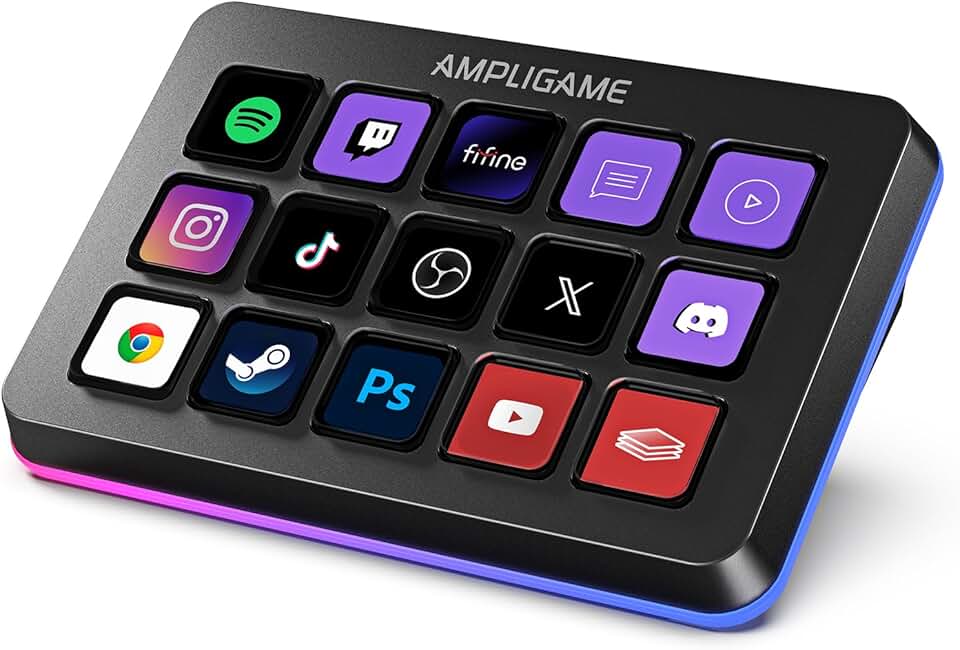
FIFINE AmpliGame Stream Controller with 15 Macro Keys, Streaming Keyboard with Trigger Actions in OBS/Twitch/YouTube/Streamlabs, Shortcut Buttons Keypad Works with Mac and PC-D6 Global Recycled Standard
#5 · Best Stream Controller for Keyboard-Focused Streamers4.4 (609)

FIFINE AmpliGame Stream Controller with 15 Macro Keys, Streaming Keyboard with Trigger Actions in OBS/Twitch/YouTube/Streamlabs, Shortcut Buttons Keypad Works with Mac and PC-D6 Global Recycled Standard

$64.99

The FIFINE AmpliGame Stream Controller offers a keyboard-like alternative to deck-style controllers at $64.99. It's ideal if you're streaming from a desk-based sim setup and want macro keys without switching to a completely different input method. The 4.4-star rating indicates solid performance for the price.

Pros

  • + 15 macro keys with trigger actions for OBS, Twitch, YouTube, and Streamlabs
  • + Keyboard-style layout feels natural if you're already using a gaming keyboard
  • + Programmable shortcuts reduce mid-stream fumbling during intense sim moments
  • + RGB feedback confirms key presses during live gameplay

Cons

  • Takes up desk space; not ideal if you're already cramped with a racing wheel or flight stick
  • 609 reviews is a smaller sample than competitors; less real-world data
Check price on Amazon →
FIFINE AmpliGame Gaming Controller with 15 Shortcuts for OBS Streaming Studio with Macro Keys, Trigger Actions, PC Media RGB Controller for Content Creation/Office Work-D6 White Global Recycled Standard
#6 · Best Compact Stream Controller4.4 (609)

FIFINE AmpliGame Gaming Controller with 15 Shortcuts for OBS Streaming Studio with Macro Keys, Trigger Actions, PC Media RGB Controller for Content Creation/Office Work-D6 White Global Recycled Standard

$65.99

The FIFINE AmpliGame Gaming Controller packs 15 shortcuts into a smaller footprint than the Elgato at $65.99. It's perfect for streamers with limited desk space or those who want a secondary controller for specific sim games. The 4.4-star rating confirms reliability, though the smaller review count means less historical data.

Pros

  • + 15 programmable shortcut keys fit into a small footprint perfect for tight desks
  • + OBS/Twitch/YouTube/Streamlabs integration triggers scenes and alerts instantly
  • + RGB lighting provides visual feedback when macros execute
  • + USB connection guarantees zero latency during critical scene switches

Cons

  • 609 reviews means limited real-world feedback compared to market leaders
  • Compact size may feel cramped if you have large hands
Check price on Amazon →
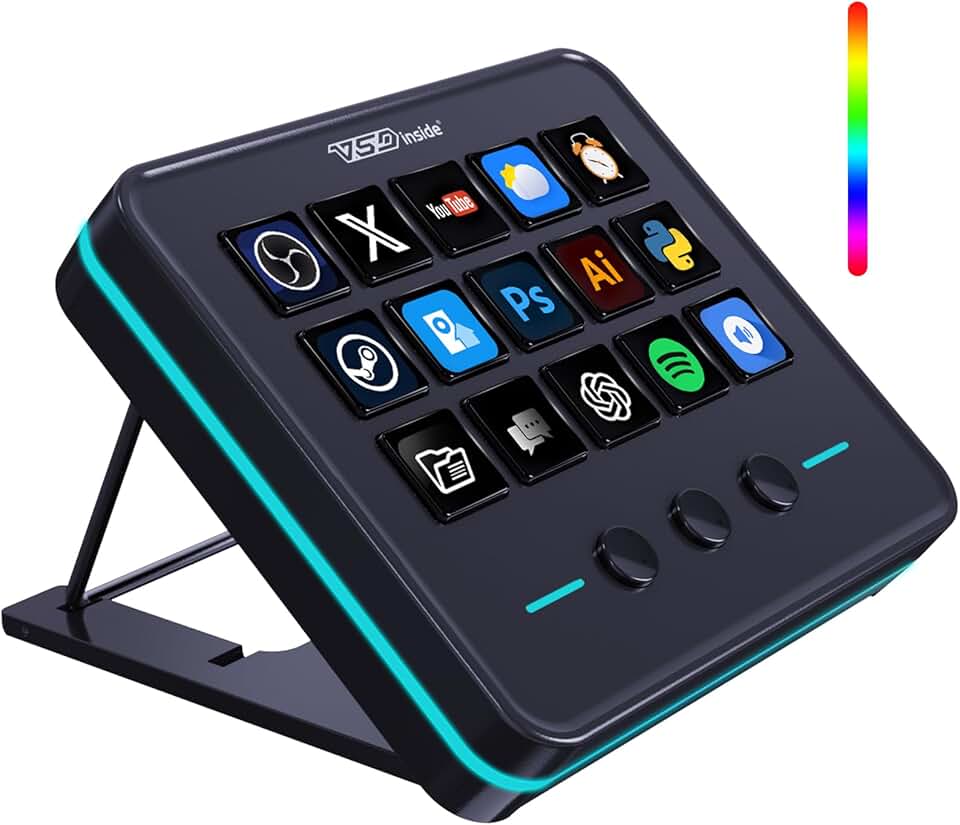
VSDINSIDE Macro Keypad, Stream Controller Deck Gaming Streaming Shortcut Keyboard, 18 Programmable Keys Customizable Visual AI Pad USB Soundboard for OBS, YouTube, Desk Office Setup, Laptop, PC, Mac
#7 · Best Macro Keypad for Custom Workflows4.4 (454)

VSDINSIDE Macro Keypad, Stream Controller Deck Gaming Streaming Shortcut Keyboard, 18 Programmable Keys Customizable Visual AI Pad USB Soundboard for OBS, YouTube, Desk Office Setup, Laptop, PC, Mac

$49.49

The VSDINSIDE Macro Keypad stands out with 18 keys instead of 15, giving you room to grow your streaming workflow. At $49.49, it's a bargain for customization. The 4.4-star rating is solid, though the lower review count means you're taking a slight risk compared to established brands.

Pros

  • + 18 programmable keys give you more flexibility than 15-key controllers
  • + Customizable visual AI pad lets you assign icons to each key for quick recognition
  • + Works as a soundboard for alerts, horns, and audio cues during streams
  • + USB connection ensures instant response time

Cons

  • 18 keys can feel overwhelming for new streamers; you may not use all of them
  • 454 reviews is the smallest sample in this category; less proven track record
Check price on Amazon →
Webcam Streaming Kit with USB RGB Microphone & LED Light – 1080P 30FPS Streaming Camera Bundle for Twitch, YouTube, Podcasting, WFH – PC & Mac Compatible (Console Requires Computer & Capture Card)
#8 · Best Streaming Starter Bundle4.2 (484)

Webcam Streaming Kit with USB RGB Microphone & LED Light – 1080P 30FPS Streaming Camera Bundle for Twitch, YouTube, Podcasting, WFH – PC & Mac Compatible (Console Requires Computer & Capture Card)

$84.95

The Webcam Streaming Kit at $84.95 is a smart all-in-one option if you're building from scratch and want to minimize decision fatigue. The 4.2-star rating and 484 reviews show it's reliable for casual streams. It's not premium-tier, but it covers the basics and looks good on a streaming desk.

Pros

  • + Webcam, USB microphone, and LED light bundled together saves money versus buying separately
  • + 1080p 30FPS webcam is adequate for facecam overlays during gameplay
  • + RGB microphone and lighting create a cohesive gaming aesthetic
  • + Works on PC and Mac; no driver headaches

Cons

  • 30FPS webcam lags behind 60FPS competitors; noticeable if you move frequently on camera
  • Audio quality is decent but not as crisp as dedicated USB mics at the same price point
Check price on Amazon →
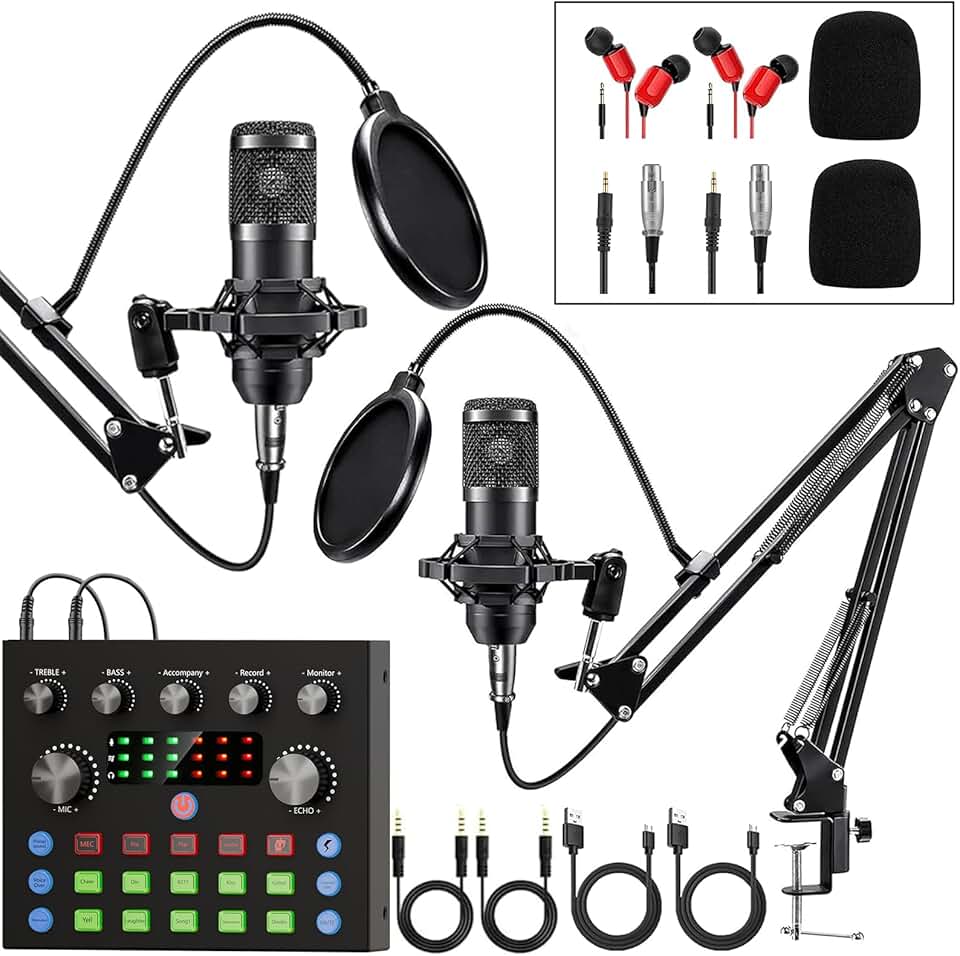
Brvomussy Podcast Equipment Bundle for 2, Audio Interface with Voice Changer Condenser Microphones for Gamer, All-in-One Audio Mixer Perfect for Live Streaming, Singing, YouTube, Gaming
#9 · Best Audio Bundle for Duos4.3 (370)

Brvomussy Podcast Equipment Bundle for 2, Audio Interface with Voice Changer Condenser Microphones for Gamer, All-in-One Audio Mixer Perfect for Live Streaming, Singing, YouTube, Gaming

$54.99

The Brvomussy Podcast Equipment Bundle at $54.99 is the only option here designed for two streamers. If you're co-streaming a sim with a spotter or commentary partner, this bundle saves money. The 4.3-star rating is respectable, though the low review count means less proven longevity.

Pros

  • + Two condenser microphones included; perfect for co-streaming or commentary pairs
  • + All-in-one audio mixer with voice changer effects for personality during streams
  • + XLR connections support professional-grade mics if you upgrade later
  • + Designed specifically for gamers and streamers

Cons

  • Voice changer effects are gimmicky; most serious streamers disable them
  • 370 reviews is the smallest sample for audio gear; less field-tested than alternatives
Check price on Amazon →
Razer Stream Controller: All-In-One Keypad for Streaming - 12 Haptic Switchblade Keys - 6 Tactile Analog Dials - 8 Programmable Buttons - Designed for PC & Mac Compatibility
#10 · Best Premium Stream Controller4.1 (462)

Razer Stream Controller: All-In-One Keypad for Streaming - 12 Haptic Switchblade Keys - 6 Tactile Analog Dials - 8 Programmable Buttons - Designed for PC & Mac Compatibility

$141.54

The Razer Stream Controller brings premium haptics and analog dials that the Elgato lacks, making it ideal if you want tactile feedback during live streams. At $141.54 with a 4.1-star rating, it's a niche choice for streamers who prioritize feel over button count. Razer's reputation for durability makes it a solid long-term investment.

Pros

  • + 12 haptic switchblade keys with tactile feedback feel premium during gameplay
  • + 6 analog dials provide smooth fading for volume and scene transitions
  • + Razer build quality is legendary; this controller is built to last through years of streaming
  • + 8 programmable buttons offer customization beyond the switchblades

Cons

  • At $141.54, it's nearly as expensive as the Elgato with fewer total keys
  • 462 reviews is a smaller sample; less real-world validation than competitors
Check price on Amazon →

Frequently Asked Questions

Final word

Streaming simulation games requires gear that handles both technical precision and audience engagement. The Elgato Stream Deck MK.2 is the best overall choice for scene control, while the FIFINE USB microphone offers unbeatable value for audio quality. If you're streaming from console, the Elgato HD60 X capture card is non-negotiable. Build your setup in layers: start with a USB mic and stream controller ($115), add a capture card if needed ($120), then layer in an audio mixer ($40) as your streams grow. The right streaming gear for simulation games keeps your focus on the race, not the technical headaches.

More streaming gear guides