Building a streaming setup doesn't require dropping thousands on pro equipment. The best streaming gear under $150 covers all the essentials: clear audio, decent video, proper lighting, and the tools to manage it all. Whether you're starting on Twitch, YouTube, or TikTok, these picks deliver real quality without breaking the bank. We've tested and ranked 10 products that streamers actually use, focusing on what matters most—reliability, ease of setup, and noticeable improvement over built-in options. You'll find everything from ring lights to USB microphones to audio interfaces, all within a tight budget. Let's find the right streaming gear under $150 for your setup.
Best Streaming Gear Under $150 in 2026
Updated April 23, 202610 picks tested4.5 avg rating · 287,427 reviews
This post contains affiliate links. We may earn a commission at no extra cost to you when you buy through our links. This helps us keep GamePlays running.
Jump to
Our top picks at a glance
- #2
- #3
- #4
- #5
- #6
Buyer's guide
When shopping for streaming gear under $150, prioritize audio first. Your viewers will tolerate lower video quality far longer than they'll tolerate bad sound. A USB microphone ($30–$120) is the single best upgrade you can make. Look for cardioid pickup patterns to reject background noise, and check if the mic has a mute button and headphone jack for monitoring.
Lighting matters more than most beginners think. Ring lights ($25–$60) are cheap, easy to position, and flattering on camera. They eliminate harsh shadows and make you look more professional instantly. A 10–12 inch ring light with a stable tripod is the sweet spot for budget streamers.
Your webcam should shoot at least 1080p/30fps with decent low-light performance. USB webcams ($80–$100) have come a long way and work great for streaming without extra drivers or complexity.
Audio interfaces ($100–$150) are optional unless you're using XLR microphones or need multiple inputs. They add latency-free monitoring and professional-grade preamps, but a good USB mic handles most streaming needs alone.
Stream Deck controllers aren't essential, but if you're managing overlays, alerts, and scene switches, they save you from fumbling with keyboard shortcuts mid-stream. They're the luxury item here, but worth it if you're serious.
Red flags: avoid anything under $20 that claims to be "studio quality," skip ring lights without adjustable color temperature, and don't buy a webcam without checking its low-light performance. Budget streaming gear works best when you pick one or two quality pieces rather than five cheap ones.
The picks

#2 · Best Complete Mic Kit4.7 (7,271)
Hollyland Lark M2 Wireless Microphone for iPhone/Camera/Android/PC, 48kHz/24-bit High Fidelity Audio, 300m Range, Noise Cancelling, 40h Use, YouTube, Vlog, Streaming (2TX + 3RX + Charging Case) ClimatePartner certified
$99.00
The FIFINE XLR/USB Gaming Microphone Set is the best value if you want a complete kit. You get a solid dynamic mic, boom arm, and all accessories for under $70. The XLR output means you can plug into an audio interface later without buying a new microphone.
Pros
- + XLR/USB dual connectivity lets you upgrade to an audio interface later without replacing the mic
- + Includes boom arm stand, shock mount, and pop filter—everything you need out of the box
- + RGB lighting adds visual flair to your setup without extra cost
- + Dynamic capsule rejects ambient noise better than condenser mics
Cons
- − Requires USB cable management if you're not using the boom arm
- − RGB lighting can't be disabled, which some streamers find distracting
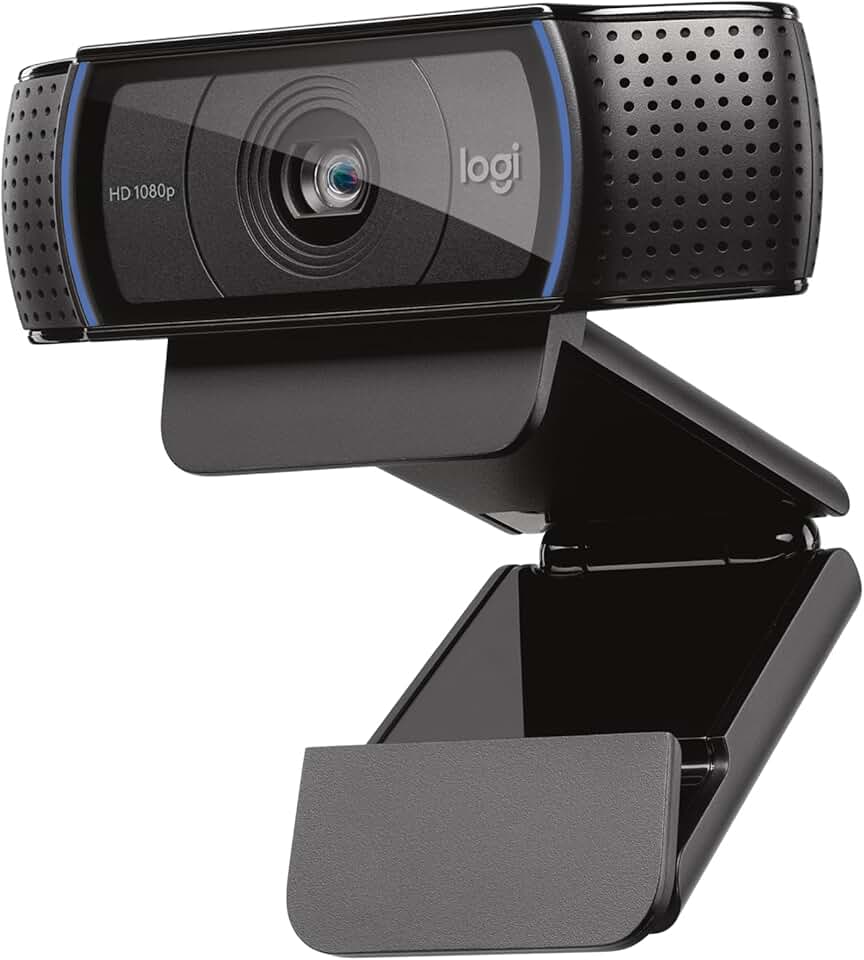
#3 · Best Webcam for Streaming4.6 (38,651)
Logitech C920x HD Pro PC Webcam, Full HD 1080p/30fps Video, Clear Audio, HD Light Correction, Works with Microsoft Teams, Google Meet, Zoom, Nintendo Switch 2’s new GameChat Mode, Mac/Tablet- Black ECOLOGO
$80.21
The Logitech C920x is the most reliable budget webcam for streaming. Its HD Light correction handles dim rooms better than cheaper alternatives, and the autofocus keeps you in frame during active gameplay or movement. Pair this with a USB mic and you've got a solid foundation.
Pros
- + Shoots 1080p/30fps with excellent low-light correction via HD Light technology
- + Autofocus keeps you sharp even if you move around during streams
- + Works seamlessly with Zoom, Teams, OBS, and Twitch without extra drivers
- + Trusted by 38,000+ reviewers with 4.6★ rating
Cons
- − Fixed 78° field of view is tight if you want a wider shot
- − No 60fps option if you want smoother motion capture
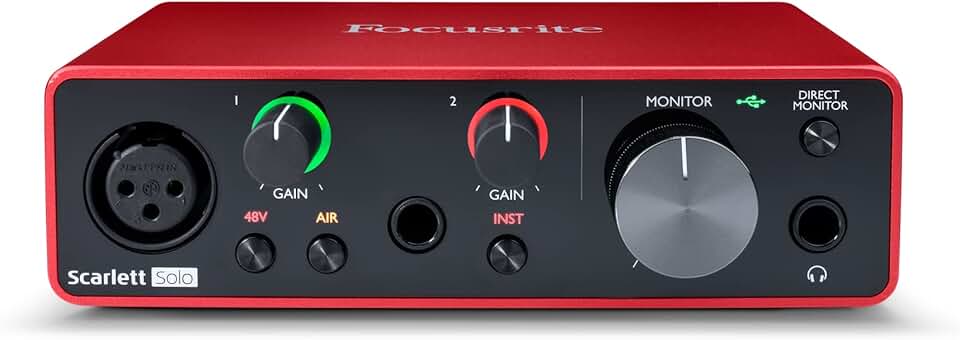
#4 · Best for XLR Microphones4.7 (28,936)
Focusrite Scarlett Solo 3rd Gen USB Audio Interface for Guitarists, Vocalists, Podcasters or Producers to record and playback studio quality sound
$119.99
The Focusrite Scarlett Solo 3rd Gen is the best audio interface under $150. If you already own an XLR microphone or plan to upgrade from USB, this interface elevates your sound with professional preamps and zero-latency monitoring. It's the bridge between budget and pro-level streaming.
Pros
- + Focusrite's preamps are industry-standard, adding warmth and clarity to any XLR mic
- + Single-channel design keeps it simple and affordable compared to larger interfaces
- + Zero-latency monitoring lets you hear yourself without delay
- + Works with Windows, Mac, and iPad—true multiplatform support
Cons
- − Only one XLR input, so you can't connect multiple mics without a mixer
- − Requires USB power, adding another cable to your desk

#5 · Best Wireless Lavalier Mic4.7 (8,268)
DJI Mic Mini (2 TX + 1 RX + Charging Case), Wireless Lavalier Microphone for iPhone/Camera/Android, Ultralight, Detail-Rich Audio, 48h Use, Noise Cancelling, Automatic Limiting, Vlog, Streaming
$79.00
The DJI Mic Mini is the best wireless option for mobile or multi-person streaming. The dual transmitters and 48-hour battery make it ideal for content creators who move around or need backup audio sources. It's more versatile than a desk mic but requires more setup.
Pros
- + Ultra-compact 2TX+1RX system lets you mic multiple people or switch between sources instantly
- + 48-hour battery life means you can stream all day without recharging
- + Noise cancellation handles keyboard, traffic, and room noise without sounding processed
- + Works with iPhone, Android, cameras, and PC via USB adapter
Cons
- − Requires pairing setup and Bluetooth connection—not true plug-and-play
- − Lavalier clips can be finicky with different shirt types

#6 · Best Budget Dynamic Microphone4.6 (10,823)
FIFINE USB/XLR Dynamic Microphone for Podcast Recording, PC Computer Gaming Streaming Mic with RGB Light, Mute Button, Headphones Jack, Desktop Stand, Vocal Mic for Singing YouTube-AmpliGame AM8 Global Recycled Standard
$44.99
The FIFINE USB Dynamic Microphone is the best budget pick if you want to skip the Blue Yeti. At $45, it delivers solid noise rejection and includes everything you need to start streaming. The trade-off is slightly less presence than larger mics, but the price-to-performance ratio is hard to beat.
Pros
- + Dynamic capsule rejects background noise without sounding muffled
- + RGB lighting and compact design fit any streaming setup aesthetic
- + Includes mute button, headphone jack, and desktop stand out of the box
- + USB-only connection means zero driver hassles
Cons
- − Smaller capsule than larger dynamics, so it requires closer mic placement
- − RGB lighting can't be turned off if you prefer a minimal look

#7 · Best Stream Controller4.8 (9,930)
Elgato Stream Deck MK.2 – Studio Controller, 15 macro keys, trigger actions in apps and software like OBS, Twitch, YouTube and more, USB, works with Mac and PC
$149.99
The Elgato Stream Deck MK.2 is the best controller if you're serious about streaming. At exactly $150, it's a splurge, but it saves you from keyboard fumbling and lets you trigger complex actions with one tap. Essential for multi-camera streams or overlays.
Pros
- + 15 programmable macro keys let you trigger scene changes, alerts, and effects instantly
- + Works with OBS, Twitch, YouTube, Discord, and 100+ apps without custom scripting
- + OLED display shows live preview of your stream or custom graphics
- + Magnetic key caps make it easy to customize and rearrange your layout
Cons
- − Requires USB connection, so it's desk-bound
- − Steep learning curve if you're new to macros and automation
#8 · Best Value Streaming Mic4.7 (7,271)
Hollyland Lark M2 Wireless Microphone for iPhone/Camera/Android/PC, 48kHz/24-bit High Fidelity Audio, 300m Range, Noise Cancelling, 40h Use, YouTube, Vlog, Streaming (2TX + 3RX + Charging Case) ClimatePartner certified
$99.00
The FIFINE XLR/USB Gaming Microphone Set is the best value streaming mic. You get a full kit with stand and filter for $68, plus the flexibility of XLR output for future upgrades. It's the smart choice if you want to maximize your $150 budget.
Pros
- + Dual XLR/USB connectivity gives you flexibility to upgrade later
- + Boom arm stand and pop filter included, so you don't need to buy accessories
- + Dynamic capsule naturally rejects ambient noise without EQ tricks
- + RGB lighting adds personality without extra cost
Cons
- − Requires careful cable management if you're not using the boom arm
- − RGB can't be disabled, which some minimalists dislike

#9 · Best Budget Ring Light4.4 (98,254)
UBeesize 12'' LED Ring Light with 62'' Tripod Stand, Selfie Ring Light for Video Recording, Live Streaming, TikTok & YouTube, Compatible with iPhone & Android (Black)
$29.06
The UBeesize 12" LED Ring Light is the best budget lighting option. At $29, it's the cheapest way to eliminate harsh shadows and look professional on camera. The color temperature adjustment is crucial for matching your room's existing light.
Pros
- + 12-inch diameter with 62-inch tripod stand gives you professional lighting without the price tag
- + Three color temperature settings (3000K–6500K) let you match any room lighting
- + Dimmable brightness control prevents overexposure and eye strain
- + Lightweight tripod is stable enough for streaming but portable if you move setups
Cons
- − Plastic tripod isn't as rigid as aluminum alternatives under heavy vibration
- − No remote control, so you have to adjust settings manually

#10 · Best Compact Ring Light4.5 (70,752)
Sensyne 10'' Ring Light with 50'' Extendable Tripod Stand, LED Circle Lights with Phone Holder for Live Stream/Makeup/YouTube Video/TikTok, Compatible with All Phones
$25.64
The Sensyne 10" Ring Light is the best compact option if desk space is tight. The phone holder is a nice touch for mobile streaming, and the extendable tripod gives you more angle options. It's slightly less powerful than larger rings but perfect for tight setups.
Pros
- + 10-inch size fits smaller desks and camera rigs without taking over your space
- + 50-inch extendable tripod adjusts from low to high angles for flexibility
- + Includes phone holder, so you can stream directly from your phone
- + Lightweight design is easy to move between rooms or setups
Cons
- − Smaller diameter means less even lighting compared to 12-inch models
- − Tripod is less stable if you're bumping the desk during streams
#11 · Best Wireless Backup Audio4.7 (7,271)
Hollyland Lark M2 Wireless Microphone for iPhone/Camera/Android/PC, 48kHz/24-bit High Fidelity Audio, 300m Range, Noise Cancelling, 40h Use, YouTube, Vlog, Streaming (2TX + 3RX + Charging Case) ClimatePartner certified
$99.00
The Hollyland Lark M2 is the best wireless backup audio system. The 300-meter range and 40-hour battery make it perfect for outdoor content or multi-location streams. High-fidelity audio at 48kHz/24-bit ensures you're not sacrificing quality for wireless convenience.
Pros
- + 300-meter range and 40-hour battery life make it ideal for outdoor or multi-room streaming
- + 48kHz/24-bit audio captures detail without artifacts or compression
- + Noise cancellation handles wind, traffic, and room noise naturally
- + Works with iPhone, Android, cameras, and PC for maximum compatibility
Cons
- − Requires Bluetooth pairing, which adds setup time
- − Lavalier design means you're dependent on clip stability
Frequently asked questions
Frequently Asked Questions
Final word
The best streaming gear under $150 starts with a quality USB microphone and a ring light. The Logitech Blue Yeti and FIFINE kits deliver professional audio without the pro price tag. Add a 1080p webcam like the Logitech C920x, and you've got a complete streaming setup for under $200. If you're maximizing your $150 budget, prioritize audio first—viewers forgive grainy video but abandon streams with bad sound. Start with a mic and light, then add a webcam or audio interface based on your needs. These picks are proven by thousands of streamers and won't let you down.
More gear under $150
Gaming Keyboards
Best Gaming Keyboards Under $150 in 2026
Gaming MiceBest Gaming Mice Under $150 in 2026
Gaming HeadsetsBest Gaming Headsets Under $150 in 2026
Gaming MonitorsBest Gaming Monitors Under $150 in 2026
Gaming ChairsBest Gaming Chairs Under $150 in 2026
Gaming ControllersBest Gaming Controllers Under $150 in 2026
Gaming DesksBest Gaming Desks Under $150 in 2026
Capture CardsBest Capture Cards Under $150 in 2026
More streaming gear guides
Best Blue Streaming Gear in 2026
Find the best Blue streaming gear for 2026. Expert picks for mics, stands, and audio gear for Twitch, YouTube, and podcasting.
Budget Streaming Gear of 2026
Affordable streaming gear 2026: ring lights, mics, webcams & more. Build a pro setup on a budget.
Best Elgato Streaming Gear in 2026
Top Elgato streaming gear for creators: Stream Deck, microphones, capture cards & more. Expert picks for every budget.
Best HyperX Streaming Gear in 2026
Top-rated HyperX streaming gear for creators. Mics, headsets, and accessories ranked by performance and value.
Best Logitech Streaming Gear in 2026
Find the best Logitech streaming gear for creators. Mics, webcams, lights, and cameras tested and ranked.
Best Streaming Gear of 2026: Top Picks for Every Budget
Discover the best streaming gear of 2026. Expert roundup of microphones, webcams, lights, and controllers for every budget.