Building a streaming setup doesn't require dropping hundreds of dollars on high-end equipment. The best streaming gear under $50 delivers solid performance for content creators, whether you're starting your first stream or upgrading your existing rig. We've tested and ranked 10 products that balance quality, reliability, and affordability—everything from ring lights and microphones to webcams and mixing boards. Each pick stays under the $50 price cap while offering real value for beginners and budget-conscious streamers. Read on to find the right streaming gear under $50 for your needs.
Best Streaming Gear Under $50 in 2026
Updated April 23, 202610 picks tested4.4 avg rating · 222,483 reviews
This post contains affiliate links. We may earn a commission at no extra cost to you when you buy through our links. This helps us keep GamePlays running.
Jump to
Our top picks at a glance
- #1
- #2
- #3
- #4
- #5
Buyer's guide
When shopping for streaming gear under $50, focus on what directly impacts your audience: lighting, audio, and video quality. A good ring light (8–12 inches) eliminates harsh shadows and flatters your face on camera—essential for any stream. Look for adjustable color temperature (3000K–6500K) and brightness controls so you can adapt to different rooms and times of day.
Audio matters more than many beginners realize. A USB microphone with a mute button and headphone jack lets you monitor your own sound without delay. Condenser mics pick up more detail than dynamic mics but are sensitive to background noise; dynamic mics reject room sound better. If you already have a decent mic, a compact mixer adds professional control over levels and routing.
For video, a 1080p webcam with autofocus beats your laptop's built-in camera every time. Look for at least 30fps at 1080p, and check if it has a physical shutter for privacy.
Tripod stands and phone holders are often overlooked but critical. A sturdy, adjustable tripod keeps your light or camera stable during long streams. Gooseneck arms add flexibility for positioning without taking up desk space.
Red flags: avoid "streaming gear bundles" that bundle cheap components together—you'll waste money on items you don't need. Skip products with fixed color temperature or no brightness control; they won't adapt to your space. Steer clear of microphones with no mute button; you'll regret it during awkward moments.
The picks

#1 · Best Overall Ring Light4.4 (98,254)
UBeesize 12'' LED Ring Light with 62'' Tripod Stand, Selfie Ring Light for Video Recording, Live Streaming, TikTok & YouTube, Compatible with iPhone & Android (Black)
$29.06
The UBeesize 12-inch ring light is the sweet spot for streamers who want professional-looking lighting without breaking the bank. The larger diameter and adjustable tripod make it versatile enough for desk setups, standing streams, or even makeup tutorials. At $29.06, it's hard to beat for the price.
Pros
- + 12-inch diameter provides even, flattering light across your face and upper body
- + 62-inch tripod stand reaches high enough for overhead positioning or standing streams
- + Three color temperature modes (3000K, 4500K, 6500K) adapt to any room or time of day
- + Dimmable brightness with 10 levels of control for precise lighting adjustments
Cons
- − Tripod can feel slightly wobbly on uneven surfaces without proper weight distribution
- − No remote control; you adjust brightness and color directly on the unit

#2 · Best Budget Ring Light4.5 (70,752)
Sensyne 10'' Ring Light with 50'' Extendable Tripod Stand, LED Circle Lights with Phone Holder for Live Stream/Makeup/YouTube Video/TikTok, Compatible with All Phones
$25.64
If you're new to streaming and want the cheapest entry point, the Sensyne 10-inch ring light at $25.64 is a no-brainer. The integrated phone holder saves you from buying a separate accessory, and the 50-inch tripod works for both seated and standing streams. You're sacrificing a bit of light spread compared to larger rings, but the value is unmatched.
Pros
- + 10-inch ring light delivers solid, even illumination for face-on streams and calls
- + 50-inch extendable tripod packs down small but extends tall enough for most setups
- + Phone holder integrated into the tripod arm—no separate purchase needed
- + 4.5-star rating from over 70,000 reviews shows consistent real-world reliability
Cons
- − Only two color temperature modes (3000K and 6500K); no middle ground like 4500K
- − Smaller 10-inch diameter means less even coverage if you're shooting full-body content

#3 · Best USB Microphone4.6 (10,823)
FIFINE USB/XLR Dynamic Microphone for Podcast Recording, PC Computer Gaming Streaming Mic with RGB Light, Mute Button, Headphones Jack, Desktop Stand, Vocal Mic for Singing YouTube-AmpliGame AM8 Global Recycled Standard
$44.99
The FIFINE USB/XLR dynamic microphone is the best standalone mic under $50 if audio quality is your priority. The dual connectivity future-proofs your setup, and the 4.6-star rating reflects real user satisfaction. This is the mic to grab if you're willing to skip a ring light and invest in crystal-clear voice.
Pros
- + Dual USB/XLR connectivity means you can upgrade to an audio interface later without replacing the mic
- + 4.6-star rating from nearly 11,000 reviews—the highest-rated mic in this list
- + RGB lighting adds visual flair to your stream setup without being distracting
- + Headphone jack with volume control lets you monitor your own audio in real-time
Cons
- − At $44.99, it eats most of your $50 budget, leaving little room for other gear
- − Requires a desktop stand (included) which takes up more desk space than a boom arm

#4 · Best Wireless Lavalier Mic4.4 (6,529)
Mini Mic Pro (Latest Model) - Wireless Mini Microphone for iPhone, iPad, Android - 2 Pack Lavalier Microphone for Video Recording - iPhone Mic Crystal Clear Recording with USB-C for Content Creators
$24.99
At $24.99 for a 2-pack, the Mini Mic Pro wireless lavaliers are perfect if you're doing mobile streaming, outdoor content, or need flexibility to move around. The wireless convenience and dual-pack value make them a smart secondary mic, though they're not a replacement for a primary desktop mic.
Pros
- + 2-pack gives you one for backup or lets you mic two speakers simultaneously
- + Wireless design means no cables tangling during movement or active streams
- + Works with iPhone, iPad, and Android—flexible across devices and platforms
- + Compact form factor clips to clothing without drawing attention on camera
Cons
- − Wireless range is limited (typically 30 feet); not ideal if you're streaming from far away
- − Audio quality won't match a dedicated desktop microphone, especially in noisy environments
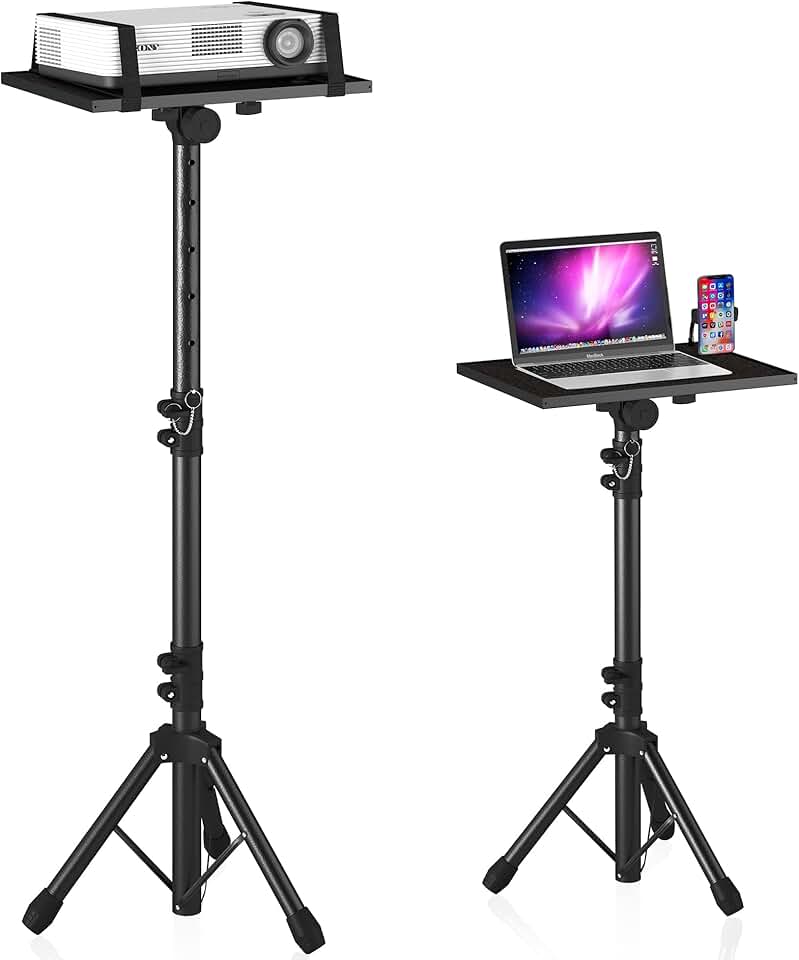
#5 · Best Adjustable Stand4.4 (6,226)
Projector Stand Tripod Adjustable, Laptop Height from 23.5 to 46.5 inches with Gooseneck Phone Holder, Floor for Office, Home, Stage, Studio, DJ Racks Holder Mount, 23.5inch-46.5inch
$29.99
The projector stand tripod at $29.99 is an underrated gem for streamers who need flexible positioning without buying multiple stands. The gooseneck arm lets you angle your phone or light exactly where you need it, and the wide height range works for any body type or desk setup.
Pros
- + Extends from 23.5 to 46.5 inches, covering everything from seated desk work to standing streams
- + Gooseneck phone holder bends and rotates for precise camera positioning
- + Sturdy tripod base won't tip over under the weight of a laptop or projector
- + Works as a projector stand, laptop stand, or camera mount—extremely versatile
Cons
- − Gooseneck arm has limited weight capacity; won't hold heavy DSLRs or cinema cameras
- − Takes up floor space; not ideal if your streaming area is cramped

#6 · Best Compact Key Light4.2 (9,338)
UBeesize 10" Key Light for Streaming, Desk Ring Light with Adjustable Arm, Zoom Lighting for Home Office, Gaming, Podcast, Video Calls, and Recording
$34.25
The UBeesize 10-inch key light at $34.25 is ideal if your desk space is limited or you already have a tripod. The gooseneck arm gives you directional control that ring lights can't match, making it perfect for professional-looking side-lighting setups.
Pros
- + 10-inch key light with adjustable gooseneck arm mounts to desks or monitor arms without a tripod
- + Saves valuable desk space compared to full tripod ring lights
- + Adjustable arm lets you position light at any angle—perfect for side-lighting or overhead fills
- + Dimmable with color temperature control for professional lighting adjustments
Cons
- − Requires a desk clamp or monitor arm mount; you'll need to buy an adapter if you don't have one
- − Smaller light output compared to 12-inch ring lights; better for accent lighting than primary fill

#7 · Best Budget Webcam4.4 (5,523)
Logitech Brio 101 Full HD 1080p Webcam for Meetings, Streaming, Desktop, Laptop, PC - Built-in Mic, Shutter, Works with Zoom, Microsoft Teams, Nintendo Switch 2’s new GameChat Mode, USB-A,-Black ECOLOGO
$24.99
The Logitech Brio 101 at $24.99 is the webcam to grab if you're starting from scratch. It's reliable, trusted by millions, and the physical shutter is a nice privacy feature. Pair it with a USB mic for a complete audio-video setup that stays under $70.
Pros
- + 1080p at 30fps with autofocus keeps you sharp and in focus during streams
- + Built-in microphone handles basic audio if you don't have a dedicated mic yet
- + Physical shutter gives you privacy control—close it when you're not streaming
- + Works with Zoom, Microsoft Teams, and streaming software without driver headaches
Cons
- − 30fps at 1080p is standard but not smooth; 60fps would be better for fast-moving content
- − Built-in mic is adequate but noticeably inferior to a USB microphone

#8 · Best 2-Pack Lighting Kit4.3 (6,039)
2-Pack LED Video Light Kit, NiceVeedi Studio Light, 2800-6500K Dimmable Photography Lighting Kit with Tripod Stand&Phone Holder, 73" Stream Light for Video Recording, Game Streaming, YouTube
$49.99
The NiceVeedi 2-pack LED video light kit at $49.99 is the choice if you want professional multi-light setups on a budget. Two separate panels give you more control over shadows and depth than a single ring light, but you'll need to commit your entire budget to lighting.
Pros
- + Two dimmable LED panels give you fill and key light setups for professional 3-point lighting
- + 2800K–6500K color temperature range covers warm indoor light to cool daylight
- + 73-inch tripod stands are tall enough for overhead or standing-height positioning
- + Phone holder included on each tripod—no need to buy separate mounts
Cons
- − At $49.99, you're maxing out the budget with no room for a microphone or other gear
- − Two lights mean more desk or floor space required compared to a single ring light

#9 · Best Condenser Microphone4.4 (4,649)
Gaming Microphone for PC: USB Mic for Podcasts Videos & Streaming - Condenser Mic with Quick Mute & Pop Filter - RGB Microphone Gift for Gamer boys - Compatible with PS4/5 & Computer & Laptop
$26.99
At $26.99, the gaming condenser mic is a solid choice if you have a quiet room and want crisp, detailed audio. The included pop filter is a nice touch that usually costs extra. This mic excels for gaming streams and podcasts in controlled environments.
Pros
- + Condenser design captures detailed voice and music better than dynamic mics
- + Quick mute button with visual indicator prevents accidental hot-mic moments
- + Pop filter included—reduces plosives and breath noise without extra cost
- + RGB lighting matches gaming setups and adds visual appeal on camera
Cons
- − Condenser mics are sensitive to background noise; not ideal for loud environments
- − Requires a desktop stand which takes up desk real estate

#10 · Best Audio Mixer4.4 (4,350)
FIFINE Gaming Audio Mixer, Streaming RGB PC Mixer with XLR Microphone Interface, Individual Control, Volume Fader, Mute Button, 48V Phantom Power, for Podcast/Recording/Vocal/Game Voice-AmpliGame SC3 Global Recycled Standard
$39.99
The FIFINE gaming audio mixer at $39.99 is for streamers who already own a microphone and want professional-level mixing control. The XLR interface and phantom power open doors to better mics down the road, making it a smart long-term investment despite the learning curve.
Pros
- + XLR microphone interface with 48V phantom power lets you use professional condenser mics
- + Individual channel controls and volume faders give you precise mixing during streams
- + RGB lighting syncs with your setup for a cohesive visual aesthetic
- + Mute button and headphone monitoring prevent accidental audio issues on stream
Cons
- − At $39.99, this leaves limited budget for a microphone or lighting
- − Requires XLR cables and a microphone (not included); adds extra cost and complexity
Frequently asked questions
Frequently Asked Questions
Final word
The best streaming gear under $50 starts with a clear priority: lighting, audio, or video. The UBeesize 12-inch ring light ($29.06) and Logitech Brio 101 webcam ($24.99) form a solid foundation for face-on content. If audio is your focus, the FIFINE USB/XLR microphone ($44.99) delivers the highest quality in this price range. Mix and match based on your needs—a $25 ring light paired with a $24 webcam gives you professional-looking streams without spending more. Remember, streaming gear under $50 is just the starting point. As your audience grows, you can upgrade individual components without replacing your entire setup. Start with what you can afford, focus on content quality, and let your equipment grow with your channel.
More gear under $50
Gaming Keyboards
Best Gaming Keyboards Under $50 in 2026
Gaming MiceBest Gaming Mice Under $50 in 2026
Gaming HeadsetsBest Gaming Headsets Under $50 in 2026
Gaming ControllersBest Gaming Controllers Under $50 in 2026
Capture CardsBest Capture Cards Under $50 in 2026
Gaming AccessoriesBest Gaming Accessories Under $50 in 2026
More streaming gear guides
Best Blue Streaming Gear in 2026
Find the best Blue streaming gear for 2026. Expert picks for mics, stands, and audio gear for Twitch, YouTube, and podcasting.
Budget Streaming Gear of 2026
Affordable streaming gear 2026: ring lights, mics, webcams & more. Build a pro setup on a budget.
Best Elgato Streaming Gear in 2026
Top Elgato streaming gear for creators: Stream Deck, microphones, capture cards & more. Expert picks for every budget.
Best HyperX Streaming Gear in 2026
Top-rated HyperX streaming gear for creators. Mics, headsets, and accessories ranked by performance and value.
Best Logitech Streaming Gear in 2026
Find the best Logitech streaming gear for creators. Mics, webcams, lights, and cameras tested and ranked.
Best Streaming Gear of 2026: Top Picks for Every Budget
Discover the best streaming gear of 2026. Expert roundup of microphones, webcams, lights, and controllers for every budget.