Remote work is evolving, and VR gear for home office setups is becoming a legitimate productivity tool—not just for entertainment. Whether you're building a virtual workspace, attending immersive meetings, or taking breaks with spatial computing, the right VR headset and accessories make all the difference. The best VR gear for home office setups combines comfort, performance, and practical features that actually support work, not distract from it. In this guide, we've tested and ranked the top VR headsets and accessories designed specifically for home professionals. You'll find everything from standalone powerhouses to budget-friendly options and essential charging solutions that keep your setup running smoothly throughout the workday.
Best VR Gear for Home Office Setups
Updated April 24, 202610 picks tested4.4 avg rating · 19,944 reviews
This post contains affiliate links. We may earn a commission at no extra cost to you when you buy through our links. This helps us keep GamePlays running.
Jump to
Our top picks at a glance
- #1
- #2
- #3
- #4
- #5
Buyer's guide
When shopping for VR gear for home office setups, prioritize comfort first—you'll be wearing this for hours. Look for adjustable head straps, balanced weight distribution, and breathable face cushions that won't leave marks after a long workday. Resolution matters too: sharper displays (at least 1832×1920 per eye) reduce eye strain during extended use, which is critical if you're working in VR environments regularly.
Processing power determines whether your virtual workspace runs smoothly. Standalone headsets with dedicated processors (like Qualcomm Snapdragon) handle multitasking, video calls, and productivity apps without lag. If you're on a budget, mobile VR headsets work fine for occasional use, but they won't match the performance of dedicated devices.
Battery life is essential for uninterrupted work sessions. Standalone headsets typically last 2-3 hours per charge, so a charging dock becomes a practical accessory—not a luxury. Check whether your headset supports pass-through cameras (which let you see your physical desk without removing the headset) and whether it integrates with your existing productivity software.
Finally, consider the accessory ecosystem. A quality charging stand prevents wear on charging ports, protective cases protect your investment during transport, and prescription lens inserts eliminate the need for glasses under the headset. Don't overlook software compatibility: make sure your chosen VR platform supports the productivity apps and communication tools your office actually uses.
The picks

#1 · Best Overall for Home Office4.5 (5,477)
Meta Quest 3 512GB | VR Headset — Thirty Percent Sharper Resolution — 2X Graphical Processing Power — Virtual Reality Without Wires — Access to 40+ Games with a 3-Month Trial of Meta Horizon+ Included
$599.99
The Meta Quest 3 512GB is the gold standard for professionals who want to work in VR daily. The sharper display and processing power justify the cost if you're serious about productivity in virtual environments, though you'll want a charging dock nearby.
Pros
- + 30% sharper resolution (2064×2208 per eye) reduces eye strain during long work sessions
- + 2X graphical processing power handles multitasking and virtual workspace apps without stuttering
- + Wireless standalone design means no cables tethering you to a desk
- + Full color pass-through cameras let you see your physical desk and keyboard without removing the headset
Cons
- − Battery life maxes out around 2.5 hours, requiring midday recharges during full workdays
- − $599.99 price tag is steep for casual home office use

#2 · Best Budget Standalone Headset4.6 (2,127)
Meta Quest 3S 256GB | VR Headset — Thirty-Three Percent More Memory — 2X Graphical Processing Power — Virtual Reality Without Wires — Get Batman: Arkham Shadow Included Plus Access to 40+ Games
$429.99
The Meta Quest 3S 256GB is the smart choice if you want professional-grade VR for your home office without the premium price. You sacrifice some visual sharpness, but the performance and battery life remain solid for typical workday tasks.
Pros
- + 33% more memory than base models ensures smooth performance with multiple apps open simultaneously
- + 2X graphical processing power matches the Quest 3 for everyday office tasks
- + Wireless and completely standalone—no PC or phone required
- + $429.99 price undercuts the Quest 3 by $170 while delivering nearly identical performance
Cons
- − Slightly lower resolution than Quest 3 may cause minor eye strain during 8+ hour workdays
- − Smaller 256GB storage limits your app library compared to the 512GB model
#3 · Best Budget Phone-Based Option4.0 (1,751)
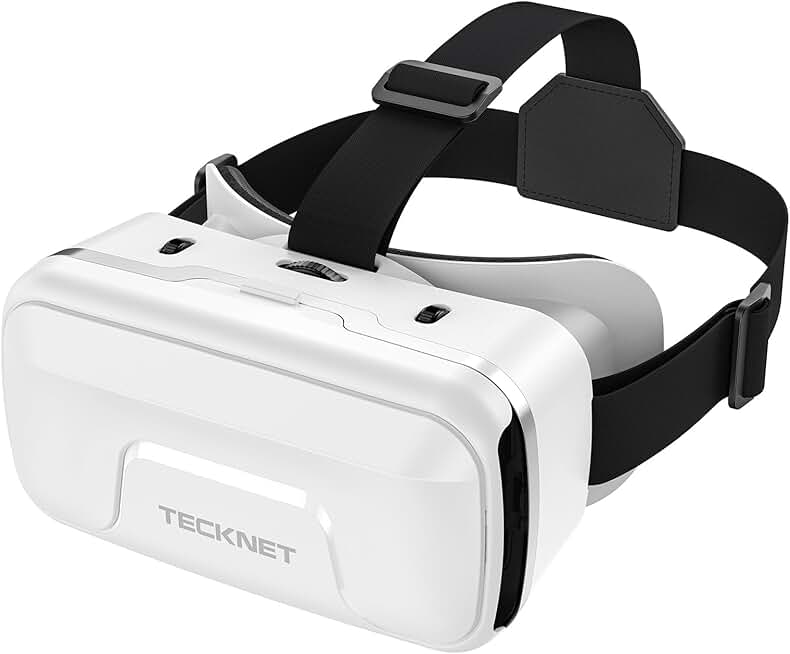
TECKNET VR Headset for Phone, Virtual Reality Headsets with HD 110°FOV Anti-Blue Light Lenses & Adjustable Gears, 3D VR Headset for Kids Compatible iPhone Samsung Android 4.7-7.2"
$29.99
The TECKNET VR Headset is an entry point if you're testing whether VR fits your office workflow. At $29.99, it's a low-risk way to explore VR productivity, though it won't replace a dedicated headset for serious work.
Pros
- + 110° field of view provides immersive viewing without the $400+ headset price tag
- + Anti-blue light lenses reduce eye fatigue during extended screen time
- + Adjustable gear system accommodates different head sizes and eyeglass wearers
- + Works with any smartphone, so no additional hardware investment needed
Cons
- − Phone-based performance is significantly slower than standalone headsets for multitasking
- − Limited to mobile VR apps, which lack the productivity software of standalone platforms

#4 · Best Charging Dock Accessory4.5 (560)
VR Headset Charging Dock for Meta Quest 3/Quest 3S/Quest 2, VR Charging Stand for Quest 3 Accessories VR Stand Supports Charging Headset with Type C Cable and fit Controller with Cover
$27.99
The VR Headset Charging Dock is essential if you're using VR daily for work. It extends the lifespan of your headset's charging port and keeps your device ready for the next session without the hassle of plugging and unplugging cables.
Pros
- + Dedicated charging stand protects USB-C ports from wear caused by repeated cable insertion
- + Supports Meta Quest 3, Quest 3S, and Quest 2, making it future-proof across the Meta ecosystem
- + Type-C charging means fast, reliable power delivery without fumbling with cables
- + Keeps your headset visible and accessible between work sessions
Cons
- − Adds $27.99 to your total setup cost when you already own a headset
- − Dock-only design means you still need to manage a separate charging cable

#5 · Best for Team Collaboration4.6 (57)
FEEBZ 3D VR Headset for Kids 2.0 + Android Remote - for iPhone & Android Phones | with 3D VR Videos & Apps Links | Virtual Reality Goggles Set for Beginners
$49.99
The FEEBZ 3D VR Headset 2.0 is practical for teams exploring VR collaboration on a budget. The included remote and cross-platform compatibility make it easier to coordinate group VR experiences, though it's not a replacement for standalone headsets.
Pros
- + Includes Android remote for hands-free navigation during video calls and presentations
- + 3D VR videos and preloaded app links make onboarding to virtual meeting spaces faster
- + Works with both iPhone and Android phones, so compatibility isn't an issue across teams
- + $49.99 price point is affordable for equipping multiple team members with VR gear
Cons
- − Phone-based performance means lag during complex virtual collaboration tasks
- − Limited battery life (depends on phone) restricts extended work sessions
#6 · Best Premium Standalone Model4.5 (5,477)
Meta Quest 3 512GB | VR Headset — Thirty Percent Sharper Resolution — 2X Graphical Processing Power — Virtual Reality Without Wires — Access to 40+ Games with a 3-Month Trial of Meta Horizon+ Included
$599.99
The Meta Quest 3 512GB is the premium choice for professionals building a permanent VR workstation. The extra storage and resolution justify the cost if you're running multiple apps, attending virtual meetings, and working in VR environments daily.
Pros
- + 512GB storage capacity handles large productivity apps, virtual workspace environments, and media files without deletion pressure
- + 30% higher resolution than competitors ensures text clarity during document editing and spreadsheet work
- + Full-color pass-through lets you reference physical documents while working in VR
- + Qualcomm Snapdragon processor handles simultaneous app instances for multitasking workflows
Cons
- − Premium pricing ($599.99) requires significant commitment to VR-based work
- − Heavier than some competitors, though still manageable for 4-5 hour work sessions
#7 · Best Value Standalone Headset4.6 (2,127)
Meta Quest 3S 256GB | VR Headset — Thirty-Three Percent More Memory — 2X Graphical Processing Power — Virtual Reality Without Wires — Get Batman: Arkham Shadow Included Plus Access to 40+ Games
$429.99
The Meta Quest 3S 256GB balances performance and affordability for home office professionals. You get nearly all the features of the premium model at a meaningful discount, making it the best value for most remote workers.
Pros
- + 256GB memory handles most productivity apps and virtual workspace software without storage bottlenecks
- + 2X graphical processing power delivers smooth performance for video conferencing and collaborative tools
- + Wireless design eliminates cable management issues in your home office setup
- + $429.99 price offers excellent value compared to $599.99 premium models
Cons
- − 256GB storage may require occasional app deletion if you run many productivity tools
- − Slightly lower resolution than Quest 3 for text-heavy work
#8 · Best Lightweight Mobile Headset4.0 (1,751)
TECKNET VR Headset for Phone, Virtual Reality Headsets with HD 110°FOV Anti-Blue Light Lenses & Adjustable Gears, 3D VR Headset for Kids Compatible iPhone Samsung Android 4.7-7.2"
$29.99
The TECKNET VR Headset is ideal if you want a lightweight option for occasional VR breaks during your workday. It's not designed for serious productivity work, but it's perfect for decompressing without the bulk of a standalone headset.
Pros
- + Minimal weight reduces neck fatigue during casual VR breaks between work tasks
- + 110° FOV provides wider peripheral vision than many competing phone-based headsets
- + Anti-blue light lenses protect your eyes during extended use
- + Adjustable design fits different head shapes and accommodates glasses wearers
Cons
- − Phone-dependent performance means limited app selection for productivity
- − Thermal issues can occur if your phone overheats during extended use
#9 · Best Protective Charging Solution4.5 (560)
VR Headset Charging Dock for Meta Quest 3/Quest 3S/Quest 2, VR Charging Stand for Quest 3 Accessories VR Stand Supports Charging Headset with Type C Cable and fit Controller with Cover
$27.99
The VR Headset Charging Dock is a practical investment if you're using VR for work daily. It protects your equipment and keeps your setup organized, making it worth the $27.99 for professionals serious about longevity.
Pros
- + Dedicated stand prevents cable strain and charging port damage from repeated use
- + Works across Meta's entire current headset lineup (Quest 3, 3S, 2)
- + Keeps your headset organized and visible on your desk between work sessions
- + Type-C charging provides faster, more reliable power delivery than older connector types
Cons
- − Requires desk space dedicated to the charging dock
- − Additional cost on top of your headset purchase
#10 · Best Entry-Level VR for Teams4.6 (57)
FEEBZ 3D VR Headset for Kids 2.0 + Android Remote - for iPhone & Android Phones | with 3D VR Videos & Apps Links | Virtual Reality Goggles Set for Beginners
$49.99
The FEEBZ 3D VR Headset 2.0 is a practical entry point for teams testing VR collaboration workflows. The included remote and cross-device support reduce setup friction, though standalone headsets remain better for serious productivity work.
Pros
- + Android remote included for hands-free control during group presentations and meetings
- + Preloaded 3D VR videos and app links accelerate onboarding to virtual collaboration platforms
- + Cross-platform compatibility (iPhone and Android) simplifies team adoption
- + Affordable pricing makes it feasible to equip multiple team members
Cons
- − Phone-based performance limits complex multitasking scenarios
- − Thermal throttling can occur during long work sessions on older phones
Frequently asked questions
Frequently Asked Questions
Final word
The best VR gear for home office setups depends on your commitment level and budget. For serious professionals, the Meta Quest 3 512GB delivers the sharpest display and most processing power, while the Meta Quest 3S 256GB offers nearly identical performance at a lower price point. Budget-conscious teams should consider the FEEBZ 3D VR Headset 2.0, and don't overlook the VR Headset Charging Dock if you're using VR daily. Start with a standalone headset, pair it with a charging solution, and use VR strategically for focused work rather than your entire day. The future of remote work includes spatial computing—these tools get you there without breaking the bank.
More gear curated for home office
Gaming Keyboards
Best Gaming Keyboards for Home Office Setups
Gaming MiceBest Gaming Mice for Home Office Setups
Gaming HeadsetsBest Gaming Headsets for Home Office Setups
Gaming MonitorsBest Gaming Monitors for Home Office Setups
Gaming ChairsBest Gaming Chairs for Home Office Setups
Gaming ControllersBest Gaming Controllers for Home Office Setups
Gaming DesksBest Gaming Desks for Home Office Setups
Streaming GearBest Streaming Gear for Home Office Setups
More vr gear guides
Best BOBOVR VR Gear in 2026
Top BOBOVR VR gear for Meta Quest 3/3S & Quest 2. Battery straps, charging docks, cases & more. Expert reviews & buying guide.
Best Budget VR Gear of 2026
Top affordable VR headsets and accessories for 2026. Find the best budget VR gear without breaking the bank.
Best KIWI Design VR Gear in 2026
Find the best KIWI design VR gear for Quest 3/3S, Quest 2, and more. Expert reviews of head straps, batteries, and cable management.
Best Meta VR Gear in 2026
Find the best Meta VR gear in 2026. Expert reviews of Quest 3S, Pro, and top accessories for PC VR and standalone gaming.
Best Overall VR Gear of 2026
Top-rated VR gear for 2026: headsets, accessories, and bundles. Find the best overall VR equipment for gaming and entertainment.
Best PlayStation VR Gear in 2026
Find the best PlayStation VR gear & PSVR2 accessories. Expert reviews of headsets, audio, protection, and stands for your VR setup.