First-person shooters demand precision, speed, and reliability from your keyboard. Every millisecond counts when you're lining up headshots or clutching a round, which means your gear needs to keep pace with your reflexes. The best gaming keyboards for FPS deliver sub-millisecond response times, responsive switches, and minimal key travel so you can react faster than your opponents. We've tested and ranked 10 keyboards specifically for competitive FPS play—from budget-friendly combos to high-end mechanical boards with advanced features like hot-swap sockets and adjustable actuation. Whether you play Call of Duty, CS2, Valorant, or Apex Legends, you'll find a keyboard that matches your playstyle and budget in this guide.
Best Gaming Keyboards for FPS
Updated April 24, 202610 picks tested4.5 avg rating · 92,514 reviews
This post contains affiliate links. We may earn a commission at no extra cost to you when you buy through our links. This helps us keep GamePlays running.
Jump to
Our top picks at a glance
- #1
- #2
- #3
- #4
- #5
Buyer's guide
When shopping for an FPS gaming keyboard, prioritize response time and switch type over flashy RGB. Mechanical switches (Cherry MX, Gateron, Razer) are faster and more consistent than membrane switches, with actuation points typically around 45 grams and travel distances of 2-4mm. Look for a polling rate of at least 1000Hz (1ms response time), though 8000Hz boards offer even faster input registration. Switch type matters: linear switches (red) are fastest for rapid taps, while tactile switches (brown) give feedback without the noise. Compact layouts (60%, TKL, or one-handed pads) are popular in FPS because they reduce hand movement and let you position your mouse closer to your keyboard. Wireless keyboards can work for FPS if they use 2.4GHz dongles with low latency (under 1ms), but wired connections eliminate any lag concerns. Anti-ghosting and N-key rollover ensure multiple simultaneous key presses register correctly during intense firefights. Hot-swap sockets let you swap switches without soldering, useful if you want to experiment with different actuation weights. Avoid overly tall keyboards or ones with high actuation forces—you want quick, light inputs. Finally, consider ergonomics: a keyboard that causes wrist strain during long sessions will hurt your performance. Test the key spacing and angle if possible before committing.
The picks

#1 · Best Overall4.6 (1,879)
Redragon K673 PRO 75% Wireless Gasket RGB Gaming Keyboard, 3-Modes 81 Keys Compact Mechanical Keyboard Hot-Swap Socket, Dedicated Knob Control and 5-Layer Noise Dampening, Linear Red Switch
$44.98
The Redragon K673 PRO combines competitive-grade mechanical switches with wireless flexibility. The 75% layout gives you numpad-free speed without sacrificing arrow keys or function row, making it ideal for FPS players who want portability without compromise.
Pros
- + 75% wireless layout balances compactness with functionality for FPS
- + Mechanical hot-swap socket lets you customize switch feel mid-season
- + 3-mode connectivity (2.4GHz, USB-C, Bluetooth) with dedicated knob control
- + Gasket mounting absorbs shock and reduces key rattle during intense play
Cons
- − Wireless can introduce latency if 2.4GHz connection drops
- − 81-key layout requires learning new key positions if switching from full-size
#2 · Best Budget Mechanical4.6 (5,615)
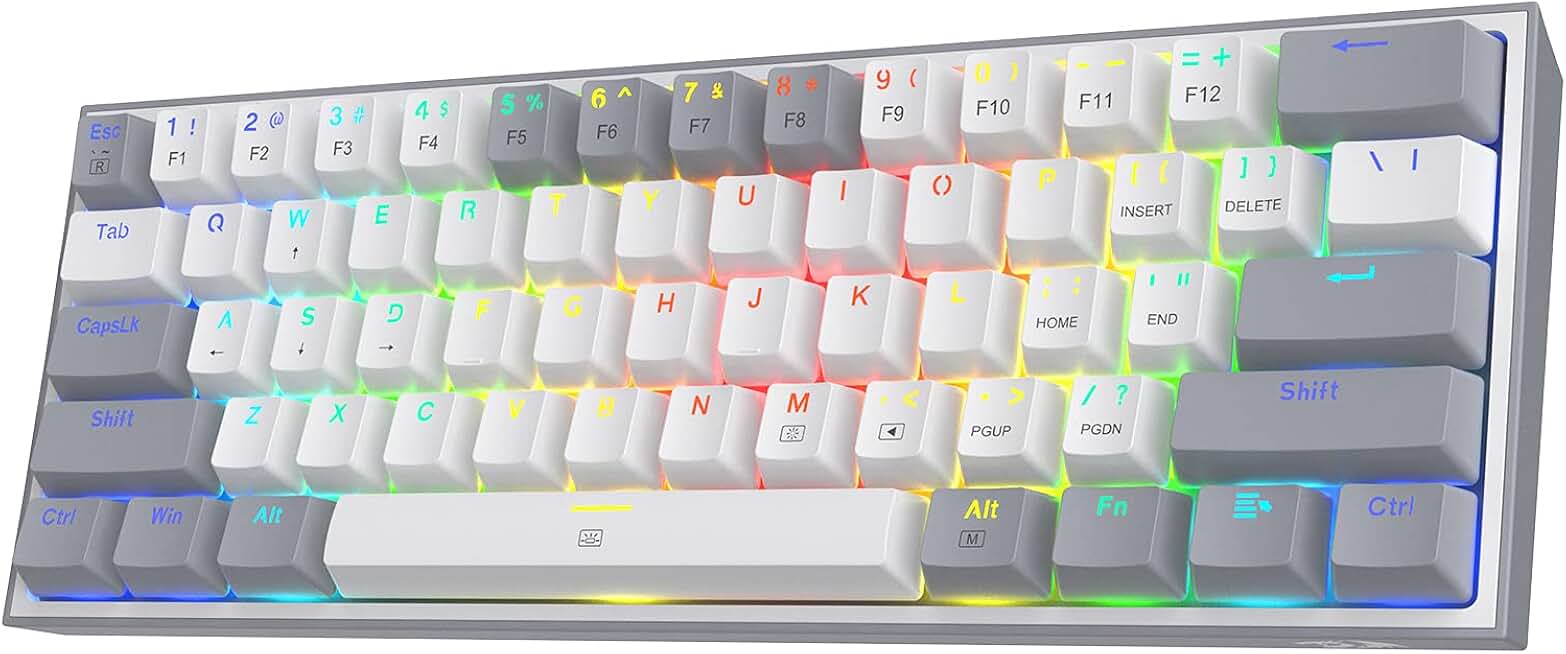
Redragon K617 Fizz 60% Wired RGB Gaming Keyboard, 61 Keys Hot-Swap Compact Mechanical Keyboard w/White and Grey Color Keycaps, Linear Red Switch, Pro Driver/Software Supported
$26.99
The Redragon K617 Fizz proves you don't need to spend $100+ for competitive FPS gear. Red linear switches and a tight 60% layout let you keep your mouse hand closer, and the hot-swap socket means you can experiment with different switch weights as your preferences evolve.
Pros
- + 60% compact form factor minimizes hand travel to mouse
- + Hot-swap red linear switches deliver 45g actuation for rapid tapping
- + 16.8M RGB customization via software for visibility in dark rooms
- + Sub-$30 price point doesn't sacrifice build quality or switch reliability
Cons
- − 61-key layout removes function row and numpad, steep learning curve
- − No wireless option—USB-C wired only
#3 · Best for Rapid Trigger4.5 (683)
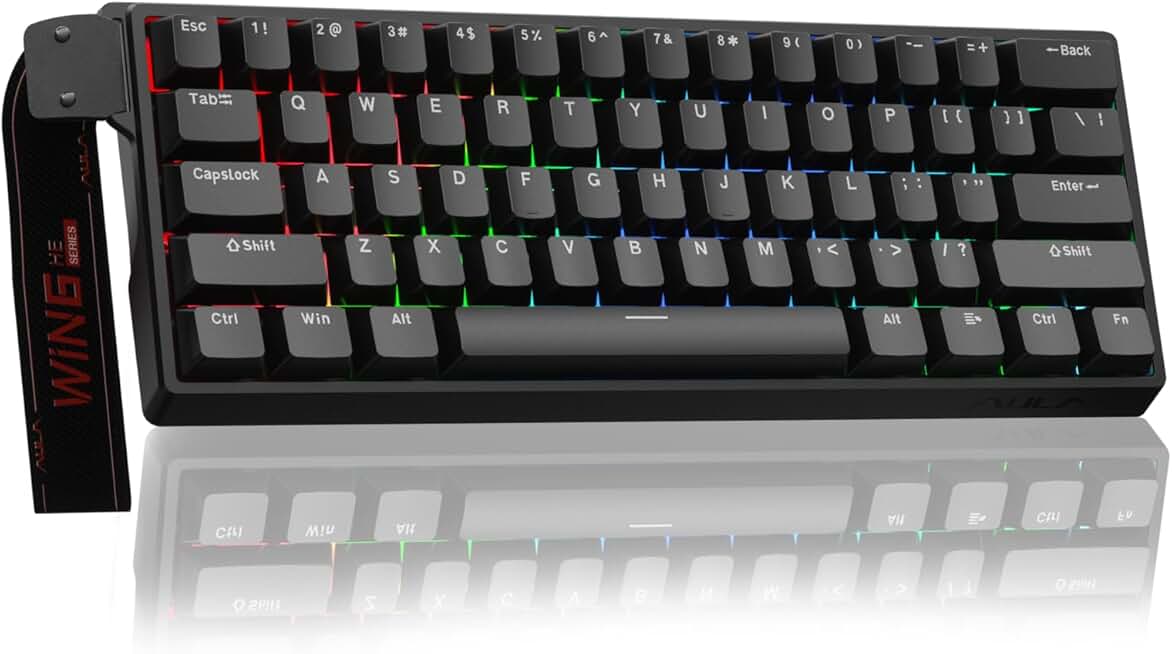
Aula WIN60 HE - 60% Mechanical Gaming Keyboard Wired, Magnetic Switch Hot Swappable, Adjustable Actuation Rapid Trigger Mode, 8000 Hz Polling Rate, RGB Small Keyboard 60 Percent Compact Design for PC
$35.99
The Aula WIN60 HE targets players who want every possible millisecond advantage. The 8000Hz polling rate and adjustable magnetic actuation let you fine-tune input response to your exact preferences, making it a top choice for Valorant and CS2 grinders.
Pros
- + 8000Hz polling rate and adjustable actuation rapid-trigger mode for sub-1ms input
- + Magnetic switch technology allows actuation point customization down to 0.2mm
- + 60% wired form factor keeps your mouse hand in optimal FPS position
- + Hot-swappable design supports any MX-compatible switch
Cons
- − Rapid-trigger mode requires software configuration and may not be allowed in all tournaments
- − Higher price than standard 60% boards reflects advanced tech

#4 · Best Quiet Membrane4.6 (5,261)
HyperX Alloy Core RGB – Membrane Gaming Keyboard, Comfortable Quiet Silent Keys with RGB LED Lighting Effects, Spill Resistant, Dedicated Media Keys, Compatible with Windows 10/8.1/8/7 – Black
$35.99
The HyperX Alloy Core RGB is built for streamers and team players who need a quiet keyboard without sacrificing reliability. The spill-resistant design and silent actuation make it practical for long LAN events, though mechanical players may find the feel less responsive.
Pros
- + Silent membrane keys reduce noise without sacrificing response speed
- + Spill-resistant design protects against coffee and energy drink accidents
- + Dedicated media keys and volume roller for in-game audio adjustments
- + RGB LED effects visible in dark competitive environments
Cons
- − Membrane switches feel mushy compared to mechanical alternatives
- − Quietness comes at the cost of tactile feedback some FPS players prefer

#5 · Best Tenkeyless4.5 (2,423)
SteelSeries Apex 3 TKL RGB Gaming Keyboard – Tenkeyless Compact Form Factor - 8-Zone RGB Illumination – IP32 Water & Dust Resistant – Whisper Quiet Gaming Switch – Gaming Grade Anti-Ghosting,Black
$31.99
The SteelSeries Apex 3 TKL strikes a balance for FPS players who want a compact layout without going full 60%. The durability and water resistance make it reliable for tournaments, though the membrane switches won't satisfy purists seeking mechanical responsiveness.
Pros
- + Tenkeyless (TKL) layout removes numpad while keeping function row and arrows
- + IP32 water and dust resistance handles tournament conditions and sweaty hands
- + 8-zone RGB illumination with per-zone customization
- + Whisper-quiet switches minimize distraction during clutch moments
Cons
- − Membrane switches lack the tactile feedback of mechanical alternatives
- − Price point sits between budget and premium without matching either

#6 · Best One-Handed4.4 (12,558)
Razer Tartarus V2 Gaming Keypad: Mecha Membrane Key Switches - One Handed Keyboard - 32 Programmable Keys - Customizable Chroma RGB Lighting - Programmable Macros - Snap Tap - Black ECOLOGO
$69.99
The Razer Tartarus V2 is purpose-built for left-hand FPS control, freeing your right hand to focus entirely on mouse movement. If you're willing to rebind your keys, the ergonomic design and programmable layout give you a genuine competitive edge over standard keyboard users.
Pros
- + 32 programmable keys mapped for left-hand-only FPS control
- + Mecha-membrane switches offer faster actuation than pure membrane
- + Customizable Chroma RGB lighting for visibility and aesthetic
- + Ergonomic left-hand design reduces reach and fatigue during marathons
Cons
- − One-handed layout requires complete rebinding of your control scheme
- − Mecha-membrane hybrid feels different from pure mechanical switches

#7 · Best Compact Mechanical4.4 (7,393)
Redragon K585 DITI Wired One-Handed RGB Mechanical Gaming Keyboard, 42 Keys Type-C Professional Gaming Keypad w/Upgraded Hot-Swappable Socket, 7 Onboard Macro Keys & Detachable Wrist Rest
$32.99
The Redragon K585 DITI targets competitive FPS players who want a mechanical pad for left-hand control without the bulk of a full keyboard. The hot-swap sockets and onboard profiles make it tournament-friendly, though the learning curve is steep.
Pros
- + 42-key one-handed mechanical pad with upgraded hot-swappable sockets
- + Type-C wired connection ensures zero latency during ranked matches
- + 7 onboard profiles let you swap between game configs without software
- + Portable mini form factor fits in a backpack for LAN tournaments
Cons
- − Extreme compactness requires significant key rebinding and muscle memory
- − Limited key count forces heavy reliance on macros and programmable profiles

#8 · Best Value Combo4.5 (51,312)
Redragon S101-3 PRO Gaming Keyboard and Mouse, RGB Backlit Programmable Keyboard Mouse with Software, Independent Macro Record Keys, Value Combo Set, New Update Version
$39.99
The Redragon S101-3 PRO is perfect for FPS newcomers who need both keyboard and mouse on a tight budget. The combo saves money upfront, though competitive players will eventually want to replace the mouse with a higher-DPI option.
Pros
- + Keyboard and mouse bundle saves $20-30 versus buying separately
- + Programmable macro keys on keyboard for ability binding in FPS games
- + RGB backlighting visible in dark competitive environments
- + Affordable entry point for beginners upgrading from laptop keyboards
Cons
- − Membrane switches feel mushy and lack mechanical responsiveness
- − Bundled mouse is beginner-grade and will likely need upgrading

#9 · Best Wired Combo with Wrist Rest4.5 (1,936)
RedThunder K10 Wired Gaming Keyboard and Mouse and Wrist Rest Combo, RGB Backlit, Mechanical Feel Anti-ghosting Keyboard + 7D 7200 DPI Mice+Soft Leather Wrist Rest 3 in 1 PC Gamer Accessories(Black)
$36.48
The RedThunder K10 combo offers better ergonomics than the S101-3 with the included wrist rest. The mechanical-feel switches and anti-ghosting make it suitable for casual FPS play, though serious competitors will want to upgrade to a true mechanical board and precision mouse.
Pros
- + Mechanical-feel switches deliver responsive actuation for FPS gameplay
- + 7D 7200 DPI mouse and soft wrist rest included for ergonomic support
- + Anti-ghosting support ensures all key presses register during intense fights
- + RGB backlighting customizable via software
Cons
- − Mechanical-feel switches aren't true mechanical—they're membrane with tactile feedback
- − Bundled mouse lacks the precision and customization of dedicated gaming mice

#10 · Best Portable Mini Pad4.4 (3,454)
RedThunder One Handed Gaming Keyboard RGB Backlit 35 Keys Portable Mini Gaming Keypad Ergonomic Game Controller for PC Gamer
$23.99
The RedThunder One-Handed Pad is the most portable option for FPS players who want a dedicated left-hand setup. The ergonomic design and low price make it accessible, though the lack of hot-swap sockets limits future customization.
Pros
- + 35-key one-handed design fits in any backpack for LANs and tournaments
- + RGB backlighting for visibility in dark venues
- + Ergonomic angled design reduces wrist strain during long sessions
- + Affordable price point for a dedicated FPS keypad
Cons
- − Extreme compactness requires extensive key rebinding and practice
- − No hot-swap sockets—switches are soldered and can't be customized
Frequently asked questions
Frequently Asked Questions
Final word
The best gaming keyboards for FPS depend on your budget and playstyle. For overall performance, the Redragon K673 PRO offers wireless flexibility and mechanical hot-swap switches at a competitive price. Budget hunters should grab the K617 Fizz, which delivers 60% compactness and red linear switches for under $30. If you want the fastest input possible, the Aula WIN60 HE's 8000Hz polling rate and adjustable actuation give you every millisecond advantage. One-handed players should consider the Razer Tartarus V2 or Redragon K585 DITI for dedicated left-hand control. Regardless of which keyboard you choose, focus on mechanical switches, 1000Hz+ polling rate, and a compact layout that keeps your mouse hand close. Your FPS performance depends on consistency and speed—pick a keyboard you trust and practice until it becomes muscle memory.
More fps gear across categories
Gaming Mice
Best Gaming Mice for FPS
Gaming HeadsetsBest Gaming Headsets for FPS
Gaming MonitorsBest Gaming Monitors for FPS
Gaming ChairsBest Gaming Chairs for FPS
Gaming ControllersBest Gaming Controllers for FPS
Gaming DesksBest Gaming Desks for FPS
Streaming GearBest Streaming Gear for FPS Games
Gaming LaptopsBest Gaming Laptops for FPS
More gaming keyboards guides
Budget Gaming Keyboards of 2026
Top 10 budget gaming keyboards 2026. RGB, mechanical, compact—all under $120. Expert reviews & buying guide.
Best Compact Gaming Keyboards in 2026
Find the best compact gaming keyboards for 2026. Expert reviews of 60% and tenkeyless boards for gaming, work, and travel.
Best Corsair Gaming Keyboards in 2026
Find the best Corsair gaming keyboards for your setup. Expert reviews of wired, wireless, and mechanical options.
Best Ergonomic Gaming Keyboards in 2026
Top ergonomic gaming keyboards for comfort and performance. Compare split designs, wrist rests, and mechanical switches.
Best Gaming Keyboards in 2026
Find the best gaming keyboards 2026. Expert reviews of mechanical, wireless, and budget options for every gamer.
Best Gaming Keyboards for Apex Legends
Top gaming keyboards for Apex Legends with fast response times, RGB, and durability. Find the best fit for your playstyle.