Best Streaming Gear for FPS Games

Updated 2026-04-24 · 10 picks tested

This post contains affiliate links. We may earn a commission at no extra cost to you when you buy through our links. This helps us keep GamePlays running.

Streaming FPS games demands more than just a good PC and fast internet—you need gear that keeps up with split-second action and delivers crystal-clear video to your audience. Whether you're grinding Valorant, Call of Duty, or CS2, your webcam and microphone are the face (and voice) of your channel. Poor video quality or audio lag will tank your viewer retention faster than a bad spray control.

This guide covers the best streaming gear for FPS, from budget-friendly webcams that punch above their price to premium rigs with AI tracking and 4K sensors. We've tested each pick for low-latency performance, autofocus reliability during fast gameplay, and audio clarity that doesn't distract from your callouts. You'll find detailed specs, real trade-offs, and honest verdicts to help you pick the right setup for your stream and budget.

Buyer's guide

When shopping for streaming gear for FPS, focus on three core specs: resolution, frame rate, and autofocus speed. For FPS streaming, 1080p at 60fps is the minimum—anything less looks choppy during intense moments. If you're streaming to multiple platforms or want a safety net for VOD quality, 4K sensors with 1080p 60fps output are worth the premium.

Autofocus matters more for FPS than other genres. You'll be moving your head, leaning back, and gesturing during gameplay. Look for webcams with PDAF (phase-detection autofocus) or advanced contrast-detection systems that track your face without lag. Razer Kiyo and Elgato Facecam MK.2 excel here.

Microphone choice depends on your setup. If you're in a treated room with minimal background noise, a USB dynamic mic like FIFINE gives you plug-and-play simplicity and built-in mute buttons. If you're in a noisy space or streaming long sessions, consider XLR with a proper interface—but that's beyond this list.

Avoid webcams with fixed focus or slow autofocus; they'll blur during gameplay. Also skip anything under 30fps—it'll feel laggy on stream. Ring lights (like Razer Kiyo) are nice but not essential; good room lighting works fine if you position yourself correctly.

Budget streamers should prioritize a solid 1080p 60fps webcam over a fancy 4K model. Your bitrate and platform limits matter more than sensor resolution. Spend the savings on a decent microphone instead—audio quality impacts viewer experience more than most people realize.

The picks

FIFINE USB/XLR Dynamic Microphone for Podcast Recording, PC Computer Gaming Streaming Mic with RGB Light, Mute Button, Headphones Jack, Desktop Stand, Vocal Mic for Singing YouTube-AmpliGame AM8 Global Recycled Standard
#1 · Best Overall Streaming Mic4.6 (10,823)

FIFINE USB/XLR Dynamic Microphone for Podcast Recording, PC Computer Gaming Streaming Mic with RGB Light, Mute Button, Headphones Jack, Desktop Stand, Vocal Mic for Singing YouTube-AmpliGame AM8 Global Recycled Standard

$44.99

The FIFINE K688 is the best all-around microphone for FPS streamers who want professional audio without the complexity of an XLR interface. The USB/XLR hybrid design means you can start simple and upgrade your signal chain later. At $44.99, it's the smartest mic investment for streamers building their first serious setup.

Pros

  • + USB and XLR connectivity for flexibility as your setup grows
  • + Cardioid pattern with noise rejection—ideal for gaming rooms with background noise
  • + Integrated headphone jack with volume control for zero-latency monitoring
  • + Mute button and RGB light visible on stream

Cons

  • Requires desktop stand; not ideal if you're tight on desk space
  • RGB customization only via software, not hardware buttons
Check price on Amazon →
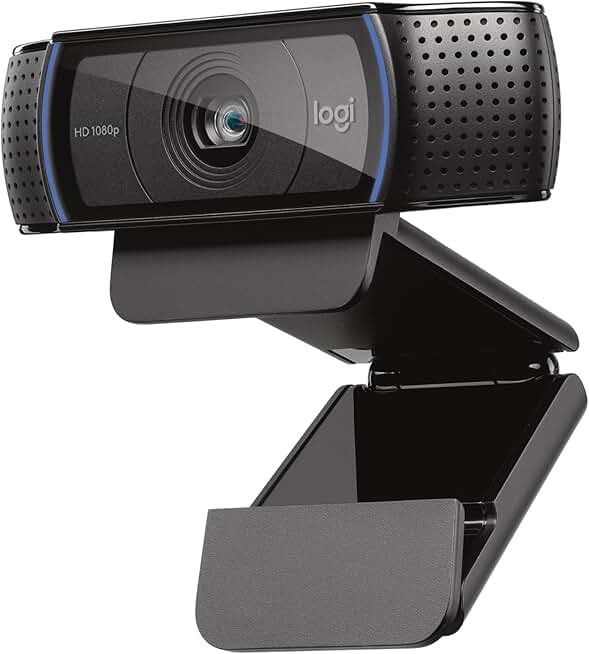
Logitech C920x HD Pro PC Webcam, Full HD 1080p/30fps Video, Clear Audio, HD Light Correction, Works with Microsoft Teams, Google Meet, Zoom, Nintendo Switch 2’s new GameChat Mode, Mac/Tablet- Black ECOLOGO
#2 · Best Budget Webcam4.6 (38,651)

Logitech C920x HD Pro PC Webcam, Full HD 1080p/30fps Video, Clear Audio, HD Light Correction, Works with Microsoft Teams, Google Meet, Zoom, Nintendo Switch 2’s new GameChat Mode, Mac/Tablet- Black ECOLOGO

$80.21

The Logitech C920x is the safest budget pick for FPS streamers who don't want to risk reliability issues. It won't give you 60fps, but the autofocus is rock-solid and the light correction saves you from buying ring lights. At $80, it's a no-nonsense entry point.

Pros

  • + 1080p 30fps with reliable autofocus—proven by 38K+ reviews
  • + HD Light Correction adjusts for poor room lighting without software tweaks
  • + Works seamlessly with Zoom, Teams, OBS, and Streamlabs
  • + Compact design fits on any monitor bezel

Cons

  • 30fps max; you'll need to upscale or accept lower frame rate on stream
  • No 60fps option means slightly less smooth motion during fast gameplay
Check price on Amazon →
NexiGo N660P Pro 4K Webcam with Distortion-Free Lens, 1080p 60 fps Autofocus USB Streaming Camera, 3DNR, Noise-Canceling Mics & Privacy Cover, Web Cam for Gaming/Live Streaming/PC/Mac/Switch 2, Black
#3 · Best Value 4K Webcam4.3 (52,219)

NexiGo N660P Pro 4K Webcam with Distortion-Free Lens, 1080p 60 fps Autofocus USB Streaming Camera, 3DNR, Noise-Canceling Mics & Privacy Cover, Web Cam for Gaming/Live Streaming/PC/Mac/Switch 2, Black

$59.49

The NexiGo N660P Pro delivers 4K sensor quality and 60fps performance for $59.49—nearly half the price of premium alternatives. The dual mics are a bonus that saves you from buying a separate microphone immediately. This is the best value for streamers who want room to grow.

Pros

  • + 4K sensor with 1080p 60fps output—future-proof for VOD quality and multi-platform streaming
  • + Dual noise-canceling mics reduce keyboard clicks and fan noise
  • + PDAF autofocus tracks your face during fast head movement
  • + Privacy cover included; no need to buy separately

Cons

  • 4K recording requires more CPU and bandwidth; 1080p 60fps is the sweet spot
  • Distortion-free lens claims are marketing; some barrel distortion at edges
Check price on Amazon →
Logitech Brio 101 Full HD 1080p Webcam for Meetings, Streaming, Desktop, Laptop, PC - Built-in Mic, Shutter, Works with Zoom, Microsoft Teams, Nintendo Switch 2’s new GameChat Mode, USB-A,-Black ECOLOGO
#4 · Best Compact Webcam4.4 (5,523)

Logitech Brio 101 Full HD 1080p Webcam for Meetings, Streaming, Desktop, Laptop, PC - Built-in Mic, Shutter, Works with Zoom, Microsoft Teams, Nintendo Switch 2’s new GameChat Mode, USB-A,-Black ECOLOGO

$24.99

The Logitech Brio 101 is the cheapest entry to Logitech's ecosystem and works fine for casual streamers or as a secondary camera. The shutter is a nice privacy touch, but the 30fps limitation makes it a poor choice for serious FPS streaming. Use it as a test rig, then upgrade.

Pros

  • + Tiny footprint—perfect for laptop streaming or minimal desk setups
  • + 1080p 30fps with built-in mic covers dual needs in one device
  • + Shutter for privacy when not streaming
  • + Lowest price point at $24.99; ideal for testing before upgrading

Cons

  • 30fps only; not suitable for fast-paced FPS action
  • Built-in mic is weak; you'll want an external mic immediately
Check price on Amazon →
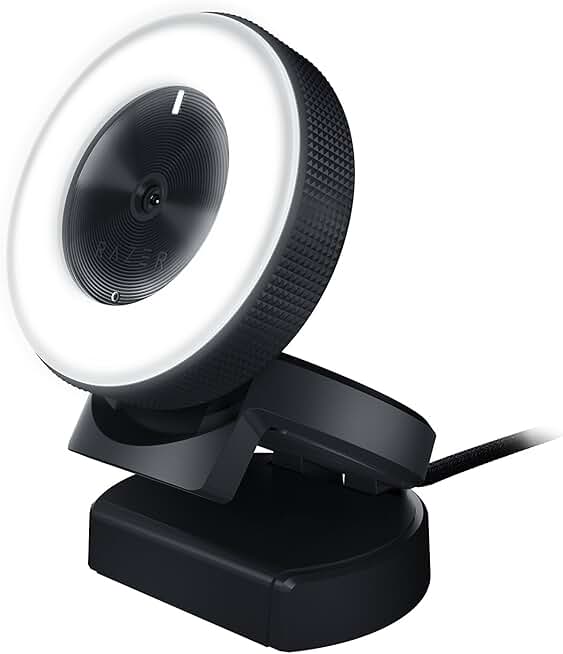
Razer Kiyo Streaming Webcam: 1080p 30 FPS / 720p 60 FPS - Ring Light w/Adjustable Brightness - Built-in Microphone - Advanced Autofocus ECOLOGO
#5 · Best Webcam with Ring Light4.2 (7,687)

Razer Kiyo Streaming Webcam: 1080p 30 FPS / 720p 60 FPS - Ring Light w/Adjustable Brightness - Built-in Microphone - Advanced Autofocus ECOLOGO

$98.00

The Razer Kiyo is the go-to for streamers who want lighting built in and don't want to buy a separate ring light. The 720p 60fps option gives you smooth motion, though 1080p 30fps looks sharper. At $98, it's a premium choice that bundles lighting and autofocus in one device.

Pros

  • + Integrated ring light with adjustable brightness—no extra purchase needed
  • + 720p 60fps or 1080p 30fps; pick your priority (frame rate or resolution)
  • + Advanced autofocus keeps you sharp during gameplay movement
  • + Iconic design; instantly recognizable on stream

Cons

  • Ring light draws extra power; requires USB 3.0 for stable operation
  • Can't do 1080p 60fps—you must choose one or the other
Check price on Amazon →
Logitech StreamCam Premium Webcam for Streaming and Content Creation, Full HD 1080p 60 fps, Works with Microsoft Teams, Google Meet, Zoom, Nintendo Switch 2’s new GameChat mode, for PC/Mac – Graphite
#6 · Best Premium Streaming Webcam4.4 (2,960)

Logitech StreamCam Premium Webcam for Streaming and Content Creation, Full HD 1080p 60 fps, Works with Microsoft Teams, Google Meet, Zoom, Nintendo Switch 2’s new GameChat mode, for PC/Mac – Graphite

$149.99

The Logitech StreamCam is built for streamers who care about color accuracy and smooth 60fps output. The vertical framing and Sony sensor make it ideal if you're mixing gameplay with facecam overlays or doing creative content. It's expensive, but the video quality justifies the cost.

Pros

  • + Full HD 1080p 60fps with vertical framing for portrait-mode streaming
  • + Sony sensor delivers natural color grading without heavy post-processing
  • + USB-C connection with low-latency performance
  • + Designed specifically for content creators, not generic video calls

Cons

  • Premium price at $149.99; double the cost of solid alternatives
  • No built-in ring light or autofocus adjustment via hardware buttons
Check price on Amazon →
EMEET S600 4K Webcam for Streaming - Sony 1/2.55'' Sensor, PDAF Autofocus, 1080P@60FPS, 2 Noise Reduction Mics, Built-in Privacy Cover, 73° FOV, Streaming Camera for Live Commerce/Gaming/Beauty ClimatePartner certified
#7 · Best 4K Sensor for FPS Streamers4.5 (1,679)

EMEET S600 4K Webcam for Streaming - Sony 1/2.55'' Sensor, PDAF Autofocus, 1080P@60FPS, 2 Noise Reduction Mics, Built-in Privacy Cover, 73° FOV, Streaming Camera for Live Commerce/Gaming/Beauty ClimatePartner certified

$59.49

The EMEET S600 is the best 4K webcam for FPS streamers who want to record high-quality VODs for YouTube while streaming 1080p 60fps to Twitch. The PDAF autofocus and dual mics make it a complete streaming solution. It's nearly identical to the NexiGo N660P but with a marginally better autofocus system.

Pros

  • + Sony 1/2.55" sensor captures 4K for VOD archival while streaming 1080p 60fps
  • + PDAF autofocus is fast and accurate—tracks your face during intense gameplay
  • + Dual noise-reduction mics built in; saves you from buying a separate mic initially
  • + Privacy cover standard; protects your camera when offline

Cons

  • 4K sensor doesn't improve your stream quality unless you're also recording locally
  • Slightly higher price than the NexiGo N660P at $59.49, though similar specs
Check price on Amazon →
Elgato Facecam MK.2 – Premium Full HD 1080p Webcam for Streaming, Gaming, Video Calls, Recording, HDR Enabled, Sony Sensor, PTZ Control – Works with OBS, Zoom, Teams, and More, for PC/Mac
#8 · Best Webcam for Streamers Who Want Control4.4 (1,420)

Elgato Facecam MK.2 – Premium Full HD 1080p Webcam for Streaming, Gaming, Video Calls, Recording, HDR Enabled, Sony Sensor, PTZ Control – Works with OBS, Zoom, Teams, and More, for PC/Mac

$132.96

The Elgato Facecam MK.2 is for streamers who want to adjust framing without leaning or moving. The PTZ control and Stream Deck integration are premium features that justify the $132.96 price. If you're already in the Elgato ecosystem, this is the obvious choice.

Pros

  • + PTZ (pan-tilt-zoom) control via software or controller—frame yourself without moving
  • + HDR enabled with Sony sensor for better low-light performance
  • + 1080p 60fps with professional-grade autofocus
  • + Elgato software integration with Stream Deck for one-click camera adjustments

Cons

  • PTZ features require software setup; not plug-and-play
  • HDR can look oversaturated if your room lighting is poor
Check price on Amazon →
Logitech MX Brio Ultra HD 4K Webcam for Collaboration and Streaming, 1080p 60 FPS, Show Mode, Works with Microsoft Teams, Zoom, Google Meet, Nintendo Switch 2, Graphite
#9 · Best 4K Webcam for Professional Streams4.5 (1,182)

Logitech MX Brio Ultra HD 4K Webcam for Collaboration and Streaming, 1080p 60 FPS, Show Mode, Works with Microsoft Teams, Zoom, Google Meet, Nintendo Switch 2, Graphite

$199.99

The Logitech MX Brio is the premium choice for streamers who want the best possible 4K sensor and plan to use VODs on YouTube or other platforms. The Show Mode and exceptional sensor justify the $199.99 price, but only if you're recording locally in 4K. For Twitch-only streamers, the NexiGo N660P offers better value.

Pros

  • + 4K native resolution with 1080p 60fps output—the highest resolution option here
  • + Show Mode automatically adjusts framing for presentation or gameplay
  • + Exceptional low-light performance with Logitech's advanced sensor
  • + Works flawlessly with Teams, Zoom, OBS, and Streamlabs

Cons

  • Premium price at $199.99; the most expensive webcam on this list
  • 4K quality is wasted if your streaming platform caps at 1080p
Check price on Amazon →
OBSBOT Tiny SE 1080P 100FPS Webcam for PC, AI Tracking PTZ Streaming Camera with 1/2.8" Sensor, Gesture Control, Dual ISO, Staggered HDR, Web Camera for Desktop Computer, Laptop, Meeting, Video Calls.
#10 · Best AI-Powered Webcam for FPS Streamers4.4 (931)

OBSBOT Tiny SE 1080P 100FPS Webcam for PC, AI Tracking PTZ Streaming Camera with 1/2.8" Sensor, Gesture Control, Dual ISO, Staggered HDR, Web Camera for Desktop Computer, Laptop, Meeting, Video Calls.

$89.00

The OBSBOT Tiny SE is the most innovative webcam here, with AI tracking and 100fps output that feels futuristic. The gesture control is gimmicky but fun, and the dual ISO handles lighting changes well. At $89, it's a solid mid-range pick if you want something different from standard webcams.

Pros

  • + 100fps output with AI tracking keeps you centered during gameplay without manual adjustment
  • + Gesture control lets you mute or adjust settings with hand signals
  • + Dual ISO and staggered HDR for consistent exposure during fast-paced action
  • + 1/2.8" sensor with advanced autofocus—sharp even during head movement

Cons

  • AI tracking can be over-aggressive; requires tuning to avoid jittery framing
  • 100fps output is overkill for most streaming platforms; you'll downscale to 60fps anyway
Check price on Amazon →

Frequently Asked Questions

Final word

The best streaming gear for FPS depends on your budget and priorities. If you're just starting, grab the FIFINE K688 microphone ($44.99) and the NexiGo N660P webcam ($59.49)—you'll have 1080p 60fps, dual mics, and room to grow for under $120. If you want the safest, most reliable option, the Logitech C920x and FIFINE combo is unbeatable. For premium setups, the Elgato Facecam MK.2 or Logitech MX Brio paired with a dedicated XLR mic will handle any FPS stream. Avoid 30fps-only webcams and cheap USB mics; they'll hold your channel back. Invest in autofocus, 60fps, and clear audio—those three factors matter most for FPS streaming.

More streaming gear guides