Starting a streaming channel doesn't require a five-figure setup. You need gear that's reliable, easy to use, and won't break the bank while you're building an audience. Whether you're streaming on Twitch, YouTube, or TikTok, the right streaming gear for beginners combines solid audio, decent lighting, and a stable camera angle—nothing more complicated. This guide covers 10 products that deliver real performance without overwhelming you with features you'll never touch. You'll find everything from USB microphones that work straight out of the box to auto-tracking tripods that keep you centered, plus affordable mixers and lighting kits that look professional on camera. We've tested and ranked these based on ease of setup, actual performance, and value for someone just starting their streaming journey.
Best Streaming Gear for Beginners
This post contains affiliate links. We may earn a commission at no extra cost to you when you buy through our links. This helps us keep GamePlays running.
Jump to
Our top picks at a glance
- #1
- #2
- #3
- #4
- #5
Buyer's guide
When picking streaming gear for beginners, focus on these core areas: audio quality, lighting, and camera stability. Audio matters most—viewers forgive mediocre video but won't stick around for muffled sound. Look for USB microphones with built-in mute buttons and headphone monitoring so you can hear yourself without delay. If you plan to add multiple audio sources (game audio, Discord chat, background music), a small mixer saves you from juggling cables and software levels later.
Lighting transforms your stream instantly. A single LED panel or two-light kit eliminates shadows on your face and makes your setup look intentional rather than amateur. Avoid harsh overhead lighting; soft, diffused light from the side or front works best. Check color temperature—3200K to 5600K adjustable lights give you flexibility for different times of day.
Camera positioning requires a sturdy tripod. If you're using a phone, look for auto-tracking options that keep you centered without manual adjustment. Desktop streamers benefit from monitor-mounted arms or simple desk tripods that free up space.
Red flags: avoid condenser mics in untreated rooms (they pick up every keyboard click and fan noise), skip RGB-heavy gear that distracts from content, and don't buy "all-in-one" bundles unless every component matches your actual needs. Start with the essentials—mic, light, tripod—then upgrade strategically based on what your audience asks for. Most successful streamers didn't buy everything at once; they added gear as their channel grew and they understood what actually mattered for their content style.
The picks

FIFINE USB/XLR Dynamic Microphone for Podcast Recording, PC Computer Gaming Streaming Mic with RGB Light, Mute Button, Headphones Jack, Desktop Stand, Vocal Mic for Singing YouTube-AmpliGame AM8 Global Recycled Standard
$44.99
The FIFINE USB/XLR mic is your safest first purchase. It handles both beginner USB streaming and grows with you into XLR territory if you add a mixer later. The build quality and audio clarity justify the $44.99 price for anyone serious about streaming.
Pros
- + USB and XLR connectivity lets you upgrade your setup later without replacing the mic
- + Cardioid pattern focuses on your voice and cuts room noise effectively
- + Mute button and headphone jack with volume control built into the base
- + RGB lighting matches gaming setups without being distracting
Cons
- − Slightly heavier than budget USB mics, requires a sturdy desk mount
- − XLR mode requires phantom power from a mixer, not a standalone feature

Gaming Microphone for PC: USB Mic for Podcasts Videos & Streaming - Condenser Mic with Quick Mute & Pop Filter - RGB Microphone Gift for Gamer boys - Compatible with PS4/5 & Computer & Laptop
$26.99
This is the mic to grab if you're testing whether streaming is for you. It sounds better than your laptop mic and costs less than a pizza. Once you know you're committed, upgrade to the FIFINE dynamic mic for better noise rejection.
Pros
- + Plug-and-play USB—no drivers, no mixer needed, works immediately on Windows and Mac
- + Condenser capsule captures clear vocals at just $26.99
- + Quick mute button and included pop filter reduce plosives
- + Compact size fits tight desk setups
Cons
- − Condenser design picks up keyboard and mouse clicks in untreated rooms
- − No headphone monitoring—you can't hear yourself in real-time

FIFINE Gaming Audio Mixer, Streaming RGB PC Mixer with XLR Microphone Interface, Individual Control, Volume Fader, Mute Button, 48V Phantom Power, for Podcast/Recording/Vocal/Game Voice-AmpliGame SC3 Global Recycled Standard
$39.99
The FIFINE mixer bridges the gap between USB mics and pro setups. At $39.99, it's an affordable way to control multiple audio sources without software juggling. Perfect if you're streaming games and want to balance in-game audio with your voice.
Pros
- + 4 channels with individual faders let you balance game audio, mic, and Discord separately
- + 48V phantom power supports condenser mics without extra equipment
- + RGB lighting syncs with your setup, mute button on every channel
- + Compact footprint fits next to your keyboard
Cons
- − Learning curve for routing audio in OBS if you've never used a mixer
- − USB-only connection limits flexibility compared to interfaces with XLR outputs

MAONO Podcast Equipment Bundle Audio mixer All-in-One Podcast Production Studio with 3.5mm Microphone for Live Streaming, Recording, PC, Smartphone, DJ MaonoCaster Lite (AU-AM200-S1)
$94.98
The MAONO bundle makes sense if you want zero guesswork about compatibility. At $94.98, it's pricier than individual pieces, but you get a matched system with phone support. Good for streamers who want to start with a complete setup rather than upgrading piecemeal.
Pros
- + Includes microphone, mixer, and cables—everything arrives ready to use
- + 3.5mm input supports both smartphones and computers
- + Phantom power and multiple XLR inputs future-proof your setup
- + Designed specifically for podcasters and streamers, not generic audio gear
Cons
- − More expensive than buying components separately if you don't need everything
- − Bulkier than compact mixers, requires dedicated desk space

Movo iVlogger Vlogging Kit for iPhone - Lightning Compatible YouTube Starter Kit for Content Creators - Accessories: Phone Tripod, Phone Mount, LED Light and Shotgun Microphone ClimeCo Certified
$89.95
If you're streaming or creating content on iPhone, this $89.95 kit eliminates the need to hunt for compatible accessories. The wireless mic and tripod combo is especially useful for TikTok creators and mobile vloggers who move around.
Pros
- + Lightning connector works with iPhones without adapters
- + Includes tripod, phone mount, LED light, and wireless mic—full kit in one box
- + Wireless lavalier mic frees you from desk setup for vlogging and TikTok
- + LED light is bright enough for outdoor use
Cons
- − iPhone-only (no Android support despite the name suggesting otherwise)
- − Wireless mic has limited range, around 30 feet maximum

Podcast Equipment Bundle, BM-800 Recording Studio Package with Voice Changer, Live Sound Card - Audio Interface for Laptop Computer Vlog Living Broadcast Live Streaming YouTube TikTok (AM100-V8)
$35.99
At $35.99, this is the cheapest way to get a dedicated streaming mic and interface. The BM-800 has a loyal following for good reason—it sounds better than USB mics at this price. Best for streamers with treated rooms or quiet environments.
Pros
- + BM-800 condenser mic is respected in budget streaming circles
- + Includes voice changer and sound card for under $36
- + Pop filter and shock mount included—no extra purchases needed
- + Works with both Windows and Mac
Cons
- − Condenser mic requires quiet room; picks up keyboard and fan noise
- − Voice changer software is gimmicky and rarely used by serious streamers

Vlogging Kit for iPhone/Android, 63”Auto Face Tracking Tripod for iPhone with Light, Wireless Microphones, Scrolling Remote Control for TikTok, Content Creator Kit for YouTube Starter
$44.98
The auto-tracking feature saves you from constantly adjusting your phone angle. At $44.98, it's ideal for TikTok creators, vloggers, and mobile streamers who move around. The wireless remote is a nice touch for hands-free content creation.
Pros
- + AI face-tracking keeps you centered in frame without manual adjustment
- + 63-inch height accommodates standing and sitting positions
- + Wireless remote with scrolling control for TikTok and Instagram Reels
- + Works with both iPhone and Android phones
Cons
- − Face-tracking requires good lighting to work reliably
- − Heavier than basic tripods, less portable for travel

LED Video Light Kit 2Pcs, Hagibis Studio Lights 18 Color Filters for Photography Lighting with Adjustable Tripod Stand Streaming Lights for Photo Camera Recording Computer Zoom Stream TikTok YouTube
$27.75
Two LED panels for $27.75 is exceptional value. The Hagibis kit transforms your stream from dark and amateurish to professional-looking. Start with daylight temperature (5600K) and adjust based on your room's natural light.
Pros
- + Two 18-inch LED panels with 18 color filters for different moods and times of day
- + Adjustable tripod stands position lights at eye level to eliminate shadows
- + Dimmable brightness (10-100%) prevents overexposure on camera
- + Low heat output—no discomfort during long streams
Cons
- − Requires two tripod stands, taking up more desk space than a single light
- − Color filters are fun but most streamers stick to daylight or warm white
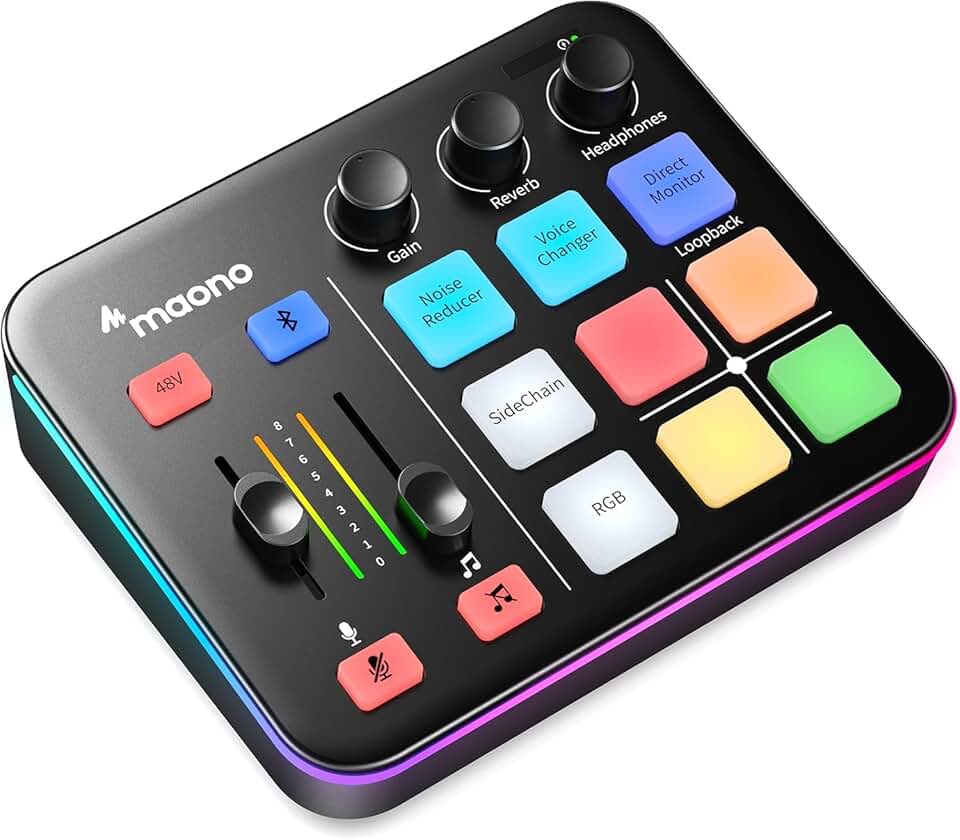
MAONO Gaming Audio Mixer, Audio Interface with Pro-preamp, RGB, Bluetooth, 48V Phantom Power for Live Streaming, Podcasting, Content Create, Gaming MaonoCaster G1 NEO (Not for USB Mic)
$44.99
The MAONO gaming mixer is for streamers who already have gaming peripherals and want everything in one ecosystem. The Bluetooth feature is genuinely useful for mixing Discord from your phone while streaming. Good middle ground between the compact and full-size mixers.
Pros
- + Bluetooth connectivity lets you mix audio from phone and computer simultaneously
- + Pro-preamp with 48V phantom power supports high-end mics without preamp noise
- + RGB lighting with Synapse software control integrates with Razer ecosystems
- + Compact size fits gaming desks without hogging space
Cons
- − Bluetooth latency can cause sync issues if you're not careful with settings
- − Pricier than basic mixers at $44.99, justified only if you need wireless audio
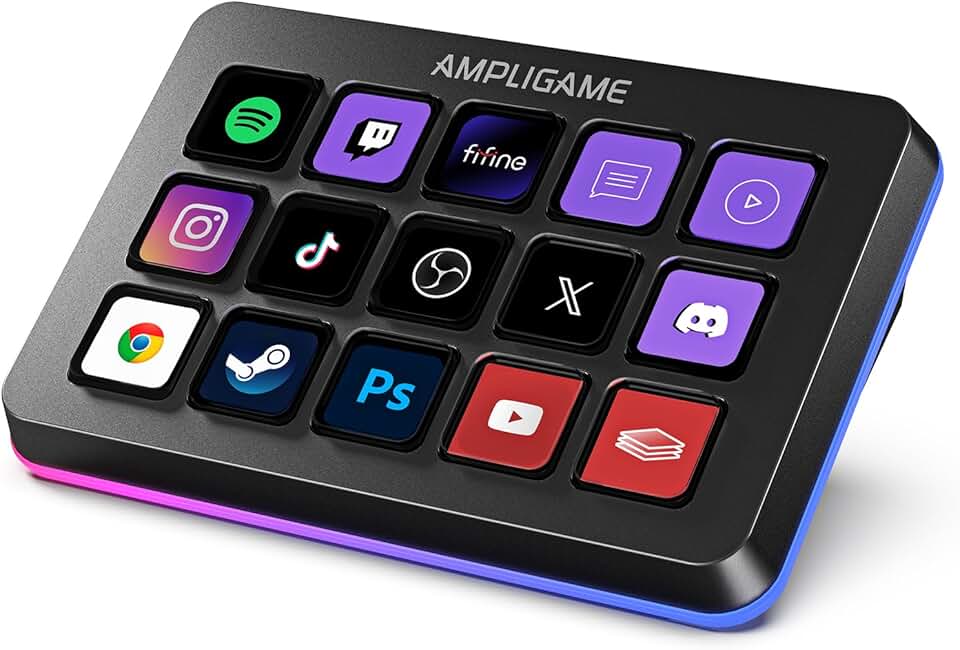
FIFINE AmpliGame Stream Controller with 15 Macro Keys, Streaming Keyboard with Trigger Actions in OBS/Twitch/YouTube/Streamlabs, Shortcut Buttons Keypad Works with Mac and PC-D6 Global Recycled Standard
$64.99
The FIFINE AmpliGame controller ($64.99) is for streamers who want one-button scene changes and alerts. It's not essential for beginners, but once you've streamed a few times, you'll appreciate not fumbling with OBS during gameplay. Best added after your mic and lights are sorted.
Pros
- + 15 macro keys programmable for OBS scene switching, alerts, and chat commands
- + Trigger actions work with Twitch, YouTube, and Streamlabs without custom scripts
- + RGB lighting matches gaming setups, compact tenkeyless design saves desk space
- + USB plug-and-play, no software required (though Synapse adds customization)
Cons
- − Macro keys require initial setup; not useful if you don't stream on supported platforms
- − Mechanical switches are loud—consider switch type if you're streaming audio from your desk
Frequently asked questions
Frequently Asked Questions
Final word
The best streaming gear for beginners starts with audio. The FIFINE USB/XLR mic ($44.99) is your safest bet—it sounds professional and grows with your setup. Add the Hagibis LED lighting kit ($27.75) to eliminate shadows, then grab an auto-tracking tripod ($44.98) if you're mobile streaming. If you want everything in one box, the MAONO bundle ($94.98) removes guesswork. Once you've streamed a few times, add the FIFINE compact mixer ($39.99) to balance multiple audio sources. Don't buy the streaming keyboard or fancy gear until you know what you actually need. Start simple, stream consistently, and upgrade based on what your audience asks for. Most successful streamers built their setups incrementally—you should too.
More gear curated for beginners
Best Gaming Keyboards for Beginners
Gaming MiceBest Gaming Mice for Beginners
Gaming HeadsetsBest Gaming Headsets for Beginners
Gaming MonitorsBest Gaming Monitors for Beginners
Gaming ChairsBest Gaming Chairs for Beginners
Gaming ControllersBest Gaming Controllers for Beginners
Gaming DesksBest Gaming Desks for Beginners
Gaming LaptopsBest Gaming Laptops for Beginners
More streaming gear guides
Best Blue Streaming Gear in 2026
Find the best Blue streaming gear for 2026. Expert picks for mics, stands, and audio gear for Twitch, YouTube, and podcasting.
Budget Streaming Gear of 2026
Affordable streaming gear 2026: ring lights, mics, webcams & more. Build a pro setup on a budget.
Best Elgato Streaming Gear in 2026
Top Elgato streaming gear for creators: Stream Deck, microphones, capture cards & more. Expert picks for every budget.
Best HyperX Streaming Gear in 2026
Top-rated HyperX streaming gear for creators. Mics, headsets, and accessories ranked by performance and value.
Best Logitech Streaming Gear in 2026
Find the best Logitech streaming gear for creators. Mics, webcams, lights, and cameras tested and ranked.
Best Streaming Gear of 2026: Top Picks for Every Budget
Discover the best streaming gear of 2026. Expert roundup of microphones, webcams, lights, and controllers for every budget.