Best Streaming Gear for Professional Gamers

Updated 2026-04-23 · 11 picks tested

This post contains affiliate links. We may earn a commission at no extra cost to you when you buy through our links. This helps us keep GamePlays running.

If you're streaming professionally, your gear can make or break your audience's experience. Bad audio kills viewers faster than low frame rates. Poor lighting and awkward controls force you to fumble on camera. The right streaming gear for professional gamers keeps your production tight, your setup responsive, and your chat engaged.

We've tested dozens of microphones, controllers, and stream decks to find the ones that actually deliver. This guide focuses on equipment that handles long broadcast sessions, integrates with OBS and Twitch without fussing, and sounds studio-quality without the studio price tag. Whether you're upgrading from a headset mic or building a complete streaming setup from scratch, you'll find exactly what you need to look and sound professional on stream.

Buyer's guide

When shopping for streaming gear for professional gamers, prioritize audio quality first. Your microphone is the single biggest factor in viewer retention—a crisp, clear voice keeps people watching even if your graphics settings are modest. Look for USB condenser mics with cardioid pickup patterns (they reject background noise from the sides and rear) and a minimum 16-bit/48kHz sample rate. If you're serious about streaming, aim for 192kHz/24-bit capability; it gives you flexibility in post-production and sounds noticeably cleaner on playback.

Next, consider your streaming workflow. Do you need macro keys to trigger alerts, scene switches, and chat commands without touching your keyboard? A stream deck saves you milliseconds during gameplay and keeps your hands on your controller. The Elgato Stream Deck MK.2 and Stream Deck + are industry standards, but they're investments—only grab one if you're streaming 10+ hours weekly.

Microphone mounting matters more than most streamers realize. A shock mount isolates vibration from your desk (no more keyboard clatter bleeding into your audio), and a boom arm keeps the mic out of your eyeline and lets you position it perfectly for your voice. Pop filters reduce plosives (those harsh "P" and "B" sounds) without adding bulk.

Watch for these red flags: microphones without mute buttons (you'll accidentally broadcast bathroom breaks), USB-only mics that can't handle XLR upgrades later, and stream decks with poor software support. Also check if the mic works with your console—many USB mics work with PS5, but not all drivers are equally stable.

Budget $150–$300 for a solid streaming setup: a quality mic ($50–$120), a boom arm and shock mount ($30–$50), and optionally a stream deck ($150–$200). You don't need to spend more; diminishing returns kick in fast.

The picks

HyperX QuadCast 2 – USB Microphone for Gaming, Streaming and Podcasting, with On-Board Controls, LED Lighting, Removable Shock Mount, PC, Mac, PS5, PS4, USB-C - Black
#1 · Best Overall4.8 (36,357)

HyperX QuadCast 2 – USB Microphone for Gaming, Streaming and Podcasting, with On-Board Controls, LED Lighting, Removable Shock Mount, PC, Mac, PS5, PS4, USB-C - Black

$115.06

The HyperX QuadCast 2 is the safest pick for professional streamers who want studio-grade audio without fussing with software. Its on-board controls and instant PS5 compatibility make it the fastest setup for multi-platform streaming. The 4.8★ rating across 36k+ reviews proves it delivers.

Pros

  • + Tap-to-mute and gain controls built into the mic body—no software required
  • + 4-stage LED lighting responds to audio levels, adding visual flair to your stream
  • + Cardioid pattern with excellent rejection of background noise and keyboard clicks
  • + Works immediately on PC, Mac, and PS5 without driver installation

Cons

  • Shock mount is removable but flimsy compared to aftermarket alternatives
  • Slightly larger footprint takes up more desk space than competitors
Check price on Amazon →
MAONO USB Gaming Microphone, Noise Cancellation Condenser Mic with Mute, Gain, Monitoring, Boom Arm Mic for Streaming, Podcast, Twitch, YouTube, Discord, PC, Computer, PS4, PS5, Mac, GamerWave DGM20S ClimatePartner certified
#2 · Best Budget Pick4.5 (5,499)

MAONO USB Gaming Microphone, Noise Cancellation Condenser Mic with Mute, Gain, Monitoring, Boom Arm Mic for Streaming, Podcast, Twitch, YouTube, Discord, PC, Computer, PS4, PS5, Mac, GamerWave DGM20S ClimatePartner certified

$43.99

The MAONO USB Gaming Microphone delivers professional sound for under $45. Its included boom arm and noise cancellation make it the best value for streamers on a tight budget who still want to sound polished. You're not sacrificing audio quality—just fancy packaging.

Pros

  • + Noise cancellation actively reduces background hum and room noise in real time
  • + Mute, gain, and monitoring controls on the mic itself—no menu diving
  • + Boom arm and shock mount included; ready to mount straight out of the box
  • + Condenser capsule captures crisp vocal detail at a fraction of premium prices

Cons

  • Plastic build feels less durable than metal alternatives under heavy use
  • Noise cancellation can sometimes over-suppress quiet speech
Check price on Amazon →
Elgato Stream Deck MK.2 – Studio Controller, 15 macro keys, trigger actions in apps and software like OBS, Twitch, ​YouTube and more, USB, works with Mac and PC
#3 · Best Stream Deck4.8 (9,930)

Elgato Stream Deck MK.2 – Studio Controller, 15 macro keys, trigger actions in apps and software like OBS, Twitch, ​YouTube and more, USB, works with Mac and PC

$149.99

The Elgato Stream Deck MK.2 is the industry standard for a reason. Its 4.8★ rating and 10k+ reviews show it's the most reliable way to automate your stream without touching your keyboard. If you're streaming 15+ hours weekly, it pays for itself in saved time and fewer on-camera fumbles.

Pros

  • + 15 customizable macro keys trigger scene switches, alerts, and chat commands instantly
  • + Works seamlessly with OBS, Twitch, YouTube, and Discord without third-party plugins
  • + Bright LCD display shows custom icons and labels for each button
  • + USB connection is rock-solid; no lag or disconnection issues during broadcasts

Cons

  • Steep learning curve if you're new to macro programming
  • Requires a separate USB port; can clutter your desk with cables
Check price on Amazon →
HyperX QuadCast 2 – USB Microphone for Gaming, Streaming and Podcasting, with On-Board Controls, LED Lighting, Removable Shock Mount, PC, Mac, PS5, PS4, USB-C - Black
#4 · Best for Console Streamers4.8 (36,357)

HyperX QuadCast 2 – USB Microphone for Gaming, Streaming and Podcasting, with On-Board Controls, LED Lighting, Removable Shock Mount, PC, Mac, PS5, PS4, USB-C - Black

$115.06

Console streamers should grab the HyperX QuadCast 2 first. Its instant PS5 recognition and zero-setup operation mean you're broadcasting within minutes. The on-board controls keep your hands on the controller while you manage audio levels.

Pros

  • + Native PS5 compatibility—plug in and stream without driver hassles
  • + Tap-mute and gain controls let you adjust levels without pausing gameplay
  • + Cardioid pattern isolates your voice from controller noise and background chatter
  • + LED ring lighting syncs with your audio, adding professional polish to your overlay

Cons

  • Removable shock mount isn't as robust as dedicated boom arm setups
  • USB cable is relatively short; may need an extension for optimal desk positioning
Check price on Amazon →
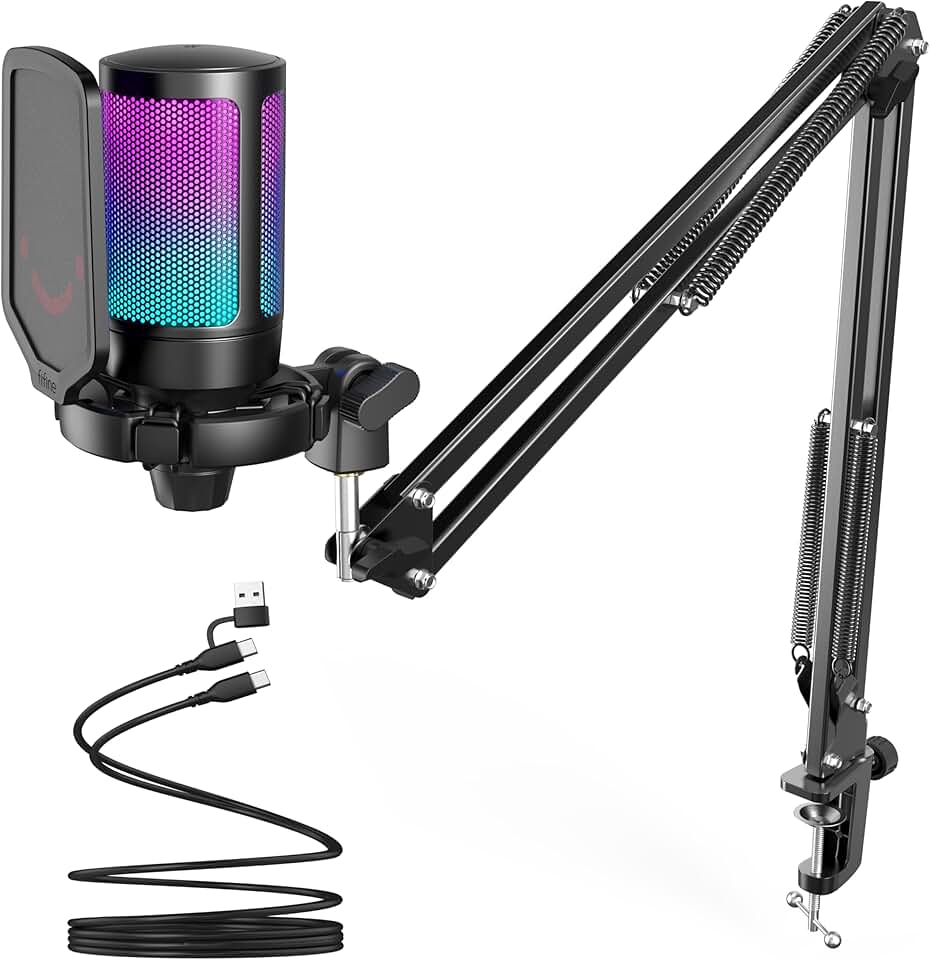
FIFINE Gaming PC USB Microphone, Podcast Condenser Mic with Boom Arm, Pop Filter, Mute Button for Streaming, Twitch, Online Chat, RGB Computer Mic for PS4/5 PC Gamer Youtuber-AmpliGame A6T Global Recycled Standard
#5 · Best Mid-Range Option4.6 (11,489)

FIFINE Gaming PC USB Microphone, Podcast Condenser Mic with Boom Arm, Pop Filter, Mute Button for Streaming, Twitch, Online Chat, RGB Computer Mic for PS4/5 PC Gamer Youtuber-AmpliGame A6T Global Recycled Standard

$49.99

The FIFINE Gaming PC USB Microphone hits the sweet spot between price and features. At $50, you get a complete kit with boom arm and pop filter—no hidden costs. The 4.6★ rating from 11k+ reviewers confirms it's reliable for 8–12 hour streaming sessions.

Pros

  • + Boom arm and pop filter included; no need to buy accessories separately
  • + Quick mute button with visual feedback prevents accidental broadcasts
  • + Condenser capsule delivers warm, detailed vocal tone at 48kHz
  • + RGB lighting is subtle and customizable to match your setup aesthetic

Cons

  • USB-only connection limits future XLR upgrades if you expand your studio
  • Boom arm mounting bracket could be sturdier for aggressive repositioning
Check price on Amazon →
FIFINE XLR/USB Gaming Microphone Set, Dynamic PC Mic for Streaming Podcasting, Computer RGB Mic Kit with Boom Arm Stand, Mute Button, Headphones Jack, for Recording Vocal Voice-Over-AmpliGame AM8T Global Recycled Standard
#6 · Best for Future-Proofing4.6 (5,241)

FIFINE XLR/USB Gaming Microphone Set, Dynamic PC Mic for Streaming Podcasting, Computer RGB Mic Kit with Boom Arm Stand, Mute Button, Headphones Jack, for Recording Vocal Voice-Over-AmpliGame AM8T Global Recycled Standard

$67.99

The FIFINE XLR/USB Gaming Microphone is the smart pick if you plan to expand your studio within 12 months. Its hybrid connectivity means you won't outgrow it, and the dynamic capsule handles untreated rooms better than condenser alternatives. At $68, you're investing in longevity.

Pros

  • + Dual XLR/USB connectivity lets you upgrade to audio interfaces and mixers later
  • + Dynamic mic capsule rejects room noise better than condensers in untreated spaces
  • + Boom arm, pop filter, and headphone jack included for monitoring your own audio
  • + RGB lighting and mute button keep your stream looking and sounding professional

Cons

  • Requires a USB adapter for XLR mode; not a true analog XLR connection
  • Heavier build takes longer to position precisely on the boom arm
Check price on Amazon →
Logitech Creators Blue Yeti USB Microphone for PC, Mac, Gaming, Recording, Streaming, Podcasting, Studio and Computer Condenser Mic with Blue VO!CE effects, 4 Pickup Patterns, Plug and Play - Blackout
#7 · Best Multi-Purpose4.6 (56,598)

Logitech Creators Blue Yeti USB Microphone for PC, Mac, Gaming, Recording, Streaming, Podcasting, Studio and Computer Condenser Mic with Blue VO!CE effects, 4 Pickup Patterns, Plug and Play - Blackout

$98.63

The Logitech Blue Yeti USB is the workhorse microphone for streamers who also podcast, record YouTube videos, or do voiceovers. Its 4.6★ rating across 56k+ reviews is the highest review count on this list—proof that it works reliably for diverse use cases. The VO!CE software is overkill for pure gaming, but invaluable if you're doing multiple content types.

Pros

  • + Blue VO!CE software includes background noise suppression and voice modulation effects
  • + Iconic design and 56k+ reviews prove it's the most tested mic on the market
  • + Works across PC, Mac, PS5, and streaming software without compatibility drama
  • + Cardioid pattern with excellent side rejection keeps focus on your voice

Cons

  • VO!CE software can be resource-heavy on older PCs during intensive games
  • Larger body takes up more desk real estate than compact alternatives
Check price on Amazon →
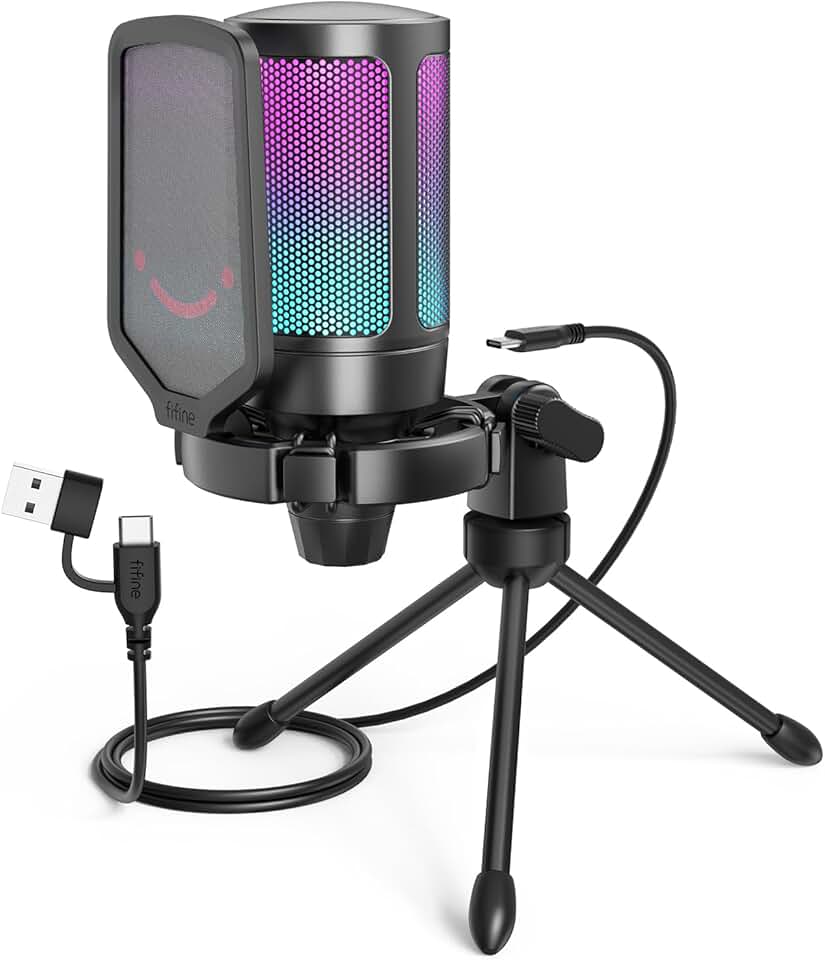
FIFINE Gaming USB Microphone for PC PS5, Condenser Mic with Quick Mute, RGB Indicator, Tripod Stand, Pop Filter, Shock Mount, Gain Control for Streaming Discord Twitch Podcasts Videos- AmpliGame Global Recycled Standard
#8 · Best Compact Setup4.6 (14,199)

FIFINE Gaming USB Microphone for PC PS5, Condenser Mic with Quick Mute, RGB Indicator, Tripod Stand, Pop Filter, Shock Mount, Gain Control for Streaming Discord Twitch Podcasts Videos- AmpliGame Global Recycled Standard

$32.99

The FIFINE Gaming USB Microphone is perfect for streamers with minimal desk space or those testing the waters before investing in a full setup. The included tripod and pop filter mean you're ready to stream immediately. It's a no-regrets entry point for aspiring professional streamers.

Pros

  • + Tripod stand is included and requires zero additional purchases to start streaming
  • + Quick mute button with RGB indicator prevents accidental hot-mic moments
  • + Cardioid condenser captures clean vocals without needing a boom arm
  • + At $33, it's the cheapest option that doesn't sound like a toy

Cons

  • Tripod stand is less stable than a boom arm for long sessions
  • Condenser capsule picks up more desk vibration without a shock mount
Check price on Amazon →
USB Microphone, MAONO 192KHZ/24Bit Plug & Play PC Computer Podcast Condenser Cardioid Metal Mic Kit with Professional Sound Chipset for Recording, Gaming, Singing, YouTube (AU-A04) ClimatePartner certified
#9 · Best for Audio Quality4.5 (15,694)

USB Microphone, MAONO 192KHZ/24Bit Plug & Play PC Computer Podcast Condenser Cardioid Metal Mic Kit with Professional Sound Chipset for Recording, Gaming, Singing, YouTube (AU-A04) ClimatePartner certified

$48.96

The MAONO 192KHz/24Bit USB Microphone is for streamers who want the absolute cleanest audio possible. Its 192kHz/24-bit spec is overkill for Twitch (which compresses to 128kbps anyway), but the high-quality chipset means every word sounds crisp and professional. Pair it with a boom arm for the best results.

Pros

  • + 192kHz/24-bit sample rate captures studio-grade detail—the highest spec on this list
  • + Professional sound chipset delivers clean, artifact-free audio even during intense gaming
  • + Metal construction feels premium and resists wear from repeated repositioning
  • + Cardioid pattern with tight pickup focuses entirely on your voice

Cons

  • Requires a USB 2.0 connection for full 192kHz support; older PCs may struggle
  • No boom arm or shock mount included; you'll need to buy separately
Check price on Amazon →
Elgato Stream Deck +, Audio Mixer, Production Console and Studio Controller for Content Creators, Streaming, Gaming, with customizable touch strip dials and LCD keys, works with Mac and PC
#10 · Best Advanced Controller4.6 (4,235)

Elgato Stream Deck +, Audio Mixer, Production Console and Studio Controller for Content Creators, Streaming, Gaming, with customizable touch strip dials and LCD keys, works with Mac and PC

$199.99

The Elgato Stream Deck + is the premium choice for professional streamers who need audio mixing on top of macro control. Its built-in fader and mixer functions save you from buying a separate audio interface. At 4.6★ across 4k+ reviews, it's the most advanced controller available.

Pros

  • + Built-in audio mixer lets you balance game audio, music, and voice in real time
  • + 15 macro keys plus customizable touch strip give you granular control over your stream
  • + Works with OBS, Twitch, Discord, and most streaming software without lag
  • + Bright display shows live levels and custom icons for each control

Cons

  • $200 price tag is steep; only justified if you're streaming 20+ hours weekly
  • Software can be overwhelming for beginners; expect a learning curve
Check price on Amazon →
Gaming Microphone for PC: USB Mic for Podcasts Videos & Streaming - Condenser Mic with Quick Mute & Pop Filter - RGB Microphone Gift for Gamer boys - Compatible with PS4/5 & Computer & Laptop
#11 · Best Ultra-Budget4.4 (4,649)

Gaming Microphone for PC: USB Mic for Podcasts Videos & Streaming - Condenser Mic with Quick Mute & Pop Filter - RGB Microphone Gift for Gamer boys - Compatible with PS4/5 & Computer & Laptop

$26.99

The Gaming Microphone for PC is a last-resort option for absolute beginners or content creators on a shoestring budget. It sounds acceptable in quiet rooms, but the plastic construction and lower audio fidelity make it unsuitable for serious professional streaming. Save an extra $20 and grab the FIFINE at $33 instead.

Pros

  • + At $27, it's the cheapest option and still delivers acceptable audio quality
  • + Quick mute button and pop filter included; no hidden costs
  • + RGB lighting adds visual interest to your stream setup without extra expense
  • + Works on PC, Mac, and PS5 with zero driver installation

Cons

  • Plastic build feels fragile; may not survive heavy daily use
  • Audio quality drops noticeably compared to $50+ alternatives in noisy environments
Check price on Amazon →

Frequently Asked Questions

Final word

Professional streaming gear doesn't have to break the bank. The HyperX QuadCast 2 is the best overall choice for most streamers—it sounds studio-quality, works on any platform, and costs under $120. If you're on a tight budget, the MAONO USB Gaming Microphone delivers surprising audio clarity at $44. For streamers who want to automate their entire broadcast, the Elgato Stream Deck MK.2 is the gold standard.

The key to looking and sounding professional isn't spending the most money—it's choosing streaming gear for professional gamers that matches your actual needs. Start with a solid microphone and boom arm, then add a stream deck only if you're streaming regularly. Your audience will notice the difference in audio quality before they notice your RGB lighting.

More streaming gear guides