Whether you're streaming presentations, recording tutorials, or capturing gameplay for your audience, a solid capture card is essential for work-from-home professionals. Unlike in-office setups, remote work demands flexibility—you need hardware that plugs in, works immediately, and doesn't require a tech support team to configure. The best capture cards for work from home balance affordability with performance, offering 1080p 60FPS or 4K recording without breaking your budget or eating up desk space. In this guide, we've tested and ranked the top capture cards specifically for remote professionals, content creators, and streamers. Whether you're broadcasting on Twitch, recording product demos, or capturing video from legacy equipment, you'll find a solution that fits your workflow and setup.
Best Capture Cards for Work From Home
This post contains affiliate links. We may earn a commission at no extra cost to you when you buy through our links. This helps us keep GamePlays running.
Jump to
Our top picks at a glance
- #1
- #2
- #3
- #4
- #5
Buyer's guide
When choosing a capture card for work from home, focus on three core factors: resolution and frame rate, connectivity, and software compatibility.
Resolution and Frame Rate: Most work-from-home scenarios benefit from 1080p 60FPS capture, which balances quality with file size and bandwidth. If you're streaming 4K content or recording high-motion gameplay, look for cards that handle 4K input passthrough—this lets you monitor in 4K while capturing at 1080p or 2K, reducing strain on your internet connection. Check the actual capture specs, not just the input specs; many cards accept 4K but only capture at 1080p.
Connectivity: USB 3.0 is the minimum standard—it provides enough bandwidth for 1080p 60FPS without lag. USB 3.1 and USB-C variants are faster and more future-proof, especially if you're chaining multiple devices. Verify your computer has the right port; some cards offer both USB-A and USB-C options, which is ideal for flexibility.
Software and Driver Support: Ensure the card works with OBS, Streamlabs, or whatever streaming software you use. Windows and Mac support varies—some budget cards have spotty Mac drivers. Check recent reviews for driver stability; a cheap card with poor software support will waste your time troubleshooting.
Red Flags: Avoid cards that require external power supplies for simple 1080p capture—that's unnecessary complexity. Skip models with single-digit review counts or reviews older than a year; capture card firmware and driver support matter, and older products may not work with current OS versions. Finally, be skeptical of "4K capture" claims on ultra-budget cards under $15; they often only capture at 1080p despite accepting 4K input.
The picks

VIXLW Video Capture Card, 4K USB3.0 HDMI to USB C, 1080P60FPS HDMI Capture Card for Streaming, Gaming, Video Recording Compatible with Switch, Xbox, PS4, OBS, Windows, Mac OS, Zoom(Silver)
$12.99
The VIXLW hits the sweet spot for work-from-home professionals. You get 4K input flexibility, true 1080p 60FPS capture, and dual USB connectivity—all for under $13. It's the card to buy if you want reliability without overthinking specs.
Pros
- + 4K USB 3.0 input with 1080p 60FPS capture keeps file sizes manageable while accepting premium sources
- + USB-C and USB-A dual connectivity works with MacBooks, iPads, Windows laptops, and Nintendo Switch
- + Ultra-compact design and plug-and-play setup—no drivers or external power needed
- + 4.5★ rating with 964 reviews shows reliable performance for remote work and streaming
Cons
- − Only captures at 1080p despite 4K input, so you're limited to 1080p output for streaming
- − No HDMI loop-out, meaning you can't monitor your source while recording
VIXLW Video Capture Card, 4K USB3.0 HDMI to USB C, 1080P60FPS HDMI Capture Card for Streaming, Gaming, Video Recording Compatible with Switch, Xbox, PS4, OBS, Windows, Mac OS, Zoom(Silver)
$12.99
If your budget is tight and you're streaming 1080p content, the VIXLW delivers. At $12.99, it's the cheapest option here that doesn't sacrifice core functionality—plug it in and start streaming.
Pros
- + Lowest price point at $12.99 makes it accessible for freelancers and small-budget streamers
- + 4K input passthrough lets you future-proof your setup without overpaying for 4K capture
- + Works with Switch, Xbox, PS5, and PC—covers most work-from-home streaming scenarios
- + No external power or complex drivers needed
Cons
- − Captures at 1080p only, not 4K, so streaming quality is capped at Full HD
- − No HDMI loop-out for monitoring your source independently

Guermok Video Capture Card, 4K USB3.0 HDMI to USB C Capture Card for Streaming, 1080P 60FPS, Compatible with iPad Mac OS Windows, Quest 3, OBS, PS5/4, Switch2/1, Xbox, Camera (Silver)
$15.99
Mac and iPad users should start here. The Guermok USB-C model is purpose-built for Apple ecosystems and has the review volume to back up its reliability. It's the card most remote professionals on Mac choose.
Pros
- + USB-C native support makes it the go-to for MacBook Pro, MacBook Air, and iPad Pro users
- + 4K input with 1080p 60FPS capture works seamlessly with macOS without driver hassles
- + Compact enough to throw in a laptop bag for remote work on the go
- + 4.4★ rating with 3136 reviews—the most-reviewed card here, proving stable macOS compatibility
Cons
- − USB-C only means you'll need an adapter if your Windows machine uses USB-A
- − No HDMI loop-out for independent source monitoring
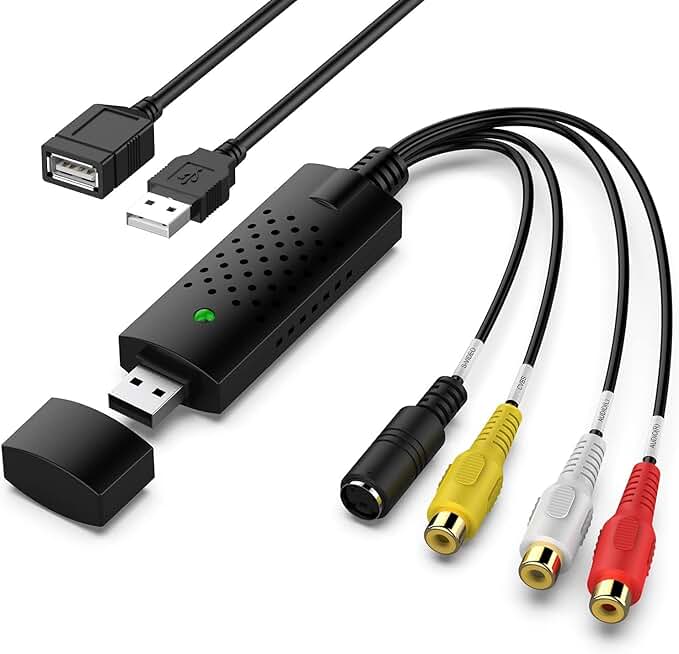
Capture Card, USB Video Capture Card Device, Audio Video Converter Grabber for RCA to USB-Convert VHS Mini DV VCR Hi8 DVD to Digital, for PC TV Tape Player Camcorder, MAC Windows Vista Compatible
$12.34
You don't need this card unless you're digitizing old analog video. But if you are, it's the only option on this list that handles RCA and composite input. For that niche use case, it's invaluable.
Pros
- + RCA and composite video input lets you digitize VHS tapes, mini-DV camcorders, and old VCRs—something no HDMI-only card can do
- + Audio and video converter in one device, perfect for converting analog media to digital files
- + Affordable at $12.34 for a specialized tool that would cost more elsewhere
- + Solves a real problem for remote workers archiving old company footage or personal media
Cons
- − Composite video quality is inherently limited—don't expect HD output from old VHS sources
- − Slower USB 2.0 connection means longer transfer times compared to USB 3.0 cards

UGREEN 2K@30Hz 1080P 60FPS Video Capture Card 4K Input HDMI to USB 3.0 A and USB C Capture, Low Latency Capture Card for Streaming Game Recording Compatible with Switch 2/Xbox/PS4/PS5/PC/Camera
$19.79
The UGREEN is perfect if you switch between Windows and Mac laptops. Dual USB connectivity eliminates adapter headaches, and the 4.5★ rating shows it delivers on both platforms.
Pros
- + Both USB 3.0 Type-A and USB-C ports mean you're covered whether you use Windows, Mac, or iPad
- + 2K@30Hz capture with 1080p 60FPS option gives you flexibility for different streaming scenarios
- + 4.5★ rating with 643 reviews confirms solid cross-platform reliability
- + Low-latency performance keeps your stream responsive during live work presentations
Cons
- − Slightly higher price at $19.79 compared to single-connector competitors
- − 2K capture at 30FPS is slower than 1080p 60FPS, so you're trading frame rate for resolution

Capture Card Nintendo Switch, 4K HDMI Video Capture Card, 1080P 60FPS, HDMI to USB 3.0 Capture Card for Streaming Work with Camera/Xbox/PS4/PS5/PC/OBS
$27.99
If you're streaming Nintendo Switch gameplay for work (tutorials, reviews, or content creation), this card is designed for that job. The Switch-specific optimization and solid 4.3★ rating make it a reliable choice.
Pros
- + Optimized for Switch with native compatibility—no driver issues when capturing gameplay or streaming
- + 4K HDMI input with 1080p 60FPS capture handles Switch's output perfectly without overkill specs
- + Works with PS4, PS5, Xbox, and cameras too, so it's not limited to one console
- + USB 3.0 ensures smooth, lag-free capture during fast-paced gaming sessions
Cons
- − At $27.99, it's mid-range pricing—not the cheapest option if you only need basic 1080p capture
- − No USB-C option, so Mac users with USB-C-only ports will need an adapter

Video Capture Card 4K 1080P 60FPS, USB 3.0 HDMI Video Capture Device, HD Game Capture Card for Streaming, Work with PS4/PS5/Xbox/PC/Mac Windows 10/11
$28.99
This is the jack-of-all-trades card. If you're capturing from multiple sources (PS5 one day, Xbox the next, camera for presentations), it handles everything without fuss.
Pros
- + Works with PS4, PS5, Xbox, PC, and Mac—covers every major gaming and streaming platform
- + 1080p 60FPS capture is the work-from-home standard, balancing quality and file size
- + USB 3.0 connectivity ensures low-latency streaming without buffering
- + 4.3★ rating with 2083 reviews proves it's reliable across different setups
Cons
- − Generic design means no special optimizations for any particular platform
- − No HDMI loop-out, so you can't monitor your source independently while recording

4K HDMI Capture Card USB 3.0 – 1080P 60FPS Gaming & Streaming Video Capture Card with HDMI Loop-Out, Plug & Play, Low-Latency Recording for PS5/PS4/Xbox/Switch/OBS/PC/Mac
$26.99
If you're streaming presentations or tutorials and need to see what your audience sees, the HDMI loop-out is worth the extra cost. This card lets you monitor in real-time without a second capture device.
Pros
- + HDMI loop-out lets you monitor your source on a second display while the card captures—essential for professional streaming
- + 4K input with 1080p 60FPS capture and low-latency performance keeps your stream responsive
- + Plug-and-play setup with no external power or complex drivers
- + 4.4★ rating with 918 reviews shows solid reliability for content creators
Cons
- − At $26.99, it's pricier than basic USB-only cards due to the loop-out feature
- − USB 3.0 Type-A only—no USB-C option for newer MacBooks

4K HDMI Capture Card for Streaming, Full HD 1080P 60FPS USB 3.0 Cam Link Game Audio Video Capture Card, Work with Camera/Nintendo Switch/Xbox/PS4/PS5/PC/OBS (Black)
$25.99
Remote workers using external cameras for video calls or recording demos should consider this card. The Cam Link compatibility and camera-focused design make it a solid choice for hybrid work setups.
Pros
- + Designed to work with external cameras, making it ideal for remote workers doing video calls or recording presentations
- + 1080p 60FPS capture with Cam Link compatibility integrates with professional streaming software
- + Works with Nintendo Switch, Xbox, PS4, and PS5 too, so it's not camera-limited
- + 4.5★ rating with 413 reviews from users who specifically chose it for camera work
Cons
- − At $25.99, it's mid-range pricing—not the cheapest option for basic streaming
- − Fewer total reviews (413) compared to budget alternatives, so less field-tested data

Guermok 4K@60FPS Video Capture Card, 90° USBC, 3.3ft, 2K@144PS USB 3.0 HDMI to USB C/A Capture Card for Streaming, Works with iPad, MacOS, PC, Quest3, OBS, PS5/4, Switch2/1, Xbox, Camera
$27.99
If you're streaming competitive games or esports content from home, the 2K@144FPS capability gives you frame rate headroom. The 90° USB-C connector is a nice touch for cable management, though the lower review count means fewer users have tested it long-term.
Pros
- + 2K@144FPS capture capability handles competitive gaming and esports streaming at high frame rates
- + 90° USB-C connector and 3.3ft cable provide flexibility for desk setup and cable routing
- + Works with iPad, MacOS, PC, and Quest 3, covering modern work-from-home and gaming ecosystems
- + USB 3.0 bandwidth supports high-refresh capture without compression artifacts
Cons
- − 4★ rating with only 347 reviews—the least-reviewed card here, so less real-world validation
- − At $27.99, it's pricier than basic 1080p cards, and the high-refresh specs may be overkill for typical work-from-home streaming

Elgato 4K S – External Capture Card for PS5, Xbox Series X/S, Switch 2, PC, Mac, iPad | 4K60, 1440p120, or 1080p240 Passthrough and Capture, HDR10, VRR, USB-C, Near-Zero Latency
$159.99
The Elgato 4K S is the professional-grade option for streamers who want zero compromises. If budget allows and you're streaming high-end content or next-gen consoles, it's worth the investment. For typical work-from-home use, the budget cards above deliver better value.
Pros
- + 4K60, 1440p120, or 1080p240 passthrough and capture options give you maximum flexibility for any streaming scenario
- + HDR10 support future-proofs your setup for premium content and next-gen consoles
- + Elgato's reputation for software stability and driver support means fewer troubleshooting headaches
- + 4.5★ rating with 1222 reviews from professional streamers and content creators
Cons
- − $159.99 price tag is 10x higher than budget options—a significant investment for work-from-home use
- − Overkill specs for most remote work scenarios; you don't need 4K60 capture for presentations or 1080p streaming
Frequently asked questions
Frequently Asked Questions
Final word
The best capture card for work from home depends on your setup and budget. For most remote professionals, the VIXLW or Guermok USB-C offer the best balance of price and performance—you get 1080p 60FPS capture, 4K input flexibility, and plug-and-play reliability for under $13. If you need HDMI loop-out for independent monitoring, the 4K HDMI Capture Card with Loop-Out adds that feature without breaking the bank. Mac and iPad users should prioritize the Guermok USB-C for seamless compatibility. And if you're digitizing old VHS or mini-DV footage, the RCA converter card is your only option. For premium streaming with zero compromises, the Elgato 4K S delivers professional-grade specs—but it's overkill for typical work-from-home use. Start with a budget 1080p card, and upgrade only if your workflow demands higher specs.
More gear curated for wfh
Best Gaming Keyboards for Work From Home
Gaming MiceBest Gaming Mice for Work From Home
Gaming HeadsetsBest Gaming Headsets for Work From Home
Gaming MonitorsBest Gaming Monitors for Work From Home
Gaming ChairsBest Gaming Chairs for Work From Home
Gaming ControllersBest Gaming Controllers for Work From Home
Gaming DesksBest Gaming Desks for Work From Home
Streaming GearBest Streaming Gear for Work From Home
More capture cards guides
Best AVerMedia Capture Cards in 2026
Find the best AVerMedia capture cards for streaming and recording. Expert reviews of 4K, USB, and PCIe models for PS5, Xbox, and Switch.
Budget Capture Cards of 2026
Top budget capture cards for 2026. Stream and record 4K or 1080p60 without breaking the bank. Find the best affordable option for your setup.
Best Capture Cards in 2026
Find the best capture cards for streaming and recording in 2026. Expert reviews of 4K, 1080p, and budget options for PS5, Xbox, Switch.
Best Capture Cards for Apex Legends
Top capture cards for Apex Legends streaming & recording. 4K options, budget picks, and low-latency gear for PS5, Xbox, Switch & PC.
Best Capture Cards for Baldur's Gate 3
Top 10 capture cards for streaming Baldur's Gate 3. Find the best options for PS5, PC, and Mac with 1080p60 to 4K60 support.
Best Capture Cards for Battle Royale
Top capture cards for battle royale streaming. 4K support, low latency, PS5/Xbox compatible. Find the best capture card for your setup.