Best Gaming Mice for Work From Home

Updated 2026-04-24 · 10 picks tested

This post contains affiliate links. We may earn a commission at no extra cost to you when you buy through our links. This helps us keep GamePlays running.

Working from home doesn't mean sacrificing performance or comfort. The best gaming mice for work from home offer precision, ergonomic design, and reliability—qualities that matter just as much for spreadsheets and video calls as they do for gaming. Unlike office-grade mice, gaming mice give you adjustable DPI, programmable buttons, and responsive sensors that make everyday tasks feel smoother while keeping your desk ready for evening gaming sessions.

We've tested and ranked the top gaming mice that excel in both work and play environments. Whether you need a budget-friendly option, an ergonomic vertical design, or a feature-packed workhorse, this guide covers the best gaming mice for work from home that deliver real value. Each pick balances productivity features with gaming performance, so you're not compromising on either front.

Buyer's guide

When shopping for gaming mice for work from home, focus on comfort first. You'll spend 8+ hours with this mouse, so ergonomic shape and weight matter more than flashy RGB. Look for mice with adjustable DPI settings—this lets you dial down sensitivity for precise cursor control during work, then ramp it up for gaming without switching devices.

Wired vs. wireless is a personal choice. Wired mice eliminate latency and never need charging, making them reliable for back-to-back meetings. Wireless options offer freedom of movement but require occasional battery management. For work-from-home setups, either works fine.

Check the sensor type and max DPI. A 6400+ DPI optical sensor handles both fine detail work and gaming, though you won't need the maximum DPI for productivity tasks. Programmable buttons are genuinely useful—map frequently used shortcuts to side buttons to speed up your workflow.

Avoid mice that are too heavy or have aggressive gaming aesthetics if you're on video calls. Neutral colors and understated designs blend better into professional settings. Finally, read reviews specifically mentioning comfort during long work sessions, not just gaming performance. A mouse that feels great for 30-minute gaming sprints might cause fatigue after 8 hours of work.

The picks

Logitech G502 Hero High Performance Wired Gaming Mouse, Hero 25K Sensor, 25,600 DPI, RGB, Adjustable Weights, 11 Programmable Buttons, On-Board Memory, PC/Mac - Black
#1 · Best Overall4.6 (57,850)

Logitech G502 Hero High Performance Wired Gaming Mouse, Hero 25K Sensor, 25,600 DPI, RGB, Adjustable Weights, 11 Programmable Buttons, On-Board Memory, PC/Mac - Black

$32.99

The Logitech G502 Hero is the safest choice for work-from-home gamers. Its 25,600 DPI sensor handles fine cursor work during the day and gaming at night, while programmable buttons genuinely improve workflow efficiency. The adjustable weight system lets you dial in comfort for your personal preference.

Pros

  • + Hero 25K sensor delivers precision for both work and gaming
  • + 11 programmable buttons let you map shortcuts for productivity
  • + Adjustable weight system (up to 18g) customizes feel to your preference
  • + Excellent build quality with proven reliability across 57,000+ reviews

Cons

  • Heavier than some alternatives, which can cause fatigue during long work sessions
  • RGB lighting is distracting if you prefer a professional appearance on video calls
Check price on Amazon →
Redragon M602 Gaming Mouse, Ergonomic RGB Gaming Mouse Wired with 7200 Adjustable DPI, 9 Programmable Buttons, Professional Software for Gamer Office [Black]
#2 · Best Budget4.6 (33,674)

Redragon M602 Gaming Mouse, Ergonomic RGB Gaming Mouse Wired with 7200 Adjustable DPI, 9 Programmable Buttons, Professional Software for Gamer Office [Black]

$16.99

The Redragon M602 proves you don't need to spend $50+ for a capable work-from-home mouse. Its 7200 DPI sensor is more than enough for productivity, and the ergonomic design keeps your wrist comfortable through full workdays. At under $17, it's the best value pick for budget-conscious remote workers.

Pros

  • + 7200 DPI optical sensor provides smooth tracking for work and casual gaming
  • + 9 programmable buttons give you room to customize your workflow
  • + Ergonomic shape reduces wrist strain during extended work sessions
  • + Priced under $17 without sacrificing quality

Cons

  • Build quality is decent but not as durable as premium options
  • RGB lighting can feel cheap compared to flagship models
Check price on Amazon →
Logitech G203 Wired Gaming Mouse, 8,000 DPI, Rainbow Optical Effect LIGHTSYNC RGB, 6 Programmable Buttons, On-Board Memory, Screen Mapping, PC/Mac Computer and Laptop Compatible - Black
#3 · Best for Lightweight Feel4.6 (19,104)

Logitech G203 Wired Gaming Mouse, 8,000 DPI, Rainbow Optical Effect LIGHTSYNC RGB, 6 Programmable Buttons, On-Board Memory, Screen Mapping, PC/Mac Computer and Laptop Compatible - Black

$24.02

The Logitech G203 is ideal if you want a gaming mouse that doesn't feel like one. Its lightweight design makes it comfortable for 8+ hour workdays, and the compact form factor fits neatly on any desk. The 8000 DPI sensor and programmable buttons handle productivity tasks without excess bulk.

Pros

  • + Compact design and light weight reduce fatigue during long work sessions
  • + 8000 DPI optical sensor provides crisp tracking for detailed work
  • + Rainbow LIGHTSYNC RGB adds visual appeal without being overwhelming
  • + 6 programmable buttons cover essential shortcuts

Cons

  • Smaller size may feel cramped for users with large hands
  • Limited side buttons compared to larger gaming mice
Check price on Amazon →
BENGOO Gaming Mouse Wired, Ergonomic Gamer Laptop PC Optical Computer Mice with RGB Backlit, 4 Adjustable DPI Up to 3600, 6 Programmable Buttons for Windows 7/8/10/XP Vista Linux -Black
#4 · Best Entry-Level Option4.6 (14,186)

BENGOO Gaming Mouse Wired, Ergonomic Gamer Laptop PC Optical Computer Mice with RGB Backlit, 4 Adjustable DPI Up to 3600, 6 Programmable Buttons for Windows 7/8/10/XP Vista Linux -Black

$10.99

The BENGOO Gaming Mouse is your answer if you're testing whether a gaming mouse suits your work-from-home setup. At under $11, it's a no-risk way to experience programmable buttons and adjustable DPI without a major investment. It works fine for productivity and light gaming, though it won't match the durability of pricier options.

Pros

  • + Optical sensor with up to 3600 DPI handles both work and casual gaming
  • + RGB backlit design adds personality to your setup
  • + 6 programmable buttons let you customize for productivity
  • + Extremely affordable entry point at under $11

Cons

  • 3600 DPI max is lower than competitors, limiting gaming versatility
  • Build quality is basic and may not survive years of daily use
Check price on Amazon →
Razer DeathAdder Essential Gaming Mouse: 6400 DPI Optical Sensor - 5 Programmable Buttons - Mechanical Switches - Rubber Side Grips - Classic Black
#5 · Best Ergonomic Design4.5 (15,780)

Razer DeathAdder Essential Gaming Mouse: 6400 DPI Optical Sensor - 5 Programmable Buttons - Mechanical Switches - Rubber Side Grips - Classic Black

$20.98

The Razer DeathAdder Essential prioritizes comfort with its contoured shape and rubber grips. If you struggle with wrist fatigue during work, this mouse's ergonomic design is worth the investment. The 6400 DPI sensor and mechanical switches provide solid performance for both productivity and evening gaming sessions.

Pros

  • + Contoured right-hand ergonomic shape reduces wrist and palm strain
  • + Rubber side grips provide secure hold during long work sessions
  • + 6400 DPI optical sensor balances precision for work with gaming capability
  • + Mechanical switches offer tactile feedback that some users prefer

Cons

  • Right-hand only design excludes left-handed users
  • 5 programmable buttons is fewer than competitors at this price point
Check price on Amazon →
Redragon M612 Predator RGB Gaming Mouse, 8000 DPI Wired Optical Mouse with 11 Programmable Buttons & 5 Backlit Modes, Software Supports DIY Keybinds Rapid Fire Button ClimeCo Certified
#6 · Best for Customization4.6 (10,319)

Redragon M612 Predator RGB Gaming Mouse, 8000 DPI Wired Optical Mouse with 11 Programmable Buttons & 5 Backlit Modes, Software Supports DIY Keybinds Rapid Fire Button ClimeCo Certified

$16.99

The Redragon M612 Predator is built for users who want to fully customize their mouse to their workflow. With 11 programmable buttons and DIY software support, you can map your most-used shortcuts and keep your hands on the mouse instead of reaching for the keyboard. The 8000 DPI sensor handles detailed work without breaking a sweat.

Pros

  • + 11 programmable buttons give you extensive shortcut options for work
  • + 8000 DPI sensor with 5 backlit modes lets you personalize your aesthetic
  • + Software supports DIY key mapping for your specific workflow
  • + Optical wired design ensures zero latency for precision work

Cons

  • 11 buttons can feel overwhelming if you don't need that many shortcuts
  • Wired connection limits desk mobility compared to wireless alternatives
Check price on Amazon →
Ergonomic Mouse, LEKVEY Vertical Wireless Mouse - Rechargeable 2.4G Optical Vertical Mice : 3 Adjustable DPI 800/1200/1600 Levels 6 Buttons, for Laptop, Mac, PC, Computer, Desktop, Notebook etc, Black ClimeCo Certified
#7 · Best Ergonomic Vertical Mouse4.4 (15,337)

Ergonomic Mouse, LEKVEY Vertical Wireless Mouse - Rechargeable 2.4G Optical Vertical Mice : 3 Adjustable DPI 800/1200/1600 Levels 6 Buttons, for Laptop, Mac, PC, Computer, Desktop, Notebook etc, Black ClimeCo Certified

$24.99

The LEKVEY Vertical Mouse is the pick if you experience wrist or forearm pain from traditional mice. Its vertical design forces a handshake grip that alleviates pronation strain common in remote workers. The wireless rechargeable design keeps your desk clean, though the 1600 DPI max is better suited for work than competitive gaming.

Pros

  • + Vertical design reduces pronation strain and prevents repetitive strain injury
  • + Wireless 2.4G connection eliminates cable clutter on your desk
  • + Rechargeable battery removes the need for constant battery replacement
  • + 3 adjustable DPI levels (800/1200/1600) suit work and light gaming

Cons

  • Vertical mice require an adjustment period if you're used to traditional shapes
  • Lower max DPI (1600) limits gaming versatility compared to other options
Check price on Amazon →
Redragon M908 Impact RGB LED MMO Gaming Mouse with 12 Side Buttons, Optical Wired Ergonomic Mouse with Max 12,400DPI, High Precision, 18 Programmable Macro Shortcuts, Comfort Grip ClimeCo Certified
#8 · Best for MMO-Style Workflow4.4 (11,482)

Redragon M908 Impact RGB LED MMO Gaming Mouse with 12 Side Buttons, Optical Wired Ergonomic Mouse with Max 12,400DPI, High Precision, 18 Programmable Macro Shortcuts, Comfort Grip ClimeCo Certified

$22.49

The Redragon M908 Impact is overkill for most remote workers, but if you use complex software with dozens of shortcuts, those 12 side buttons become invaluable. The 12,400 DPI sensor and high-precision tracking handle both detailed design work and gaming. This is the mouse for power users who want maximum button real estate.

Pros

  • + 12 side buttons provide extensive macro options for complex workflows
  • + 12,400 DPI optical sensor handles both detailed work and gaming
  • + High-precision ergonomic design reduces hand fatigue
  • + 18 programmable buttons total give you maximum customization

Cons

  • 12 side buttons are overkill for most work-from-home tasks
  • Larger size may feel bulky if you prefer compact mice
Check price on Amazon →
Redragon Gaming Mouse, MMO Mouse Gaming UP 12400 DPI, 19 Macro Programmable Buttons, RGB Mouse with 12 Side Buttons, 8 * 2.4g Weight Tuning for PC Laptop MOBA FPS, M901K, Black
#9 · Best for Advanced Macro Mapping4.4 (9,837)

Redragon Gaming Mouse, MMO Mouse Gaming UP 12400 DPI, 19 Macro Programmable Buttons, RGB Mouse with 12 Side Buttons, 8 * 2.4g Weight Tuning for PC Laptop MOBA FPS, M901K, Black

$29.99

The Redragon MMO Gaming Mouse is built for users running complex applications with dozens of shortcuts—think video editors, 3D modelers, or power users juggling multiple tools. The 19 programmable buttons and 8 weight-tuning options let you create a mouse perfectly matched to your workflow. It's overkill for basic productivity, but invaluable for specialized work.

Pros

  • + 19 macro programmable buttons enable complex workflow automation
  • + 12 side buttons specifically designed for rapid-fire shortcuts
  • + 12,400 DPI sensor with 8 weight-tuning options (2.4g each) customizes feel
  • + RGB design with extensive customization options

Cons

  • 19 programmable buttons is excessive for typical work-from-home setups
  • Larger footprint requires more desk space
Check price on Amazon →
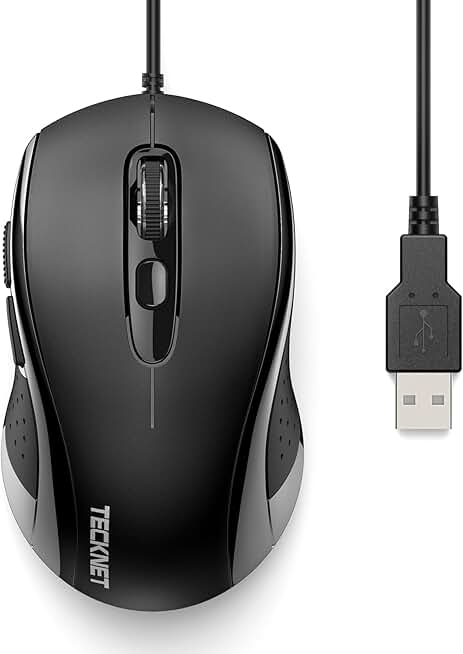
TECKNET Wired Mouse, USB Wired Computer Mice, 3600DPI 4 Adjustable Levels, 6-Button Ergonomic Mouse for Laptop PC Desktop Notebook - Black Global Recycled Standard
#10 · Best Ultra-Budget Option4.4 (7,421)

TECKNET Wired Mouse, USB Wired Computer Mice, 3600DPI 4 Adjustable Levels, 6-Button Ergonomic Mouse for Laptop PC Desktop Notebook - Black Global Recycled Standard

$9.99

The TECKNET Wired Mouse is the absolute cheapest entry point into gaming mice for work-from-home. At under $10, it's perfect for testing whether programmable buttons and adjustable DPI improve your productivity. Don't expect durability or premium features, but for casual work and light gaming, it delivers.

Pros

  • + 3600 DPI with 4 adjustable levels covers work and casual gaming
  • + 6-button ergonomic design balances functionality and simplicity
  • + Wired USB connection ensures reliability without battery concerns
  • + Under $10 price point makes it risk-free for first-time gaming mouse buyers

Cons

  • 3600 DPI max is lower than most competitors
  • Basic build quality may not survive years of heavy daily use
Check price on Amazon →

Frequently Asked Questions

Final word

The best gaming mice for work from home combine ergonomic comfort, adjustable DPI, and programmable buttons that actually improve your productivity. The Logitech G502 Hero remains the top choice for balanced performance and reliability. If budget is tight, the Redragon M602 delivers exceptional value under $17. For wrist pain, the LEKVEY Vertical Mouse offers relief that traditional mice can't match.

Your ideal pick depends on your specific needs: prioritize ergonomics if you work long hours, choose wireless if you move around, or go vertical if you experience strain. All of these gaming mice for work from home outperform standard office mice while keeping your desk ready for evening gaming sessions. Pick one, test it for a week, and you'll wonder how you ever worked without programmable buttons.

More gaming mice guides