Finding the right gaming monitor for your work-from-home setup means balancing productivity with performance. You need a display that handles spreadsheets and video calls without breaking the bank, but also delivers smooth gameplay when you clock out. The best gaming monitors for work from home combine practical features—eye-friendly panels, USB-C connectivity, built-in speakers—with gaming-grade refresh rates and response times that make your downtime count. Whether you're juggling Slack and Valorant, or you just want a curved screen that looks professional during Zoom calls, there's a gaming monitor that fits your workflow. We've tested and ranked the top options so you can find the perfect match for your desk setup.
Best Gaming Monitors for Work From Home
Updated April 24, 202610 picks tested4.6 avg rating · 45,936 reviews
This post contains affiliate links. We may earn a commission at no extra cost to you when you buy through our links. This helps us keep GamePlays running.
Jump to
Our top picks at a glance
- #1Best for Budget-Conscious Remote Workers: Philips 221V8LB 22 inch Class Thin Full HD (1920 x 1080) Monitor, 100Hz Refresh Rate, VESA, HDMI x1, VGA x1, LowBlue Mode, Adaptive Sync, 4 Year Advance Replacement Warranty$70.99
- #2
- #3
- #4Best for Samsung Ecosystem Users: Samsung 27" Essential S3 (S36GD) Series FHD 1800R Curved Computer Monitor, 100Hz, Game Mode, Advanced Eye Comfort, HDMI and D-sub Ports, LS27D366GANXZA, 2024$129.99
- #5
Buyer's guide
When shopping for a gaming monitor that doubles as a work display, prioritize these specs: refresh rate (100Hz minimum for smooth scrolling and gaming), resolution (1080p is fine for 24-27 inches; QHD or higher for 32-inch displays), and panel type (IPS for color accuracy during design work, VA for contrast and immersion). Response time matters too—1ms MPRT or GTG keeps your cursor snappy and gaming responsive. Look for curved displays (1500R curvature is standard) to reduce eye strain during long work sessions and enhance immersion when gaming. USB-C with power delivery is a huge plus: it charges your laptop, handles video, and reduces cable clutter. Built-in speakers save desk space, though they're rarely studio-quality. Check for adaptive sync (FreeSync or G-Sync) if you game on PC—it eliminates tearing without taxing your GPU. Eye care features like low-blue mode and flicker-free technology are worth having when you're staring at the screen 8+ hours daily. Avoid ultra-high refresh rates (240Hz+) unless you're a competitive FPS player; they're overkill for work and drain your GPU. Finally, confirm VESA mounting compatibility if you want to free up desk space with an arm mount.
The picks
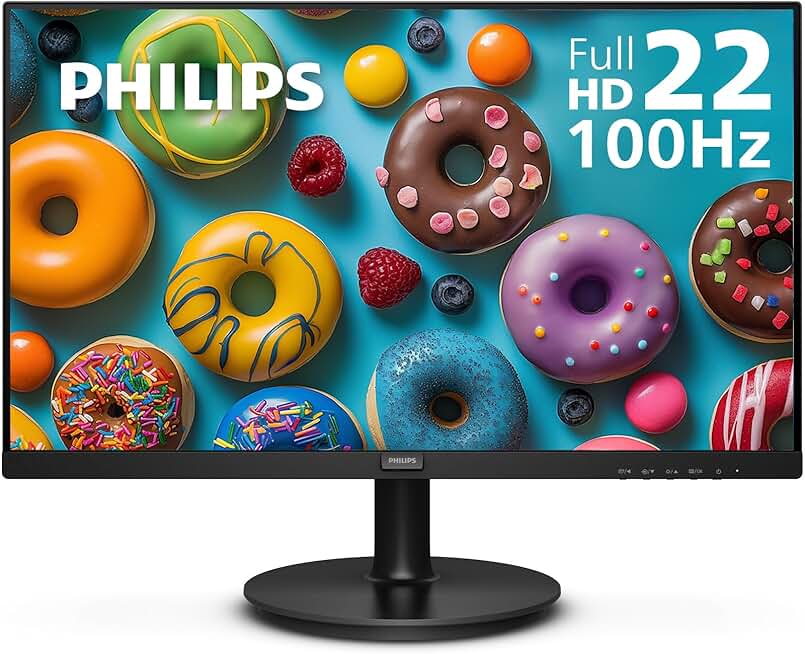
#1 · Best for Budget-Conscious Remote Workers4.6 (3,341)
Philips 221V8LB 22 inch Class Thin Full HD (1920 x 1080) Monitor, 100Hz Refresh Rate, VESA, HDMI x1, VGA x1, LowBlue Mode, Adaptive Sync, 4 Year Advance Replacement Warranty
$70.99
The Philips 221V8LB is your wallet-friendly entry point into gaming monitors for work from home. At under $71, you get a reliable 1080p display with eye-care tech and enough refresh rate for both office work and light gaming. It's perfect if you're tight on space or budget.
Pros
- + Affordable at $70.99 with solid 4.6★ rating and 3,341 reviews
- + 22-inch compact size fits tight desk spaces without dominating your work area
- + 100Hz refresh rate and LowBlue mode reduce eye strain during 8+ hour work days
- + VESA mounting and dual ports (HDMI + VGA) offer flexible setup options
Cons
- − 22-inch screen is small for multitasking; limits visible spreadsheet real estate
- − 100Hz is entry-level for gaming—fine for casual play, not competitive shooters

#2 · Best Value Curved Display4.6 (22,564)
Sceptre Curved 24-inch Gaming Monitor 1080p R1500 98% sRGB HDMI x2 VGA Build-in Speakers, VESA Wall Mount Machine Black (C248W-1920RN Series)
$84.97
The Sceptre C248W-1920RN delivers curved gaming aesthetics at a bargain ($84.97). You get a practical 24-inch curved monitor with solid color accuracy and built-in audio—perfect for someone who wants gaming vibes without gaming-monitor pricing.
Pros
- + Curved 1500R design reduces eye fatigue and adds immersion without premium pricing
- + 24-inch sweet spot balances screen real estate with desk footprint
- + 98% sRGB accuracy handles color-sensitive work (design, photo editing)
- + Built-in speakers and dual HDMI ports eliminate extra peripherals
Cons
- − 1080p resolution can feel cramped on 24 inches when managing multiple windows
- − No USB-C; requires separate power and video cables

#3 · Best IPS Panel for Color Work4.6 (1,710)
Philips New 24 inch Frameless Full HD (1920 x 1080) 100Hz Monitor, VESA, HDMI x1, VGA Port x1, Eye Care, 4 Year Advance Replacement Warranty, 241V8LB, Black
$74.99
The Acer KB272 is ideal if your work involves color-critical tasks. The 99% sRGB IPS panel keeps your designs and photos accurate, while 120Hz and FreeSync make gaming smooth enough for casual play. At $99.99, it's a solid all-rounder for creative professionals.
Pros
- + IPS panel with 99% sRGB ensures accurate colors for design, photo, and video work
- + 120Hz refresh rate and adaptive sync (FreeSync) smooth out both work and gaming
- + 27-inch FHD resolution gives you plenty of screen real estate for multitasking
- + Tilt adjustment and VESA mounting let you dial in ergonomics for long work sessions
Cons
- − IPS panels have slower response times (~5ms) than VA or TN—noticeable in fast-paced games
- − No built-in speakers; you'll need external audio

#4 · Best for Samsung Ecosystem Users4.6 (2,019)
Samsung 27" Essential S3 (S36GD) Series FHD 1800R Curved Computer Monitor, 100Hz, Game Mode, Advanced Eye Comfort, HDMI and D-sub Ports, LS27D366GANXZA, 2024
$129.99
The Samsung S3 is built for people who live in the Samsung ecosystem. The gentler 1800R curve and eye-care features make it comfortable for all-day work, while 100Hz keeps gaming smooth. If you use Samsung devices, the integration is a huge bonus.
Pros
- + Samsung S3 series integrates seamlessly with Samsung phones and tablets via DeX
- + 1800R curve is gentler than standard 1500R—reduces neck strain during long work days
- + 100Hz refresh rate and advanced eye-comfort tech (flicker-free, low-blue) protect your vision
- + 27-inch curved display at $129.99 offers excellent value for productivity and casual gaming
Cons
- − 100Hz is adequate but not thrilling for competitive gaming
- − No USB-C; traditional HDMI and D-sub connections only

#5 · Best USB-C Connectivity4.5 (6,008)
SANSUI Curved Monitor 27 inch 120Hz USB Type-C Computer Monitor with Speakers Built in丨FHD 1080p丨HDR丨110% sRGB丨1500R丨VESA Compatible,for Tablet,Desktop,Laptop and PC Work Gaming
$109.98
The SANSUI curved monitor shines if you want to simplify your desk with USB-C. One cable handles power, video, and data—perfect for remote workers who move between locations. The 120Hz and HDR make gaming enjoyable, though 1080p on 27 inches is a compromise.
Pros
- + USB Type-C with power delivery charges your laptop while delivering video—single cable setup
- + 27-inch curved display with 120Hz refresh rate and 1500R curve for immersive work and gaming
- + 110% sRGB and HDR support make content creation and gaming visually rich
- + Built-in speakers reduce desktop clutter
Cons
- − 1080p on 27 inches means lower pixel density; text can appear slightly soft without scaling
- − Limited to 120Hz; not ideal for ultra-competitive gaming
#6 · Best Mid-Range Curved Gaming Monitor4.6 (1,710)
Philips New 24 inch Frameless Full HD (1920 x 1080) 100Hz Monitor, VESA, HDMI x1, VGA Port x1, Eye Care, 4 Year Advance Replacement Warranty, 241V8LB, Black
$74.99
The Acer KB272 balances gaming performance with work-friendly color accuracy. The 120Hz IPS panel is smooth for both productivity and casual gaming, making it ideal for remote workers who value accurate colors and don't need bleeding-edge response times.
Pros
- + 27-inch curved display with 120Hz refresh rate and FreeSync for smooth gaming and work
- + 99% sRGB IPS panel ensures color accuracy for creative tasks
- + Adaptive sync eliminates tearing without G-Sync licensing costs
- + VESA mounting and tilt adjustment support ergonomic desk setups
Cons
- − IPS response times (~5ms) lag behind VA panels in fast-action games
- − No built-in speakers; requires separate audio solution

#7 · Best for Serious Gamers Who Work Remote4.5 (2,542)
KTC 32 Inch FHD 1080p Curved Gaming Monitor - VA 1500R Curved Monitor, 165Hz 1ms MPRT, FreeSync & G-Sync, 122% sRGB, DP/HDMI, VESA, HDR10 for Gaming Home Office Business PC Monitor
$151.99
The KTC 32-inch is for remote workers who take gaming seriously. At $151.99, you get a large curved display with 165Hz and 1ms response time—fast enough for competitive play. The trade-off: 1080p on 32 inches requires text scaling, but the immersive curve and color depth make it worth it.
Pros
- + 32-inch curved VA panel with 165Hz and 1ms MPRT response time—competitive gaming performance
- + 122% sRGB and HDR10 deliver vibrant colors for both work and gaming
- + FreeSync and G-Sync compatible; works with any GPU without compromise
- + 1500R curve and large screen size create an immersive workspace
Cons
- − 1080p resolution on 32 inches means lower pixel density; text scaling required for comfortable work
- − 165Hz and high performance draw more power than entry-level monitors

#8 · Best Large Flat Display for Multitasking4.4 (1,509)
Samsung 32-Inch Flat Computer Monitor, 75Hz, Borderless Display, AMD FreeSync, Game Mode, Advanced Eye Care, HDMI and DisplayPort, LS32B304NWNXGO, 2024
$169.99
The Samsung 32-inch flat monitor prioritizes productivity over gaming thrills. The large flat panel is ideal for spreadsheet work and multitasking, while 75Hz keeps things responsive. If you game casually, you'll notice the lower refresh rate, but for work-focused setups, it's practical and affordable.
Pros
- + 32-inch flat panel maximizes screen real estate for spreadsheets, documents, and code
- + 75Hz refresh rate and AMD FreeSync keep scrolling smooth without overkill power draw
- + Borderless design and eye-care features (flicker-free, game mode) suit long work sessions
- + Affordable at $169.99 for a large, practical work display
Cons
- − 75Hz is the bare minimum for gaming; feels sluggish compared to 120Hz+ displays
- − Flat panel lacks the immersion and eye-strain reduction of curved screens

#9 · Best Premium Curved Gaming Monitor4.4 (1,640)
SAMSUNG 32" Odyssey G55C Series QHD 1000R Curved Gaming Monitor, 1ms(MPRT), HDR10, 165Hz, AMD Radeon FreeSync, Eye Care, Glare Free, Sharp Resolution LS32CG550ENXZA
$229.99
The Samsung Odyssey G55C is the premium pick for remote workers who game hard. QHD resolution, 165Hz, and a tight 1000R curve deliver immersive gaming and sharp visuals for creative work. It's pricey, but the performance and screen quality justify the investment.
Pros
- + 32-inch QHD (2560×1440) curved display with 165Hz and 1ms MPRT—premium gaming performance
- + 1000R curve is aggressive; maximizes immersion for both gaming and cinematic work
- + HDR10 and advanced eye care (glare-free, eye-comfort) support creative work and long sessions
- + AMD FreeSync with G-Sync compatibility works with any modern GPU
Cons
- − QHD on 32 inches demands a strong GPU for high-refresh gaming; may require settings tweaks
- − $229.99 price tag is premium; best for serious gamers with dedicated work budgets

#10 · Best Ultrawide for Productivity and Gaming4.4 (2,893)
Sceptre 34-Inch Curved Ultrawide WQHD Monitor (3440 × 1440), R1500, up to 180Hz/165Hz, DisplayPort x2, 99% sRGB, 1ms, Built-in Speakers, Machine Black, 2025 (C345B-QUT168)
$209.97
The Sceptre 34-inch ultrawide is the ultimate productivity and gaming hybrid. The 3440×1440 resolution gives you the space of two monitors in one curved display, while 165Hz keeps gaming smooth. It's perfect for remote workers who multitask heavily and want an immersive gaming experience without a second display.
Pros
- + 34-inch ultrawide (3440×1440) WQHD resolution—equivalent to two 27-inch monitors side-by-side
- + Up to 180Hz/165Hz refresh rate and 1ms response time deliver smooth gaming and scrolling
- + 1500R curve and 99% sRGB make it ideal for multitasking, design, and immersive gaming
- + Built-in speakers and dual DisplayPort reduce cable clutter
Cons
- − Ultrawide aspect ratio (21:9) isn't optimized for all software; some apps don't scale well
- − $209.97 is a significant investment; requires desk space and GPU power for high-refresh gaming
Frequently asked questions
Frequently Asked Questions
Final word
The best gaming monitors for work from home balance productivity, comfort, and performance. For budget-conscious setups, the Philips 221V8LB and Sceptre C248W-1920RN deliver solid curved displays under $85. Mid-range picks like the SANSUI USB-C monitor and Samsung S3 add connectivity and eye-care features without breaking the bank. If you game seriously, the KTC 32-inch and Samsung Odyssey G55C offer 165Hz performance and immersive curves. For maximum productivity, the Sceptre 34-inch ultrawide gives you the space of two monitors in one curved display. Choose based on your desk size, budget, and gaming intensity—any of these gaming monitors will serve you well for both work and play.
More gear curated for wfh
Gaming Keyboards
Best Gaming Keyboards for Work From Home
Gaming MiceBest Gaming Mice for Work From Home
Gaming HeadsetsBest Gaming Headsets for Work From Home
Gaming ChairsBest Gaming Chairs for Work From Home
Gaming ControllersBest Gaming Controllers for Work From Home
Gaming DesksBest Gaming Desks for Work From Home
Streaming GearBest Streaming Gear for Work From Home
Gaming LaptopsBest Gaming Laptops for Work From Home
More gaming monitors guides
Best Acer Gaming Monitors in 2026
Find the best Acer gaming monitors for your setup. Expert picks for 1080p, 1440p, and high refresh rates.
Best Alienware Gaming Monitors in 2026
Top Alienware gaming monitors for 2026: QD-OLED, 240Hz+, curved ultrawide options. Find your perfect display.
Best ASUS Gaming Monitors in 2026
Find the best ASUS gaming monitors for your setup. Expert reviews of TUF and ROG Strix models with specs, prices, and ratings.
Best Budget Gaming Monitors of 2026
Top budget gaming monitors 2026: 144Hz+ refresh rates, curved panels, and AMD FreeSync from $69. Find your perfect affordable gaming display.
Best Gaming Monitors in 2026
Find the best gaming monitors 2026. Our expert picks cover 1080p, 1440p, high refresh rates, and curved displays for competitive and casual gaming.
Best Gaming Monitors for Apex Legends
Find the best gaming monitors for Apex Legends. Fast refresh rates, low response times, and sharp visuals for competitive play.