Working from home doesn't mean settling for a bland office keyboard. The best gaming keyboards for work from home blend quiet operation, durability, and professional aesthetics—without the noise that'll annoy your coworkers on video calls. Whether you're juggling spreadsheets by day and gaming by night, or just want a keyboard that feels better to type on than standard office gear, gaming keyboards deliver responsive switches, customizable lighting, and build quality that lasts years. This guide covers 10 proven options across different budgets and styles, from compact wireless combos to full-size mechanical boards. You'll find keyboards that work hard during 9-to-5 and play hard after hours—all without breaking the bank or your focus during important meetings.
Best Gaming Keyboards for Work From Home
This post contains affiliate links. We may earn a commission at no extra cost to you when you buy through our links. This helps us keep GamePlays running.
Jump to
Our top picks at a glance
- #1
- #2
- #3
- #4
- #5
Buyer's guide
When shopping for a gaming keyboard that doubles as a work tool, focus on these key factors: Switch type matters most. Mechanical switches offer tactile feedback and durability (typically 50+ million keystrokes), while membrane and mech-dome switches are quieter and cheaper. If you're on calls all day, quieter switches prevent mic pickup. Wired vs. wireless depends on your desk setup. Wired eliminates latency and charging hassles, but wireless gives you freedom to move and cleaner cable management. Lighting should be subtle. RGB is fun, but look for keyboards with adjustable brightness or toggle-off modes—you don't want a light show during a client presentation. Ergonomics matter during 8-hour shifts. A wrist rest, adjustable feet, and proper key spacing reduce fatigue. Check if the keyboard has media controls or programmable keys to speed up work tasks. Build quality should include an all-metal panel or sturdy plastic frame; flimsy keyboards feel cheap and fail faster. Size and layout affect workflow—full-size keeps the numpad for data entry, while tenkeyless saves desk space. Finally, water resistance (IP32 rating) is practical if you have coffee near your desk. Avoid keyboards with overly complex software requirements; simpler is better for remote work stability.
The picks

Logitech MK270 Wireless Keyboard and Mouse Combo for Windows, 2.4 GHz Wireless, Compact Mouse, 8 Multimedia and Shortcut Keys, 2-Year Battery Life, for PC, Laptop - Black ECOLOGO
$26.43
The Logitech MK270 is the no-fuss choice for work-from-home setups on a tight budget. It pairs a wireless keyboard with a mouse, keeps your desk cable-free, and runs for two years on batteries. If you want something that just works without distractions, this is it.
Pros
- + 2.4 GHz wireless with 2-year battery life—no charging or cables needed
- + Compact design saves desk space and includes a matching mouse
- + 8 multimedia and shortcut keys for quick access to volume, email, and media
- + 118,000+ reviews and 4.5★ rating prove reliability for everyday use
Cons
- − Membrane switches lack the tactile feedback of mechanical keyboards
- − No RGB lighting—purely functional, which is actually ideal for professional calls

Redragon S101-3 PRO Gaming Keyboard and Mouse, RGB Backlit Programmable Keyboard Mouse with Software, Independent Macro Record Keys, Value Combo Set, New Update Version
$39.99
The Redragon S101-3 PRO bundles keyboard and mouse for under $40, making it excellent value if you need both. The programmable macros help automate work tasks, and RGB lighting adds personality without being overwhelming on video calls.
Pros
- + Includes both keyboard and mouse with programmable macro keys for productivity shortcuts
- + RGB backlit with customizable lighting via software
- + Independent macro record keys let you automate repetitive work tasks
- + 51,000+ reviews at 4.5★ show solid performance across mixed use
Cons
- − Membrane switches are quieter but less responsive than mechanical alternatives
- − Software can be finicky on some systems—basic operation works without it

SteelSeries Apex 3 RGB Gaming Keyboard – 10-Zone RGB Illumination – IP32 Water Resistant – Premium Magnetic Wrist Rest (Whisper Quiet Gaming Switch)
$49.99
The SteelSeries Apex 3 RGB prioritizes silence without sacrificing feel. The whisper-quiet switches are perfect for remote work where every keystroke might be heard on a call, and the wrist rest keeps your hands comfortable through 8-hour workdays.
Pros
- + Whisper-quiet gaming switches minimize noise during video conferences and calls
- + 10-zone RGB illumination with adjustable brightness for professional ambiance
- + IP32 water resistance protects against coffee spills and desk accidents
- + Premium magnetic wrist rest reduces hand fatigue during long work sessions
Cons
- − Mech-dome switches feel different from true mechanical—takes adjustment if you're used to clicky boards
- − Wired only, so you'll need a USB cable on your desk

LANGTU Membrane Gaming Keyboard, Rainbow LED Backlit Quiet Keyboard for Office, USB Wired All-Metal Panel 25 Keys Anti-ghosting Computer Keyboard 104 Keys - L1 White/Silver
$25.94
The LANGTU keyboard delivers a solid metal build at under $30, making it one of the toughest budget options. The compact design works well for smaller desks, and the anti-ghosting ensures accuracy whether you're typing reports or gaming after hours.
Pros
- + All-metal panel feels premium and durable—built to last through years of work and gaming
- + 25-key anti-ghosting prevents missed inputs during fast typing or gaming
- + Rainbow LED backlit with quiet membrane switches for office-friendly operation
- + USB wired connection eliminates battery concerns and latency
Cons
- − Compact size means fewer keys—not ideal if you rely on a numpad for data entry
- − Membrane switches lack the tactile response of mechanical boards

Logitech G213 Prodigy Gaming Keyboard - Wired RGB Backlit Keyboard with Mech-Dome Keys, Palm Rest, Adjustable Feet, Media Controls, USB, Compatible with Windows – Black
$49.99
The Logitech G213 Prodigy splits the difference between office keyboard and gaming board. The mech-dome switches feel better than membrane but won't annoy coworkers, and the palm rest keeps your hands fresh through long days at the desk.
Pros
- + Mech-dome keys balance responsiveness with quiet operation—better feel than membrane, quieter than clicky mechanical
- + Adjustable feet and palm rest reduce wrist strain during full workdays
- + Media controls and USB pass-through for headsets or other peripherals
- + Wired connection ensures zero latency for both work and gaming
Cons
- − Mech-dome switches are niche—not true mechanical, so some gamers find them less satisfying
- − RGB lighting is fixed to Logitech's preset patterns without much customization

Redragon K580 VATA RGB LED Backlit Mechanical Gaming Keyboard with Macro Keys & Dedicated Media Controls, Hot-Swappable Socket, Onboard Macro Recording (Blue Switches)
$51.99
The Redragon K580 VATA is for users who want true mechanical quality without the noise of ultra-clicky switches. The hot-swappable design means you can experiment with different switch types to find your perfect work-gaming balance.
Pros
- + Hot-swappable socket lets you swap switches without soldering—customize your typing feel anytime
- + Mechanical switches deliver crisp, responsive feedback that makes typing feel premium
- + Macro keys and dedicated media controls speed up work tasks and gaming
- + Onboard macro recording means you don't need software to program shortcuts
Cons
- − Mechanical switches are louder than membrane—not ideal if you're on calls all day
- − Wired connection means cable management on your desk

Camiysn Typewriter Style Mechanical Gaming Keyboard, Pink Retro Punk Gaming Keyboard with White Backlit, 104 Keys Blue Switch Wired Cute Keyboards, Round Keycaps for Windows/Mac/PC
$39.99
The Camiysn typewriter keyboard stands out if you work in design, content creation, or any role where your setup reflects your personality. The full 104-key layout and blue switches deliver solid performance, though the noise level requires call-muting discipline.
Pros
- + Typewriter-style retro design brings personality to your workspace—perfect for creative roles
- + Blue switches provide satisfying tactile feedback with moderate noise levels
- + 104-key full layout includes numpad for spreadsheet work and data entry
- + White backlit keeps the aesthetic clean without RGB overload
Cons
- − Pink color and retro styling may not fit traditional corporate setups
- − Blue switches are louder than office-friendly alternatives—problematic on video calls

TECKNET Gaming Keyboard, USB Wired Computer Keyboard, 15-Zone RGB Illumination, IP32 Water Resistance, 25 Anti-ghosting Keys, All-Metal Panel (Whisper Quiet Gaming Switch) Global Recycled Standard
$29.64
The TECKNET keyboard prioritizes accuracy over everything else. The 25-key anti-ghosting is overkill for most users, but if you're entering data all day, the guaranteed keystroke registration is worth it. The metal build and quiet switches make it office-appropriate too.
Pros
- + 25-key anti-ghosting ensures every keystroke registers—critical for spreadsheets and data-heavy work
- + 15-zone RGB illumination with adjustable brightness for ambiance control
- + IP32 water resistance protects against desk spills and accidents
- + All-metal panel and whisper-quiet switches create a professional, durable setup
Cons
- − Compact layout sacrifices the numpad—limiting for accountants or data analysts
- − Membrane switches lack the tactile feel of mechanical alternatives
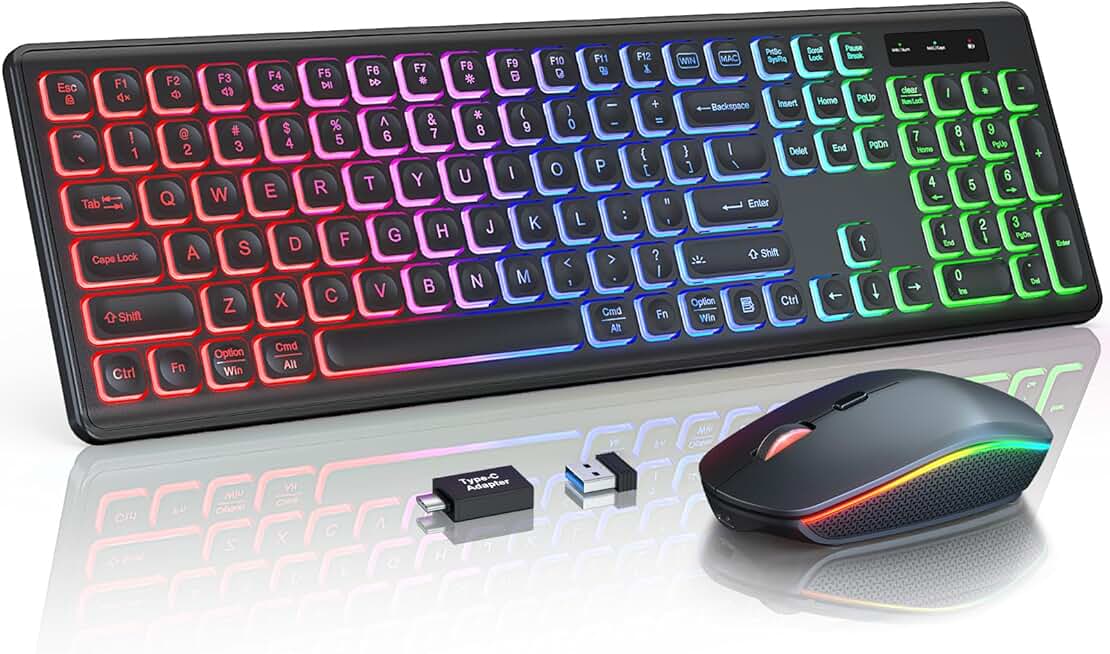
Wireless Keyboard and Mouse Combo, RGB Backlit, Rechargeable & Light Up Letters, Full-Size, Soft Typing, Sleep Mode, 2.4GHz Quiet Keyboard Set for Mac, Windows, Laptop, PC, Trueque KM42Pro (Black) ClimatePartner certified
$49.99
The wireless rechargeable combo appeals to users who hate battery shopping and want cable-free convenience. The full-size layout and light-up letters are practical, though the lower rating hints at occasional wireless hiccups that wired keyboards avoid.
Pros
- + Rechargeable battery eliminates constant battery replacement—plug in overnight and forget it
- + 2.4 GHz wireless gives you freedom to move around your workspace
- + RGB backlit with light-up letters for visibility in any lighting condition
- + Full-size layout preserves numpad and function keys for complete productivity
Cons
- − 4.1★ rating suggests occasional connectivity issues—not as reliable as wired options
- − Soft typing feel is quieter but may feel mushy to users who prefer tactile feedback

AULA F2088 Typewriter Style Mechanical Gaming Keyboard Wired,Blue Switches,Rainbow LED Backlit,Removable Wrist Rest,Media Control Knob,Retro Punk Round Keycaps,USB Wired Computer Keyboard Global Recycled Standard
$42.64
The AULA F2088 combines mechanical quality with typewriter nostalgia, making it ideal for writers, developers, and creative professionals who spend hours typing. The removable wrist rest and media knob add comfort and control, though the noise level demands call discipline.
Pros
- + Blue mechanical switches deliver satisfying tactile feedback and classic typewriter feel
- + Removable wrist rest adapts to your comfort preferences and desk setup
- + Media control knob provides tactile volume and brightness adjustment
- + Rainbow LED backlit adds personality while remaining subtle enough for professional work
Cons
- − Blue switches are louder than office-friendly alternatives—requires muting during calls
- − Retro punk styling limits appeal in traditional corporate environments
Frequently asked questions
Frequently Asked Questions
Final word
The best gaming keyboard for work from home depends on your priorities. For pure budget and reliability, the Logitech MK270 wireless combo is hard to beat. If you want mechanical quality without breaking the bank, the Redragon K580 VATA offers hot-swappable switches and macro keys. For users on constant video calls, the SteelSeries Apex 3 RGB delivers whisper-quiet switches and a wrist rest. And if aesthetics matter—whether retro typewriter style or compact metal builds—the AULA F2088 and LANGTU keyboards prove gaming keyboards don't sacrifice personality for professionalism. All 10 options here work for both productivity and play, meaning you can invest in one keyboard that serves your entire day. Pick based on noise level, switch preference, and whether you need wireless freedom or wired stability. Your hands will thank you.
More gear curated for wfh
Best Gaming Mice for Work From Home
Gaming HeadsetsBest Gaming Headsets for Work From Home
Gaming MonitorsBest Gaming Monitors for Work From Home
Gaming ChairsBest Gaming Chairs for Work From Home
Gaming ControllersBest Gaming Controllers for Work From Home
Gaming DesksBest Gaming Desks for Work From Home
Streaming GearBest Streaming Gear for Work From Home
Gaming LaptopsBest Gaming Laptops for Work From Home
More gaming keyboards guides
Budget Gaming Keyboards of 2026
Top 10 budget gaming keyboards 2026. RGB, mechanical, compact—all under $120. Expert reviews & buying guide.
Best Compact Gaming Keyboards in 2026
Find the best compact gaming keyboards for 2026. Expert reviews of 60% and tenkeyless boards for gaming, work, and travel.
Best Corsair Gaming Keyboards in 2026
Find the best Corsair gaming keyboards for your setup. Expert reviews of wired, wireless, and mechanical options.
Best Ergonomic Gaming Keyboards in 2026
Top ergonomic gaming keyboards for comfort and performance. Compare split designs, wrist rests, and mechanical switches.
Best Gaming Keyboards in 2026
Find the best gaming keyboards 2026. Expert reviews of mechanical, wireless, and budget options for every gamer.
Best Gaming Keyboards for Apex Legends
Top gaming keyboards for Apex Legends with fast response times, RGB, and durability. Find the best fit for your playstyle.